Server: NC 15.0.0, versions do not appear, TypeError: this.sync is not a function
Following the advice of stratege1401 on nextcloud forum
Please bear with me, this is my very first bug report on github, I will try to do my best!
Steps to reproduce
- Create a file
- Make a change so a new version is created
- Verify that a new file in /nextcloud-data/username/files-versions has effectively been created
- In the web interface, click on Details -> Versions for that particular file
Expected behaviour
The list of previous versions of the file should appear.
Actual behaviour
Nothing is displayed.
The other tabs work normally: activity shows that the file has been modified, Share allows for sharing the file. Only "versions" does apparently nothing.
Output from Firefox and Chrome consoles (see below): TypeError: this.sync is not a function** core.js:2101:14. I can provide other details if needed.
It might be related to my php configuration, so I included a link to the whole phpinfo() below.
Server configuration
Operating system: linux / shared hosting
Web server: Apache
Database: 10.1.37-MariaDB
PHP version: 7.2.13 - see phpinfo
Nextcloud version: 15.0.0
Updated from an older Nextcloud/ownCloud or fresh install: Updated gradually since NC11 whenever updates were available
Where did you install Nextcloud from: From nextcloud.com web installer initially (NC11), then using auto-updater
Login as admin user into your Nextcloud and access
http://example.com/index.php/settings/integrity/failed
No errors have been found.
List of activated apps:
App list
Accessibility 1.1.0 Officielle
Activity 2.8.2 Officielle
Auditing / Logging 1.5.0 Officielle
Contacts 3.0.1 Officielle
Default encryption module 2.3.0 Officielle
External storage support 1.6.0 Officielle
Federation 1.5.0 Officielle
File sharing 1.7.0 Officielle
First run wizard 2.4.0 Officielle
Gallery 18.2.0 Officielle
Log Reader 2.0.0 Officielle
Nextcloud announcements 1.4.0 Officielle
Notifications 2.3.0 Officielle
Password policy 1.5.0 Officielle
PDF viewer 1.4.0 Officielle
Share by mail 1.5.0 Officielle
Support 1.0.0 Officielle
Text editor 2.7.0 Officielle
Theming 1.6.0 Officielle
Update notification 1.5.0 Officielle
Versions 1.8.0 Officielle
Nextcloud configuration:
Config report
$CONFIG = array (
  'instanceid' => 'XXX',
  'passwordsalt' => 'XXX',
  'secret' => 'XXX',
  'trusted_domains' =>
  array (
    0 => 'XXX',
  ),
  'datadirectory' => '/home/secondes/nextcloud-data',
  'overwrite.cli.url' => 'XXX',
  'dbtype' => 'mysql',
  'version' => '15.0.0.10',
  'dbname' => 'XXX',
  'dbhost' => 'localhost',
  'dbport' => '',
  'dbtableprefix' => 'oc_',
  'dbuser' => 'XXX',
  'dbpassword' => 'XXX',
  'logtimezone' => 'UTC',
  'installed' => true,
  'memcache.local' => '\\OC\\Memcache\\APCu',
  'debug' => false,
  'updater.secret' => 'XXX',
  'maintenance' => false,
  'enable_certificate_management' => false,
  'mail_from_address' => 'nextcloud',
  'mail_smtpmode' => 'smtp',
  'mail_domain' => 'XXX',
  'theme' => '',
  'loglevel' => 2,
  'updater.release.channel' => 'stable',
  'versions_retention_obligation' => 'auto',
  'mail_smtphost' => 'XXX',
  'mail_smtpport' => '465',
  'mail_smtpauth' => 1,
  'mail_smtpname' => 'XXX',
  'mail_smtppassword' => 'XXX',
  'mail_smtpsecure' => 'ssl',
);
Are you using external storage, if yes which one: no
Are you using encryption: yes
Are you using an external user-backend, if yes which one: No
Client configuration
Browser: Firefox 60.0.1 / Chrome 67.0.3396.87
Operating system: Windows 10
Logs
Web server error log
Web server error log
Nothing relevant to the error according to the timestamps
Nextcloud log (data/nextcloud.log)
Nextcloud log
Nothing relevant to the error according to the timestamps
Browser log
Firefox console, when I hit "Versions" on the web interface
    **`TypeError: this.sync is not a function** core.js:2101:14
fetch    https://XXX/core/vendor/core.js:2101:14
nextPage    https://XXX/index.php/js/files_versions/merged.js:270:4
setFileInfo    https://XXX/index.php/js/files_versions/merged.js:360:5
selectTab    https://XXX/index.php/js/files/merged-index.js:9972:4
_onClickTab    https://XXX/index.php/js/files/merged-index.js:9876:4
_onClickTab self-hosted:975:17
dispatch    https://XXX/core/vendor/core.js:3:6414
add/r.handle    https://XXX/core/vendor/core.js:3:3224
 lecyril
All 12 comments
Same over here. Had a fresh installation, only with the default apps installed.
 MonksterFX
on 2 Jan 2019
MonksterFX
on 2 Jan 2019
I tried installing a new instance on another subdomain, and versioning worked as designed.
After fiddling around to find the differences between my live instance and the fresh one, I noticed that I had disabled the _Comments_ application on the former.
Re-enabling _Comments_ app restored the versioning functionality. Disabling it again broke it.
So at least in my particular settings, disabling the Comments app breaks versioning app in the web interface.
Problem solved on my side, but you might want to confirm whether this is an actual, general bug.
Thanks for the fantastic work developing Nextcloud,
Cyril
EDIT: I was indeed able to reproduce this on demo.nextcloud.com
lecyril
on 3 Jan 2019
Same to me: no older versions appear in the expected list:
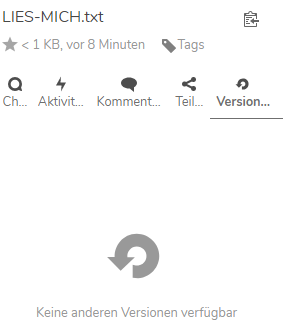
My NextCloud instance is v15.0.0 running with mysql database.
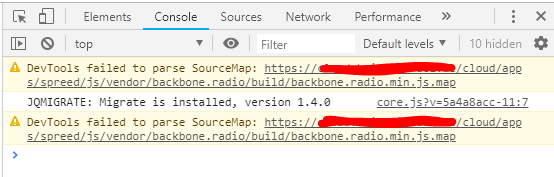
My Chrome console found following errors on opening/reloading the directory list at https://xyz-host/cloud/index.php/apps/files/?dir=/abc%20Allgemein&fileid=15:
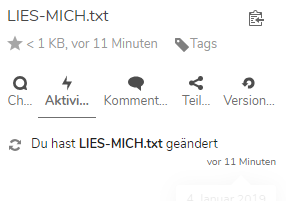
The activity tab correctly notes that there was a change:
The Comments app is still activated in my instance, also deactivation+re-activation didn't solve the issue:

Versions app is activated, also deactivation+re-activation didn't solve the issue:

 JochenHWezel
on 4 Jan 2019
JochenHWezel
on 4 Jan 2019
Same to me with Nextclud 15.0.2.
Versions are stored in users files_version directory properly

but neither appear in the browser nor appear e.g. in collabora (i.e. gewicht.xlsx).

Nothing was written to the nextcloud.log.
Debian Stretch 9.6 64Bit
Nextcloud 15.0.2
NGINX 1.15.8 TLS 1.3
PHP 7.3
MariaDB 10.3
Redis
files_versions: 1.8.0
In the browser console i received:
TypeError: this.sync is not a function[Weitere Informationen] core.js:2101:14
fetch
https://my.cloud.org/core/vendor/core.js:2101:14
nextPage
https://my.cloud.org/js/files_versions/merged.js:270:4
setFileInfo
https://my.cloud.org/js/files_versions/merged.js:360:5
selectTab
https://my.cloud.org/js/files/merged-index.js:9972:4
_onClickTab
https://my.cloud.org/js/files/merged-index.js:9876:4
_onClickTab self-hosted:974:17 dispatch
https://my.cloud.org/core/vendor/core.js:3:6414
add/r.handle
https://my.cloud.org/core/vendor/core.js:3:3224
while selecting the versions in firefox 64.0.2 (64Bit).
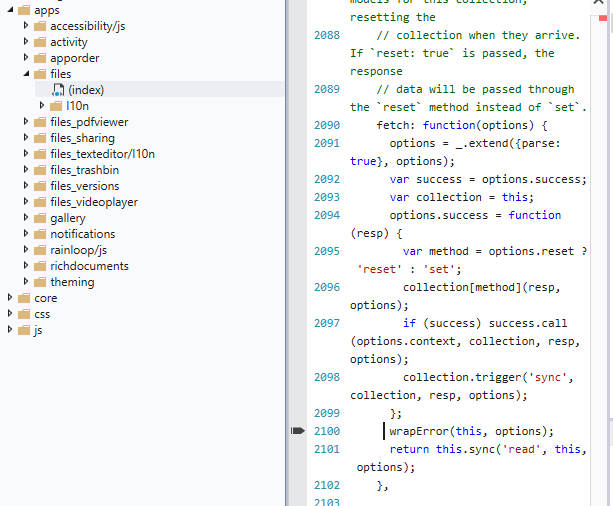
Using Edge the console throws:

 ghost
on 20 Jan 2019
ghost
on 20 Jan 2019
I have the same issue in Nextcloud 15.0.2.
The Versions tab is empty, console shows:
TypeError: this.sync is not a function[Learn More] core.js:2101:14
Enabling the Comments App fixes the issue & the Versions tab works as expected.
 felixn
on 23 Jan 2019
felixn
on 23 Jan 2019
i can confirm. enabling the comments app fixed the issue. great - thanks.
ghost
on 23 Jan 2019
In my case, the Comments App was already active, and the Versions tab didn't appear.
Deactivating and reactivating the Versions App resolved the issue
 Omnimercador
on 21 Feb 2019
Omnimercador
on 21 Feb 2019
I agree with @Omnimercador, I enabled comments application. Disabled and re-enabled version application. I can see the versions of file now. Works perfectly. :)
 parthdmaniar
on 24 Feb 2019
parthdmaniar
on 24 Feb 2019
Same problem here ! Thanks for the workaround.
When would it will be fixed ?
 adaigre
on 28 Feb 2019
adaigre
on 28 Feb 2019
The issue can still be easily reproduced on demo.nextcloud.com (15.0.4 as of today).
- Create a demo instance and log into it with admin/admin
- Disable Comments app
-> Version tab is broken (blank) - Enable Comments app
-> Versions work as expected - Disable Comments app to reproduce again... I don't think that it is necessary to disable/enable the Versions app for reproducing or fixing the bug.
lecyril
on 1 Mar 2019
I'm trying to find the cause of this, but it's slow progress.
What I've found so far:
return this.sync('read', this, options);failsthisis VersionCollection, butthis.syncis undefinedsyncis set here, butOC.Backbone.davSyncis undefined: https://github.com/nextcloud/server/blob/1cfa870821c92bdd6854171c8c073ed16529b6df/apps/files_versions/src/versioncollection.js#L17
When I enable the versions app, oc-backbone-webdav.js gets loaded and OC.Backbone.davSync gets set correctly -> versions tab works as expected.
I haven't figured out what affects whether oc-backbone-webdav.js gets loaded...
felixn
on 2 Mar 2019
Fixed with #14472
 juliushaertl
on 4 Mar 2019
juliushaertl
on 4 Mar 2019
Related issues
 j-ed
·
3Comments
j-ed
·
3Comments
 williambargent
·
3Comments
williambargent
·
3Comments
 Django-BOfH
·
3Comments
juliushaertl
·
3Comments
Django-BOfH
·
3Comments
juliushaertl
·
3Comments
 jancborchardt
·
3Comments
jancborchardt
·
3Comments
Most helpful comment
i can confirm. enabling the comments app fixed the issue. great - thanks.