Server: The "action" menu show in the wrong place
Steps to reproduce
1.Select language to Chinese Simplified or Chinese traditional
2.Back to the file view pages
Expected behaviour
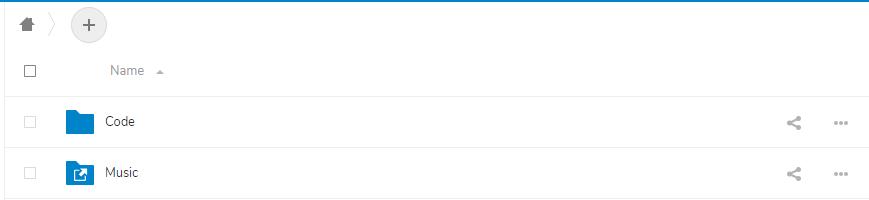
If I check some files, the "action" menu will appear in the header of the table (near to the "Name")
If I check nothing, nothing will happen
Actual behaviour
Whether or not I check, the "action" menu will show behind the name of the first file (or folder) and hard to click
Server configuration
Operating system: Centos 7
Web server: Nginx
Database: MySQL
PHP version: 7.2
Nextcloud version: (see Nextcloud admin page) 15.0.0
Updated from an older Nextcloud/ownCloud or fresh install: fresh install
Where did you install Nextcloud from:
Signing status:
Signing status
No errors have been found.
List of activated apps:
App list
\Enabled:
  - accessibility: 1.1.0
  - activity: 2.8.2
  - cloud_federation_api: 0.1.0
  - comments: 1.5.0
  - dav: 1.8.0
  - federatedfilesharing: 1.5.0
  - federation: 1.5.0
  - files: 1.10.0
  - files_external: 1.6.0
  - files_pdfviewer: 1.4.0
  - files_sharing: 1.7.0
  - files_texteditor: 2.7.0
  - files_trashbin: 1.5.0
  - files_versions: 1.8.0
  - files_videoplayer: 1.4.0
  - firstrunwizard: 2.4.0
  - gallery: 18.2.0
  - logreader: 2.0.0
  - lookup_server_connector: 1.3.0
  - music: 0.9.3
  - nextcloud_announcements: 1.4.0
  - notifications: 2.3.0
  - oauth2: 1.3.0
  - password_policy: 1.5.0
  - provisioning_api: 1.5.0
  - serverinfo: 1.5.0
  - sharebymail: 1.5.0
  - support: 1.0.0
  - survey_client: 1.3.0
  - systemtags: 1.5.0
  - theming: 1.6.0
  - twofactor_backupcodes: 1.4.1
  - updatenotification: 1.5.0
  - workflowengine: 1.5.0
Disabled:
  - admin_audit
  - encryption
  - user_external
  - user_ldap
Nextcloud configuration:
Config report
{
    "system": {
        "instanceid": "***REMOVED SENSITIVE VALUE***",
        "passwordsalt": "***REMOVED SENSITIVE VALUE***",
        "secret": "***REMOVED SENSITIVE VALUE***",
        "trusted_domains": [
            "cloud.***REMOVED SENSITIVE VALUE***.com"
        ],
        "datadirectory": "***REMOVED SENSITIVE VALUE***",
        "dbtype": "mysql",
        "version": "15.0.0.10",
        "overwrite.cli.url": "***REMOVED SENSITIVE VALUE***",
        "dbname": "***REMOVED SENSITIVE VALUE***",
        "dbhost": "***REMOVED SENSITIVE VALUE***",
        "dbport": "",
        "dbtableprefix": "oc_",
        "mysql.utf8mb4": true,
        "dbuser": "***REMOVED SENSITIVE VALUE***",
        "dbpassword": "***REMOVED SENSITIVE VALUE***",
        "installed": true,
        "filelocking.enabled": true,
        "memcache.local": "\\OC\\Memcache\\APCu",
        "memcache.distributed": "\\OC\\Memcache\\Memcached",
        "memcached_servers": [
            [
                "localhost",
                11211
            ]
        ],
        "memcache.locking": "\\OC\\Memcache\\Redis",
        "redis": {
            "host": "***REMOVED SENSITIVE VALUE***",
            "port": 6379,
            "timeout": 0,
            "password": "***REMOVED SENSITIVE VALUE***"
        },
        "updater.release.channel": "daily",
        "mail_from_address": "***REMOVED SENSITIVE VALUE***",
        "mail_smtpmode": "smtp",
        "mail_sendmailmode": "smtp",
        "mail_domain": "***REMOVED SENSITIVE VALUE***",
        "mail_smtpauth": 1,
        "mail_smtpport": "25",
        "mail_smtpname": "***REMOVED SENSITIVE VALUE***",
        "mail_smtppassword": "***REMOVED SENSITIVE VALUE***",
        "updater.secret": "***REMOVED SENSITIVE VALUE***",
        "maintenance": false
    }
}
Are you using external storage, if yes which one: local
Are you using encryption: no
Are you using an external user-backend, if yes which one: no
Client configuration
Browser: Chrome 71
Operating system: Windows 10
Logs
Browser log
Browser log
Uncaught (in promise) TypeError: Cannot read property 'replace' of undefined
    at _build (merged-template-prepend.js?v=1b8fc0f6-0:3872)
    at Object.translate (merged-template-prepend.js?v=1b8fc0f6-0:3895)
    at Object.translatePlural (merged-template-prepend.js?v=1b8fc0f6-0:3920)
    at FileSummary.update (merged-index.js?v=1b8fc0f6-0:4072)
    at FileSummary.setSummary (merged-index.js?v=1b8fc0f6-0:4037)
    at FileSummary.calculate (merged-index.js?v=1b8fc0f6-0:4020)
    at FileList.setFiles (merged-index.js?v=1b8fc0f6-0:5818)
    at FileList.reloadCallback (merged-index.js?v=1b8fc0f6-0:6521)
    at Object.<anonymous> (core.js?v=1b8fc0f6-0:2)
    at j (core.js?v=1b8fc0f6-0:2)
 limstash
All 8 comments
Could I ask you to provide some screenshots?
 rullzer
on 3 Jan 2019
rullzer
on 3 Jan 2019
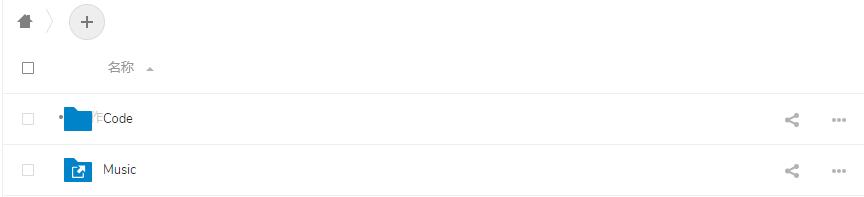
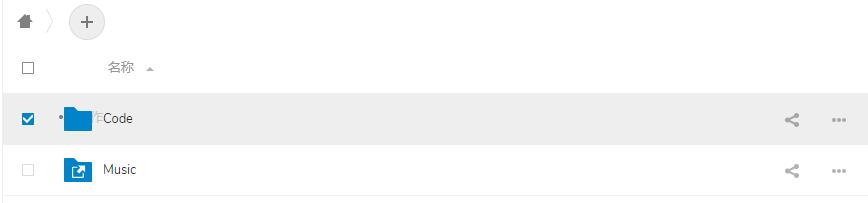
Actually, it should be like this

limstash
on 3 Jan 2019
I have this issue too after upgrading the latest nextcloud docker version. The error logs in browser console is like that in file merged-template-prepend.js?v=76320180-0:3872 :
Uncaught (in promise) TypeError: Cannot read property 'replace' of undefined
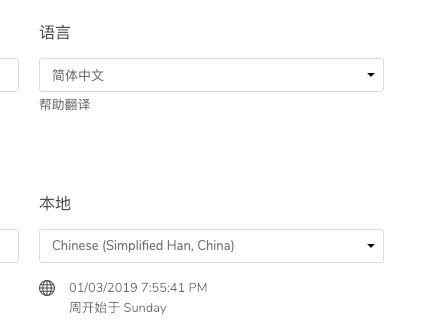
But when I change my locale to Chinese (Simplified Hans, China), it looks normal again. So I think it should be a bug in certain situation rather than all times.
@hytzongxuan You may have a try.
 zhonger
on 3 Jan 2019
zhonger
on 3 Jan 2019
I have this issue too after upgrading the latest nextcloud docker version. The error logs in browser console is like that in file
merged-template-prepend.js?v=76320180-0:3872:Uncaught (in promise) TypeError: Cannot read property 'replace' of undefined
But when I change my locale to Chinese (Simplified Hans, China), it looks normal again. So I think it should be a bug in certain situation rather than all times.
@hytzongxuan You may have a try.
Yeah, when I change my locale to Chinese, it works too, tks.
As you say, maybe it is a bug in certain situation.
limstash
on 3 Jan 2019
Russian locale affected by this bug too.
Other locales maybe affected by this bug too.
 max41479
on 26 Jan 2019
max41479
on 26 Jan 2019
When I change my locale to Chinese, it works too
it may be a bug
 yw1994
on 5 Mar 2019
yw1994
on 5 Mar 2019
Still happening on latests versions?
 skjnldsv
on 8 Nov 2020
skjnldsv
on 8 Nov 2020
This issue has been automatically marked as stale because it has not had recent activity and seems to be missing some essential information. It will be closed if no further activity occurs. Thank you for your contributions.
![nextcloud-stale[bot] picture](https://avatars1.githubusercontent.com/in/32530?v=4&s=40) nextcloud-stale[bot]
on 8 Dec 2020
nextcloud-stale[bot]
on 8 Dec 2020
Related issues
 arno01
·
3Comments
arno01
·
3Comments
 mfechner
·
3Comments
mfechner
·
3Comments
 jancborchardt
·
3Comments
jancborchardt
·
3Comments
 georgehrke
·
3Comments
georgehrke
·
3Comments
 juliushaertl
·
3Comments
juliushaertl
·
3Comments
Most helpful comment
I have this issue too after upgrading the latest nextcloud docker version. The error logs in browser console is like that in file
merged-template-prepend.js?v=76320180-0:3872:But when I change my locale to Chinese (Simplified Hans, China), it looks normal again. So I think it should be a bug in certain situation rather than all times.
@hytzongxuan You may have a try.