Server: Unable to visually determine selected tab in file details view when using keyboard navigation
Steps to reproduce
- Open the files view. For any file, open the file details view
- Try to navigate the tabs (Activities, Comments, Sharing, Versions) using the keyboard
- Nothing visible is happening. It is unclear which element currently has focus
Expected behaviour
The tab element in focus should have a visible outline around it to enable the user to visually determine the component on which keyboard operations will interact at any point in time.

☝️ expected output when the sharing tab is focused with the keyboard
Actual behaviour
There is no visual indicator of the element that currently has keyboard focus
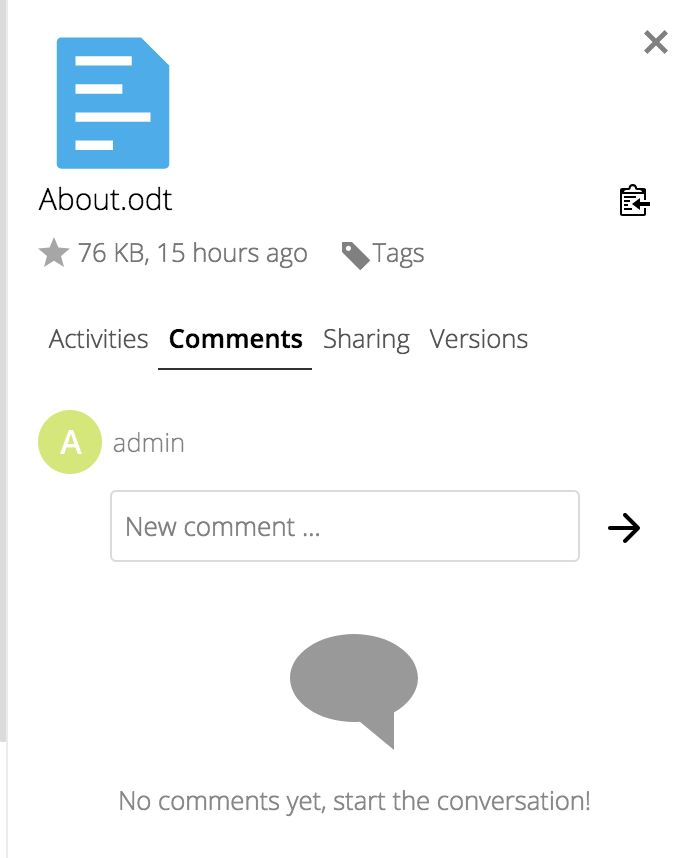
For this image, when a user interacts with the keyboard, it is not possible to tell which element they would be interacting with.
Server configuration
Operating system: Ubuntu 16.04
Nextcloud version: 13.0.4
Updated from an older Nextcloud/ownCloud or fresh install: Fresh install
Where did you install Nextcloud from: snap install nextcloud
 kevgathuku
All 6 comments
GitMate.io thinks possibly related issues are https://github.com/nextcloud/server/issues/2096 (Readability / Distinction of currently selected element on right sidebar), https://github.com/nextcloud/server/issues/3632 (Unable to login using FreeIPA users with 2FA Enabled), https://github.com/nextcloud/server/issues/9005 (c), https://github.com/nextcloud/server/issues/9154 (Unable to use SCSS for apps which operate on the login screen), and https://github.com/nextcloud/server/issues/3049 (Hiding navigation bar).
 nextcloud-bot
on 21 Jun 2018
nextcloud-bot
on 21 Jun 2018
cc @nextcloud/designers
 MorrisJobke
on 21 Jun 2018
MorrisJobke
on 21 Jun 2018
@kevgathuku thank you for the feedback, I will look into it! :) You are also welcome to contribute a fix if you like, I am happy to help.
 jancborchardt
on 21 Jun 2018
jancborchardt
on 21 Jun 2018
Thanks @jancborchardt
I'll work on a fix, and I'll make sure to ask any questions that may come up 😃
kevgathuku
on 21 Jun 2018
Fixed in #9956
kevgathuku
on 26 Jun 2018
It’s awesome when the person who finds the issue also fixes it! :) High five @kevgathuku
jancborchardt
on 26 Jun 2018
Related issues
 mfechner
·
3Comments
MorrisJobke
·
3Comments
mfechner
·
3Comments
MorrisJobke
·
3Comments
 arno01
·
3Comments
arno01
·
3Comments
 georgehrke
·
3Comments
georgehrke
·
3Comments
 mama21mama
·
3Comments
mama21mama
·
3Comments