Server: Javascript errors while upgrading
Expected behaviour
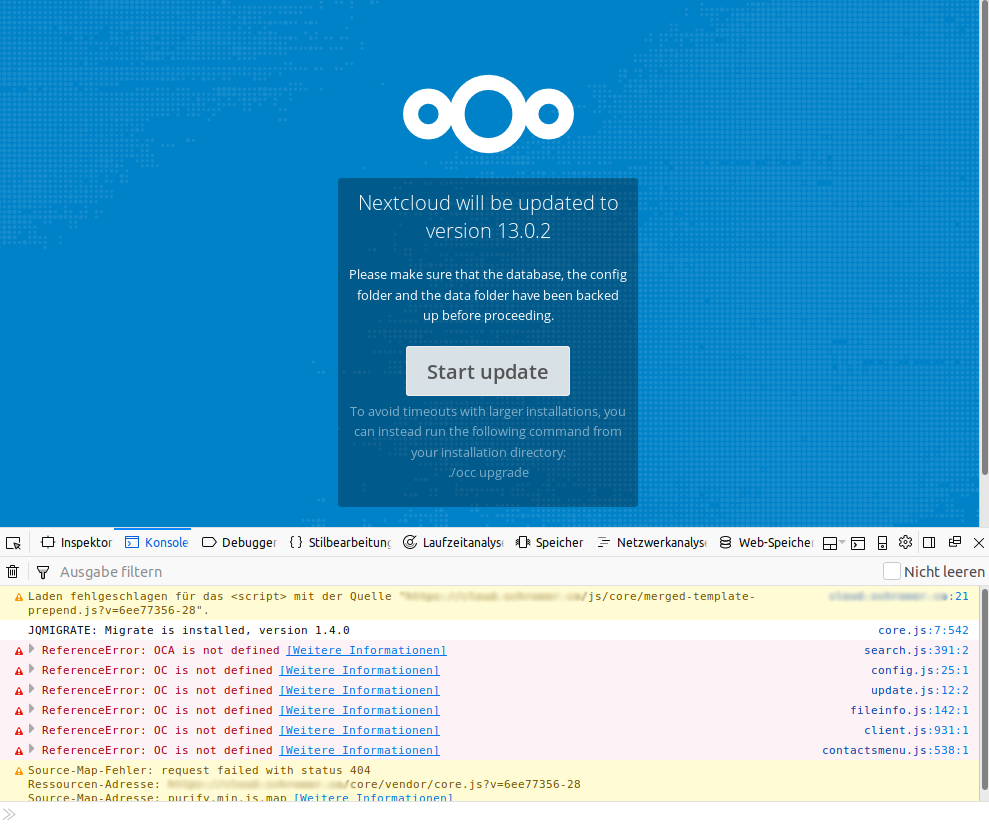
After the update screen it should be possible to press the Start update button.
Actual behaviour
A javascript file is missing and so the OC / OCA namespace is missing and the Start update button does not work.
I experienced this issue on every Nc update since the beginning but forgot to submit an issue before. Finishing the update via shell works very well.
The updater log has no errors only info log entries.
Server configuration
Operating system: CentOS
Web server: Apache 2
Database: MariaDB
PHP version: 7.1
Nextcloud version: 13.0.2
Updated from an older Nextcloud/ownCloud or fresh install: Fresh
Where did you install Nextcloud from: Official page
{"reqId":"...","level":1,"time":"2018-04-26T14:01:15+00:00","remoteAddr":"","user":"--","app":"updater","method":"--","url":"--","message":"\\OC\\Repair::step: Repair step: Clear frontend caches","userAgent":"--","version":"13.0.1.1"}
{"reqId":"...","level":1,"time":"2018-04-26T14:01:15+00:00","remoteAddr":"","user":"--","app":"updater","method":"--","url":"--","message":"\\OC\\Repair::info: Repair info: Image cache cleared","userAgent":"--","version":"13.0.1.1"}
{"reqId":"...","level":1,"time":"2018-04-26T14:01:19+00:00","remoteAddr":"","user":"--","app":"updater","method":"--","url":"--","message":"\\OC\\Repair::info: Repair info: SCSS cache cleared","userAgent":"--","version":"13.0.1.1"}
{"reqId":"...","level":1,"time":"2018-04-26T14:01:21+00:00","remoteAddr":"","user":"--","app":"updater","method":"--","url":"--","message":"\\OC\\Repair::info: Repair info: JS cache cleared","userAgent":"--","version":"13.0.1.1"}
 splitt3r
All 9 comments
@juliushaertl Might this be related to the "can't load theming data"? Because those things are also defined in the combined JS and thus also stored in the code that is served from the app data dir?
cc @rullzer
Maybe worth to port the update page to purely self contained JS.
 MorrisJobke
on 27 Apr 2018
MorrisJobke
on 27 Apr 2018
@juliushaertl Might this be related to the "can't load theming data"? Because those things are also defined in the combined JS and thus also stored in the code that is served from the app data dir?
@MorrisJobke Not sure what you a re refering to with the "can't load theming data" here.
Maybe worth to port the update page to purely self contained JS.
That would make sense, we don't need any of those included js code on then update page.
@splitt3r When is the log output triggered for you? When you load the maintenance page? Can you also post your config?
 juliushaertl
on 27 Apr 2018
juliushaertl
on 27 Apr 2018
Yes exaactly. Only the maintenance page shows this errors. The update page before works just well.
Config:
$CONFIG = array (
  'instanceid' => '***',
  'passwordsalt' => '***',
  'secret' => '***',
  'trusted_domains' =>
  array (
    0 => '***',
  ),
  'datadirectory' => '***',
  'dbtype' => 'mysql',
  'version' => '13.0.2.1',
  'dbname' => '***',
  'dbhost' => 'localhost',
  'dbport' => '',
  'dbtableprefix' => '***',
  'dbuser' => '***',
  'dbpassword' => '***',
  'logtimezone' => 'UTC',
  'installed' => true,
  'maintenance' => false,
  'theme' => '',
  'loglevel' => 2,
  'mail_from_address' => '***',
  'mail_smtpmode' => 'php',
  'mail_domain' => '***',
  'filelocking.enabled' => true,
  'memcache.locking' => '\\OC\\Memcache\\Redis',
  'memcache.local' => '\\OC\\Memcache\\Redis',
  'redis' =>
  array (
    'host' => '***',
    'port' => 0,
    'timeout' => 0.0,
  ),
  'updater.release.channel' => 'stable',
  'overwrite.cli.url' => '***',
  'overwriteprotocol' => 'https',
  'htaccess.RewriteBase' => '/',
  'htaccess.IgnoreFrontController' => true,
  'updater.secret' => '***',
);
@MorrisJobke Not sure what you a re refering to with the "can't load theming data" here.
That the maintenance page is not themed, because the app data is not accessible - #5789
The problem here is that we also combine the JS and this is stored in the app data folder and this is not available during upgrade.
MorrisJobke
on 27 Apr 2018
The issue is still present in 13.0.3 😀
splitt3r
on 7 Jun 2018
The repair steps should actually be executed after the button is clicked, so I see no reason the file is not available at that state.
@splitt3r I assume you have a dev env for Nextcloud, can you reproduce the issue locally? YOu can trigger the update page by bumping the last integer value of $OC_version in version.php.
juliushaertl
on 12 Jun 2018
Yes i will try to reproduce it and give further information.
splitt3r
on 12 Jun 2018
Raising the version number shows the upgrade page without any problems.
splitt3r
on 22 Jun 2018
Raising the version number shows the upgrade page without any problems.
Okay - then let's close this for now and reopen once it happens again and we can look at the exact files and why it happens then.
MorrisJobke
on 25 Jun 2018
Related issues
 blackcrack
·
3Comments
blackcrack
·
3Comments
 e-alfred
·
3Comments
e-alfred
·
3Comments
 jancborchardt
·
3Comments
jancborchardt
·
3Comments
 Django-BOfH
·
3Comments
Django-BOfH
·
3Comments
 georgehrke
·
3Comments
georgehrke
·
3Comments