Server: MySQL server has gone away during upgrade
Steps to reproduce
- Initiate update to 13.0.1 via Web UI
- Continue update via Web UI
Expected behaviour
Updater should complete without error.
Actual behaviour
Update is not successful:

NextCloudPi diagnostics
NextCloudPi version  v0.52.1
NextCloudPi image    NextCloudPi_12-04-17
distribution         Raspbian GNU/Linux 9 \n \l
automount            yes
USB devices          sda sdb
datadir              /media/brickCloud/ncdata
data in SD           no
data filesystem      btrfs
data disk usage      207G/1.9T
rootfs usage         1.9G/15G
swapfile             /var/swap
Nextcloud check      ok
Nextcloud version    13.0.1.1
HTTPD service        up
PHP service          up
MariaDB service      up
Redis service        up
Postfix service      up
internet check       ok
port check 80        open
port check 443       open
IP                   192.168.1.82
gateway              192.168.1.254
interface            eth0
certificates         annawalklate.plus.com
certs due            84 days
NAT loopback         no
uptime               52min
Nextcloud configuration
Nextcloud or one of the apps require upgrade - only a limited number of commands are available
You may use your browser or the occ upgrade command to do the upgrade
{
    "system": {
        "passwordsalt": "***REMOVED SENSITIVE VALUE***",
        "secret": "***REMOVED SENSITIVE VALUE***",
        "trusted_domains": {
            "0": "localhost",
            "5": "nextcloudpi.local",
            "1": "192.168.1.82",
            "4": "annawalklate.plus.com",
            "2": "annawalklate.plus.com"
        },
        "datadirectory": "***REMOVED SENSITIVE VALUE***",
        "overwrite.cli.url": "https:\/\/annawalklate.plus.com",
        "dbtype": "mysql",
        "version": "13.0.0.14",
        "dbname": "***REMOVED SENSITIVE VALUE***",
        "dbhost": "***REMOVED SENSITIVE VALUE***",
        "dbport": "",
        "dbtableprefix": "oc_",
        "mysql.utf8mb4": true,
        "dbuser": "***REMOVED SENSITIVE VALUE***",
        "dbpassword": "***REMOVED SENSITIVE VALUE***",
        "installed": true,
        "instanceid": "***REMOVED SENSITIVE VALUE***",
        "memcache.local": "\\OC\\Memcache\\Redis",
        "memcache.locking": "\\OC\\Memcache\\Redis",
        "redis": {
            "host": "***REMOVED SENSITIVE VALUE***",
            "port": 0,
            "timeout": 0,
            "password": "***REMOVED SENSITIVE VALUE***"
        },
        "mail_smtpmode": "php",
        "mail_smtpauthtype": "LOGIN",
        "mail_from_address": "***REMOVED SENSITIVE VALUE***",
        "mail_domain": "***REMOVED SENSITIVE VALUE***",
        "overwriteprotocol": "https",
        "loglevel": "2",
        "log_type": "file",
        "maintenance": false,
        "logfile": "\/media\/brickCloud\/ncdata\/nextcloud.log",
        "theme": "",
        "updater.secret": "***REMOVED SENSITIVE VALUE***"
    }
}
HTTPd logs
[Fri Mar 16 06:25:02.108164 2018] [ssl:warn] [pid 841:tid 1992212480] AH01909: localhost:4443:0 server certificate does NOT include an ID which matches the server name
[Fri Mar 16 06:25:03.001097 2018] [mpm_event:notice] [pid 841:tid 1992212480] AH00489: Apache/2.4.25 (Raspbian) OpenSSL/1.0.2l configured -- resuming normal operations
[Fri Mar 16 06:25:03.001176 2018] [core:notice] [pid 841:tid 1992212480] AH00094: Command line: '/usr/sbin/apache2'
[Fri Mar 16 23:53:50.099971 2018] [mpm_event:notice] [pid 841:tid 1992212480] AH00491: caught SIGTERM, shutting down
[Fri Mar 16 23:54:13.109988 2018] [ssl:warn] [pid 765:tid 1992273920] AH01909: localhost:4443:0 server certificate does NOT include an ID which matches the server name
[Fri Mar 16 23:54:14.051389 2018] [ssl:warn] [pid 1012:tid 1992273920] AH01909: localhost:4443:0 server certificate does NOT include an ID which matches the server name
[Fri Mar 16 23:54:15.005289 2018] [mpm_event:notice] [pid 1012:tid 1992273920] AH00489: Apache/2.4.25 (Raspbian) OpenSSL/1.0.2l configured -- resuming normal operations
[Fri Mar 16 23:54:15.005538 2018] [core:notice] [pid 1012:tid 1992273920] AH00094: Command line: '/usr/sbin/apache2'
Database logs
2018-03-17  0:17:02 1988698112 [Note] InnoDB: GCC builtin __atomic_thread_fence() is used for memory barrier
2018-03-17  0:17:02 1988698112 [Note] InnoDB: Compressed tables use zlib 1.2.8
2018-03-17  0:17:02 1988698112 [Note] InnoDB: Using Linux native AIO
2018-03-17  0:17:02 1988698112 [Note] InnoDB: Using generic crc32 instructions
2018-03-17  0:17:02 1988698112 [Note] InnoDB: Initializing buffer pool, size = 128.0M
2018-03-17  0:17:02 1988698112 [Note] InnoDB: Completed initialization of buffer pool
2018-03-17  0:17:02 1988698112 [Note] InnoDB: Highest supported file format is Barracuda.
2018-03-17  0:17:02 1988698112 [Note] InnoDB: The log sequence numbers 591266213 and 591266213 in ibdata files do not match the log sequence number 613061340 in the ib_logfiles!
2018-03-17  0:17:02 1988698112 [Note] InnoDB: Restoring possible half-written data pages from the doublewrite buffer...
2018-03-17  0:17:03 1988698112 [Note] InnoDB: 128 rollback segment(s) are active.
2018-03-17  0:17:03 1988698112 [Note] InnoDB: Waiting for purge to start
2018-03-17  0:17:03 1988698112 [Note] InnoDB:  Percona XtraDB (http://www.percona.com) 5.6.35-80.0 started; log sequence number 613061340
2018-03-17  0:17:03 1442837312 [Note] InnoDB: Dumping buffer pool(s) not yet started
2018-03-17  0:17:03 1988698112 [Note] Plugin 'FEEDBACK' is disabled.
2018-03-17  0:17:03 1988698112 [Note] Recovering after a crash using tc.log
2018-03-17  0:17:03 1988698112 [Note] Starting crash recovery...
2018-03-17  0:17:03 1988698112 [Note] Crash recovery finished.
2018-03-17  0:17:03 1988698112 [Note] Server socket created on IP: '127.0.0.1'.
2018-03-17  0:17:03 1988698112 [Note] /usr/sbin/mysqld: ready for connections.
Version: '10.1.23-MariaDB-9+deb9u1'  socket: '/var/run/mysqld/mysqld.sock'  port: 3306  Raspbian 9.0
Nextcloud logs
{"reqId":"WqxeYn8AAQEAAAQRj@kAAA4T","level":1,"time":"2018-03-17T00:16:36+00:00","remoteAddr":"81.174.158.229","user":"--","app":"updater","method":"GET","url":"\/core\/ajax\/update.php?requesttoken=5O1U155XZkuqsVqmUW4sQ6mwTpBgVYnNhVzzd3CVSEo%3D%3Aib4ajdd4VHqbxBnKPSEDF8XbfscWGrz4xgTYXEP4KSw%3D","message":"\\OC\\Repair::step: Repair step: Add move avatar background job","userAgent":"Mozilla\/5.0 (Windows NT 6.1; Win64; x64) AppleWebKit\/537.36 (KHTML, like Gecko) Chrome\/65.0.3325.162 Safari\/537.36","version":"13.0.0.14"}
{"reqId":"WqxeYn8AAQEAAAQRj@kAAA4T","level":1,"time":"2018-03-17T00:16:36+00:00","remoteAddr":"81.174.158.229","user":"--","app":"updater","method":"GET","url":"\/core\/ajax\/update.php?requesttoken=5O1U155XZkuqsVqmUW4sQ6mwTpBgVYnNhVzzd3CVSEo%3D%3Aib4ajdd4VHqbxBnKPSEDF8XbfscWGrz4xgTYXEP4KSw%3D","message":"\\OC\\Repair::info: Repair info: Repair step already executed","userAgent":"Mozilla\/5.0 (Windows NT 6.1; Win64; x64) AppleWebKit\/537.36 (KHTML, like Gecko) Chrome\/65.0.3325.162 Safari\/537.36","version":"13.0.0.14"}
{"reqId":"WqxeYn8AAQEAAAQRj@kAAA4T","level":1,"time":"2018-03-17T00:16:36+00:00","remoteAddr":"81.174.158.229","user":"--","app":"updater","method":"GET","url":"\/core\/ajax\/update.php?requesttoken=5O1U155XZkuqsVqmUW4sQ6mwTpBgVYnNhVzzd3CVSEo%3D%3Aib4ajdd4VHqbxBnKPSEDF8XbfscWGrz4xgTYXEP4KSw%3D","message":"\\OC\\Repair::step: Repair step: Add preview cleanup background jobs","userAgent":"Mozilla\/5.0 (Windows NT 6.1; Win64; x64) AppleWebKit\/537.36 (KHTML, like Gecko) Chrome\/65.0.3325.162 Safari\/537.36","version":"13.0.0.14"}
{"reqId":"WqxeYn8AAQEAAAQRj@kAAA4T","level":1,"time":"2018-03-17T00:16:36+00:00","remoteAddr":"81.174.158.229","user":"--","app":"updater","method":"GET","url":"\/core\/ajax\/update.php?requesttoken=5O1U155XZkuqsVqmUW4sQ6mwTpBgVYnNhVzzd3CVSEo%3D%3Aib4ajdd4VHqbxBnKPSEDF8XbfscWGrz4xgTYXEP4KSw%3D","message":"\\OC\\Repair::step: Repair step: Fix potential broken mount points","userAgent":"Mozilla\/5.0 (Windows NT 6.1; Win64; x64) AppleWebKit\/537.36 (KHTML, like Gecko) Chrome\/65.0.3325.162 Safari\/537.36","version":"13.0.0.14"}
{"reqId":"WqxeYn8AAQEAAAQRj@kAAA4T","level":1,"time":"2018-03-17T00:16:36+00:00","remoteAddr":"81.174.158.229","user":"--","app":"updater","method":"GET","url":"\/core\/ajax\/update.php?requesttoken=5O1U155XZkuqsVqmUW4sQ6mwTpBgVYnNhVzzd3CVSEo%3D%3Aib4ajdd4VHqbxBnKPSEDF8XbfscWGrz4xgTYXEP4KSw%3D","message":"\\OC\\Repair::info: Repair info: No mounts updated","userAgent":"Mozilla\/5.0 (Windows NT 6.1; Win64; x64) AppleWebKit\/537.36 (KHTML, like Gecko) Chrome\/65.0.3325.162 Safari\/537.36","version":"13.0.0.14"}
{"reqId":"WqxeYn8AAQEAAAQRj@kAAA4T","level":1,"time":"2018-03-17T00:16:36+00:00","remoteAddr":"81.174.158.229","user":"--","app":"updater","method":"GET","url":"\/core\/ajax\/update.php?requesttoken=5O1U155XZkuqsVqmUW4sQ6mwTpBgVYnNhVzzd3CVSEo%3D%3Aib4ajdd4VHqbxBnKPSEDF8XbfscWGrz4xgTYXEP4KSw%3D","message":"\\OC\\Repair::step: Repair step: Repair language codes","userAgent":"Mozilla\/5.0 (Windows NT 6.1; Win64; x64) AppleWebKit\/537.36 (KHTML, like Gecko) Chrome\/65.0.3325.162 Safari\/537.36","version":"13.0.0.14"}
{"reqId":"WqxeYn8AAQEAAAQRj@kAAA4T","level":1,"time":"2018-03-17T00:16:36+00:00","remoteAddr":"81.174.158.229","user":"--","app":"updater","method":"GET","url":"\/core\/ajax\/update.php?requesttoken=5O1U155XZkuqsVqmUW4sQ6mwTpBgVYnNhVzzd3CVSEo%3D%3Aib4ajdd4VHqbxBnKPSEDF8XbfscWGrz4xgTYXEP4KSw%3D","message":"\\OC\\Repair::step: Repair step: Install new core bundle components","userAgent":"Mozilla\/5.0 (Windows NT 6.1; Win64; x64) AppleWebKit\/537.36 (KHTML, like Gecko) Chrome\/65.0.3325.162 Safari\/537.36","version":"13.0.0.14"}
{"reqId":"WqxeYn8AAQEAAAQRj@kAAA4T","level":1,"time":"2018-03-17T00:16:36+00:00","remoteAddr":"81.174.158.229","user":"--","app":"updater","method":"GET","url":"\/core\/ajax\/update.php?requesttoken=5O1U155XZkuqsVqmUW4sQ6mwTpBgVYnNhVzzd3CVSEo%3D%3Aib4ajdd4VHqbxBnKPSEDF8XbfscWGrz4xgTYXEP4KSw%3D","message":"\\OC\\Repair::step: Repair step: Repair invalid paths in file cache","userAgent":"Mozilla\/5.0 (Windows NT 6.1; Win64; x64) AppleWebKit\/537.36 (KHTML, like Gecko) Chrome\/65.0.3325.162 Safari\/537.36","version":"13.0.0.14"}
{"reqId":"WqxeYn8AAQEAAAQRj@kAAA4T","level":1,"time":"2018-03-17T00:16:36+00:00","remoteAddr":"81.174.158.229","user":"--","app":"updater","method":"GET","url":"\/core\/ajax\/update.php?requesttoken=5O1U155XZkuqsVqmUW4sQ6mwTpBgVYnNhVzzd3CVSEo%3D%3Aib4ajdd4VHqbxBnKPSEDF8XbfscWGrz4xgTYXEP4KSw%3D","message":"\\OC\\Repair::step: Repair step: Rename folder with user specific keys","userAgent":"Mozilla\/5.0 (Windows NT 6.1; Win64; x64) AppleWebKit\/537.36 (KHTML, like Gecko) Chrome\/65.0.3325.162 Safari\/537.36","version":"13.0.0.14"}
{"reqId":"WqxeYn8AAQEAAAQRj@kAAA4T","level":1,"time":"2018-03-17T00:16:36+00:00","remoteAddr":"81.174.158.229","user":"--","app":"updater","method":"GET","url":"\/core\/ajax\/update.php?requesttoken=5O1U155XZkuqsVqmUW4sQ6mwTpBgVYnNhVzzd3CVSEo%3D%3Aib4ajdd4VHqbxBnKPSEDF8XbfscWGrz4xgTYXEP4KSw%3D","message":"\\OC\\Repair::step: Repair step: Add log rotate job","userAgent":"Mozilla\/5.0 (Windows NT 6.1; Win64; x64) AppleWebKit\/537.36 (KHTML, like Gecko) Chrome\/65.0.3325.162 Safari\/537.36","version":"13.0.0.14"}
{"reqId":"WqxeYn8AAQEAAAQRj@kAAA4T","level":1,"time":"2018-03-17T00:16:36+00:00","remoteAddr":"81.174.158.229","user":"--","app":"updater","method":"GET","url":"\/core\/ajax\/update.php?requesttoken=5O1U155XZkuqsVqmUW4sQ6mwTpBgVYnNhVzzd3CVSEo%3D%3Aib4ajdd4VHqbxBnKPSEDF8XbfscWGrz4xgTYXEP4KSw%3D","message":"\\OC\\Repair::step: Repair step: Clear frontend caches","userAgent":"Mozilla\/5.0 (Windows NT 6.1; Win64; x64) AppleWebKit\/537.36 (KHTML, like Gecko) Chrome\/65.0.3325.162 Safari\/537.36","version":"13.0.0.14"}
{"reqId":"WqxeYn8AAQEAAAQRj@kAAA4T","level":1,"time":"2018-03-17T00:16:36+00:00","remoteAddr":"81.174.158.229","user":"--","app":"updater","method":"GET","url":"\/core\/ajax\/update.php?requesttoken=5O1U155XZkuqsVqmUW4sQ6mwTpBgVYnNhVzzd3CVSEo%3D%3Aib4ajdd4VHqbxBnKPSEDF8XbfscWGrz4xgTYXEP4KSw%3D","message":"\\OC\\Repair::info: Repair info: Image cache cleared","userAgent":"Mozilla\/5.0 (Windows NT 6.1; Win64; x64) AppleWebKit\/537.36 (KHTML, like Gecko) Chrome\/65.0.3325.162 Safari\/537.36","version":"13.0.0.14"}
{"reqId":"WqxeYn8AAQEAAAQRj@kAAA4T","level":3,"time":"2018-03-17T00:16:36+00:00","remoteAddr":"81.174.158.229","user":"--","app":"PHP","method":"GET","url":"\/core\/ajax\/update.php?requesttoken=5O1U155XZkuqsVqmUW4sQ6mwTpBgVYnNhVzzd3CVSEo%3D%3Aib4ajdd4VHqbxBnKPSEDF8XbfscWGrz4xgTYXEP4KSw%3D","message":"PDOStatement::execute(): MySQL server has gone away at \/var\/www\/nextcloud\/3rdparty\/doctrine\/dbal\/lib\/Doctrine\/DBAL\/Driver\/PDOStatement.php#105","userAgent":"Mozilla\/5.0 (Windows NT 6.1; Win64; x64) AppleWebKit\/537.36 (KHTML, like Gecko) Chrome\/65.0.3325.162 Safari\/537.36","version":"13.0.0.14"}
{"reqId":"WqxeYn8AAQEAAAQRj@kAAA4T","level":3,"time":"2018-03-17T00:16:36+00:00","remoteAddr":"81.174.158.229","user":"--","app":"PHP","method":"GET","url":"\/core\/ajax\/update.php?requesttoken=5O1U155XZkuqsVqmUW4sQ6mwTpBgVYnNhVzzd3CVSEo%3D%3Aib4ajdd4VHqbxBnKPSEDF8XbfscWGrz4xgTYXEP4KSw%3D","message":"PDOStatement::execute(): Error reading result set's header at \/var\/www\/nextcloud\/3rdparty\/doctrine\/dbal\/lib\/Doctrine\/DBAL\/Driver\/PDOStatement.php#105","userAgent":"Mozilla\/5.0 (Windows NT 6.1; Win64; x64) AppleWebKit\/537.36 (KHTML, like Gecko) Chrome\/65.0.3325.162 Safari\/537.36","version":"13.0.0.14"}
{"reqId":"WqxeYn8AAQEAAAQRj@kAAA4T","level":2,"time":"2018-03-17T00:16:36+00:00","remoteAddr":"81.174.158.229","user":"--","app":"updater","method":"GET","url":"\/core\/ajax\/update.php?requesttoken=5O1U155XZkuqsVqmUW4sQ6mwTpBgVYnNhVzzd3CVSEo%3D%3Aib4ajdd4VHqbxBnKPSEDF8XbfscWGrz4xgTYXEP4KSw%3D","message":"\\OC\\Repair::warning: Repair warning: Unable to clear the frontend cache","userAgent":"Mozilla\/5.0 (Windows NT 6.1; Win64; x64) AppleWebKit\/537.36 (KHTML, like Gecko) Chrome\/65.0.3325.162 Safari\/537.36","version":"13.0.0.14"}
{"reqId":"WqxeYn8AAQEAAAQRj@kAAA4T","level":3,"time":"2018-03-17T00:16:36+00:00","remoteAddr":"81.174.158.229","user":"--","app":"core","method":"GET","url":"\/core\/ajax\/update.php?requesttoken=5O1U155XZkuqsVqmUW4sQ6mwTpBgVYnNhVzzd3CVSEo%3D%3Aib4ajdd4VHqbxBnKPSEDF8XbfscWGrz4xgTYXEP4KSw%3D","message":"Exception: {\"Exception\":\"Doctrine\\\\DBAL\\\\Exception\\\\DriverException\",\"Message\":\"An exception occurred while executing 'UPDATE `oc_appconfig` SET `configvalue` = ? WHERE (`appid` = ?) AND (`configkey` = ?) AND (`configvalue` <> ?)' with params [0, \\\"core\\\", \\\"lastupdatedat\\\", 0]:\\n\\nSQLSTATE[HY000]: General error: 2006 MySQL server has gone away\",\"Code\":0,\"Trace\":\"#0 \\\/var\\\/www\\\/nextcloud\\\/3rdparty\\\/doctrine\\\/dbal\\\/lib\\\/Doctrine\\\/DBAL\\\/DBALException.php(128): Doctrine\\\\DBAL\\\\Driver\\\\AbstractMySQLDriver->convertException('An exception oc...', Object(Doctrine\\\\DBAL\\\\Driver\\\\PDOException))\\n#1 \\\/var\\\/www\\\/nextcloud\\\/3rdparty\\\/doctrine\\\/dbal\\\/lib\\\/Doctrine\\\/DBAL\\\/Connection.php(1015): Doctrine\\\\DBAL\\\\DBALException::driverExceptionDuringQuery(Object(Doctrine\\\\DBAL\\\\Driver\\\\PDOMySql\\\\Driver), Object(Doctrine\\\\DBAL\\\\Driver\\\\PDOException), 'UPDATE `oc_appc...', Array)\\n#2 \\\/var\\\/www\\\/nextcloud\\\/lib\\\/private\\\/DB\\\/Connection.php(216): Doctrine\\\\DBAL\\\\Connection->executeUpdate('UPDATE `oc_appc...', Array, Array)\\n#3 \\\/var\\\/www\\\/nextcloud\\\/3rdparty\\\/doctrine\\\/dbal\\\/lib\\\/Doctrine\\\/DBAL\\\/Query\\\/QueryBuilder.php(208): OC\\\\DB\\\\Connection->executeUpdate('UPDATE `oc_appc...', Array, Array)\\n#4 \\\/var\\\/www\\\/nextcloud\\\/lib\\\/private\\\/DB\\\/QueryBuilder\\\/QueryBuilder.php(214): Doctrine\\\\DBAL\\\\Query\\\\QueryBuilder->execute()\\n#5 \\\/var\\\/www\\\/nextcloud\\\/lib\\\/private\\\/AppConfig.php(210): OC\\\\DB\\\\QueryBuilder\\\\QueryBuilder->execute()\\n#6 \\\/var\\\/www\\\/nextcloud\\\/lib\\\/private\\\/AllConfig.php(166): OC\\\\AppConfig->setValue('core', 'lastupdatedat', 0)\\n#7 \\\/var\\\/www\\\/nextcloud\\\/lib\\\/private\\\/Updater.php(293): OC\\\\AllConfig->setAppValue('core', 'lastupdatedat', 0)\\n#8 \\\/var\\\/www\\\/nextcloud\\\/lib\\\/private\\\/Updater.php(139): OC\\\\Updater->doUpgrade('13.0.1.1', '13.0.0.14')\\n#9 \\\/var\\\/www\\\/nextcloud\\\/core\\\/ajax\\\/update.php(212): OC\\\\Updater->upgrade()\\n#10 {main}\",\"File\":\"\\\/var\\\/www\\\/nextcloud\\\/3rdparty\\\/doctrine\\\/dbal\\\/lib\\\/Doctrine\\\/DBAL\\\/Driver\\\/AbstractMySQLDriver.php\",\"Line\":115}","userAgent":"Mozilla\/5.0 (Windows NT 6.1; Win64; x64) AppleWebKit\/537.36 (KHTML, like Gecko) Chrome\/65.0.3325.162 Safari\/537.36","version":"13.0.0.14"}
{"reqId":"WqxeYn8AAQEAAAQRj@kAAA4T","level":3,"time":"2018-03-17T00:16:36+00:00","remoteAddr":"81.174.158.229","user":"--","app":"updater","method":"GET","url":"\/core\/ajax\/update.php?requesttoken=5O1U155XZkuqsVqmUW4sQ6mwTpBgVYnNhVzzd3CVSEo%3D%3Aib4ajdd4VHqbxBnKPSEDF8XbfscWGrz4xgTYXEP4KSw%3D","message":"\\OC\\Updater::failure: Doctrine\\DBAL\\Exception\\DriverException: An exception occurred while executing 'UPDATE `oc_appconfig` SET `configvalue` = ? WHERE (`appid` = ?) AND (`configkey` = ?) AND (`configvalue` <> ?)' with params [0, \"core\", \"lastupdatedat\", 0]:\n\nSQLSTATE[HY000]: General error: 2006 MySQL server has gone away","userAgent":"Mozilla\/5.0 (Windows NT 6.1; Win64; x64) AppleWebKit\/537.36 (KHTML, like Gecko) Chrome\/65.0.3325.162 Safari\/537.36","version":"13.0.0.14"}
{"reqId":"WqxeYn8AAQEAAAQRj@kAAA4T","level":3,"time":"2018-03-17T00:16:36+00:00","remoteAddr":"81.174.158.229","user":"--","app":"updater","method":"GET","url":"\/core\/ajax\/update.php?requesttoken=5O1U155XZkuqsVqmUW4sQ6mwTpBgVYnNhVzzd3CVSEo%3D%3Aib4ajdd4VHqbxBnKPSEDF8XbfscWGrz4xgTYXEP4KSw%3D","message":"\\OC\\Updater::updateEnd: Update failed","userAgent":"Mozilla\/5.0 (Windows NT 6.1; Win64; x64) AppleWebKit\/537.36 (KHTML, like Gecko) Chrome\/65.0.3325.162 Safari\/537.36","version":"13.0.0.14"}
{"reqId":"WqxeYn8AAQEAAAQRj@kAAA4T","level":1,"time":"2018-03-17T00:16:36+00:00","remoteAddr":"81.174.158.229","user":"--","app":"updater","method":"GET","url":"\/core\/ajax\/update.php?requesttoken=5O1U155XZkuqsVqmUW4sQ6mwTpBgVYnNhVzzd3CVSEo%3D%3Aib4ajdd4VHqbxBnKPSEDF8XbfscWGrz4xgTYXEP4KSw%3D","message":"\\OC\\Updater::maintenanceActive: Maintenance mode is kept active","userAgent":"Mozilla\/5.0 (Windows NT 6.1; Win64; x64) AppleWebKit\/537.36 (KHTML, like Gecko) Chrome\/65.0.3325.162 Safari\/537.36","version":"13.0.0.14"}
{"reqId":"WqxeYn8AAQEAAAQRj@kAAA4T","level":1,"time":"2018-03-17T00:16:36+00:00","remoteAddr":"81.174.158.229","user":"--","app":"updater","method":"GET","url":"\/core\/ajax\/update.php?requesttoken=5O1U155XZkuqsVqmUW4sQ6mwTpBgVYnNhVzzd3CVSEo%3D%3Aib4ajdd4VHqbxBnKPSEDF8XbfscWGrz4xgTYXEP4KSw%3D","message":"\\OC\\Updater::resetLogLevel: Reset log level to Warning(2)","userAgent":"Mozilla\/5.0 (Windows NT 6.1; Win64; x64) AppleWebKit\/537.36 (KHTML, like Gecko) Chrome\/65.0.3325.162 Safari\/537.36","version":"13.0.0.14"}
 leavenotracks
All 60 comments
Googling General error: 2006 MySQL server has gone away gives some hints. Perhaps this is related to NextCloudPi?
 splitt3r
on 17 Mar 2018
splitt3r
on 17 Mar 2018
@rullzer @nickvergessen I really don't like that we more often get the "MySQL server has gone away" messages ... it seem to be not reasonable that all the mysql servers to stop working right in the middle of the updates :/ This looks really 🐟y
 MorrisJobke
on 17 Mar 2018
MorrisJobke
on 17 Mar 2018
@MorrisJobke It seem to be getting more indeed. Maybe recent mysql/mariadb updates shortend the timout of connections?
 rullzer
on 17 Mar 2018
rullzer
on 17 Mar 2018
@splitt3r I have not yet ruled out the possibility that of it being related to NCP, though I haven't seen the exact same issues reported over there.
@rullzer in terms of timeouts this is what I have:

These "MySQL server has gone away" errors are causing me problems during normal operation also, see
8770
leavenotracks
on 19 Mar 2018
@leavenotracks What is the max_allowed_packet variable set to?
MorrisJobke
on 19 Mar 2018
@MorrisJobke

leavenotracks
on 19 Mar 2018
That means 16 MB ... 🤔 ... @rullzer @nickvergessen could this be a reason? But 16 MB is really a lot. :/
MorrisJobke
on 20 Mar 2018
in theory sure. but in practice 16MB should be more than enough.
Also it seems to fail on setting a config value. I find it very unlikely that this results in a packet of more than 16MB.
rullzer
on 20 Mar 2018
Not to redirect away from the app, but raspberry pi's use sd cards for storage by default, correct? If this user is using an sdcard, couldn't this be caused by various io issues? Assuming the db is on the pi.
 user23498723452
on 21 Mar 2018
user23498723452
on 21 Mar 2018
I am on debian testing here, mariadb 10.1.29, on a machine which is comparable in slowness to the raspi, and I upgraded to 13.0.1 with the web updater just fine without mariadb crashing.
 LollenJumplan
on 21 Mar 2018
LollenJumplan
on 21 Mar 2018
@user23498723452 The nc database sits on a USB HD, along with the data.
@LollenJumplan I was able to upgrade to 13.0 from 12.0.5 via the web updater without any issues.
leavenotracks
on 22 Mar 2018
I tried to upgrade from 13.0.0 to 13.0.1 via the web updater. But the update did not finish completely. When I open Nextcloud in the browser, I get this message:
"This Nextcloud instance is currently in maintenance mode..."
See this forum post for more details.
I'm using MariaDB on a Synology NAS.
I get this exception when trying to set the maintenance mode to off:
Doctrine\DBAL\DBALException: Failed to connect to the database: An exception occured in driver: could not find driver in /volume1/web/nextcloud/lib/private/DB/Connection.php:64
MariaDB version: 5.5.57-MariaDB
 janvlug
on 24 Mar 2018
janvlug
on 24 Mar 2018
I made a small modification to the code to fully throw the original stack trace. Here is part of it:
An unhandled exception has been thrown:
PDOException: could not find driver in /volume1/web/nextcloud/3rdparty/doctrine/dbal/lib/Doctrine/DBAL/Driver/PDOConnection.php:43
Stack trace:
#0 /volume1/web/nextcloud/3rdparty/doctrine/dbal/lib/Doctrine/DBAL/Driver/PDOConnection.php(43): PDO->__construct('mysql:host=loca...', '[REDACTED]', '[REDACTED]', Array)
#1 /volume1/web/nextcloud/3rdparty/doctrine/dbal/lib/Doctrine/DBAL/Driver/PDOMySql/Driver.php(44): Doctrine\DBAL\Driver\PDOConnection->__construct('mysql:host=loca...', '[REDACTED]', '[REDACTED]', Array)
#2 /volume1/web/nextcloud/3rdparty/doctrine/dbal/lib/Doctrine/DBAL/Connection.php(360): Doctrine\DBAL\Driver\PDOMySql\Driver->connect(Array, '[REDACTED]', '[REDACTED]', Array)
#3 /volume1/web/nextcloud/lib/private/DB/Connection.php(61): Doctrine\DBAL\Connection->connect()
Further on the issue I had, it has been solved now.
It appeared that the pdo module is not installed when using php70 from the CLI.
I manually set 'maintenance' => false in config/config.php.
When I accessed Nextcloud in the browser after changing this setting the update was triggered again, and went smoothly. Everything seems to work fine again.
Concluding: somehow the value of maintenance was not set back to false. Now the update went through, I'm probably unable to reproduce the root case.
janvlug
on 25 Mar 2018
Many others reported that as well:
- #2768
- #3709
- #7552
- #8107
- #8319
- #8419
- #8762
- #9065
😢
MorrisJobke
on 4 Apr 2018
9065 had this:
ALTER TABLE oc_authtoken CHANGE id id BIGINT UNSIGNED AUTO_INCREMENT NOT NULL
and
ALTER TABLE oc_admin_settings CHANGE id id BIGINT UNSIGNED AUTO_INCREMENT NOT NULL
MorrisJobke
on 4 Apr 2018
@IPlayForHer @janvlug @leavenotracks @LollenJumplan @user23498723452 @splitt3r Do you use SSL for the mysql connection? (see #3709) Maybe this only affects SSL mysql connections and this is the reason why we can't reproduce it.
MorrisJobke
on 4 Apr 2018
No I Turn SSL off
On 4 Apr 2018, at 10:11 pm, Morris Jobke <[email protected] notifications@github.com> wrote:
@IPlayForHer https://github.com/IPlayForHer @janvlug https://github.com/janvlug @leavenotracks https://github.com/leavenotracks @LollenJumplan https://github.com/LollenJumplan @user23498723452 https://github.com/user23498723452 @splitt3r https://github.com/splitt3r Do you use SSL for the mysql connection? (see #3709 https://github.com/nextcloud/server/issues/3709) Maybe this only affects SSL mysql connections and this is the reason why we can't reproduce it.
—
You are receiving this because you were mentioned.
Reply to this email directly, view it on GitHub https://github.com/nextcloud/server/issues/8863#issuecomment-378578114, or mute the thread https://github.com/notifications/unsubscribe-auth/AUSXH1NKY2SJVsXLkMWPFcJFl1zs6HHiks5tlLhfgaJpZM4Sumsj.
 IPlayForHer
on 5 Apr 2018
IPlayForHer
on 5 Apr 2018
And i install aplha 14.0.0 no this problem
IPlayForHer
on 5 Apr 2018
How much RAM do the systems of people reporting the issues have?
 oparoz
on 6 Apr 2018
oparoz
on 6 Apr 2018
I have 8GB in a QNAP NAS. The memory shows mostly used with some available. 100-300M free at least.
I am noticing that the oc_authtoken table has thousands of entries, when it is just a single user with 5 devices connecting.
user23498723452
on 7 Apr 2018
IPlayForHer
on 7 Apr 2018
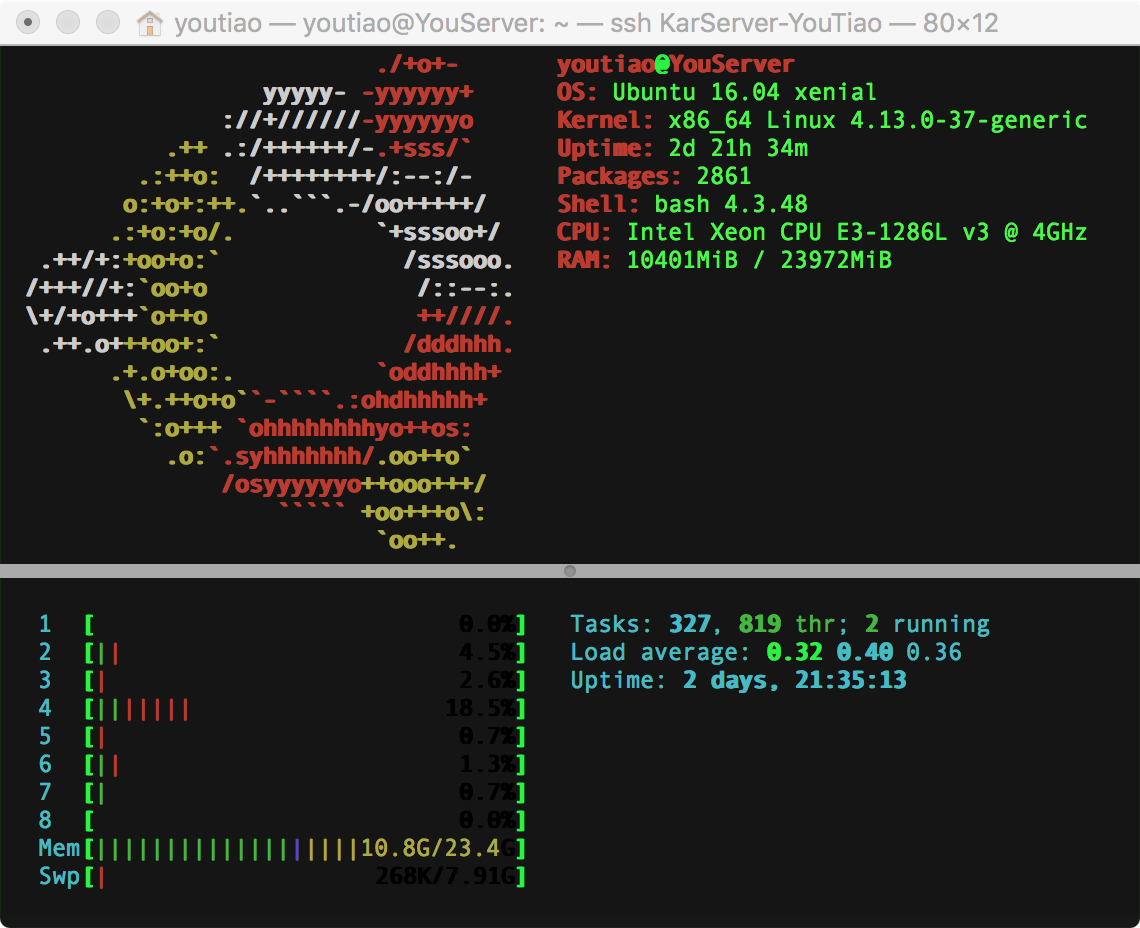
IPlayForHer
on 7 Apr 2018
and 13.0.0.1 and 14.0.0.0A didn't have this problem ,i am trying to setup 13.0.1 in other server for test
IPlayForHer
on 7 Apr 2018
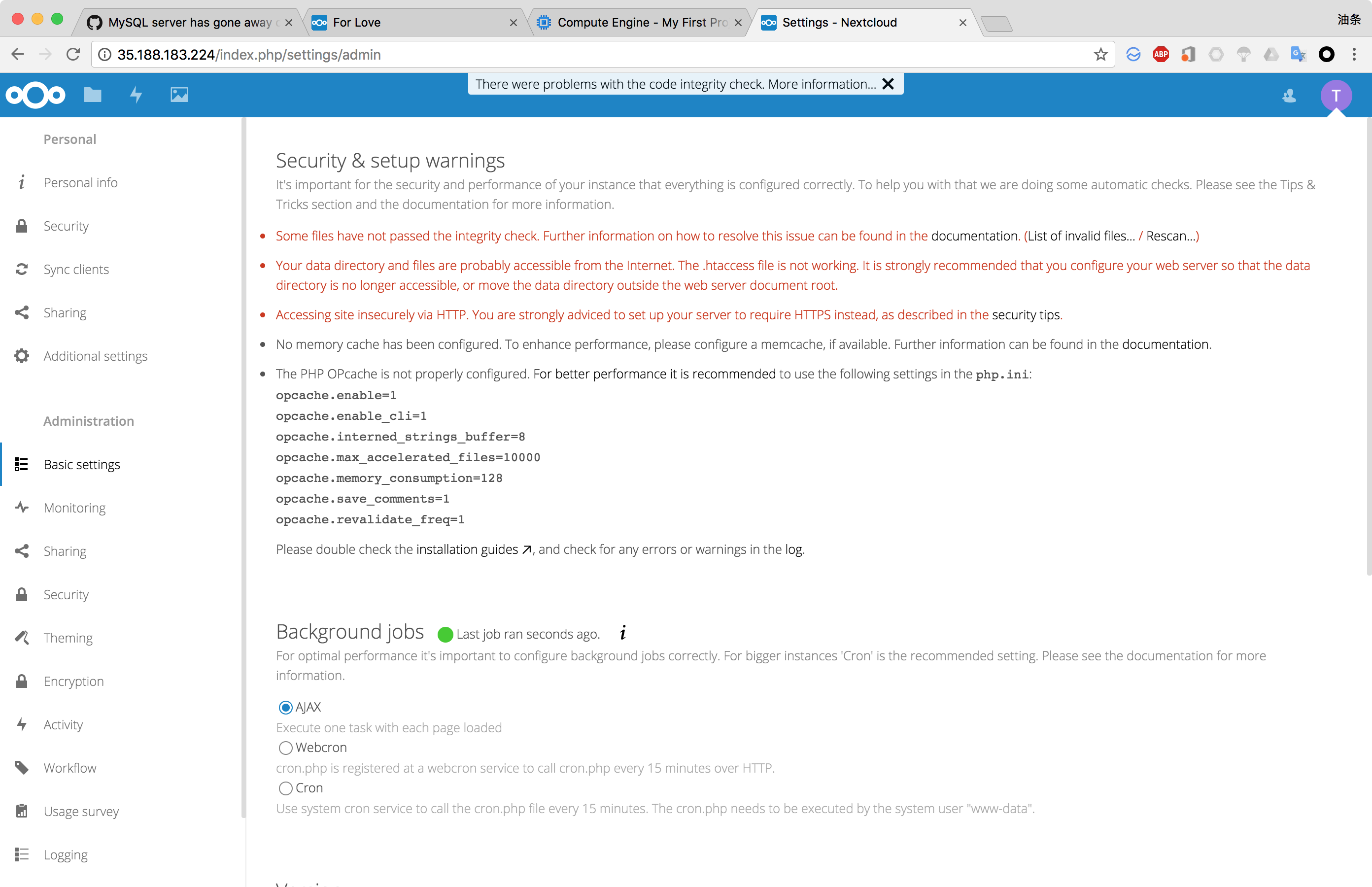
It look like not problem
IPlayForHer
on 7 Apr 2018

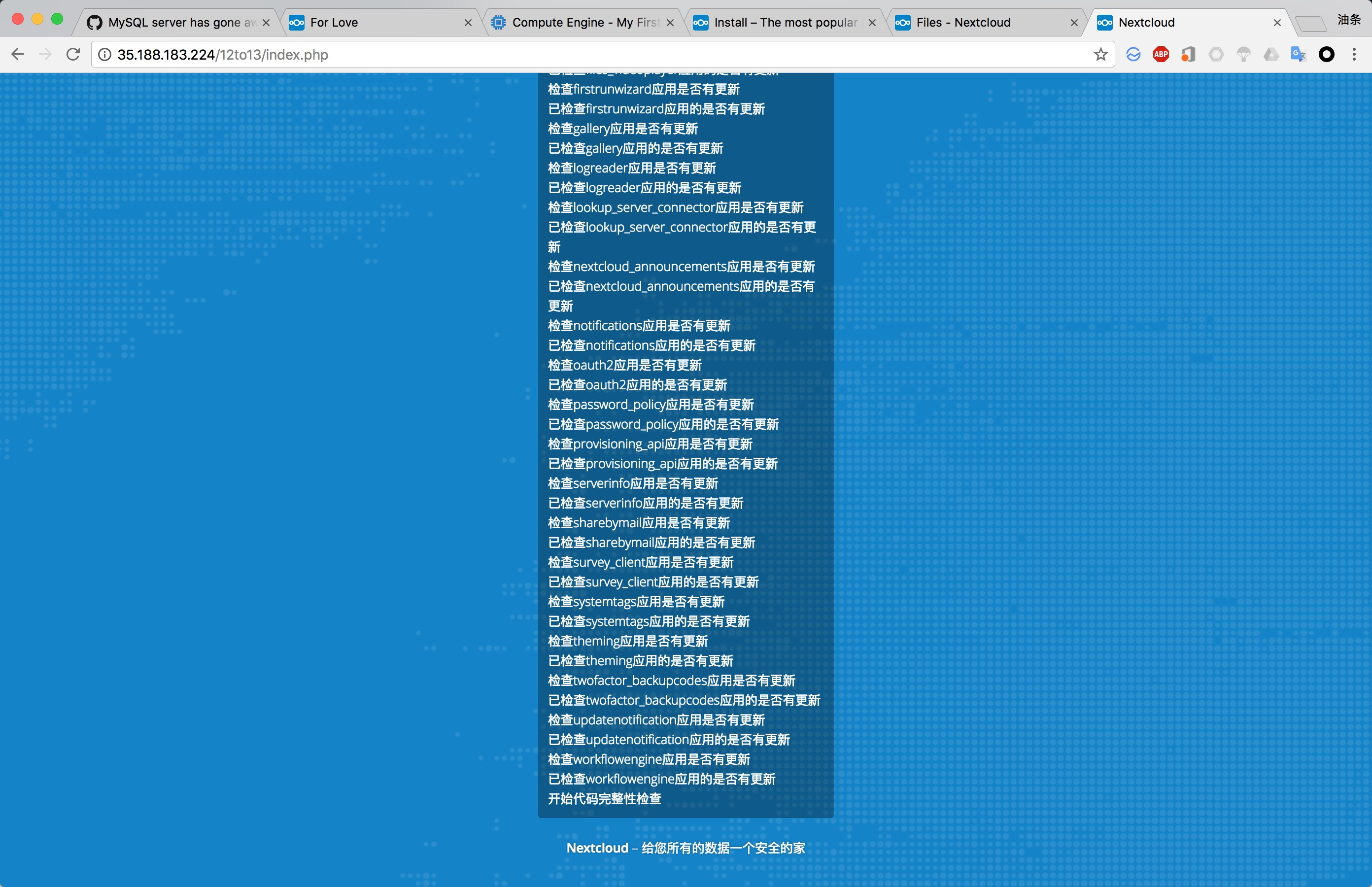
I don't know it isn't happen on my test server
IPlayForHer
on 7 Apr 2018
On my Main server when it happen i set the mysql
max_allowed_packet=300M
wait_timeout=2880000
interactive_timeout = 2880000
it still didn't work, with this I go to database to select the tables it lost connect too
I try to reinstall Nextcloud 13.0.1 [fail]
I uninstall mysql and install mariadb, and try install Nextcloud 13.0.1 [fail]
finally I clone the master install [success]
I don't know why it happen :( It make me lost a part of data ;-;
IPlayForHer
on 7 Apr 2018
My issue occurs during normal usage. Seemingly at random.
re-adding my NC account on my ios device it behaves very slow, usually not loading any content. It took multiple tries to get it to load the 6 items in one folder.
I've restarted NC server (and the apache based web server) multiple times. So that is not the issue. The mysql DB is operating fine.
I host my service over HTTPS on a non-standard port (high port) and there is no "nextcloud" subdir in my url.
And I'm having issues via all of my clients - Android, iOS and ubuntu. It says "request timed out" from iOS fairly consistently.
With the new PHP 7.2 support, could this be a new incompatibility? Is there an issue with the size of the local client db files?
UPDATE: Unsure if it matters, but just updated the iOS client from the last version to the newest and it is working fine right now. Didn't test just before the upgrade though.
user23498723452
on 7 Apr 2018
How much RAM do the systems of people reporting the issues have?
Good point. Could you check if the RAM usage is higher during the time when it happens and the internal limit of MySQL hits in and rejects requests.
MorrisJobke
on 9 Apr 2018
As I said before 24G
On 9 Apr 2018, at 5:31 pm, Morris Jobke notifications@github.com wrote:
How much RAM do the systems of people reporting the issues have?
Good point. Could you check if the RAM usage is higher during the time when it happens and the internal limit of MySQL hits in and rejects requests.
—
You are receiving this because you were mentioned.
Reply to this email directly, view it on GitHub https://github.com/nextcloud/server/issues/8863#issuecomment-379660718, or mute the thread https://github.com/notifications/unsubscribe-auth/AUSXHyzO6i4ijXSCmx4V8Vt2zjJqwhdMks5tmw42gaJpZM4Sumsj.
IPlayForHer
on 9 Apr 2018
8GB. The problem is I can't stare at my desktop NC icon all day (where this is visible readily). I'm at work. If NC has a script that can be run to monitor this, let me know.
user23498723452
on 10 Apr 2018
Another question/concern I have is if the cron jobs are running. I have an unsupported platform, and I have no idea if the cron job is successfully executing. Is there something I can look at in oc_jobs table to prove the success of the cron task?
The latest last_run and last_checked values are March 21 (its April 9th)
I think something isn't working with the cron jobs.
Each time I refresh a browser view of the site, it cleans up one job of the hundreds I have. I watched it go down one row at a time after each page refresh.
Should a single page load, cause ALL the jobs to be checked? I could see the last_run and last_checked values get updated one by one, once it got down to the regular default jobs.
user23498723452
on 10 Apr 2018
The latest last_run and last_checked values are March 21 (its April 9th)
I think something isn't working with the cron jobs.
This indicates, that something went wrong. Could you check your logs if there are some hints in there?
MorrisJobke
on 10 Apr 2018
I couldn't possibly save the logs for that entire timeframe as I get flooded with errors. The "mysql server has gone away" is the start of it, followed by a neverending flow of "hash(): Unknown hashing algorithm: sha512 at [[ insert various files here]]"
I'm not saying they are directly correlated due to a gap in timestamps, but it would seem so, almost like there is a memory issue with php.
I currently have mysql "Max. concurrent connections" of 14. That number is slowly going up.
My "slow query" log is empty, but I'm not certain is is fully functional, as I manually enabled the option on the fly in myphpadmin.
There are 45 aborted connections listed.
The DB has been up for 6 days. The NC web app for a day only. (I made other changes)
oc_jobs doesn't have any of those additional jobs showing still - but I've not done anything with the app i nthe last day.
Statements          #       ø per hour  %
select              1,200 k     7,876.5     87.28
set option          134 k       882.1       9.78
update              21,395      140.5       1.56
delete              12,108      79.5        0.88
insert              3,615       23.7        0.26
insert select           1,013       6.7         0.07
change db           556         3.7         0.04
show fields         404         2.7         0.03
show variables          222         1.5         0.02
show create table       219         1.4         0.02
show tables         181         1.2     0.01
show keys           149         1       0.01
show table status       134         0.9         0.01
show triggers           132         0.9         0.01
begin               70      0.5         0.01
commit              68      0.4         <0.01
show status         39      0.3         <0.01
show slave status       37      0.2         <0.01
show master status      37      0.2         <0.01
show processlist        20      0.1         <0.01
show binlogs            5       <0.1    <0.01
show grants         5       <0.1    <0.01
show create db          3       <0.1    <0.01
unlock tables           2       <0.1    <0.01
show databases          1       <0.1    <0.01
I couldn't possibly save the logs for that entire timeframe as I get flooded with errors. The "mysql server has gone away" is the start of it, followed by a neverending flow of "hash(): Unknown hashing algorithm: sha512 at [[ insert various files here]]"
@icewind1991 Could this be caused by the path_hash thing?
MorrisJobke
on 11 Apr 2018
path_hash is md5
 icewind1991
on 11 Apr 2018
icewind1991
on 11 Apr 2018
The hash issue has returned, but I cannot find a correlating database down event. So that leaves this type of messages as a correlated one for the "hash" events.
And the client devices cannot sync. The Ubuntu client had a Red X fo the icon, and it has now changed to a grey NC icon. The Android client says the server is in maintenance mode - which isn't accurate. The website loads the login page just fine.
These messages below seem unrelated to me, but perhaps they lead to a server issue/memory leak. They occur 1.5 hours before the hash event spam, which I think would be when I can no longer sync.
Confirmed that my nc web service is able to access mysql. I have userstat logging enabled and can see it login over time.
{"reqId":"tZFVpyWN8Vygu3z6lLyV","level":0,"time":"2018-04-10T07:34:50-04:00","remoteAddr":"192.168.1.156","user":"username","app":"core","method":"GET","url":"\/index.php\/apps\/files\/api\/v1\/thumbnail\/256\/256\/InstantUpload\/Screenshots\/Screenshot_20180410-073445.png","message":"OC_Image->fixOrientation() Image is not a JPEG.","userAgent":"Mozilla\/5.0 (Android) ownCloud-android\/3.0.3","version":"13.0.0.14"}
{"reqId":"tZFVpyWN8Vygu3z6lLyV","level":0,"time":"2018-04-10T07:34:50-04:00","remoteAddr":"192.168.1.156","user":"username","app":"core","method":"GET","url":"\/index.php\/apps\/files\/api\/v1\/thumbnail\/256\/256\/InstantUpload\/Screenshots\/Screenshot_20180410-073445.png","message":"OC_Image->fixOrientation() Orientation: -1","userAgent":"Mozilla\/5.0 (Android) ownCloud-android\/3.0.3","version":"13.0.0.14"}
{"reqId":"tZFVpyWN8Vygu3z6lLyV","level":0,"time":"2018-04-10T07:34:52-04:00","remoteAddr":"192.168.1.156","user":"username","app":"core","method":"GET","url":"\/index.php\/apps\/files\/api\/v1\/thumbnail\/256\/256\/InstantUpload\/Screenshots\/Screenshot_20180410-073445.png","message":"OC_Image->loadFromBase64, could not load","userAgent":"Mozilla\/5.0 (Android) ownCloud-android\/3.0.3","version":"13.0.0.14"}
{"reqId":"SYvCuzxr5nCcsuPeCQaU","level":0,"time":"2018-04-10T07:34:56-04:00","remoteAddr":"192.168.1.156","user":"username","app":"core","method":"GET","url":"\/index.php\/apps\/files\/api\/v1\/thumbnail\/256\/256\/InstantUpload\/Screenshots\/Screenshot_20180410-073452.png","message":"OC_Image->fixOrientation() Image is not a JPEG.","userAgent":"Mozilla\/5.0 (Android) ownCloud-android\/3.0.3","version":"13.0.0.14"}
{"reqId":"SYvCuzxr5nCcsuPeCQaU","level":0,"time":"2018-04-10T07:34:56-04:00","remoteAddr":"192.168.1.156","user":"username","app":"core","method":"GET","url":"\/index.php\/apps\/files\/api\/v1\/thumbnail\/256\/256\/InstantUpload\/Screenshots\/Screenshot_20180410-073452.png","message":"OC_Image->fixOrientation() Orientation: -1","userAgent":"Mozilla\/5.0 (Android) ownCloud-android\/3.0.3","version":"13.0.0.14"}
{"reqId":"SYvCuzxr5nCcsuPeCQaU","level":0,"time":"2018-04-10T07:34:58-04:00","remoteAddr":"192.168.1.156","user":"username","app":"core","method":"GET","url":"\/index.php\/apps\/files\/api\/v1\/thumbnail\/256\/256\/InstantUpload\/Screenshots\/Screenshot_20180410-073452.png","message":"OC_Image->loadFromBase64, could not load","userAgent":"Mozilla\/5.0 (Android) ownCloud-android\/3.0.3","version":"13.0.0.14"}
{"reqId":"Eh7VQ8KYBFj1Tdr4cr2U","level":0,"time":"2018-04-10T07:35:23-04:00","remoteAddr":"192.168.1.156","user":"username","app":"core","method":"GET","url":"\/index.php\/apps\/files\/api\/v1\/thumbnail\/256\/256\/InstantUpload\/Screenshots\/Screenshot_20180410-073518.png","message":"OC_Image->fixOrientation() Image is not a JPEG.","userAgent":"Mozilla\/5.0 (Android) ownCloud-android\/3.0.3","version":"13.0.0.14"}
{"reqId":"Eh7VQ8KYBFj1Tdr4cr2U","level":0,"time":"2018-04-10T07:35:23-04:00","remoteAddr":"192.168.1.156","user":"username","app":"core","method":"GET","url":"\/index.php\/apps\/files\/api\/v1\/thumbnail\/256\/256\/InstantUpload\/Screenshots\/Screenshot_20180410-073518.png","message":"OC_Image->fixOrientation() Orientation: -1","userAgent":"Mozilla\/5.0 (Android) ownCloud-android\/3.0.3","version":"13.0.0.14"}
{"reqId":"Eh7VQ8KYBFj1Tdr4cr2U","level":0,"time":"2018-04-10T07:35:24-04:00","remoteAddr":"192.168.1.156","user":"username","app":"core","method":"GET","url":"\/index.php\/apps\/files\/api\/v1\/thumbnail\/256\/256\/InstantUpload\/Screenshots\/Screenshot_20180410-073518.png","message":"OC_Image->loadFromBase64, could not load","userAgent":"Mozilla\/5.0 (Android) ownCloud-android\/3.0.3","version":"13.0.0.14"}
{"reqId":"5kwqdtDydKp0rfErfHI5","level":0,"time":"2018-04-10T08:49:41-04:00","remoteAddr":"192.168.1.1","user":"username","app":"core","method":"REPORT","url":"\/remote.php\/dav\/files\/username","message":"OC\\Tags::getFavorites, exception: Could not find category \"_$!<Favorite>!$_\"","userAgent":"Mozilla\/5.0 (iOS) Nextcloud-iOS\/2.20.8","version":"13.0.0.14"}
{"reqId":"ouNexefgv6qcmlJeladj","level":0,"time":"2018-04-10T17:02:41-04:00","remoteAddr":"x.x.x.x","user":"username","app":"core","method":"GET","url":"\/index.php\/apps\/files\/api\/v1\/thumbnail\/256\/256\/InstantUpload\/Screenshots\/Screenshot_20180410-121427.png","message":"OC_Image->fixOrientation() Image is not a JPEG.","userAgent":"Mozilla\/5.0 (Android) ownCloud-android\/3.0.3","version":"13.0.0.14"}
{"reqId":"ouNexefgv6qcmlJeladj","level":0,"time":"2018-04-10T17:02:41-04:00","remoteAddr":"x.x.x.x","user":"username","app":"core","method":"GET","url":"\/index.php\/apps\/files\/api\/v1\/thumbnail\/256\/256\/InstantUpload\/Screenshots\/Screenshot_20180410-121427.png","message":"OC_Image->fixOrientation() Orientation: -1","userAgent":"Mozilla\/5.0 (Android) ownCloud-android\/3.0.3","version":"13.0.0.14"}
{"reqId":"ouNexefgv6qcmlJeladj","level":0,"time":"2018-04-10T17:02:42-04:00","remoteAddr":"x.x.x.x","user":"username","app":"core","method":"GET","url":"\/index.php\/apps\/files\/api\/v1\/thumbnail\/256\/256\/InstantUpload\/Screenshots\/Screenshot_20180410-121427.png","message":"OC_Image->loadFromBase64, could not load","userAgent":"Mozilla\/5.0 (Android) ownCloud-android\/3.0.3","version":"13.0.0.14"}
{"reqId":"lNvc8BS1KG9C8c84X6ur","level":0,"time":"2018-04-10T17:02:44-04:00","remoteAddr":"x.x.x.x","user":"username","app":"core","method":"GET","url":"\/index.php\/apps\/files\/api\/v1\/thumbnail\/256\/256\/InstantUpload\/Screenshots\/Screenshot_20180410-121422.png","message":"OC_Image->fixOrientation() Image is not a JPEG.","userAgent":"Mozilla\/5.0 (Android) ownCloud-android\/3.0.3","version":"13.0.0.14"}
{"reqId":"lNvc8BS1KG9C8c84X6ur","level":0,"time":"2018-04-10T17:02:44-04:00","remoteAddr":"x.x.x.x","user":"username","app":"core","method":"GET","url":"\/index.php\/apps\/files\/api\/v1\/thumbnail\/256\/256\/InstantUpload\/Screenshots\/Screenshot_20180410-121422.png","message":"OC_Image->fixOrientation() Orientation: -1","userAgent":"Mozilla\/5.0 (Android) ownCloud-android\/3.0.3","version":"13.0.0.14"}
{"reqId":"lNvc8BS1KG9C8c84X6ur","level":0,"time":"2018-04-10T17:02:45-04:00","remoteAddr":"x.x.x.x","user":"username","app":"core","method":"GET","url":"\/index.php\/apps\/files\/api\/v1\/thumbnail\/256\/256\/InstantUpload\/Screenshots\/Screenshot_20180410-121422.png","message":"OC_Image->loadFromBase64, could not load","userAgent":"Mozilla\/5.0 (Android) ownCloud-android\/3.0.3","version":"13.0.0.14"}
{"reqId":"zmwCkDrkIXLFQ1ELwibD","level":0,"time":"2018-04-10T17:02:47-04:00","remoteAddr":"x.x.x.x","user":"username","app":"core","method":"GET","url":"\/index.php\/apps\/files\/api\/v1\/thumbnail\/256\/256\/InstantUpload\/Screenshots\/Screenshot_20180410-113407.png","message":"OC_Image->fixOrientation() Image is not a JPEG.","userAgent":"Mozilla\/5.0 (Android) ownCloud-android\/3.0.3","version":"13.0.0.14"}
{"reqId":"zmwCkDrkIXLFQ1ELwibD","level":0,"time":"2018-04-10T17:02:47-04:00","remoteAddr":"x.x.x.x","user":"username","app":"core","method":"GET","url":"\/index.php\/apps\/files\/api\/v1\/thumbnail\/256\/256\/InstantUpload\/Screenshots\/Screenshot_20180410-113407.png","message":"OC_Image->fixOrientation() Orientation: -1","userAgent":"Mozilla\/5.0 (Android) ownCloud-android\/3.0.3","version":"13.0.0.14"}
{"reqId":"zmwCkDrkIXLFQ1ELwibD","level":0,"time":"2018-04-10T17:02:48-04:00","remoteAddr":"x.x.x.x","user":"username","app":"core","method":"GET","url":"\/index.php\/apps\/files\/api\/v1\/thumbnail\/256\/256\/InstantUpload\/Screenshots\/Screenshot_20180410-113407.png","message":"OC_Image->loadFromBase64, could not load","userAgent":"Mozilla\/5.0 (Android) ownCloud-android\/3.0.3","version":"13.0.0.14"}
And I just tried to log into the web app and got "an internal error has occurred" . Here is the log entry - which by the way included about the first 15 characters of my password (removed here).
oc_authtoken has 417 rows. Again I'm 1 person with 3 devices. Clearing out this table, and trying to log in again did not succeed. I get the same error. I restarted the web server and everything is working again.
A single login fro mmy android device leaves 5 token entries. That seems excessive. I have 3 NC "folders" I access, fyi.
info of note:
SQLSTATE[23000]: Integrity constraint violation: 1062 Duplicate entry '0' for key 'authtoken_token_index'
{"reqId":"RA5olVEG6ixhufzomYWQ","level":3,"time":"2018-04-11T20:02:22-04:00","remoteAddr":"192.168.1.1","user":"ncadmin","app":"index","method":"POST","url":"\/index.php\/login","message":"Exception: {\"Exception\":\"Doctrine\\\\DBAL\\\\Exception\\\\UniqueConstraintViolationException\",\"Message\":\"An exception occurred while executing 'INSERT INTOoc_authtoken(uid,login_name,password,name,token,type,remember,last_activity,last_check) VALUES(?,?,?,?,?,?,?,?,?)' with params [\\\"ncadmin\\\", \\\"ncadmin\\\", \\\"b8812bd9d10bb5b9f3567eb4c38cc7479375167101a3514f18b671f8a2829492|W85lb5isAvJ4RZJH|\\\", \\\"Mozilla\\\\\\\/5.0 (X11; Ubuntu; Linux x86_64; rv:59.0) Gecko\\\\\\\/20100101 Firefox\\\\\\\/59.0\\\", false, 0, 0, 1523491342, 1523491342]:\\n\\nSQLSTATE[23000]: Integrity constraint violation: 1062 Duplicate entry '0' for key 'authtoken_token_index'\",\"Code\":0,\"Trace\":\"#0 \\\/share\\\/CACHEDEV1_DATA\\\/.qpkg\\\/NextCloud\\\/nextcloud\\\/3rdparty\\\/doctrine\\\/dbal\\\/lib\\\/Doctrine\\\/DBAL\\\/DBALException.php(128): Doctrine\\\\DBAL\\\\Driver\\\\AbstractMySQLDriver->convertException('An exception oc...', Object(Doctrine\\\\DBAL\\\\Driver\\\\PDOException))\\n#1 \\\/share\\\/CACHEDEV1_DATA\\\/.qpkg\\\/NextCloud\\\/nextcloud\\\/3rdparty\\\/doctrine\\\/dbal\\\/lib\\\/Doctrine\\\/DBAL\\\/Statement.php(177): Doctrine\\\\DBAL\\\\DBALException::driverExceptionDuringQuery(Object(Doctrine\\\\DBAL\\\\Driver\\\\PDOMySql\\\\Driver), Object(Doctrine\\\\DBAL\\\\Driver\\\\PDOException), 'INSERT INTOoc...', Array)\n#2 \/share\/CACHEDEV1_DATA\/.qpkg\/NextCloud\/nextcloud\/lib\/public\/AppFramework\/Db\/Mapper.php(247): Doctrine\\DBAL\\Statement->execute()\n#3 \/share\/CACHEDEV1_DATA\/.qpkg\/NextCloud\/nextcloud\/lib\/public\/AppFramework\/Db\/Mapper.php(125): OCP\\AppFramework\\Db\\Mapper->execute('INSERT INTO *P...', Array)\\n#4 \\\/share\\\/CACHEDEV1_DATA\\\/.qpkg\\\/NextCloud\\\/nextcloud\\\/lib\\\/private\\\/Authentication\\\/Token\\\/DefaultTokenProvider.php(102): OCP\\\\AppFramework\\\\Db\\\\Mapper->insert(Object(OC\\\\Authentication\\\\Token\\\\DefaultToken))\\n#5 \\\/share\\\/CACHEDEV1_DATA\\\/.qpkg\\\/NextCloud\\\/nextcloud\\\/lib\\\/private\\\/User\\\/Session.php(616): OC\\\\Authentication\\\\Token\\\\DefaultTokenProvider->generateToken(*** sensitive parameters replaced ***)\\n#6 \\\/share\\\/CACHEDEV1_DATA\\\/.qpkg\\\/NextCloud\\\/nextcloud\\\/core\\\/Controller\\\/LoginController.php(281): OC\\\\User\\\\Session->createSessionToken(Object(OC\\\\AppFramework\\\\Http\\\\Request), 'ncadmin', 'ncadmin', '<REMOVED_MANUALLY>', 0)\\n#7 [internal function]: OC\\\\Core\\\\Controller\\\\LoginController->tryLogin(*** sensitive parameters replaced ***)\\n#8 \\\/share\\\/CACHEDEV1_DATA\\\/.qpkg\\\/NextCloud\\\/nextcloud\\\/lib\\\/private\\\/AppFramework\\\/Http\\\/Dispatcher.php(161): call_user_func_array(Array, Array)\\n#9 \\\/share\\\/CACHEDEV1_DATA\\\/.qpkg\\\/NextCloud\\\/nextcloud\\\/lib\\\/private\\\/AppFramework\\\/Http\\\/Dispatcher.php(91): OC\\\\AppFramework\\\\Http\\\\Dispatcher->executeController(Object(OC\\\\Core\\\\Controller\\\\LoginController), 'tryLogin')\\n#10 \\\/share\\\/CACHEDEV1_DATA\\\/.qpkg\\\/NextCloud\\\/nextcloud\\\/lib\\\/private\\\/AppFramework\\\/App.php(115): OC\\\\AppFramework\\\\Http\\\\Dispatcher->dispatch(Object(OC\\\\Core\\\\Controller\\\\LoginController), 'tryLogin')\\n#11 \\\/share\\\/CACHEDEV1_DATA\\\/.qpkg\\\/NextCloud\\\/nextcloud\\\/lib\\\/private\\\/AppFramework\\\/Routing\\\/RouteActionHandler.php(47): OC\\\\AppFramework\\\\App::main('OC\\\\\\\\Core\\\\\\\\Control...', 'tryLogin', Object(OC\\\\AppFramework\\\\DependencyInjection\\\\DIContainer), Array)\\n#12 [internal function]: OC\\\\AppFramework\\\\Routing\\\\RouteActionHandler->__invoke(Array)\\n#13 \\\/share\\\/CACHEDEV1_DATA\\\/.qpkg\\\/NextCloud\\\/nextcloud\\\/lib\\\/private\\\/Route\\\/Router.php(297): call_user_func(Object(OC\\\\AppFramework\\\\Routing\\\\RouteActionHandler), Array)\\n#14 \\\/share\\\/CACHEDEV1_DATA\\\/.qpkg\\\/NextCloud\\\/nextcloud\\\/lib\\\/base.php(998): OC\\\\Route\\\\Router->match('\\\/login')\\n#15 \\\/share\\\/CACHEDEV1_DATA\\\/.qpkg\\\/NextCloud\\\/nextcloud\\\/index.php(37): OC::handleRequest()\\n#16 {main}\",\"File\":\"\\\/share\\\/CACHEDEV1_DATA\\\/.qpkg\\\/NextCloud\\\/nextcloud\\\/3rdparty\\\/doctrine\\\/dbal\\\/lib\\\/Doctrine\\\/DBAL\\\/Driver\\\/AbstractMySQLDriver.php\",\"Line\":66}","userAgent":"Mozilla\/5.0 (X11; Ubuntu; Linux x86_64; rv:59.0) Gecko\/20100101 Firefox\/59.0","version":"13.0.0.14"}
user23498723452
on 12 Apr 2018
At this point, my best suspicion is that the android client is leading to the server issue. As I only use the Android client during the day. I will isolate this by shutting down the Ubuntu client.
user23498723452
on 13 Apr 2018
More input:
Error while running background job (class: OC\Command\CommandJob, arguments: O:33:"OCA\Files_Versions\Command\Expire":2:{s:43:"\u0000OCA\Files_Versions\Command\Expire\u0000fileName";s:23:"/.../Logo/Logo.ai";s:39:"\u0000OCA\Files_Versions\Command\Expire\u0000user";s:24:"580bb48489b28f6f451748aa";}): {"Exception":"Doctrine\DBAL\Exception\DriverException","Message":"An exception occurred while executing 'SELECT `fileid` FROM `oc_filecache` WHERE `storage` = ? AND `path_hash` = ?' with params [53961, "81c5b332f4d12d073e9e025bfd86fbdc"]:\
\
SQLSTATE[HY000]: General error: 1205 Lock wait timeout exceeded; try restarting transaction","Code":0,"Trace":"#0 /var/www/nextcloud/3rdparty/doctrine/dbal/lib/Doctrine/DBAL/DBALException.php(128): Doctrine\DBAL\Driver\AbstractMySQLDriver->convertException('An exception oc...', Object(Doctrine\DBAL\Driver\PDOException))\
#1 /var/www/nextcloud/3rdparty/doctrine/dbal/lib/Doctrine/DBAL/Connection.php(855): Doctrine\DBAL\DBALException::driverExceptionDuringQuery(Object(Doctrine\DBAL\Driver\PDOMySql\Driver), Object(Doctrine\DBAL\Driver\PDOException), 'SELECT `fileid`...', Array)\
#2 /var/www/nextcloud/lib/private/DB/Connection.php(192): Doctrine\DBAL\Connection->executeQuery('SELECT `fileid`...', Array, Array, NULL)\
#3 /var/www/nextcloud/lib/private/Files/Cache/Cache.php(392): OC\DB\Connection->executeQuery('SELECT `fileid`...', Array)\
#4 /var/www/nextcloud/lib/private/Files/Cache/Cache.php(411): OC\Files\Cache\Cache->getId('files_versions/...')\
#5 /var/www/nextcloud/lib/private/Files/Cache/Updater.php(242): OC\Files\Cache\Cache->getParentId('files_versions/...')\
#6 /var/www/nextcloud/lib/private/Files/Cache/Updater.php(160): OC\Files\Cache\Updater->correctParentStorageMtime('files_versions/...')\
#7 /var/www/nextcloud/lib/private/Files/View.php(327): OC\Files\Cache\Updater->remove('files_versions/...')\
#8 /var/www/nextcloud/lib/private/Files/View.php(1168): OC\Files\View->removeUpdate(Object(OCA\Files_Trashbin\Storage), 'files_versions/...')\
#9 /var/www/nextcloud/lib/private/Files/View.php(721): OC\Files\View->basicOperation('unlink', '/.../Logo...', Array)\
#10 /var/www/nextcloud/apps/files_versions/lib/Storage.php(220): OC\Files\View->unlink('/.../Logo...')\
#11 /var/www/nextcloud/apps/files_versions/lib/Storage.php(779): OCA\Files_Versions\Storage::deleteVersion(Object(OC\Files\View), '/.../Logo...')\
#12 /var/www/nextcloud/apps/files_versions/lib/Command/Expire.php(61): OCA\Files_Versions\Storage::expire('/.../Logo...', '580bb48489b28f6...')\
#13 /var/www/nextcloud/lib/private/Command/CommandJob.php(35): OCA\Files_Versions\Command\Expire->handle()\
#14 /var/www/nextcloud/lib/private/BackgroundJob/Job.php(59): OC\Command\CommandJob->run('O:33:"OCA\Files...')\
#15 /var/www/nextcloud/lib/private/BackgroundJob/QueuedJob.php(43): OC\BackgroundJob\Job->execute(Object(OC\BackgroundJob\JobList), Object(OC\Log))\
#16 /var/www/nextcloud/cron.php(124): OC\BackgroundJob\QueuedJob->execute(Object(OC\BackgroundJob\JobList), Object(OC\Log))\
#17 {main}","File":"/var/www/nextcloud/3rdparty/doctrine/dbal/lib/Doctrine/DBAL/Driver/AbstractMySQLDriver.php","Line":116}

Error while running background job (class: OCA\DAV\CardDAV\SyncJob, arguments: ): {"Exception":"Doctrine\DBAL\Exception\DriverException","Message":"An exception occurred while executing 'SELECT `id`, `uri`, `lastmodified`, `etag`, `size`, `carddata` FROM `oc_cards` WHERE (`addressbookid` = ?) AND (`uri` = ?) LIMIT 1' with params ["5", "Database:5809ae7a89b28f65690e09be.vcf"]:\
\
SQLSTATE[HY000]: General error: 2006 MySQL server has gone away","Code":0,"Trace":"#0 /var/www/nextcloud/3rdparty/doctrine/dbal/lib/Doctrine/DBAL/DBALException.php(128): Doctrine\DBAL\Driver\AbstractMySQLDriver->convertException('An exception oc...', Object(Doctrine\DBAL\Driver\PDOException))\
#1 /var/www/nextcloud/3rdparty/doctrine/dbal/lib/Doctrine/DBAL/Connection.php(855): Doctrine\DBAL\DBALException::driverExceptionDuringQuery(Object(Doctrine\DBAL\Driver\PDOMySql\Driver), Object(Doctrine\DBAL\Driver\PDOException), 'SELECT `id`, `u...', Array)\
#2 /var/www/nextcloud/lib/private/DB/Connection.php(192): Doctrine\DBAL\Connection->executeQuery('SELECT `id`, `u...', Array, Array, NULL)\
#3 /var/www/nextcloud/3rdparty/doctrine/dbal/lib/Doctrine/DBAL/Query/QueryBuilder.php(206): OC\DB\Connection->executeQuery('SELECT `id`, `u...', Array, Array)\
#4 /var/www/nextcloud/lib/private/DB/QueryBuilder/QueryBuilder.php(213): Doctrine\DBAL\Query\QueryBuilder->execute()\
#5 /var/www/nextcloud/apps/dav/lib/CardDAV/CardDavBackend.php(524): OC\DB\QueryBuilder\QueryBuilder->execute()\
#6 /var/www/nextcloud/apps/dav/lib/CardDAV/SyncService.php(273): OCA\DAV\CardDAV\CardDavBackend->getCard('5', 'Database:5809ae...')\
#7 /var/www/nextcloud/apps/dav/lib/CardDAV/SyncService.php(320): OCA\DAV\CardDAV\SyncService->updateUser(Object(OC\User\User))\
#8 /var/www/nextcloud/lib/private/User/Manager.php(417): OCA\DAV\CardDAV\SyncService->OCA\DAV\CardDAV\{closure}(Object(OC\User\User))\
#9 /var/www/nextcloud/apps/dav/lib/CardDAV/SyncService.php(324): OC\User\Manager->callForAllUsers(Object(Closure))\
#10 /var/www/nextcloud/apps/dav/lib/CardDAV/SyncJob.php(40): OCA\DAV\CardDAV\SyncService->syncInstance()\
#11 /var/www/nextcloud/lib/private/BackgroundJob/Job.php(59): OCA\DAV\CardDAV\SyncJob->run(NULL)\
#12 /var/www/nextcloud/lib/private/BackgroundJob/TimedJob.php(54): OC\BackgroundJob\Job->execute(Object(OC\BackgroundJob\JobList), Object(OC\Log))\
#13 /var/www/nextcloud/cron.php(124): OC\BackgroundJob\TimedJob->execute(Object(OC\BackgroundJob\JobList), Object(OC\Log))\
#14 {main}","File":"/var/www/nextcloud/3rdparty/doctrine/dbal/lib/Doctrine/DBAL/Driver/AbstractMySQLDriver.php","Line":116}
 skjnldsv
on 17 Apr 2018
skjnldsv
on 17 Apr 2018
I got this error while using the "download as zip" feature of a large folder. In that case I was able to fix it by increasing wait_timeout of mariadb.
 Ablu
on 2 Jul 2018
Ablu
on 2 Jul 2018
Hello. I tried to upgrade from 13.0.6 to 14.0.3.
Got this error:
Suche nach einer Aktualisierung für die App "workflowengine" im App-Store

App-Store auf Aktualisierung für die App "workflowengine" geprüft

Doctrine\DBAL\Exception\DriverException: An exception occurred while executing ' UPDATE `oc_filecache` SET `mimetype` = ? WHERE `mimetype` <> ? AND `mimetype` <> ? AND `name` COLLATE UTF8_general_ci LIKE ? ' with params ["99", 2, "99", "%.vsdm"]: SQLSTATE[HY000]: General error: 2006 MySQL server has gone away
When I read the other postings correctly: there's still no solution to this, right?
I ran updater.phar and it "told me" it did a backup. As I'm new to Nextcloud: where did updater.phar put the backup, so I can restore it, like described here?
 dasboeh
on 17 Oct 2018
dasboeh
on 17 Oct 2018
I ran updater.phar and it "told me" it did a backup. As I'm new to Nextcloud: where did updater.phar put the backup, so I can restore it, like described here?
The updater only backs up the code itself but not the whole data nor database. But you could rerun "occ upgrade" and check if it works then.
MorrisJobke
on 17 Oct 2018
When I issue occ upgrade again, the same error occurs again, at the same positon in upgrade process, namely: "workflowengine".
As I understand it: the upgrade process wants to alter some tables in the database and failes because connection to database is lost. Wouldn't it be possible to do the update in the database manually? Could this work, to log in to nextcloud db and to issue the failed command like:
UPDATE `oc_filecache` SET `mimetype` = ? WHERE `mimetype` <> ? AND `mimetype` <> ? AND `name` COLLATE UTF8_general_ci LIKE ? ' with params ["99", 2, "99", "%.vsdm"];
I don't know if this is correct, since I don't know the SQL language by heart.
Thanks for any help in fixing this error.
dasboeh
on 17 Oct 2018
@icewind1991 @nickvergessen @rullzer Any idea what could be the problem here and why MySQL drops the connection?
MorrisJobke
on 17 Oct 2018
Do you also see this in your DB log?
Recovering after a crash using tc.log
2018-03-17  0:17:03 1988698112 [Note] Starting crash recovery...
2018-03-17  0:17:03 1988698112 [Note] Crash recovery finished.
...
Yes, I see it around the time I was trying to update nextcloud:
2018-10-17  7:54:51 3063208768 [Note] Recovering after a crash using tc.log
2018-10-17  7:54:51 3063208768 [Note] Starting crash recovery...
2018-10-17  7:54:51 3063208768 [Note] Crash recovery finished.
Yes, I see it around the time I was trying to update nextcloud:
is there anything else that maybe indicate what the crash cause was?
MorrisJobke
on 17 Oct 2018
is there anything else that maybe indicate what the crash cause was?
hmm... nothing I can think of. I updated Nextcloud before, but only in the range of version 13.
journalctl -S 2018-10-17 -r | grep mysql doesn't show anything either besides messages of restarting the mysql server
dasboeh
on 17 Oct 2018
doesn't show anything either besides messages of restarting the mysql server
Maybe check for "mariadb" as well?
MorrisJobke
on 17 Oct 2018
I got this:
Okt 17 07:54:49 odroid systemd[1]: mariadb.service: Scheduled restart job, restart counter is at 4.
Okt 17 07:54:49 odroid systemd[1]: mariadb.service: Service hold-off time over, scheduling restart.
Okt 17 07:54:43 odroid systemd[1]: mariadb.service: Failed with result 'signal'.
Okt 17 07:54:43 odroid systemd[1]: mariadb.service: Main process exited, code=killed, status=6/ABRT
Don't know if it's helpful...
dasboeh
on 17 Oct 2018
Main process exited, code=killed, status=6/ABRT
That one looks weird -.-
https://discuss.elastic.co/t/es-node-killed-with-6-abrt-how-to-find-out-why-and-by-whom/24108/3
Could you maybe check your system log? syslog, journalctl or dmesg at this time maybe?
MorrisJobke
on 18 Oct 2018
This is journalctl -S "2018-10-17 07:54:40" -U "2018-10-17 07:54:53":
-- Logs begin at Mon 2018-07-23 08:43:54 UTC, end at Thu 2018-10-18 12:59:43 UTC. --
Okt 17 07:54:40 odroid sudo[2535]:   user : TTY=pts/1 ; PWD=/var/www/nextcloud ; USER=www-data ; COMMAND=./occ upgrade
Okt 17 07:54:40 odroid sudo[2535]: pam_unix(sudo:session): session opened for user www-data by user(uid=0)
Okt 17 07:54:43 odroid systemd[1]: mariadb.service: Main process exited, code=killed, status=6/ABRT
Okt 17 07:54:43 odroid systemd[1]: mariadb.service: Failed with result 'signal'.
Okt 17 07:54:43 odroid sudo[2535]: pam_unix(sudo:session): session closed for user www-data
Okt 17 07:54:49 odroid systemd[1]: mariadb.service: Service hold-off time over, scheduling restart.
Okt 17 07:54:49 odroid systemd[1]: mariadb.service: Scheduled restart job, restart counter is at 4.
Okt 17 07:54:49 odroid systemd[1]: Stopped MariaDB 10.1.34 database server.
Okt 17 07:54:49 odroid systemd[1]: Starting MariaDB 10.1.34 database server...
Okt 17 07:54:49 odroid mysqld[2789]: 2018-10-17  7:54:49 3063208768 [Note] /usr/sbin/mysqld (mysqld 10.1.34-MariaDB-0ubuntu0.18.04.1) starting as pr
Okt 17 07:54:51 odroid /etc/mysql/debian-start[2847]: Upgrading MySQL tables if necessary.
Okt 17 07:54:51 odroid /etc/mysql/debian-start[2851]: /usr/bin/mysql_upgrade: the '--basedir' option is always ignored
Okt 17 07:54:51 odroid /etc/mysql/debian-start[2851]: Looking for 'mysql' as: /usr/bin/mysql
Okt 17 07:54:51 odroid /etc/mysql/debian-start[2851]: Looking for 'mysqlcheck' as: /usr/bin/mysqlcheck
Okt 17 07:54:51 odroid /etc/mysql/debian-start[2851]: This installation of MySQL is already upgraded to 10.1.34-MariaDB, use --force if you still ne
Okt 17 07:54:51 odroid /etc/mysql/debian-start[2859]: Checking for insecure root accounts.
Okt 17 07:54:51 odroid /etc/mysql/debian-start[2864]: Triggering myisam-recover for all MyISAM tables and aria-recover for all Aria tables
Okt 17 07:54:51 odroid systemd[1]: Started MariaDB 10.1.34 database server.
Maybe I should consider a fresh installation of 14.03...
dasboeh
on 18 Oct 2018
occ upgrade triggered and 3 seconds later mariadb crashes :/
MorrisJobke
on 18 Oct 2018
Running the latest stable version of Nextcloud and this error started popping up out of blue. Particularly when I click on the gallery button or on a file name that is a picture.
Doctrine\DBAL\Exception\DriverException: An exception occurred while executing 'SELECT `fileid`, `storage`, `path`, `path_hash`, `parent`, `name`, `mimetype`, `mimepart`, `size`, `mtime`, `storage_mtime`, `encrypted`, `etag`, `permissions`, `checksum` FROM `oc_filecache` WHERE `storage` = ? AND `path_hash` = ?' with params [1, "a03ebdb66d92002be01dffa1de24d276"]: SQLSTATE[HY000]: General error: 2006 MySQL server has gone away
 haysebeyse
on 20 Oct 2018
haysebeyse
on 20 Oct 2018
Here my is MySQL 5.7 config:
[mysqld]
connect_timeout=60
wait_timeout=60
interactive_timeout=60
max_allowed_packet=128M
Keep receiving this error when navigating folders with pictures. Very small folders. Only handful files and each file is about ~1 mb. Any thoughts?
haysebeyse
on 3 Nov 2018
From what I see this is the main thread for this "Server has gone away" issue caused by MySQL SSL connection.
I have a fresh instance of Nextcloud 16.0.0 installed a week ago. I have only one user, no data uploaded yet and have a lot of "Server has gone away" 💩 in my logs. My MariaDB server is setup locally to the nextcloud. The connection is through the socket and it is SSL based. SSL certs are self-signed.
To me, this is obviously a bug in the nextcloud code and here is why I think so. I have a few months old owncloud instance next to the nextcloud. Configuration in config/config.php is exactly the same (except obvious things like dbname). At the time writing it stores over 100GB of files in total for 3 users. Owncloud doesn't report any "server has gone away" nor "SSL_shutdown:shutdown while in init" errors.
Same Ubuntu 18.04, PHP, nginx, OpenSSL, MariaDB server, MariaDB certificates, config/config.php config. But different codebase (from some point as I understand). Hope this will reopen the discussion a bit :)
In my case when the issue appears I always get at least 4 errors in the following order. First 3 from APP = PHP:
PDOStatement::execute(): SSL operation failed with code 1. OpenSSL Error messages: error:140E0197:SSL routines:SSL_shutdown:shutdown while in init at /srv/www/nextcloud/3rdparty/doctrine/dbal/lib/Doctrine/DBAL/Driver/PDOStatement.php#141

PDOStatement::execute(): MySQL server has gone away at /srv/www/nextcloud/3rdparty/doctrine/dbal/lib/Doctrine/DBAL/Driver/PDOStatement.php#141

PDOStatement::execute(): Error reading result set's header at /srv/www/nextcloud/3rdparty/doctrine/dbal/lib/Doctrine/DBAL/Driver/PDOStatement.php#141
And then failed commands. Usually up to two. One from App = core and second from App = cron:
Doctrine\DBAL\Exception\DriverException: An exception occurred while executing 'UPDATE `oc_jobs` SET `execution_duration` = ? WHERE `id` = ?' with params [3, 30]: SQLSTATE[HY000]: General error: 2006 MySQL server has gone away

Doctrine\DBAL\Exception\DriverException: An exception occurred while executing 'DELETE FROM `oc_jobs` WHERE (`class` = ?) AND (`argument` = ?)' with params [some_private_data_here]: SQLSTATE[HY000]: General error: 2006 MySQL server has gone away
 Rychu-Pawel
on 11 May 2019
Rychu-Pawel
on 11 May 2019
Hello. I tried to upgrade on WebUI and has error when upload file on Web:
An exception occurred while executing 'SELECT * FROM oc_files_avir_status WHERE status_type=? and result=?' with params [1, 0]: SQLSTATE[HY000]: General error: 2006 MySQL server has gone away
Help me solve it!
 longnh994
on 11 Sep 2019
longnh994
on 11 Sep 2019
I also get this error since weeks. I'm using NC 16.0.6.1.
[webdav] Fatal: Sabre\DAV\Exception\ServiceUnavailable: Doctrine\DBAL\Exception\DriverException: An exception occurred while executing 'UPDATE `oc_preferences` SET `configvalue` = ? WHERE (`userid` = ?) AND (`appid` = ?) AND (`configkey` = ?)' with params [1573297718, "curtis", "login", "lastLogin"]:

SQLSTATE[HY000]: General error: 2006 MySQL server has gone away at <<closure>>

0. /var/www/nextcloud/3rdparty/sabre/dav/lib/DAV/Auth/Plugin.php line 201
   OCA\DAV\Connector\Sabre\Auth->check(Sabre\HTTP\Reque ... "}, Sabre\HTTP\Response {})
1. /var/www/nextcloud/3rdparty/sabre/dav/lib/DAV/Auth/Plugin.php line 150
   Sabre\DAV\Auth\Plugin->check(Sabre\HTTP\Reque ... "}, Sabre\HTTP\Response {})
2. <<closure>>
   Sabre\DAV\Auth\Plugin->beforeMethod(Sabre\HTTP\Reque ... "}, Sabre\HTTP\Response {})
3. /var/www/nextcloud/3rdparty/sabre/event/lib/EventEmitterTrait.php line 105
   undefinedundefinedcall_user_func_array([Sabre\DAV\Auth\ ... "], [Sabre\HTTP\Requ ... }])
4. /var/www/nextcloud/3rdparty/sabre/dav/lib/DAV/Server.php line 466
   Sabre\Event\EventEmitter->emit("beforeMethod", [Sabre\HTTP\Requ ... }])
5. /var/www/nextcloud/3rdparty/sabre/dav/lib/DAV/Server.php line 254
   Sabre\DAV\Server->invokeMethod(Sabre\HTTP\Reque ... "}, Sabre\HTTP\Response {})
6. /var/www/nextcloud/apps/dav/lib/Server.php line 316
   Sabre\DAV\Server->exec()
7. /var/www/nextcloud/apps/dav/appinfo/v2/remote.php line 35
   OCA\DAV\Server->exec()
8. /var/www/nextcloud/remote.php line 163
   undefinedundefinedrequire_once("/var/www/nextcl ... p")

PROPFIND /remote.php/dav/calendars/curtis/curtis/
from 95.91.208.109 by curtis at 2019-11-09T12:08:38+01:00
 kwoxer
on 9 Nov 2019
kwoxer
on 9 Nov 2019
change the MySQL config, resolved.
set global max_allowed_packet=134217728;
 barnettZQG
on 7 Apr 2020
barnettZQG
on 7 Apr 2020
As I cannot reproduce the original issue anymore, I will close this ticket. If this is still happening please make sure to upgrade to the latest version. After that, feel free to reopen.
skjnldsv
on 10 Apr 2020
Related issues
 dl5rcw
·
3Comments
dl5rcw
·
3Comments
 j-ed
·
3Comments
j-ed
·
3Comments
 georgehrke
·
3Comments
georgehrke
·
3Comments
 mfechner
·
3Comments
mfechner
·
3Comments
 ChristophWurst
·
3Comments
ChristophWurst
·
3Comments
Most helpful comment
Running the latest stable version of Nextcloud and this error started popping up out of blue. Particularly when I click on the gallery button or on a file name that is a picture.
Doctrine\DBAL\Exception\DriverException: An exception occurred while executing 'SELECT `fileid`, `storage`, `path`, `path_hash`, `parent`, `name`, `mimetype`, `mimepart`, `size`, `mtime`, `storage_mtime`, `encrypted`, `etag`, `permissions`, `checksum` FROM `oc_filecache` WHERE `storage` = ? AND `path_hash` = ?' with params [1, "a03ebdb66d92002be01dffa1de24d276"]: SQLSTATE[HY000]: General error: 2006 MySQL server has gone away