Server: Maximum upload file size applied but has no effect
Steps to reproduce
- In Web UI Interface change maximum upload file size and saved configuration ( I use 100 MB )
- No erreur and value change. I check the value in .user.ini and .htaccess.ini and the value is changed too in the two files
- But I can always upload file bigger thanthe value saved. ( I test with a file of 4,2 Go and no error)
Same as describ on the forum here :
https://help.nextcloud.com/t/maximum-upload-size-applied-but-has-no-effect/24670
Expected behaviour
It would be impossible to upload file bigger than 100 MB in web interface
Actual behaviour
I can upload file bigger than the value I set as limit
Server configuration
Operating system:
CentOS Linux release 7.4.1708 (Core)
Web server:
Server version: Apache/2.4.6 (CentOS)
Database:
Version du serveur : 10.0.33-MariaDB-wsrep - MariaDB Server, wsrep_25.21.rc3fc46e Galera Cluster
PHP version:
PHP 7.1.11 (cli)
Nextcloud version: (see Nextcloud admin page)
$OC_Version = array(12,0,4,3);
Updated from an older Nextcloud/ownCloud or fresh install:
fresh install
Where did you install Nextcloud from:
curl -o nextcloud-12-latest.tar.bz2 https://download.nextcloud.com/server/releases/latest-12.tar.bz2
Signing status:
Signing status
Login as admin user into your Nextcloud and access
http://example.com/index.php/settings/integrity/failed
paste the results here.
No errors have been found.
List of activated apps:
App list
If you have access to your command line run e.g.:
sudo -u www-data php occ app:list
from within your Nextcloud installation folder
Enabled:
- activity: 2.5.2
- comments: 1.2.0
- dav: 1.3.0
- federatedfilesharing: 1.2.0
- federation: 1.2.0
- files: 1.7.2
- files_pdfviewer: 1.1.1
- files_sharing: 1.4.0
- files_texteditor: 2.4.1
- files_trashbin: 1.2.0
- files_versions: 1.5.0
- files_videoplayer: 1.1.0
- firstrunwizard: 2.1
- gallery: 17.0.0
- logreader: 2.0.0
- lookup_server_connector: 1.0.0
- nextcloud_announcements: 1.1
- notifications: 2.0.0
- oauth2: 1.0.5
- password_policy: 1.2.2
- provisioning_api: 1.2.0
- serverinfo: 1.2.0
- sharebymail: 1.2.0
- survey_client: 1.0.0
- systemtags: 1.2.0
- theming: 1.3.0
- twofactor_backupcodes: 1.1.1
- updatenotification: 1.2.0
- user_ldap: 1.2.1
- workflowengine: 1.2.0
Disabled: - admin_audit
- encryption
- files_external
- user_external
Nextcloud configuration:
Config report
If you have access to your command line run e.g.:
sudo -u www-data php occ config:list system
from within your Nextcloud installation folder

or

Insert your config.php content here.
Make sure to remove all sensitive content such as passwords. (e.g. database password, passwordsalt, secret, smtp password, …)
[root@nextcloud1 nextcloud]# sudo -u apache php occ config:list system
{
"system": {
"instanceid": "ocovhuc7ct32",
"passwordsalt": "REMOVED SENSITIVE VALUE",
"secret": "REMOVED SENSITIVE VALUE",
"trusted_domains": [
"nextcloud1.ac-caen.fr",
"nextcloud.ac-caen.fr"
],
"datadirectory": "\/nextcloud\/data",
"overwrite.cli.url": "http:\/\/nextcloud1.ac-caen.fr\/nextcloud",
"dbtype": "mysql",
"version": "12.0.4.3",
"dbname": "nextcloud",
"dbhost": "sqlgal.in.ac-caen.fr:3306",
"dbport": "",
"dbtableprefix": "oc_",
"dbuser": "REMOVED SENSITIVE VALUE",
"dbpassword": "REMOVED SENSITIVE VALUE",
"installed": true,
"ldapIgnoreNamingRules": false,
"ldapProviderFactory": "\OCA\User_LDAP\LDAPProviderFactory",
"proxy": "proxy.ac-caen.fr:8080",
"memcache.local": "\OC\Memcache\APCu",
"loglevel": 2,
"enable_previews": false,
"maintenance": false
}
}
Are you using external storage, if yes which one: I use VMWARE with local mount storage
Are you using encryption: no
Are you using an external user-backend, if yes which one: Oracle Directory Server
LDAP configuration (delete this part if not used)
LDAP config
With access to your command line run e.g.:
sudo -u www-data php occ ldap:show-config
from within your Nextcloud installation folder

Without access to your command line download the data/owncloud.db to your local
computer or access your SQL server remotely and run the select query:
SELECT * FROM `oc_appconfig` WHERE `appid` = 'user_ldap';


Eventually replace sensitive data as the name/IP-address of your LDAP server or groups.
[root@nextcloud1 nextcloud]# sudo -u apache php occ ldap:show-config
+-------------------------------+--------------------------------------------------------------------------------------------------------------------------------------------------------------------------------------------------+
| Configuration | |
+-------------------------------+--------------------------------------------------------------------------------------------------------------------------------------------------------------------------------------------------+
| hasMemberOfFilterSupport | 0 |
| hasPagedResultSupport | |
| homeFolderNamingRule | attr:uid |
| lastJpegPhotoLookup | 0 |
| ldapAgentName | |
| ldapAgentPassword | * |
| ldapAttributesForGroupSearch | |
| ldapAttributesForUserSearch | uid;cn |
| ldapBackupHost | |
| ldapBackupPort | |
| ldapBase | ou=personnels EN,ou=ac-caen,ou=education,o=gouv,c=fr |
| ldapBaseGroups | ou=personnels EN,ou=ac-caen,ou=education,o=gouv,c=fr |
| ldapBaseUsers | ou=personnels EN,ou=ac-caen,ou=education,o=gouv,c=fr |
| ldapCacheTTL | 600 |
| ldapConfigurationActive | 1 |
| ldapDefaultPPolicyDN | |
| ldapDynamicGroupMemberURL | |
| ldapEmailAttribute | mail |
| ldapExperiencedAdmin | 1 |
| ldapExpertUUIDGroupAttr | |
| ldapExpertUUIDUserAttr | |
| ldapExpertUsernameAttr | uid |
| ldapGidNumber | gidNumber |
| ldapGroupDisplayName | cn |
| ldapGroupFilter | |
| ldapGroupFilterGroups | |
| ldapGroupFilterMode | 0 |
| ldapGroupFilterObjectclass | |
| ldapGroupMemberAssocAttr | uniqueMember |
| ldapHost | ldap.ac-caen.fr |
| ldapIgnoreNamingRules | |
| ldapLoginFilter | (&(|(&(grade=522)(|(discipline=0011X)(discipline=Y0011)(discipline=0012X)(discipline=Y0012))(finfonction=X)(!(rne=X))(mail=))(uid=npenot)(uid=perso01)(uid=gmadelaine1)(uid=blods))(uid=%uid)) |
| ldapLoginFilterAttributes | |
| ldapLoginFilterEmail | 0 |
| ldapLoginFilterMode | 0 |
| ldapLoginFilterUsername | 1 |
| ldapNestedGroups | 0 |
| ldapOverrideMainServer | |
| ldapPagingSize | 500 |
| ldapPort | 389 |
| ldapQuotaAttribute | |
| ldapQuotaDefault | |
| ldapTLS | 0 |
| ldapUserDisplayName | cn |
| ldapUserDisplayName2 | |
| ldapUserFilter | (|(&(grade=522)(|(discipline=0011X)(discipline=Y0011)(discipline=0012X)(discipline=Y0012))(finfonction=X)(!(rne=X))(mail=))(uid=npenot)(uid=perso01)(uid=gmadelaine1)(uid=blods)) |
| ldapUserFilterGroups | |
| ldapUserFilterMode | 0 |
| ldapUserFilterObjectclass | |
| ldapUuidGroupAttribute | auto |
| ldapUuidUserAttribute | auto |
| turnOffCertCheck | 0 |
| turnOnPasswordChange | 0 |
| useMemberOfToDetectMembership | 1 |
+-------------------------------+--------------------------------------------------------------------------------------------------------------------------------------------------------------------------------------------------+
Client configuration
Browser:
Firefox ESR 52.5.2 (32 bits)
Operating system:
Windows 10
Logs
Web server error log
Web server error log
No error log
Nextcloud log (data/nextcloud.log)
Nextcloud log
No error log
Browser log
Browser log
no error log
 narutobaka
All 19 comments
Hi
Read some post on nextcloud forum related this problem :
- https://help.nextcloud.com/t/maximum-upload-size-applied-but-has-no-effect/24670
- https://help.nextcloud.com/t/limit-upload-file-size/14104
cordialy
narutobaka
on 20 Feb 2018
Hi!
Just to clarify... Are you uploading your files thru the Web UI or thru nextcloud desktop client?
Because the settings you are talking about are only for Web UI uploads and don't apply to desktop client
https://docs.nextcloud.com/server/12/admin_manual/configuration_files/big_file_upload_configuration.html#uploading-big-files-512mb
 marcos-guerrero
on 20 Feb 2018
marcos-guerrero
on 20 Feb 2018
Hi
Yes I'm uploading file throught the Web UI.
And limit I set in in Web UI has no effect, I can upload with Web UI files bigger than value I set in.
I've already read documentation you link ;).
I don't talk about webdav throught nextcloud desktop client.
Thanks for help
cordialy
narutobaka
on 20 Feb 2018
@narutobaka I have the same problem,have you solved this problem?Thanks.
 supermanlinux
on 7 Mar 2018
supermanlinux
on 7 Mar 2018
No
I haven't solved this problem.
I create this issue to know if it's a bug or not.
Does someone have this feature worked?
cordialy
narutobaka
on 7 Mar 2018
With file chunking now enabled in the web frontend this can't work anymore. It is currently a useless UI piece as it has no effect on any official client which uses chunking. Actually you do now limit the maximum chunk size, but the default for those is 10MB, so you would see an effect if you go to 9MB as example.
@jancborchardt
 Escubaer
on 7 Mar 2018
Escubaer
on 7 Mar 2018
This work around seems to be working. Hope there will be a proper fix soon.
https://help.nextcloud.com/t/nextcloud-13-chunking-upload-not-working/28755/17
 pvanthony
on 7 May 2018
pvanthony
on 7 May 2018
Any help here @rullzer @MorrisJobke?
 jancborchardt
on 15 May 2018
jancborchardt
on 15 May 2018
So the maximum upload size was never meant as a way to configure a max upload. It was from a tehcnical point of view that you'd not try to upload files larger than your whole stack could handle and everything would do :boom:.
Since then we switched to using PUT for uploads as well as using chunked uploads.
If you still want this try the accesscontrol app.
 rullzer
on 6 Sep 2018
rullzer
on 6 Sep 2018
The settings that no longer work should be removed from the admin web UI (and user.ini/config.in)i, and commentary added in the UI admin section regarding how to now set an upload limit.
Related: the documentation at https://docs.nextcloud.com/server/14/admin_manual/configuration_files/big_file_upload_configuration.html (and other versions impacted) should be amended appropriately.
 putt1ck
on 1 Nov 2018
putt1ck
on 1 Nov 2018
The settings that no longer work should be removed from the admin web UI (and user.ini/config.in)i, and commentary added in the UI admin section regarding how to now set an upload limit.
Currently we have no way to set an upload limit. Technically there is no reason to have such a limit, but you can use the files_accesscontol app to define one in the application layer.
 MorrisJobke
on 1 Nov 2018
MorrisJobke
on 1 Nov 2018
Personally I'm easy on having no upload limit (with chunked uploads), and/or using access control app to achieve the same result - but the documentation and admin UI (config files) should reflect that, else it's just confusing (and a bug, in effect)
putt1ck
on 1 Nov 2018
Failed to load resource: net::ERR_CONNECTION_RESET when trying to upload large files. If it weren't for this I'd never know the settings in the web UI is useless
 Nottt
on 26 Nov 2018
Nottt
on 26 Nov 2018
Currently we have no way to set an upload limit. Technically there is no reason to have such a limit, but you can use the files_accesscontol app to define one in the application layer.
"Technically there is no reason to have such a limit" - this may be true technically (since file chunking is now enabled by default) but practically this is very important. I am using Nextcloud for my company, and I don't want users uploading 5GB files (either intentionally or by accident) to Nextcloud. I came across this issue since one user last week was uploading Gigabytes of videos to Nextcloud.
It would be preferable if we can:
a) set a maximum file size to be stored in the Admin settings
b) If a user uploads a file larger than the filesize, they get an error message (either in web or in client) - ideally one that's editable saying "Your file [filename] is larger than the allowed filesize to store in [name of NC instance] and therefore cannot be uploaded. The maximum filesize you can upload is [max file size]"
For b) it'd be great if it was editable - that way I can for example add in 'instructions' on how to compress files. E.g. if I work in a company that deals a lot with videos, I can provide instructions on compressing videos, or say I work in a company that uses large binary dumps, I can provide instructions on zipping/compressing those files etc.
 pjrobertson
on 17 Jul 2019
pjrobertson
on 17 Jul 2019
"Technically there is no reason to have such a limit" - this may be true technically (since file chunking is now enabled by default) but _practically_ this is very important. I am using Nextcloud for my company, and I don't want users uploading 5GB files (either intentionally or by accident) to Nextcloud. I came across this issue since one user last week was uploading Gigabytes of videos to Nextcloud.
That makes sense, still we need to look at what it aims to solve. The one listed here was a technical limitation - the one you describe is a soft limitation and is a separate feature. So the technical limitation and options to work around this technical limitation were used as a feature.
As this sounds like a nice feature, the requests for this are quite low. Currently there are no plans to implement such a feature. Thus I will close this ticket for now. This does not mean we don't want this feature, but it is simply not on our roadmap for the near future. If somebody wants to implement this feature nevertheless we are happy to assist and help out.
If you wish to have this feature implemented by the Nextcloud GmbH there is the option for consulting work on top of your Nextcloud Enterprise subscription to get your features implemented.
MorrisJobke
on 17 Jul 2019
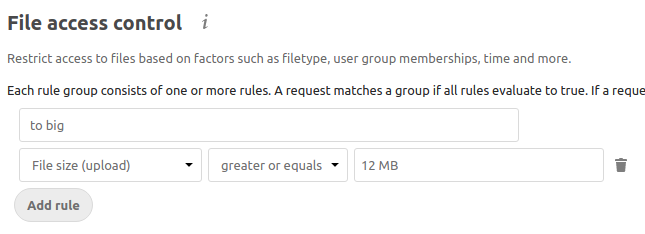
It's possible with the File access control app: https://docs.nextcloud.com/server/16/admin_manual/file_workflows/access_control.html
 kesselb
on 17 Jul 2019
kesselb
on 17 Jul 2019
Thanks Daniel, that’s exactly what I was looking for!
I guess the ‘fix’ here is to improve documentation of the File access control app, however I’m sure this issue will now show up for people Googling ’nextcloud limit maximum upload file size’ :)
On 17 Jul 2019, at 22:24, Daniel Kesselberg notifications@github.com wrote:
It's already possible with the File access control app: https://docs.nextcloud.com/server/16/admin_manual/file_workflows/access_control.html https://docs.nextcloud.com/server/16/admin_manual/file_workflows/access_control.html
https://user-images.githubusercontent.com/3902676/61383627-57f61900-a8af-11e9-8f9c-adf357751c1e.png
—
You are receiving this because you commented.
Reply to this email directly, view it on GitHub https://github.com/nextcloud/server/issues/8445?email_source=notifications&email_token=AABEXHYZQG3FRIOFPVHNOALP74TTNA5CNFSM4EROSQ7KYY3PNVWWK3TUL52HS4DFVREXG43VMVBW63LNMVXHJKTDN5WW2ZLOORPWSZGOD2EL4AI#issuecomment-512278017, or mute the thread https://github.com/notifications/unsubscribe-auth/AABEXHYOETDFTMS4DKSYI4TP74TTNANCNFSM4EROSQ7A.
pjrobertson
on 21 Jul 2019
Maybe it's my docker, or maybe it's cloudflare, but I just gave up on using nextcloud to upload large files.
Nottt
on 21 Jul 2019
@Nottt wrong issue.
Expected behaviour
It would be impossible to upload file bigger than 100 MB in web interface
Actual behaviour
I can upload file bigger than the value I set as limit
Look at the initial post. People set max_upload_size to X and try to upload a file X+1 and wonder why this works. Please visit https://help.nextcloud.com for configuration questions or create a new issue. Thanks for understanding :+1:
kesselb
on 21 Jul 2019
Related issues
MorrisJobke
·
3Comments
 brylie
·
3Comments
brylie
·
3Comments
 dl5rcw
·
3Comments
dl5rcw
·
3Comments
 Django-BOfH
·
3Comments
rullzer
·
3Comments
Django-BOfH
·
3Comments
rullzer
·
3Comments
Most helpful comment
Personally I'm easy on having no upload limit (with chunked uploads), and/or using access control app to achieve the same result - but the documentation and admin UI (config files) should reflect that, else it's just confusing (and a bug, in effect)