Server: Loading of Users list is really slow after upgrade to 13.0.0 RC1 and still the same for 13.0.0 RC2
Steps to reproduce
- Upgrade to 13.0.0 RC1 or 2
- Try loading users list (mine is 27 users strong)
Expected behaviour
Should load within seconds as in NC 12
Actual behaviour
Takes really long to load, something between 30 secs to 2 min
Server configuration
Operating system: Ubuntu
Web server: Apache2
Database: MariaDB
PHP version: 7.x (I think)
Nextcloud version: (see Nextcloud admin page) 13.0.0 RC02
Updated from an older Nextcloud/ownCloud or fresh install: Updated from 12
Where did you install Nextcloud from: The documantation for ubuntu on the official Nextcloud pages
Signing status:
Signing status
Login as admin user into your Nextcloud and access
http://example.com/index.php/settings/integrity/failed
paste the results here.

No errors have been found.
List of activated apps:
App list
If you have access to your command line run e.g.:
sudo -u www-data php occ app:list
from within your Nextcloud installation folder

Enabled:
  - activity: 2.6.1
  - admin_audit: 1.3.0
  - admin_notifications: 1.0.1
  - bruteforcesettings: 1.0.3
  - calendar: 1.5.7
  - circles: 0.13.6
  - comments: 1.3.0
  - contacts: 2.0.1
  - dav: 1.4.6
  - encryption: 2.0.0
  - federatedfilesharing: 1.3.1
  - federation: 1.3.0
  - files: 1.8.0
  - files_downloadactivity: 1.2.0
  - files_external: 1.4.1
  - files_pdfviewer: 1.2.0
  - files_sharing: 1.5.0
  - files_texteditor: 2.5.1
  - files_trashbin: 1.3.0
  - files_versions: 1.6.0
  - files_videoplayer: 1.2.0
  - firstrunwizard: 2.2.1
  - gallery: 18.0.0
  - groupfolders: 1.1.0
  - impersonate: 1.0.2
  - logreader: 2.0.0
  - lookup_server_connector: 1.1.0
  - mail: 0.7.8
  - metadata: 0.6.0
  - nextcloud_announcements: 1.2.0
  - notifications: 2.1.2
  - oauth2: 1.1.0
  - password_policy: 1.3.0
  - provisioning_api: 1.3.0
  - quota_warning: 1.2.0
  - serverinfo: 1.3.0
  - sharebymail: 1.3.0
  - socialsharing_email: 1.0.3
  - spreed: 3.0.1
  - survey_client: 1.1.0
  - systemtags: 1.3.0
  - twofactor_backupcodes: 1.2.3
  - updatenotification: 1.3.0
  - weather: 1.5.1
  - workflowengine: 1.3.0
Disabled:
  - files_accesscontrol
  - files_automatedtagging
  - theming
  - user_external
  - user_ldap
Nextcloud configuration:
Config report
If you have access to your command line run e.g.:
sudo -u www-data php occ config:list system
from within your Nextcloud installation folder

{
    "system": {
        "passwordsalt": "***REMOVED SENSITIVE VALUE***",
        "secret": "***REMOVED SENSITIVE VALUE***",
        "trusted_domains": [
            "localhost",
            "cloud.vossystems.nl"
        ],
        "htaccess.RewriteBase": "\/",
        "memcache.local": "\\OC\\Memcache\\APCu",
        "datadirectory": "***REMOVED SENSITIVE VALUE***",
        "overwrite.cli.url": "http:\/\/cloud.vossystems.nl",
        "dbtype": "mysql",
        "version": "13.0.0.11",
        "dbname": "***REMOVED SENSITIVE VALUE***",
        "dbhost": "***REMOVED SENSITIVE VALUE***",
        "dbport": "",
        "dbtableprefix": "oc_",
        "dbuser": "***REMOVED SENSITIVE VALUE***",
        "dbpassword": "***REMOVED SENSITIVE VALUE***",
        "logtimezone": "UTC",
        "installed": true,
        "instanceid": "***REMOVED SENSITIVE VALUE***",
        "mail_from_address": "***REMOVED SENSITIVE VALUE***",
        "mail_smtpmode": "sendmail",
        "mail_domain": "***REMOVED SENSITIVE VALUE***",
        "default_language": "nl",
        "session_keepalive": "true",
        "enable_previews": "true",
        "share_folder": "\/Gedeeld\/",
        "updater.release.channel": "beta",
        "maintenance": false,
        "theme": "VosCloud",
        "loglevel": 1,
        "mail_smtphost": "***REMOVED SENSITIVE VALUE***",
        "mail_smtpport": "587",
        "mail_smtpauth": 1,
        "mail_smtpsecure": "tls",
        "mail_smtpname": "***REMOVED SENSITIVE VALUE***",
        "mail_smtppassword": "***REMOVED SENSITIVE VALUE***",
        "app.mail.smtp.timeout": 20,
        "updater.secret": "***REMOVED SENSITIVE VALUE***"
    }
}
Are you using external storage, if yes which one: local/smb/sftp/... Yes, some users are linking to Stack from TransIP of linking from one user to another
Are you using encryption: yes
Are you using an external user-backend, if yes which one: No
Client configuration
Browser: FireFox Quantum, Edge, Internet Explorer
Operating system: Windows 10
Logs
Nextcloud log (data/nextcloud.log)
Nextcloud log
Insert your Nextcloud log here

https://we.tl/tncQlNyMcC - Had to just this, log is a bit big
Browser log
Browser log
Insert your browser log here, this could for example include:

a) The javascript console log
Content Security Policy: De instellingen van de pagina blokkeerden het laden van een bron op self (‘script-src https://cloud.vossystems.nl 'unsafe-eval' 'nonce-eWRTakx3TGZ5UHpSaGZlT3pKTDY3MENzM2VDQnhPUTE4cllESFJqTXBjVT06bUk3NVoybnI4Y3VTOGNMQTlQRE1naHFEak0rd3NJQk1pTTVMUkdDOTEvVT0='’). Source: try {

(function injectPageScriptAPI(scr....
users:1
Content Security Policy: De instellingen van de pagina blokkeerden het laden van een bron op self (‘script-src https://cloud.vossystems.nl 'unsafe-eval' 'nonce-eWRTakx3TGZ5UHpSaGZlT3pKTDY3MENzM2VDQnhPUTE4cllESFJqTXBjVT06bUk3NVoybnI4Y3VTOGNMQTlQRE1naHFEak0rd3NJQk1pTTVMUkdDOTEvVT0='’). Source: ;(function(e){let t={};const n={Vue:null....
users:1
Content Security Policy: De instellingen van de pagina blokkeerden het laden van een bron op self (‘script-src https://cloud.vossystems.nl 'unsafe-eval' 'nonce-eWRTakx3TGZ5UHpSaGZlT3pKTDY3MENzM2VDQnhPUTE4cllESFJqTXBjVT06bUk3NVoybnI4Y3VTOGNMQTlQRE1naHFEak0rd3NJQk1pTTVMUkdDOTEvVT0='’). Source: try {

var AG_onLoad=function(func){if(d....
users:1
JQMIGRATE: Migrate is installed, version 1.4.0
core.js:7:542
Missing argument $row in OC.Notification.hide() call, caller needs to be adjusted to only dismiss its own notification
merged-template-prepend.js:2330:4
Fout bij brontoewijzing: SyntaxError: JSON.parse: unexpected character at line 1 column 1 of the JSON data
Bron-URL: https://cloud.vossystems.nl/core/vendor/core.js?v=df7d525e
Brontoewijzings-URL: purify.min.js.map
[Meer info]
Content Security Policy: De instellingen van de pagina blokkeerden het laden van een bron op self (‘script-src https://cloud.vossystems.nl 'unsafe-eval' 'nonce-eWRTakx3TGZ5UHpSaGZlT3pKTDY3MENzM2VDQnhPUTE4cllESFJqTXBjVT06bUk3NVoybnI4Y3VTOGNMQTlQRE1naHFEak0rd3NJQk1pTTVMUkdDOTEvVT0='’). Source: ;(function(e){setTimeout(()=>{const n=do....
users:1
Content Security Policy: De instellingen van de pagina blokkeerden het laden van een bron op self (‘script-src https://cloud.vossystems.nl 'unsafe-eval' 'nonce-eWRTakx3TGZ5UHpSaGZlT3pKTDY3MENzM2VDQnhPUTE4cllESFJqTXBjVT06bUk3NVoybnI4Y3VTOGNMQTlQRE1naHFEak0rd3NJQk1pTTVMUkdDOTEvVT0='’). Source: ;(function(e){let n=null,t=0;const o={no....
 ThaDaVos
All 54 comments
I'm not sure if this is related:
- you probably want to rotate your logfiles to keep the total size down: https://github.com/nextcloud/server/blob/master/config/config.sample.php
- You have many errors with files couldn't be decrypted and that the owner should try to reshare them (not sure if it says this message in the current setup). It certainly would speed up the system if you reviewed the shares a bit, especially deleting old and invalid ones.
- Did you delete some files manually? I found this a couple of times in the logs
failed to open stream: No such file or directory, you could run an update on the filecache table via occ (https://docs.nextcloud.com/server/12/admin_manual/configuration_server/occ_command.html?highlight=occ#file-operations-label) - I found a few file locked errors, and judging from your config file, you don't use any caching. If you are using Ubuntu 16.04, this should be pretty easy and will improve the speed of your interface dramatically: https://docs.nextcloud.com/server/12/admin_manual/configuration_server/caching_configuration.html?highlight=caching
 tflidd
on 20 Jan 2018
tflidd
on 20 Jan 2018
@dvdbot any feedback about @tflidd suggestions and questions?
 blizzz
on 27 Feb 2018
blizzz
on 27 Feb 2018
I've done everything he mentioned but loading users is still slower than it used to be
ThaDaVos
on 28 Feb 2018
Same issue here since the upgrade from Nextcloud 12 to Nextcloud 13, it tooks very long (10-15 Minutes) until the user list loads. I have only 3 local users without ldap.
Server configuration
Operating system:
Ubuntu 16 Server, up-to-date
Web server:
Apache 2.4.18 Webserver
Database:
MySQL 5.7.21
PHP version:
PHP 7.0.25
Nextcloud version: (see Nextcloud admin page)
13.0.0
Updated from an older Nextcloud/ownCloud or fresh install:
Updated from v.12
Where did you install Nextcloud from:
https://download.nextcloud.com/server/releases/latest.zip
Login as admin user into your Nextcloud and access
http://example.com/index.php/settings/integrity/failed
paste the results here.
=> No errors have been found.
I have done the steps to update the filecache. In my Nextcloud i use redis and php opcache, so before the upgrade it runs very fast. Any updates on how to solve these issue?
 fibaxx
on 5 Mar 2018
fibaxx
on 5 Mar 2018
@fibaxx could you check you're browser network tab to see what is taking THAT long?
blizzz
on 5 Mar 2018
@blizzz In the picture above you can see that json is taking that long.

fibaxx
on 6 Mar 2018
Hey, this issue has been closed because the label stale is set and there were no updates for 14 days. Feel free to reopen this issue if you deem it appropriate.
(This is an automated comment from GitMate.io.)
 nextcloud-bot
on 5 Jul 2018
nextcloud-bot
on 5 Jul 2018
This issue still persists - it improved a little with the latest releases but it's still too slow, I've got to wait for 5 minutes almost to access the user list
ThaDaVos
on 5 Jul 2018
This issue still persists - it improved a little with the latest releases but it's still too slow, I've got to wait for 5 minutes almost to access the user list
Something is wrong then on your server. Could you profile this via blackfire.io or a similar tool.
You can right click on the request and select "Copy as curl" to have a single curl command that allows to profile with blackfire. For blackfire you need to install their extension and an agent, but then you see pretty clearly where the problem is.
 MorrisJobke
on 6 Jul 2018
MorrisJobke
on 6 Jul 2018
@MorrisJobke - nothing changed except the upgrade from Nextcloud 12 to Nextcloud 13
ThaDaVos
on 6 Jul 2018
@MorrisJobke - nothing changed except the upgrade from Nextcloud 12 to Nextcloud 13
Still, there is something broken somewhere and we can't reproduce. Over here even instances with multiple hundred users load within seconds (at least the first ~20 users). So we need profiling otherwise there is no chance to find the root cause.
MorrisJobke
on 6 Jul 2018

We've got 31 users by now
ThaDaVos
on 6 Jul 2018
That's the thing that takes so long
ThaDaVos
on 6 Jul 2018
Is there any guide on how to profile using BlackFire in Nextcloud?
ThaDaVos
on 6 Jul 2018
Is there any guide on how to profile using BlackFire in Nextcloud?
- Follow the install guide here: https://blackfire.io/docs/up-and-running/installation
- then install the blackfire CLI tool on some machine (could be the server itself)
- then run
blackfire <PASTE COPIED CURL COMMAND>and press enter
MorrisJobke
on 6 Jul 2018

This is a performance snapshot made using Mozilla FireFox - sorry for the Dutch text, I can translate needed parts if needed.
I'll take a look at BlackFire :D
ThaDaVos
on 6 Jul 2018
This is a performance snapshot made using Mozilla FireFox - sorry for the Dutch text, I can translate needed parts if needed.
Unfortunately this does not help, as we need to look into the server metrics.
MorrisJobke
on 6 Jul 2018
I ran a profile but apparently I can't view the profile because I got an account on Hacker lvl...
ThaDaVos
on 6 Jul 2018
I started a trial and now I can see into my profile, what do I do now?
ThaDaVos
on 6 Jul 2018
ThaDaVos
on 6 Jul 2018
"Hack Edition users cannot profile non-local HTTP applications."
:/
is it possible that you do the profile on the server itself with http://localhost/ instead?
MorrisJobke
on 6 Jul 2018
It might be, that you then need to allow http traffic for some minutes to allow the profile to happen.
MorrisJobke
on 6 Jul 2018
The Profile is made, I can access it from my account - you can start a free trial for 14 days
ThaDaVos
on 6 Jul 2018
ThaDaVos
on 6 Jul 2018
Generating a new one for you, from the server
ThaDaVos
on 6 Jul 2018
I can't do https://localhost because there are 2 more domains on it
ThaDaVos
on 6 Jul 2018
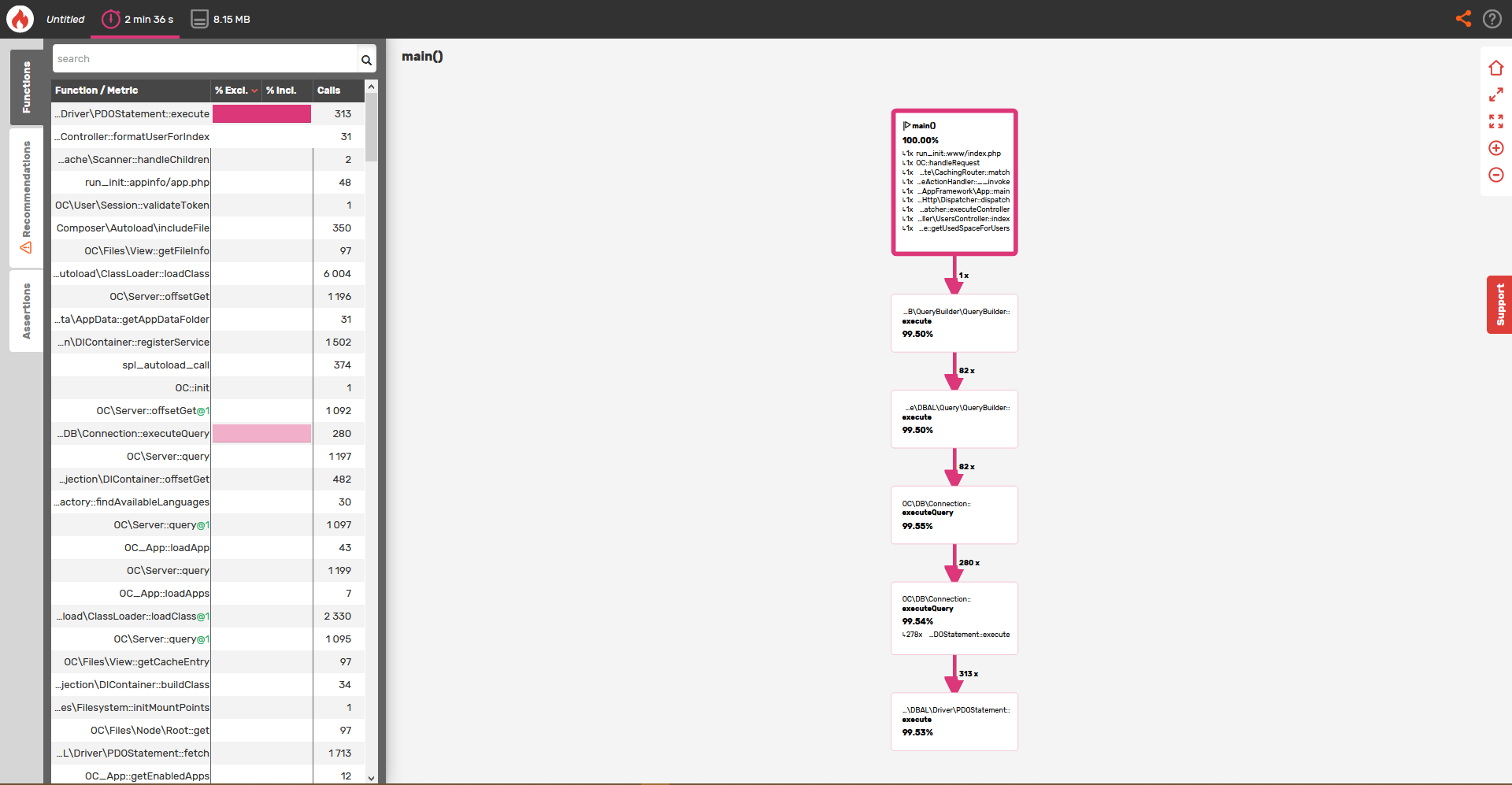
This means your database is slow. Could you enable the slow query log and check if it logs something with more information?
MorrisJobke
on 6 Jul 2018
MorrisJobke
on 6 Jul 2018
I've got a new URL for BlackFire - currently looking how to setup the slow logs
https://blackfire.io/profiles/6d7e71a4-2e59-4f2a-8b4a-5766c0baa94d/graph
ThaDaVos
on 6 Jul 2018
I don't seem able to get the slow query log to work - it's not MySQL it's a MariaDB, I set the right system variables globally, set time to 1 sec but still no log
ThaDaVos
on 7 Jul 2018
There is no log in the /var/log/mysql folder
ThaDaVos
on 7 Jul 2018
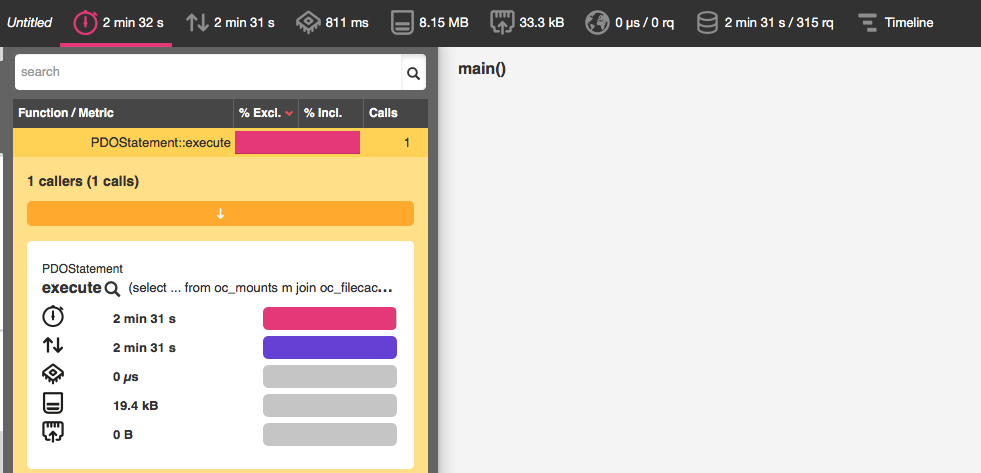
Clearly something in the DB. 1 call - 2 minutes and 31 seconds execution time:
Quite likely that it is not logged to the file, but to a DB table: https://mariadb.com/kb/en/library/slow-query-log-overview/
MorrisJobke
on 9 Jul 2018
The only Query which shows up is the following - I redacted a little piece of it because it container emails
SELECT `m`.`user_id`,
       `f`.`size`
FROM   `oc_mounts` `m`
       INNER JOIN `oc_filecache` `f`
               ON ( `m`.`storage_id` = `f`.`storage` )
                  AND ( `f`.`path` = 'files' )
WHERE  ( `m`.`mount_point` = Concat(Concat('/', `user_id`), '/') )
       AND ( `m`.`user_id` IN ( {LIST OF USERS}
                                    ) );
Could you show the output of:
SELECT COUNT(*) FROM oc_filecache;
SELECT COUNT(*) FROM oc_mounts;
Could you also run copy the command and prepend EXPLAIN and run this inside a mariadb client? Soemthing like:
EXPLAIN SELECT `m`.`user_id`, `f`.`size` FROM `oc_mounts` `m`;
SELECT COUNT(*) FROM oc_filecache;
+----------+
| COUNT(*) |
+----------+
|  5211745 |
+----------+
1 row in set (3.22 sec)
SELECT COUNT(*) FROM oc_mounts;
+----------+
| COUNT(*) |
+----------+
|       57 |
+----------+
1 row in set (0.00 sec)
EXPLAIN SELECT m.user_id, f.size FROM oc_mounts m;
ERROR 1054 (42S22): Unknown column 'f.size' in 'field list'
So I did a select because of the error:
SELECT * FROM oc_mounts LIMIT 1;
+----+------------+---------+------------+--------------+----------+
| id | storage_id | root_id | user_id    | mount_point  | mount_id |
+----+------------+---------+------------+--------------+----------+
|  1 |          1 |       1 |  {USER_ID} | {MOUNT_POINT}|     NULL |
+----+------------+---------+------------+--------------+----------+
1 row in set (0.00 sec)
EXPLAIN SELECT COUNT(*) FROM oc_filecache;
+------+-------------+--------------+-------+---------------+---------------------+---------+------+---------+-------------+
| id   | select_type | table        | type  | possible_keys | key                 | key_len | ref  | rows    | Extra       |
+------+-------------+--------------+-------+---------------+---------------------+---------+------+---------+-------------+
|    1 | SIMPLE      | oc_filecache | index | NULL          | fs_storage_mimetype | 8       | NULL | 5078512 | Using index |
+------+-------------+--------------+-------+---------------+---------------------+---------+------+---------+-------------+
1 row in set (0.01 sec)
EXPLAIN SELECT COUNT(*) FROM oc_mounts;
+------+-------------+-----------+-------+---------------+----------------------+---------+------+------+-------------+
| id   | select_type | table     | type  | possible_keys | key                  | key_len | ref  | rows | Extra       |
+------+-------------+-----------+-------+---------------+----------------------+---------+------+------+-------------+
|    1 | SIMPLE      | oc_mounts | index | NULL          | mounts_storage_index | 4       | NULL |   54 | Using index |
+------+-------------+-----------+-------+---------------+----------------------+---------+------+------+-------------+
1 row in set (0.00 sec)
So I did a select because of the error:
That's not how it works. You need to let you explain the original query. It is then this:
EXPLAIN SELECT `m`.`user_id`, `f`.`size` FROM `oc_mounts` `m` INNER JOIN `oc_filecache` `f` ON ( `m`.`storage_id` = `f`.`storage` ) AND ( `f`.`path` = 'files' ) WHERE ( `m`.`mount_point` = Concat(Concat('/', `user_id`), '/') ) AND ( `m`.`user_id` IN ( 'a', 'b', 'c', 'd', 'e', 'f', 'g', 'h', 'i', 'j', 'k' ) );
This one could be used as it is because I added some dummy parameter.
MorrisJobke
on 9 Jul 2018
I'm sorry, I didn't really understand what you meant - here it is
EXPLAIN SELECT `m`.`user_id`, `f`.`size` FROM `oc_mounts` `m` INNER JOIN `oc_filecache` `f` ON ( `m`.`storage_id` = `f`.`storage` ) AND ( `f`.`path` = 'files' ) WHERE ( `m`.`mount_point` = Concat(Concat('/', `user_id`), '/') ) AND ( `m`.`user_id` IN ( 'a', 'b', 'c', 'd', 'e', 'f', 'g', 'h', 'i', 'j', 'k' ) );
+------+-------------+-------+------+------------------------------------------------------------------------------+----------------------+---------+------------------------+------+-------------+
| id   | select_type | table | type | possible_keys                                                                | key                  | key_len | ref                    | rows | Extra       |
+------+-------------+-------+------+------------------------------------------------------------------------------+----------------------+---------+------------------------+------+-------------+
|    1 | SIMPLE      | m     | ALL  | mounts_user_root_index,mounts_user_index,mounts_storage_index                | NULL                 | NULL    | NULL                   |   54 | Using where |
|    1 | SIMPLE      | f     | ref  | fs_storage_path_hash,fs_storage_mimetype,fs_storage_mimepart,fs_storage_size | fs_storage_path_hash | 4       | NEXTCLOUD.m.storage_id |  506 | Using where |
+------+-------------+-------+------+------------------------------------------------------------------------------+----------------------+---------+------------------------+------+-------------+
2 rows in set (0.00 sec)
Then I don't get why your DB needs 2,5 minutes to execute two simple queries with a few hundred rows.
It seems that your server is heavily overloaded or constrained by some settings in your DB. Nothing we can really do from a product perspective. This needs to be addressed in the setup of the DB itself.
As this is a setup issue I would like to ask you to raise your question in the forums: https://help.nextcloud.com
If you wish support with setup issues from Nextcloud GmbH we offer this as part of the Nextcloud subscription. Learn more about this at https://nextcloud.com/enterprise/
MorrisJobke
on 9 Jul 2018
Weird thing is - it used te be fast before the upgrade from NextCloud 12 to 13 - nothing really changed
ThaDaVos
on 9 Jul 2018
@nickvergessen @rullzer @icewind1991 Any other idea here?
MorrisJobke
on 9 Jul 2018
Maybe something got corrupted during the upgrade?
ThaDaVos
on 9 Jul 2018
Also - there are only a few slow queries:
SELECT SUM(`size`) AS f1, MIN(`size`) AS f2 FROM `oc_filecache` WHERE `parent` = '{NUMBER}' AND `storage` = '{NUMBER}';

SELECT `fileid`, `storage`, `path`, `parent`, `name`, `mimetype`, `mimepart`, `size`, `mtime`,
                                                   `storage_mtime`, `encrypted`, `etag`, `permissions`, `checksum`
                                        FROM `oc_filecache` WHERE `parent` = '{NUMBER}' ORDER BY `name` ASC;
You could run the occ maintenance:repair command to check for stuff that can be repaired and will be fixed immediately.
Those two queries are not related to the user management :/
MorrisJobke
on 9 Jul 2018
I figured those aren't but those are also slow ones - maybe related because they also access oc_filecache
ThaDaVos
on 9 Jul 2018
Not a lot happened - didn't fix the slowness
sudo -u www-data php occ maintenance:repair
 - Repair MySQL collation
     - All tables already have the correct collation -> nothing to do
 - Repair mime types
 - Clean tags and favorites
     - 0 tags of deleted users have been removed.
     - 0 tags for delete files have been removed.
     - 0 tag entries for deleted tags have been removed.
     - 0 tags with no entries have been removed.
 - Repair invalid shares
 - Remove shares of a users root folder
 - Move .step file of updater to backup location
 - Add move avatar background job
     - Repair step already executed
 - Add preview cleanup background jobs
 - Fix potential broken mount points
     - No mounts updated
 - Repair language codes
 - Install new core bundle components
 - Repair invalid paths in file cache
 - Rename folder with user specific keys
 - Add log rotate job
 - Clear frontend caches
     - Image cache cleared
     - SCSS cache cleared
     - JS cache cleared
 - Fix the shares to use timestamp instead of datetime
     - Update timestamp of shares
    0 [>---------------------------]
 - Fix the share type of guest shares when migrating from ownCloud
 - Generate unique id on created circle
     - Generate unique id on circles
    0 [>---------------------------]
 - Using shorten unique id instead of circle id
 - Cleaning shares database of dead shares
 - Fix component of birthday calendars
     - 1 birthday calendars updated.
 - Fix broken values of calendar objects
    0 [>---------------------------]
 - Registering building of calendar search index as background job
     - Repair step already executed
 - Delete orphaned ACL rules
 - Write default encryption module configuration to the database
 - Fix the share type of guest shares when migrating from ownCloud
 - Copy the share password into the dedicated column
 - Purify and migrate collected mail addresses
    0 [>---------------------------]
 - Update OAuth token expiration times
Check out a few topics on the forum. There are some script to help to configure the database caches correctly (tuning-primer.sh and mysqltuner). This can change the speed a lot. Also check if you are running out of RAM and the server starts swapping. And perhaps check the general logfiles, perhaps a hard disk is going to fail or something like that (check io-wait with top).
If you don't use a socket connection for your database, there is perhaps a point where your system tries to resolve a hostname for an ip and times out.
Regarding Nextcloud itself, there was a topic recently (1-2 months ago) where a user reported some important performance issues when using a lot of shares and reshares (not sure if it was combined with federated sharing). Or perhaps something with external storage ...
tflidd
on 11 Jul 2018
I have the same problem here. I used EXPLAIN to show the index hits for those kind of query and found the culprit I think:
In
SELECT m.user_id, f.size FROM oc_mounts m INNER JOIN oc_filecache f ON (m.storage_id = f.storage) AND (f.path = 'files') WHERE (m.mount_point = CONCAT(CONCAT('/', user_id), '/')) AND (m.user_id IN ( ... some list of users ... )) LIMIT 0, 25;
using clause
(f.path = 'files')
misses a good index for table oc_filecache (at least in mysql 5.7, which I use). In my case the query takes 2 Minutes.
If instead hashing the path and use
(f.path_hash = '45b963397aa40d4a0063e0d85e4fe7a1')
instead, reduces the query time to milliseconds.
Though I don't know, if the hash of "files" is the same in every installation, it should be easy to change the query in the code to go over the hash and not the path, shouldn't it?
Dirk
 dirkpape
on 14 Jul 2018
dirkpape
on 14 Jul 2018
Fix is in #10260
MorrisJobke
on 16 Jul 2018
@dirkpape Really cool that you showed so much persistence to find the cause of this issue :+1:
tflidd
on 22 Jul 2018
I just updated to 13.0.5 but apperently the fix isn't in there - going to manually add it again
ThaDaVos
on 24 Jul 2018
I just updated to 13.0.5 but apperently the fix isn't in there - going to manually add it again
It was not back ported to 13.0.5 because 13.0.5 was in RC phase already. Will be in 13.0.6
MorrisJobke
on 24 Jul 2018
Oh thanks for the info :D
ThaDaVos
on 24 Jul 2018
Related issues
 williambargent
·
3Comments
williambargent
·
3Comments
 mfechner
·
3Comments
mfechner
·
3Comments
 juliushaertl
·
3Comments
juliushaertl
·
3Comments
 georgehrke
·
3Comments
georgehrke
·
3Comments
 dl5rcw
·
3Comments
dl5rcw
·
3Comments