Server: client time out after upload of chunked file on slow storage causes (client triggered) infinite recopying/moving of data on server
Steps to reproduce
Upload a big file that has to be chunked, with ownCloud/nextCloud desktop client version 2.3.3rc2, which has to be stored on a slow storage on the server side.
The file gets uploaded, when finished the server moves the files to the slow storage. The client times out.
- The client restarts the sync, the server or client recognizes that all chunks are already uploaded (to a temporary location?), and starts a new transfer of the file to the slow storage (bandwidth of the slow storage gets divided between running transfers). Client times out. Repeats this step.
Even if the file is successfully moved in the time after the client timed out and before the restart of the sync, the server restarts moving the file. In this case the storage consumption is no problem because it does not stack up.
Expected behavior
The client restarts the sync, the server or client recognizes that all chunks are already uploaded, _the server also recognizes that the file is already being moved to the slow storage_, and skips the file.
EDIT: The server should complete MoveJobs properly even when the client times out. (as far as I can see after the Movejob is completed, it gets deleted again - maybe because the client is no longer there)
the server should also detect if the previous transfer failed, clean up the old files or resume by using the old files.
Actual behavior
In my case I am uploading one 15GB file to my server, the file gets uploaded to a place that is located on a slower drive (bandwidth 35mbit) which is mounted by the operating system not additionally by nextcould.
The File gets successfully uploaded by the ownCloud/nextCloud desktop client version 2.3.3rc2 to the new dav backend, I assume because its chunked, all parts are stored in a temporary location and are than moved to the final destination (which in this case is not on the same physical drive --> copy).
The client times out (should take in my case almost an hour to transfer the file).
The client restarts the sync, I assume the server detects that all parts are already there but the new file is not in the final location. The client does not reupload the file (which is good), but the server does not check that the moving of the file is still in progress and starts a new file move. This slows down the transfer with every new restart and consumes large amount of disk space. (I stopped it after it consumed 250GB)
Server configuration
Operating system:
Debian 10 buster, Linux 4.12, (staging system)
Web server:
Apache 2.4.27
Database:
MySQL 5.7.19
PHP version:
7.1.8
Nextcloud version: (see Nextcloud admin page)
12.0.2
Updated from an older Nextcloud/ownCloud or fresh install:
very old - last nextcloud 11
Where did you install Nextcloud from:
source from official webpage
Signing status:
fine
List of activated apps:
Enabled:
  - activity: 2.5.2
  - bruteforcesettings: 1.0.2
  - calendar: 1.5.3
  - comments: 1.2.0
  - contacts: 1.5.3
  - dav: 1.3.0
  - external: 2.0.3
  - federatedfilesharing: 1.2.0
  - federation: 1.2.0
  - files: 1.7.2
  - files_accesscontrol: 1.2.4
  - files_automatedtagging: 1.2.2
  - files_external: 1.3.0
  - files_pdfviewer: 1.1.1
  - files_sharing: 1.4.0
  - files_texteditor: 2.4.1
  - files_trashbin: 1.2.0
  - files_videoplayer: 1.1.0
  - firstrunwizard: 2.1
  - gallery: 17.0.0
  - impersonate: 1.0.1
  - lookup_server_connector: 1.0.0
  - mail: 0.7.0
  - notifications: 2.0.0
  - oauth2: 1.0.5
  - password_policy: 1.2.2
  - provisioning_api: 1.2.0
  - serverinfo: 1.2.0
  - sharebymail: 1.2.0
  - systemtags: 1.2.0
  - theming: 1.3.0
  - twofactor_backupcodes: 1.1.1
  - twofactor_totp: 1.3.1
  - updatenotification: 1.2.0
  - user_ldap: 1.2.1
  - workflowengine: 1.2.0
Disabled:
  - admin_audit
  - checksum
  - encryption
  - files_versions
  - logreader
  - nextcloud_announcements
  - survey_client
  - user_external
Nextcloud configuration:
{
    "system": {
        "instanceid": "xxx",
        "passwordsalt": "***REMOVED SENSITIVE VALUE***",
        "trusted_domains": [
            "xxxx.tld"
        ],
        "dbtype": "mysql",
        "version": "12.0.2.0",
        "dbname": "wolke",
        "dbhost": "xxx",
        "dbtableprefix": "",
        "dbuser": "***REMOVED SENSITIVE VALUE***",
        "dbpassword": "***REMOVED SENSITIVE VALUE***",
        "installed": true,
        "maintenance": false,
        "datadirectory": "\/var\/lib\/owncloud\/data",
        "appstoreenabled": true,
        "apps_paths": [
            {
                "path": "\/var\/www\/nextcloud\/apps",
                "url": "\/apps",
                "writable": true
            }
        ],
        "log_type": "file",
        "logfile": "\/var\/log\/nextcloud.log",
        "loglevel": 2,
        "logdateformat": "c",
        "maxZipInputSize": 0,
        "allowZipDownload": true,
        "ldapIgnoreNamingRules": false,
        "forcessl": true,
        "mail_smtpmode": "smtp",
        "secret": "***REMOVED SENSITIVE VALUE***",
        "trashbin_retention_obligation": "auto",
        "updatechecker": false,
        "mail_from_address": "no-reply",
        "mail_domain": "xxx",
        "singleuser": false,
        "overwrite.cli.url": "\/xxx",
        "htaccess.RewriteBase": "\/xxx",
        "ldapProviderFactory": "\\OCA\\User_LDAP\\LDAPProviderFactory",
        "mail_smtphost": "xxx",
        "updater.release.channel": "stable",
        "memcache.local": "\\OC\\Memcache\\APCu",
        "memcache.distributed": "\\OC\\Memcache\\Redis",
        "memcache.locking": "\\OC\\Memcache\\Redis",
        "redis": {
            "host": "xxx",
            "port": 6379
        }
    }
}
Are you using external storage, if yes which one:
The external storage app is not used in this case, it is enabled for a differernt user group.
Just storage mounted by the operating system.
Are you using encryption: no
Are you using an external user-backend, if yes which one: LDAP
should not be relevant but the configuration is attached
LDAP configuration
+-------------------------------+--------------------------------------------------------+
| Configuration                 |                                                        |
+-------------------------------+--------------------------------------------------------+
| hasMemberOfFilterSupport      |                                                        |
| hasPagedResultSupport         |                                                        |
| homeFolderNamingRule          | attr:uid                                               |
| lastJpegPhotoLookup           | 0                                                      |
| ldapAgentName                 | cn=xxx,ou=xxx,ou=user,dc=xxx,dc=com       |
| ldapAgentPassword             | ***                                                    |
| ldapAttributesForGroupSearch  |                                                        |
| ldapAttributesForUserSearch   |                                                        |
| ldapBackupHost                |                                                        |
| ldapBackupPort                | 389                                                    |
| ldapBase                      | dc=xxx,dc=com                                   |
| ldapBaseGroups                | ou=owncloud,ou=groups,dc=xxx,dc=com             |
| ldapBaseUsers                 | dc=xxx,dc=com                                   |
| ldapCacheTTL                  | 600                                                    |
| ldapConfigurationActive       | 1                                                      |
| ldapDefaultPPolicyDN          |                                                        |
| ldapDynamicGroupMemberURL     |                                                        |
| ldapEmailAttribute            | mail                                                   |
| ldapExperiencedAdmin          | 0                                                      |
| ldapExpertUUIDGroupAttr       |                                                        |
| ldapExpertUUIDUserAttr        |                                                        |
| ldapExpertUsernameAttr        | uid                                                    |
| ldapGidNumber                 | gidNumber                                              |
| ldapGroupDisplayName          | cn                                                     |
| ldapGroupFilter               |                                                        |
| ldapGroupFilterGroups         |                                                        |
| ldapGroupFilterMode           | 0                                                      |
| ldapGroupFilterObjectclass    |                                                        |
| ldapGroupMemberAssocAttr      | memberUid                                              |
| ldapHost                      | xxx|
| ldapIgnoreNamingRules         |                                                        |
| ldapLoginFilter               | (&(objectclass=inetOrgPerson)(|(uid=%uid)(mail=%uid))) |
| ldapLoginFilterAttributes     |                                                        |
| ldapLoginFilterEmail          | 1                                                      |
| ldapLoginFilterMode           | 1                                                      |
| ldapLoginFilterUsername       | 1                                                      |
| ldapNestedGroups              | 0                                                      |
| ldapOverrideMainServer        | 0                                                      |
| ldapPagingSize                | 500                                                    |
| ldapPort                      | 389                                                    |
| ldapQuotaAttribute            | description                                            |
| ldapQuotaDefault              | 12GB                                                   |
| ldapTLS                       | 1                                                      |
| ldapUserDisplayName           | displayname                                            |
| ldapUserDisplayName2          |                                                        |
| ldapUserFilter                | (|(objectclass=inetOrgPerson))                         |
| ldapUserFilterGroups          |                                                        |
| ldapUserFilterMode            | 0                                                      |
| ldapUserFilterObjectclass     | inetOrgPerson                                          |
| ldapUuidGroupAttribute        | auto                                                   |
| ldapUuidUserAttribute         | auto                                                   |
| turnOffCertCheck              | 0                                                      |
| turnOnPasswordChange          | 0                                                      |
| useMemberOfToDetectMembership | 1                                                      |
+-------------------------------+--------------------------------------------------------+
Client configuration
Browser:
ownCloud/nextCloud desktop client version 2.3.3rc2
Operating system:
Debian/MacOS
Log files will follow in the next 2 days (sorry)
 olerichter
All 20 comments
Client-log:
```08-28 13:53:14:329 52988 OCC::AbstractNetworkJob::slotTimeout: virtual
void OCC::AbstractNetworkJob::slotTimeout() OCC::MoveJob(0x7fa2b9c93280)
Timeout
QUrl("https://XXX.tld/XXX/remote.php/dav/uploads/XXX/578904475/.file")
08-28 13:53:14:329 52988 OCC::AbstractNetworkJob::slotFinished: void
OCC::AbstractNetworkJob::slotFinished()
QNetworkReply::NetworkError(OperationCanceledError) "Operation canceled"
QVariant(Invalid)
08-28 13:53:14:329 52988 unknown: QIODevice::read
(QNetworkReplyHttpImpl): device not open
08-28 13:53:14:329 52988 OCC::SyncEngine::slotItemCompleted: void
OCC::SyncEngine::slotItemCompleted(const SyncFileItemPtr &)
"XXX/.git/objects/pack/pack-e0899617f2522dec3ccdda9cb2a52d58cfd66f43.pack"
INSTRUCTION_NEW 1 "Connection timed out"
08-28 13:53:14:329 52988 OCC::SocketListener::sendMessage: SocketApi:
Sending message: "STATUS:SYNC:/XXX"
08-28 13:53:14:331 52988 OCC::SocketListener::sendMessage: SocketApi:
Sending message: "STATUS:IGNORE:/XXX"
08-28 13:53:20:076 52988 OCC::SyncJournalDb::walCheckpoint: void
OCC::SyncJournalDb::walCheckpoint() took 0 msec
08-28 13:53:20:077 52988 OCC::SyncJournalDb::commitInternal: void
OCC::SyncJournalDb::commitInternal(const QString &, bool) Transaction
commit "All Finished."
08-28 13:53:20:078 52988 OCC::SyncJournalDb::close: void
OCC::SyncJournalDb::close() "/XXX/._sync_0922ec7f7904.db"
08-28 13:53:20:078 52988 OCC::SyncJournalDb::commitTransaction: No
database Transaction to commit
08-28 13:53:20:079 52988 OCC::SyncEngine::finalize: CSync run took 494362
```
No error is logged on the server for Client1 which uploads the file
olerichter
on 28 Aug 2017
Obvious Workaround: Increase Client timeout significantly, maybe increase server's keepalive and strangely also disable file locking. Without disabling file locking the MoveJob will fail with file locked file exception even if the file is uploaded for the first time
olerichter
on 31 Aug 2017
I had the same issue and fixed it with some parameters... which I lost yesterday when my whole hard drive crashed. I remember I had to increase some timeout somewhere. I can't remember which one and in which file (config.php or .user.ini or nginx.conf, but definitely one of them). I'm currently trying to solve this the same way I did 1 week ago.
 cluxter
on 19 Sep 2017
cluxter
on 19 Sep 2017
I set this parameter in nginx.conf:
fastcgi_read_timeout 43200;
This prevents the error Gateway Time-out. However once the file has been uploaded, the client will wait until the chunks on the server are copied as the final file on the server (which is good), but once it's done the server won't delete the chunks and will delete the final file. Then the client will try to sync and the server will retry to create the final file from the chunks. This cycle will repeat 3 times until the client blacklists the file. The error on the client is file is locked which makes sense.
cluxter
on 19 Sep 2017
I remember now. My fix was simply to turn off the file locking... So this is definitely a bug here.
From what I saw the client doesn't time out when I set fastcgi_read_timeout SOME_HUGE_VALUE; in nginx.conf. Also I ran the Nextcloud Client with nextcloud --logwindow and I didn't see anything about any timeout from the client. What I saw was the response from the server saying that the file was successfully uploaded but the next result was that this file was locked (even when it's the first upload).
Here is my understanding of the process. When you upload a huge file (let's say it's called SOMETHING.bin):
- the server creates chunks of 10 Mb in
nextcloud/data/user/uploads/xxxxxxxxxfor the file which is being uploaded - once all the chunks are in the
uploadfolder, the copy from the chunks to the final consolidated file begins, namedSOMETHING.bin.part(still inuploads) - after some time (which is likely a timeout defined somewhere) the server puts a lock in the database saying that the file
SOMETHING.binis locked. This is where something goes wrong - once the whole content has been copied to
SOMETHING.bin.part, the server renames it asSOMETHING.bin. But when it tries to do this, it sees that the file is already locked. So it deletes it, but keeps the uploaded chunks in theuploadsfolder - since the client saw an error saying that the file is locked, it will retry uploading the file. It won't actually reupload the file since the server already has the chunks and will say to the client that it's not necessary to send them again. But the server will retry to create the consolidated file from the chunks, failing again and again.
cluxter
on 19 Sep 2017
I found a workaround. Your config.php file probably has something like this:
'redis' => array(
     'host' => '192.168.0.123',
     'port' => 6379,
),
If you set the timeout to 0.0 the locking issue will go away:
'redis' => array(
     'host' => '192.168.0.123',
     'port' => 6379,
     'timeout' => 0.0,
),
I don't know if this is the proper way to fix this, but it works and I assume the locking mechanism is still working. Having a test case would be nice though but I don't know how to test it to be sure that it's still doing its job.
Any details about all this would be welcome.
EDIT: this parameter was set in the Nextcloud 10 doc: https://docs.nextcloud.com/server/10/admin_manual/configuration_server/config_sample_php_parameters.html
So I think it is safe to use it.
cluxter
on 22 Sep 2017
Same here. Is there any workaround? client 2.3.2, server 12.0.3.
I have no memory cache.
 tcm300
on 19 Nov 2017
tcm300
on 19 Nov 2017
@icewind1991 Any idea how to fix that?
cc @rullzer @pfiff45
 MorrisJobke
on 24 Nov 2017
MorrisJobke
on 24 Nov 2017
After activating Redis with the following parameters, the first copy still fails but the second attempt is succesfull.
'redis' => array(
'host' => 'localhost',
'port' => 6379,
'timeout' => 0.0,
),
But what with servers without Redis?
tcm300
on 24 Nov 2017
Same here, first copy fails but second succeeds with redis timeout at 0 and locking enabled
 gvansanden
on 30 Dec 2017
gvansanden
on 30 Dec 2017
Well, this makes NC13 unusable. Is there a way to disable chunking ATM?
 nick4fake
on 6 May 2018
nick4fake
on 6 May 2018
Still does not work. :(
On nginx side I see this:
172.16.11.38 - [172.16.11.38] - bohdan.yurov [06/May/2018:09:15:27 +0000] "MOVE /remote.php/dav/uploads/1171934a-e5e3-1035-827c-f9b473938429/3301732829/.file HTTP/1.1" 499 0 "-" "Mozilla/5.0 (Windows) mirall/2.3.3 (build 1) (Nextcloud)" 866 55.787 [service-nextcloud-nextcloud-nextcloud-80] 100.96.1.193:80 0 - -
It does not look like redis config changed anything.
nick4fake
on 6 May 2018
Looks like someone found how to configure the client (which is what causes the issue after you set the Redis timeout to 0): https://github.com/mailcow/mailcow-dockerized/issues/1286#issuecomment-382702790
I didn't try it though. Please let us know if this solves the issue @nick4fake
Regarding the server, a patch is now in the dev branch according to the same post.
cluxter
on 7 May 2018
@cluxter Thank you a lot for quick response. Unfortunately, I've already tried adding Redis timeout:
````php
root@nextcloud-nextcloud-nextcloud-5cc9f55cdd-pkcs9:/var/www/html# cat config/redis.config.php
if (getenv('REDIS_HOST')) {
$CONFIG = [
'filelocking.enabled' => true,
'memcache.locking' => '\OC\Memcache\Redis',
'redis' => [
'host' => getenv('REDIS_HOST'),
'port' => (int)getenv('REDIS_PORT') ?: 6379,
'timeout' => 0.0,
],
];
}
````
It did not help with locking problem. But client timeout setting looks promising: let me check it and get back to you.
nick4fake
on 7 May 2018
@cluxter nope, same connection closed after ~3-5 minutes oO
Let me recheck once again proxy, though it already has all timeouts set to ~1200s
Update
Well, it seems like file was uploaded. Perhaps this is the locking issue: upload is finished only on the second try.
nick4fake
on 7 May 2018
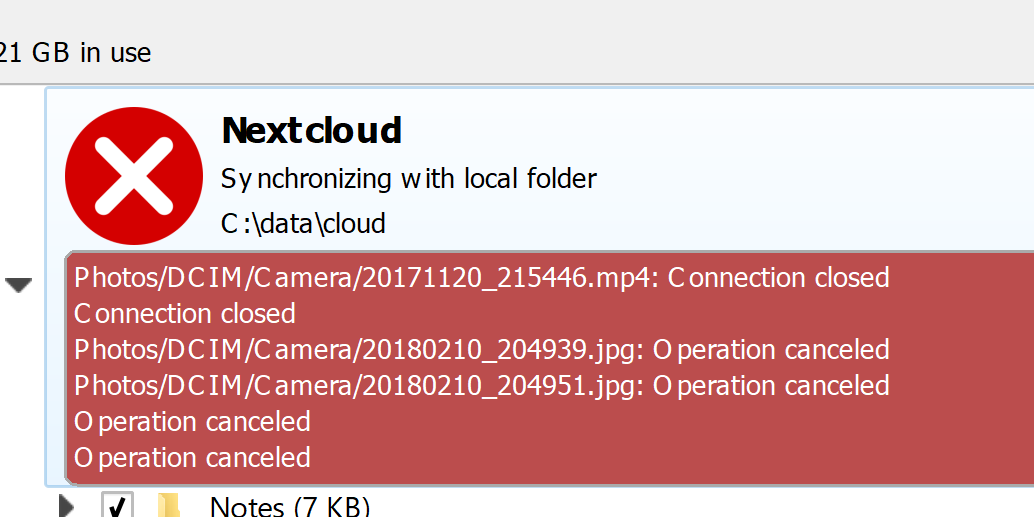
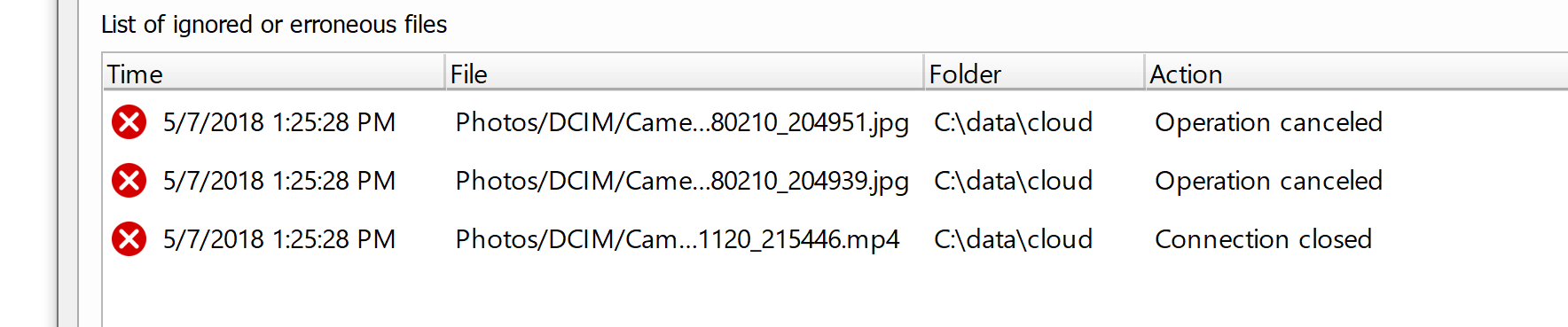
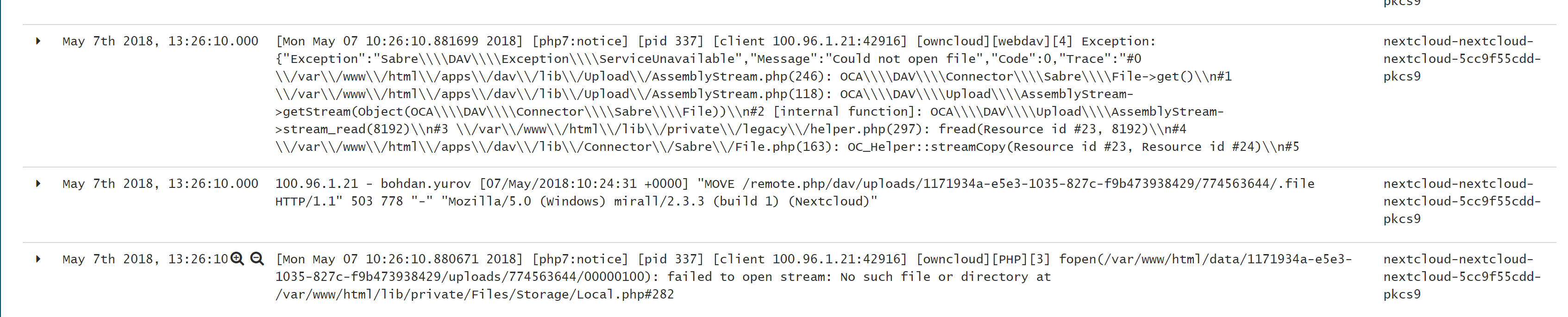
text log:
100.96.1.21 - bohdan.yurov [07/May/2018:10:24:31 +0000] "MOVE /remote.php/dav/uploads/1171934a-e5e3-1035-827c-f9b473938429/774563644/.file HTTP/1.1" 503 778 "-" "Mozilla/5.0 (Windows) mirall/2.3.3 (build 1) (Nextcloud)"
[Mon May 07 10:26:10.880671 2018] [php7:notice] [pid 337] [client 100.96.1.21:42916] [owncloud][PHP][3] fopen(/var/www/html/data/1171934a-e5e3-1035-827c-f9b473938429/uploads/774563644/00000100): failed to open stream: No such file or directory at /var/www/html/lib/private/Files/Storage/Local.php#282
nick4fake
on 7 May 2018
So the main problem now is the fact, that desktop client needs two tries for big file upload.
nick4fake
on 7 May 2018
Nope, still the same error. I have event replaced apache with nginx, tried without ssl - nothing helps. It does not look like client even uses timeout config setting.
nick4fake
on 7 May 2018
@nick4fake Maybe this summary will help:
There's 3 things that need to be done to make it work correctly if server IO speed is low:
- Set up the Redis locking as posted before in this thread.
- Increase the PHP timeout (and any web server related timeouts) on the server-side, otherwise PHP gets killed while reconstructing the chunks:
max_execution_time = 1200;
max_input_time = 1200;
- Increase the timeout in the client, otherwise the client may attempt to re-upload while the server is still busy reconstructing the file, causing another reconstruction in parallel.
Debugging notes:
- If your client begins re-uploading the file 300 seconds after having finished uploading, it points to (3) not having been done.
- If your client keeps reiterating that it wants to sync the file and instantly says 0 seconds remaining, it points to (2) not having been done. (PHP keeps getting killed on the server before it is done reconstructing the chunks)
- If your client hangs at 0 seconds remaining for a while and eventually shows "file is locked" for a split second before resetting itself, it points to (1) not having been done.
The 3rd thing can also be caused by a stray lock within Redis due to PHP having been killed in the past due to incorrect timeout settings. You can put Nextcloud into maintenance mode and then run this to find stray locks:
redis-cli --scan --pattern "*lock*"
Then proceed to delete them by running this where \
redis-cli del <id>
Be careful if you use Redis for more than just Nextcloud not to delete locks owned by another app.
Afterwards disable maintenance mode and restart your webserver, php-fpm and redis.
 hachre
on 16 May 2018
hachre
on 16 May 2018
@hachre Hi and thank you for the response. Unfortunately I've already tried all these step (simultaneously, one by one, etc) - nothing helps
nick4fake
on 16 May 2018
Related issues
 brylie
·
3Comments
brylie
·
3Comments
 blackcrack
·
3Comments
blackcrack
·
3Comments
 ghost
·
3Comments
ghost
·
3Comments
 j-ed
·
3Comments
j-ed
·
3Comments
 Django-BOfH
·
3Comments
Django-BOfH
·
3Comments