Server: Files app: scroll bar in Chromium is very thin
Steps to reproduce
- Login to NC via Chromium web browser.
- Open Files app / folder with items list longer than the screen height
- Try to scroll down using mouse.
Expected behaviour
On mouse hover, show a wider scroll bar.
Actual behaviour
It is difficult to point the mouse cursor to the scroll bar thin just 4 pixels, especially on high dpi screen (it actually is wide just about 1.2 mm or so).
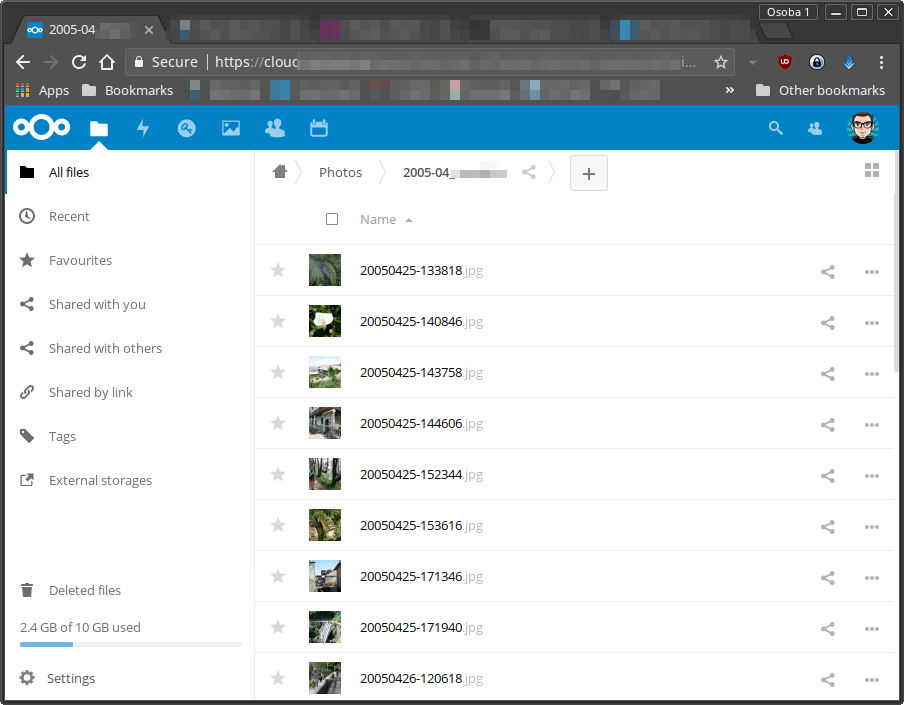
Server configuration
Nextcloud version: (see Nextcloud admin page)
12.0.1
Updated from an older Nextcloud/ownCloud or fresh install:
From 12.0
Where did you install Nextcloud from:
wonderfall/nextcloud docker image
 archont00
👍2
All 2 comments
cc @nextcloud/designers
 MorrisJobke
on 27 Aug 2017
MorrisJobke
on 27 Aug 2017
Seems like a good starter issue to experiment with increasing the scrollbar width (a bit) on hover.
 jancborchardt
on 27 Aug 2017
jancborchardt
on 27 Aug 2017
👍3
Was this page helpful?
0 / 5 - 0 ratings
Related issues
 dl5rcw
·
3Comments
dl5rcw
·
3Comments
 ChristophWurst
·
3Comments
ChristophWurst
·
3Comments
 ghost
·
3Comments
ghost
·
3Comments
 e-alfred
·
3Comments
e-alfred
·
3Comments
 blackcrack
·
3Comments
blackcrack
·
3Comments
Most helpful comment
Seems like a good starter issue to experiment with increasing the scrollbar width (a bit) on hover.