Server: On-Premise Hosting w/ Docker - Beta
I am opening this issue to gather feedback for beta testing on-premise hosting of bitwarden.
Docs
- Installing & Deploying: https://help.bitwarden.com/article/install-on-premise/
- Updating: https://help.bitwarden.com/article/updating-on-premise/
These docs are a WIP so if you have any feedback on then, please let me know.
Licensing
On-premise hosting requires a license for certain features such as premium membership and creating an organization (enterprise only).
You can use the following beta license files when upgrading your account to premium or creating an organization from the web vault. Note that these licenses will only work on beta installations and expire 30 days from now.
Note that premium licenses are tired to the user's email address. This means that to use the beta testing premium license above you must create a user account with the email address [email protected]. It will not work with any other email address.
Installation id and key for these licenses is:
Installation Id: 20A048D1-F854-47E3-934D-8796473981B0
Installation Key: NBRu5oWbJs7MNpRyVdDbJSU
Feedback
Please provide feedback in this issue. Do not open new issues about problems with Docker deployments. We are interested in knowing any issues you run into or any general feedback with the installation/deployment process in general (even if only positive feedback).
Warning
You should only use this beta for testing. DO NOT STORE SENSITIVE DATA IN THESE BETA INSTALLATIONS. There could be bugs and other vulnerabilities in these installations. There will be no upgrade path to the production builds from these beta installations and they should be removed when you are done.
 kspearrin
All 89 comments
Latest dev build of the browser extension allow you to set the environment URLs from the login page.

kspearrin
on 22 Aug 2017
TVP issue mentioned has been temporarily resolved for now, so you should be able to use everything without issue. If you have already deployed you can update with
./bitwarden.sh stop./bitwarden.sh update./bitwarden.sh start
kspearrin
on 22 Aug 2017
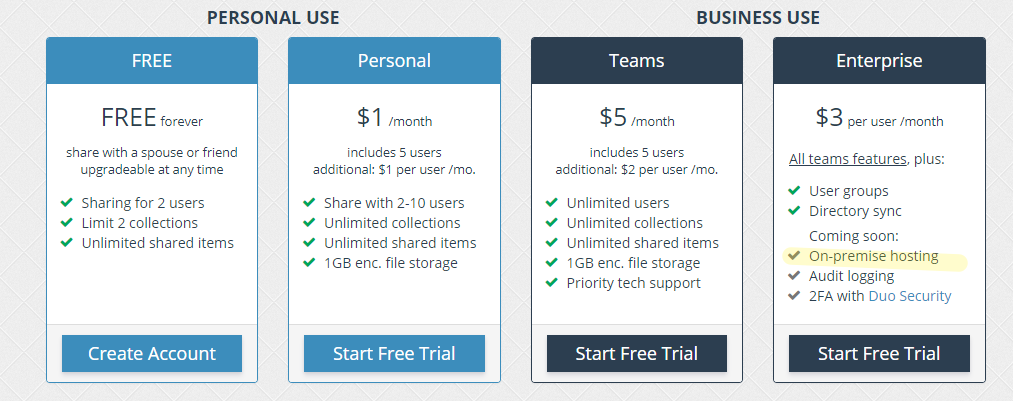
Quick Question: The On-Premise Hosting or the Docker Container Features, are they just available for Enterprise customers later or available for everybody?
 stev-it
on 23 Aug 2017
stev-it
on 23 Aug 2017
@stev-it It will be free for everyone to self-host, however, if you want to unlock the premium features it will require a premium license. If you want to create an organization it will require an enterprise license.
kspearrin
on 23 Aug 2017
@kspearrin Hi. Thanks for the work! Will we get a release soon of Bitwarden Mobile with your last great commit?
Btw, I would love an integration of Bitwarden as an extension of Nextcloud.
It would be a killer-app.
 HLFH
on 24 Aug 2017
HLFH
on 24 Aug 2017
@HLFH You can download the latest mobile apk from here: https://ci.appveyor.com/project/bitwarden/mobile/build/artifacts
Note that this APK is not compatible with the current bitwarden production server, though it will work with your locally hosted installations if you change the environment URLs.
kspearrin
on 24 Aug 2017
I've started working on some of the official help documentation for installing and deploying bitwarden via Docker in our help center here: https://help.bitwarden.com/article/install-on-premise/
kspearrin
on 24 Aug 2017
Hello! There is an issue with attached files download: application returns 404 with empty response body.
 migolovanov
on 25 Aug 2017
migolovanov
on 25 Aug 2017
@migolovanov Thanks! This has now been fixed. Just run the update command. Please let me know if it is working for you now.
kspearrin
on 25 Aug 2017
@kspearrin During update it didn't pull new version of docker containers, but when i done that step manually everything works fine. Thank you very much!
migolovanov
on 26 Aug 2017
@migolovanov I think I need to add docker pull to the update.
kspearrin
on 26 Aug 2017
wow have been watching this project for quite some while as my last solution was a passopolis based server, but it s not really maintained anymore and was a pain to setup.
I had a bitwarden docker server up and running in notime, very nice!
I have a few question now though,
Is it possible to disable registration, or a system that would need admin approval?
Will the ios app get an update to enter a custom server url in the future?
Any hint where i can change the email template? it seems it still got a wrong sender adress included.
 tcjew
on 27 Aug 2017
tcjew
on 27 Aug 2017
@tcjew
- Currently, no, but that is a good idea for personal users. I will add something.
- Yes, the iOS app is already ready. We just need to push out the update when we go live.
- Yes, you can change the "from" address in the
./bitwarden/env/global.override.envfile. Add a line like this:
[email protected]
Awesome job, @kspearrin
I just took it for a spin on localhost and it works great.
I also tried it with the browser extension (also easy instructions on how to set it up) and it also works great. The only thing is that if I change a password on the web ui, the browser extension won't pick up the change unless I log out and in again.
As per the installation, I have no further feedback. Everything is nice and smooth with the whole Docker workflow.
 mongrelion
on 28 Aug 2017
mongrelion
on 28 Aug 2017
@mongrelion that is expected behavior. It will eventually log you out automatically. Usually on your next automated sync.
kspearrin
on 28 Aug 2017
Currently using a personal organization for my family, will self-hosting be available to me for them or would I need an enterprise license? Want to utilize for my wife, two teenagers, and myself.
 DailenG
on 28 Aug 2017
DailenG
on 28 Aug 2017
@DailenG Any self-hosted organization account will require an enterprise license.
kspearrin
on 28 Aug 2017
@kspearrin thanks! i'll probably spring for it at some point!
DailenG
on 28 Aug 2017
This is awesome stuff, do you have an idea on when it will go live?
 bspradling
on 29 Aug 2017
bspradling
on 29 Aug 2017
@bspradling8 We cant go live until our dependency on sql server 2017 does. It is currently in public preview so I am guessing sometime in the next month or two.
kspearrin
on 29 Aug 2017
all:
Images have been updated. Update to latest with
./bitwarden.sh stop
./bitwarden.sh update
./bitwarden.sh start
Updating works great as well. No problems so far, on my mashine at home.
I tried deploying the server on a KVM though with 1 GB RAM ... didnt work. I gues that is the sql server that needs 4 GB, am i right?
Any workaround for that? Seems kinda overkill 4 GB for a password databse :D
tcjew
on 4 Sep 2017
@tcjew Yes, not sure a way around that. Sorry.
kspearrin
on 4 Sep 2017
all:
Client applications such as the mobile app and browser extension have all been updated to the live stores now. You can change their environment on the login page.
kspearrin
on 5 Sep 2017
Just tried the IOS app with my server.
Works very well!
I love this sollution, thx for all the effort you have put into this.
tcjew
on 6 Sep 2017
The current 'Free' platform supports spouse/significant other, etc. Will self hosted be able to support this, or is it going to require enterprise, etc? Would be interesting to clarify which 'feature set' is supporting, how the varying features work, etc.
 Daemoen
on 7 Sep 2017
Daemoen
on 7 Sep 2017
@Daemoen Any self-hosted organization account will require an enterprise license. The free option is not available when self-hosting.
kspearrin
on 7 Sep 2017
I would like to host this on a machine with multiple IPs, could you please make a way to specify which IP to listen on?
 nbebout
on 11 Sep 2017
nbebout
on 11 Sep 2017
@nbebout Bitwarden is exposed to port 80/443 on localhost. How you assign IPs is up to you and how you have Docker configured.
kspearrin
on 11 Sep 2017
all:
You should now obtain installation ids/key from here: https://bitwarden.com/host/
Push notifications to client apps should also be working when using a proper installation id/key.
kspearrin
on 13 Sep 2017
All images have been updated for our 1.10.0 release.
How to update: https://help.bitwarden.com/article/updating-on-premise/
kspearrin
on 13 Sep 2017
When updating to the newest version i get the following error:
https://pastebin.com/wBZCJThr
Though it works if I just start it afterwards.
Can I ignore that?
And I just replaced the generated id/keys in the config. Was that the right process?
Or should I start from scratch?
tcjew
on 17 Sep 2017
@tcjew Looks like the database update failed so some features may be broken. I'll look into it and get another update out.
kspearrin
on 17 Sep 2017
I am getting the following errors while running ./bitwarden.sh updatedb
https://pastebin.com/enAErZtz
After installing I tried to create an account via https://localhost/#/register, unfortunately it fails with "An unhandled server error has occured.". I checked the logs via docker logs web but nothing was logged.
Do I need to configure a SMTP server for basic usage?(I have never used bitwarden, just looking for something selfhosted for our business )
 moxli
on 18 Sep 2017
moxli
on 18 Sep 2017
@moxli Looks like the database may not be running. Can you run docker ps and post the output?
kspearrin
on 18 Sep 2017
@tcjew I see why it is failing. I did a breaking change last release that breaks the database migrations for existing installations. I'd prefer to just leave it in, which means you will need to create a new database from scratch.
kspearrin
on 18 Sep 2017
@kspearrin
thats what I checked after installing it, looks fine to me:
CONTAINER ID        IMAGE                   COMMAND             CREATED             STATUS              PORTS                                      NAMES
77125a9b2df0        bitwarden/identity      "/entrypoint.sh"    About an hour ago   Up 2 minutes        80/tcp                                     identity
a0129db0d057        bitwarden/nginx         "/entrypoint.sh"    About an hour ago   Up 2 minutes        0.0.0.0:80->80/tcp, 0.0.0.0:443->443/tcp   nginx
c2d02e91066f        bitwarden/mssql         "/entrypoint.sh"    About an hour ago   Up 2 minutes        0.0.0.0:1433->1433/tcp                     mssql
2f283e2877f5        bitwarden/attachments   "/entrypoint.sh"    About an hour ago   Up 2 minutes        80/tcp                                     attachments
abcf0f2f2aa7        bitwarden/web           "/entrypoint.sh"    About an hour ago   Up 2 minutes        80/tcp                                     web
750461d450d3        bitwarden/api           "/entrypoint.sh"    About an hour ago   Up 2 minutes        80/tcp                                     api
Hmm. The error is stating your database login credentials are not working. Is there a SA_PASSWORD in bitwarden\env\mssql.override.env?
kspearrin
on 18 Sep 2017
@kspearrin yes, 32 characters, MSSQL_PID=Express
moxli
on 18 Sep 2017
@moxli Try connecting to the database manually and running a sql command.
See here for more info https://docs.microsoft.com/en-us/sql/linux/quickstart-install-connect-docker
Run something like:
$ docker exec -it mssql "bash"
$ /opt/mssql-tools/bin/sqlcmd -S localhost -U SA -P '<YourPassword>'

> SELECT Name from sys.Databases
> GO
@kspearrin
$ /opt/mssql-tools/bin/sqlcmd -S localhost -U SA -P 'thePWfromtheconfigfile'
Sqlcmd: Error: Microsoft ODBC Driver 13 for SQL Server : Login failed for user 'SA'..
Do you know how to reset the password without knowing the old one?
moxli
on 18 Sep 2017
Looks like for some reason the password is not the same. Did you happen to install multiple times or something? Maybe we're dealing with an old leftover image from a previous installation and the passwords did not change from then???
kspearrin
on 18 Sep 2017
@moxli You can just delete all the containers/images and start over with a new installation if that works for you.
# Delete all containers
docker rm $(docker ps -a -q)
# Delete all images
docker rmi $(docker images -q)
Delete your old installation folder and start over with a new install from step 1.
kspearrin
on 18 Sep 2017
@tcjew I pushed a new update out that should fix your updatedb problem.
Please try a full update and let me know.
kspearrin
on 18 Sep 2017
@kspearrin I removed the bitwarden folder and all docker containers and images, I now receive the following error: https://pastebin.com/rvf1q1G5
All containers are running, however creating a user is not possible (An unhandled server error has occurred).
moxli
on 18 Sep 2017
@moxli Whoops. You caught me in the middle of a fix for @tcjew (see above) and looks like that breaks things for new installations. I just pushed another update out with a possible fix.
Run the following:
./bitwarden.sh stop
./bitwarden.sh update
./bitwarden.sh start
./bitwarden.sh updatedb
@kspearrin Just tried it again and it worked flawless, thx for the fix!
Is it possible to buy a license yet?
I would love to have the attachment feature included.
tcjew
on 18 Sep 2017
@tcjew Not yet. Hoping to move out of beta soon, however, if you have an organization or premium membership already you can already use your license to unlock those features (or use the test license in the original post).
kspearrin
on 18 Sep 2017
@kspearrin I have a premium user, and downloaded the license json from my bitwarden.com account, and tried to import that into a user with the same email on my on-premise installation, and it says the license doesn't belong to that user.
nbebout
on 18 Sep 2017
@nbebout make sure your email is verified on both systems
kspearrin
on 18 Sep 2017
@kspearrin Thanks! That fixed it. I had not verified my on-premise user yet. Now it works
nbebout
on 18 Sep 2017
I know it is still in beta, but once it leaves beta, what should I be backing up to make sure all the data is backed up?
nbebout
on 18 Sep 2017
@nbebout There will be no official upgrade path from the beta. If you want to save your data once we go live with this you can export it to CSV and then import it back in after re-installing.
kspearrin
on 18 Sep 2017
@kspearrin It now works fine after doing a clean reinstall. Thanks for the support!
moxli
on 19 Sep 2017
Any timeframe / eta on live?
 christianreiss
on 25 Sep 2017
christianreiss
on 25 Sep 2017
As much as I love to test, the notion of no upgrade path kills it for all purposes. No test installation will ever be used like a real production once, as such far fewer bugs will be found. So I have no other option that to wait it out I am afraid.
christianreiss
on 25 Sep 2017
We cant go live until our dependency on sql server 2017 does. It is currently in public preview so I am guessing sometime in the next month or two.
SQL Server 2017 was announced today to go live on Oct 2. So likely sometime next week we can launch this.
kspearrin
on 25 Sep 2017
Will an option without the use of docker be an option? I'd prefer to use LXC or a KVM managed VM.
Huge thanks for working on making this able to be self hosted!
 BurningSmile
on 27 Sep 2017
BurningSmile
on 27 Sep 2017
@BurningSmile not at this time.
kspearrin
on 27 Sep 2017
Hey,
Today I made room and time for a Docker trial. After some (for me minor) issues it's up and running. Awesome job on the Docker Setup! Kudos!
I would really go for the Premium Membership to support you guys. Being an private non-commercial entity I need to ask: 10 Bucks? Per Instance or User? ~Would it be possible to get a trial license to test the docker Instance with premium features?~ Thanks for posting the license on the site. I am an idiot.
Cheers!
-Christian
christianreiss
on 28 Sep 2017
Hey,
running current (28.09.2017) docker image. Turns out the system will not let you send emails if you leave the username & password fields empty. We run firewalled mailservers that do not require Login. Maybe add a "use_smpt_login" variable?
Cheers!
-Christian.
christianreiss
on 28 Sep 2017
Hey,
running current (28.09.2017) docker image. Got it running, went straight for the "import from Keepass" option. Issue is that my Keepass Vault has several files stored which raises the "maximum length of 1000 chars" import error. One of Keepass'es killer feature is the ability to hold license files/files in general, which will get exported as well.
Suggestion: Either cleanly handle such issues or let the import continue even after failure.
Cheers!
-Christian.
christianreiss
on 28 Sep 2017
@christianreiss
- Thanks. I was not aware you could have blank SMTP credentials. Is this the property we want for that mail server configuration? https://msdn.microsoft.com/en-us/library/system.net.mail.smtpclient.usedefaultcredentials(v=vs.110).aspx
- The importer issue you are describing has nothing to do with Docker. There is a limit on all vault entries that block huge values from being stored in the database. Large things like that are to be stored as attachments which can't really be exported/imported through simple CSV/XML/JSON files.
kspearrin
on 28 Sep 2017
Hey @kspearrin ,
thanks for gettting back to me.
My Mailserver has a whitelisted IP Range that can send without the need to authorize beforehand (firewalls be blessed). So It's just a normal 25/smtp delivery. I am not entirely certain regarding .net functions, but SmtpClient.UseDefaultCredentials might do the trick; I am not sure whether this just toggles sending the default User Creds instead of (specific) ones _or_ no credentials at all.
Regarding the importer issue; you are right. It's not docker related. The issue is that my KeePass vault has 500+ entries with several files in between. The Export function is not really letting me apply any sorts of filter so the importing side should be able to deal with this. I am pretty sure I am not the only one having this issue :)
Cheers!
-Chris.
christianreiss
on 28 Sep 2017
Yea, this flag is kind of confusing to me. We'll give it a try.
Can you open a separate issue for the importer in the web repo?
kspearrin
on 28 Sep 2017
Can, will, shall. :)
christianreiss
on 28 Sep 2017
all images updated for 1.11.x release
kspearrin
on 29 Sep 2017
all images updated for 1.11.x release
That sounds like a live release, did we leave beta? \o/
christianreiss
on 29 Sep 2017
1.11.x is probably the last beta release. Looking to go live next week.
kspearrin
on 29 Sep 2017
Awesome.
Any hope of introducing a non-commercial server-wide enterprise license at a 'special price'?
Getting Aunts, mums and spouses to sign up will be a nightmare...
christianreiss
on 29 Sep 2017
@christianreiss Not sure what you mean, but there are no plans for a different licensing model. It follows the same freemium licensing as bitwarden cloud with exception to organization accounts where only an enterprise plan is available.
kspearrin
on 29 Sep 2017
Is it possible to run it behind a reverse proxy and do not use the port 80/443 to host something else on the same server?
 luclu7
on 29 Sep 2017
luclu7
on 29 Sep 2017
Sure, you would just have to manually manage the docker-compose configuration yourself instead of using our install scripts which abstract all that away from you.
kspearrin
on 29 Sep 2017
CSV Import is not working on the on-prem, I've tried it with the exact same csv on vault.bitwarden.com and it worked fine. I also tried exporting from the hosted version and encountered the same problem with the on-prem.
Couldn't find anything in the docker logs.
 metalsp0rk
on 29 Sep 2017
metalsp0rk
on 29 Sep 2017
@kebrx We did a hotfix for imports yesterday. I forgot to push the hotfix out to docker hub. Do an update now and it should be working.
kspearrin
on 29 Sep 2017
Worked now. Had to clear browser cache to get it to work, must have had some old JS in there. (in case anyone else is having issues still)
Thanks!
metalsp0rk
on 29 Sep 2017
[root@dedicated ~]# ./bitwarden.sh stop
_ _ _ _
| |__ (_) |___ ____ _ _ __ __| | ___ _ __
| '_ \| | __\ \ /\ / / _| '__/ _ |/ _ \ '_ \
| |_) | | |_ \ V V / (_| | | | (_| | __/ | | |
|_.__/|_|__| _/_/ __,_|_| __,_|___|_| |_|
Open source password management solutions
Copyright 2015-2017, 8bit Solutions LLC
https://bitwarden.com, https://github.com/bitwarden
===================================================
Docker version 17.06.2-ce, build cec0b72
docker-compose version 1.16.1, build 6d1ac21
Stopping identity ... done
Stopping mssql ... done
Stopping attachments ... done
Stopping api ... done
Stopping web ... done
Stopping nginx ... done
Removing identity ...
Removing mssql ...
Removing attachments ... error
Removing api ...
Removing web ...
Removing nginx ... error
ERROR: for web UnixHTTPConnectionPool(host='localhost', port=None): Read timed out. (read timeout=60)
ERROR: for attachments driver "devicemapper" failed to remove root filesystem for 72c7f433d00f3843a0265d72279cab5e6a18def22e39184092a379dbbf6c7b2f: failed to remove device 35436842c9b68adcb3d90eb1e621018dca03d015f2d17e8dc0eace34c8ea5599: Device is Busy
ERROR: for nginx driver "devicemapper" failed to remove root filesystem for 5e4734c41d51821f023532ad566ea574bed0781f939a574c404f5e742117a274: failed to remove device 521fa5679233e44baef97800b189093063453210f4fef3f70a2e3ca83f23b335: Device is Busy
ERROR: for api UnixHTTPConnectionPool(host='localhost', port=None): Read timed out. (read timeout=60)
ERROR: for mssql UnixHTTPConnectionPool(host='localhost', port=None): Read timed out. (read timeout=60)
ERROR: for identity UnixHTTPConnectionPool(host='localhost', port=None): Read timed out. (read timeout=60)
ERROR: An HTTP request took too long to complete. Retry with --verbose to obtain debug information.
If you encounter this issue regularly because of slow network conditions, consider setting COMPOSE_HTTP_TIMEOUT to a higher value (current value: 60).
nbebout
on 29 Sep 2017
Try restarting docker?
kspearrin
on 29 Sep 2017
I did. Seems like the only thing I've done so far that has fixed it is a reboot.
I've had the same problem happen other times. Sometimes stop/start works, sometimes it gives me the same or similar errors.
nbebout
on 29 Sep 2017
I'm curious: has anyone been successfully using the letsencrypt cert options?
kspearrin
on 2 Oct 2017
all:
SQL Server 2017 GA is now available. I have pushed updates out. This may be the last update before we go live.
kspearrin
on 3 Oct 2017
@kspearrin I was wondering if you would renew the betatesting org license? I'm currently using my real premium license, but would like to test orgs, i might end up subscribing to that also.
nbebout
on 3 Oct 2017
@nbebout We are going live very soon so we will not be renewing the test licenses. Stay tuned.
kspearrin
on 3 Oct 2017
all:
This beta is now over. 1.12.0 is now live on DockerHub.
You should delete any existing installations that you have and start fresh with a clean install. See docs here: https://help.bitwarden.com/hosting/
All previous installation ids/keys and license files are now invalid.
Announcement will be posted soon. Thanks for all the feedback during this beta. Enjoy!
kspearrin
on 4 Oct 2017
Hey,
thanks for releasing this so very timely!
However I had 3 different people read over https://help.bitwarden.com/article/licensing-on-premise/. It is perfetcly unclear to us, what we need-- maybe others our there have the same issue.
Let's say we have 5 users on self-hosted that want to share each others passwords (family). Do I need one Organization Account (Sharing) in total? Or each user? Does it suffice if I get one single license?
In the case of Organization Account, does this include the premium features, too?
Trying to understand that licensing model is rather difficult; maybe add some examples in there? I am sure more people would love to upgrade, but that's a hurdle..
Cheers,
-Christian.
christianreiss
on 4 Oct 2017
@christianreiss Thanks. We'll check out making that clearer in the docs, however, I think your confusion comes with not understanding what organizations are and how they work. With your scenario you will need 1 organization account (license) with 5 user seats. On self-hosted instances, yes, organization users are also granted premium membership access.
kspearrin
on 4 Oct 2017
Getting a 'An error has occurred - There is a problem connecting to the server' using the iOS app with the latest version of an on-premise install. Any way to debug or see what the detail of the error is? I am able to connect to the server using the Safari app, but no luck using the bitwarden app to the same server URL.
 Kirk-Harr
on 5 Oct 2017
Kirk-Harr
on 5 Oct 2017
@Kirk-Harr Update your app to v1.11.1. There was a bug in 1.11.0
kspearrin
on 5 Oct 2017
Announcement blog post: https://blog.bitwarden.com/host-your-own-open-source-password-manager-ace147649936
Please do not post in this topic anymore. If you have any issues, please open a new issue in the respective repo. Thanks again.
kspearrin
on 5 Oct 2017
Related issues
 theontho
·
4Comments
theontho
·
4Comments
 chasgames
·
4Comments
chasgames
·
4Comments
 FoxBJK
·
3Comments
FoxBJK
·
3Comments
 marcrib
·
5Comments
marcrib
·
5Comments
 timdvail
·
4Comments
timdvail
·
4Comments
Most helpful comment
all:
This beta is now over. 1.12.0 is now live on DockerHub.
You should delete any existing installations that you have and start fresh with a clean install. See docs here: https://help.bitwarden.com/hosting/
All previous installation ids/keys and license files are now invalid.
Announcement will be posted soon. Thanks for all the feedback during this beta. Enjoy!