Server: Disk usage shown as 0% while GB's are stored on Nextcloud
Steps to reproduce
- I upgraded from Nextcloud 11 to 12.1, not sure what really triggered it...
Expected behaviour
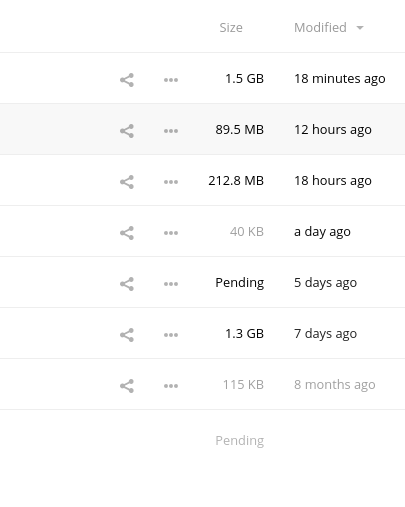
I have about 10 GB in my Nextcloud, but it displays the usage with 0%. The Nextcloud client however does show folder sizes in the GB's. But the 'in use' graph also displays 0% usage.
Actual behaviour
What I expect is to have the same disk usage displayed. I already did a "files:scan", but didn't made any difference.
Server configuration
Operating system: Raspbian 8
Web server: Apache 2
Database: MariaDB
PHP version: 5.6
Nextcloud version: 12.1
Updated from an older Nextcloud/ownCloud or fresh install: 11
Where did you install Nextcloud from: Manually, downloaded from the official source.
No errors have been found.
List of activated apps:
App list
Enabled:
  - activity: 2.5.2
  - audioplayer: 2.0.2
  - bruteforcesettings: 1.0.2
  - calendar: 1.5.3
  - comments: 1.2.0
  - contacts: 1.5.3
  - dav: 1.3.0
  - federatedfilesharing: 1.2.0
  - federation: 1.2.0
  - files: 1.7.2
  - files_pdfviewer: 1.1.1
  - files_sharing: 1.4.0
  - files_texteditor: 2.4.1
  - files_trashbin: 1.2.0
  - files_versions: 1.5.0
  - files_videoplayer: 1.1.0
  - firstrunwizard: 2.1
  - gallery: 17.0.0
  - logreader: 2.0.0
  - lookup_server_connector: 1.0.0
  - news: 11.0.5
  - nextcloud_announcements: 1.1
  - notes: 2.3.1
  - notifications: 2.0.0
  - oauth2: true
  - password_policy: 1.2.2
  - provisioning_api: 1.2.0
  - radio: 0.5.0
  - rainloop: 5.0.0
  - serverinfo: 1.2.0
  - sharebymail: 1.2.0
  - socialsharing_email: 1.0.1
  - survey_client: 1.0.0
  - systemtags: 1.2.0
  - tasks: 0.9.5
  - theming: 1.3.0
  - twofactor_backupcodes: 1.1.1
  - twofactor_totp: 1.3.0
  - twofactor_u2f: 1.3.2
  - updatenotification: 1.2.0
  - weather: 1.5.0
  - workflowengine: 1.2.0
Disabled:
  - admin_audit
  - encryption
  - files_external
  - files_reader
  - user_external
  - user_ldap
Nextcloud configuration:
Config report
{
    "system": {
        "instanceid": "",
        "passwordsalt": "***REMOVED SENSITIVE VALUE***",
        "secret": "***REMOVED SENSITIVE VALUE***",
        "trusted_domains": [
            ""
        ],
        "datadirectory": "",
        "overwrite.cli.url": "",
        "dbtype": "mysql",
        "version": "12.0.1.5",
        "dbname": "nextcloud",
        "dbhost": "localhost",
        "dbport": "",
        "dbtableprefix": "oc_",
        "dbuser": "***REMOVED SENSITIVE VALUE***",
        "dbpassword": "***REMOVED SENSITIVE VALUE***",
        "logtimezone": "UTC",
        "installed": true,
        "enable_previews": "false",
        "htaccess.RewriteBase": "\/",
        "filelocking.enabled": "true",
        "memcache.distributed": "\\OC\\Memcache\\Redis",
        "memcache.local": "\\OC\\Memcache\\APCu",
        "memcache.locking": "\\OC\\Memcache\\Redis",
        "redis": {
            "host": "\/tmp\/redis.sock",
            "port": 0,
            "timeout": 0
        },
        "maintenance": false,
        "theme": "",
        "loglevel": 2,
        "updater.release.channel": "stable",
        "mail_smtpmode": "php",
        "updater.secret": "***REMOVED SENSITIVE VALUE***",
        "mysql.utf8mb4": true
    }
}
Are you using external storage, if yes which one: local
Are you using encryption: no
Are you using an external user-backend, if yes which one: No
Client configuration
Browser: Chrome
Operating system: Fedora 26
 AquaL1te
All 11 comments
How does the web UI files app screen look like? Is there the storage properly shown in the summary column at the very bottom? Do you use external storages?
 MorrisJobke
on 8 Aug 2017
MorrisJobke
on 8 Aug 2017
This might be related #5031
I use locally mounted storage. I also noticed that the quota should be 150 GB (set in the admin panel). So I guess the 139 GB is just the 150 GB minus the data that's stored in Nextcloud. The disk does have enough space left to serve the 150 GB quota.
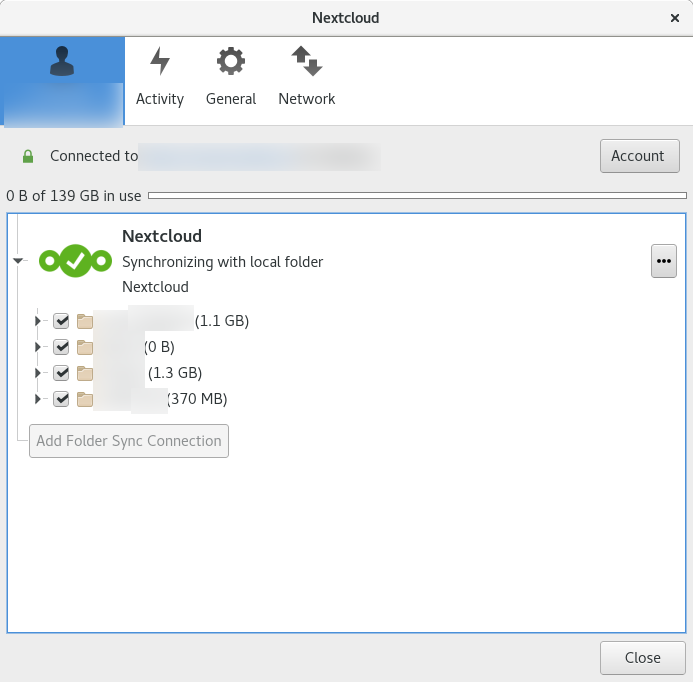
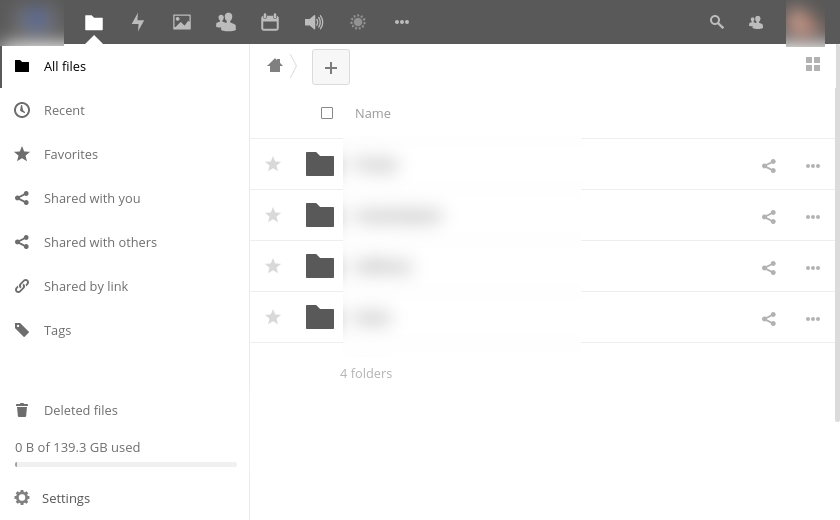
AquaL1te
on 8 Aug 2017
In the last screenshot: could you make the window wider, then in the same row as "4 folders" the sum of all folders is shown.
cc @icewind1991
MorrisJobke
on 8 Aug 2017
The screenshot below does indeed give some indication of file sizes, but it's incomplete. The sizes in Linux are:
11G     .
372M    ./asdf
1.1G    ./asdf
9.3G    ./asdf
4.0K    ./asdf
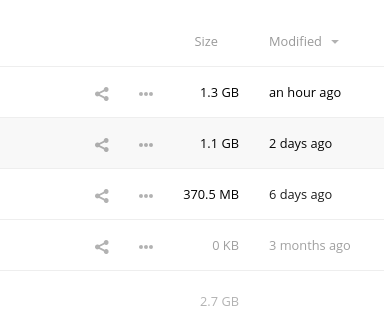
AquaL1te
on 8 Aug 2017
5031 might be the same problem, I just opened a folder in the web UI, it says 'pending'.
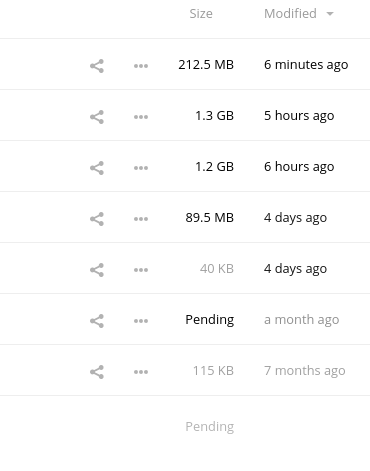
AquaL1te
on 8 Aug 2017
Need to wait for @icewind1991's feedback.
MorrisJobke
on 8 Aug 2017
I have no pending size, but I have the same effect since I've upgrade from 12.0 to 12.1
 azlux
on 9 Aug 2017
azlux
on 9 Aug 2017
Just upgraded to Nextcloud 12.0.2. Still the same problems.

AquaL1te
on 15 Aug 2017
Issue #5031. Fix is said to be merged in Nextcloud 12.0.3 and will be included in Nextcloud 13. The problem comes from a wrong cast to integer that causes problems on 32-bit systems. See #5925 for the changes necessary to fix this.
 1manprojects
on 22 Aug 2017
1manprojects
on 22 Aug 2017
As noted this is also an issue with 64bit.
 alexhass
on 22 Aug 2017
alexhass
on 22 Aug 2017
Upgrading to 12.0.3 fixed it for me, thanks! I hope this fixed it for everyone. If not, please reopen this issue.
AquaL1te
on 21 Sep 2017
Related issues
 georgehrke
·
3Comments
georgehrke
·
3Comments
 ThomasLeister
·
3Comments
MorrisJobke
·
3Comments
ThomasLeister
·
3Comments
MorrisJobke
·
3Comments
 MariusBluem
·
3Comments
MariusBluem
·
3Comments
 juliushaertl
·
3Comments
juliushaertl
·
3Comments
Most helpful comment
Just upgraded to Nextcloud 12.0.2. Still the same problems.