Server: Trailing Whitespace Directory breaks Nextcloud Sync and Windows Explorer
I have a directory a user of mine shared with me. She has five subdirectories, one of which does not show up in the sync client. I would love for someone to help me debug this.
This is what it looks like side-by-side (same directory) on the web and in nextcloud sync:
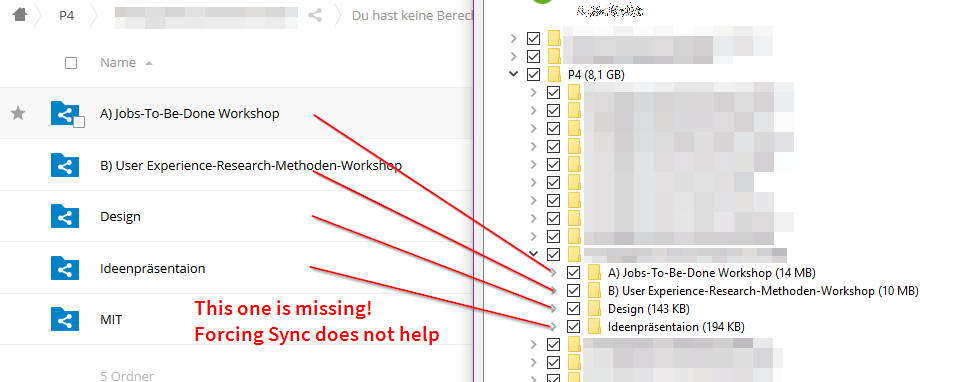
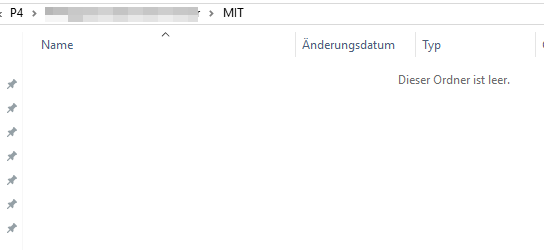
The missing directory shows up in webdav, but reads as "empty". It is not empty on the web:
Steps to reproduce
I am not yet sure, I would require some guidance on how to tackle this.
Steps have been added to this post: https://github.com/nextcloud/server/issues/5843#issuecomment-317290658
Expected behaviour
The shown directory contains files. They are visible on the web. The same directory shows up empty in WebDAV. The Directory is not visible in the nextcloud sync client.
Operating system:
Ubuntu 16.04 / xenial
Web server:
Apache2 (from packages)
Database:
Mariadb (from packages)
PHP version:
php7.0.18 (from packages)
Nextcloud version: (see Nextcloud admin page)
11.0.3
Updated from an older Nextcloud/ownCloud or fresh install:
Fresh install of 11.0.x and upgraded to 11.0.3 at some point
Where did you install Nextcloud from:
zipfile from nc website
Integrity
Integrity
No errors have been found.
List of activated apps:
App list
root@$someHost:/var/www/nextcloud# sudo -u www-data php occ app:list
Enabled:
  - activity: 2.4.1
  - calendar: 1.5.3
  - comments: 1.1.0
  - dav: 1.1.1
  - deck: 0.2.1
  - direct_menu: 0.10.2
  - federatedfilesharing: 1.1.1
  - federation: 1.1.1
  - files: 1.6.1
  - files_pdfviewer: 1.0.1
  - files_sharing: 1.1.1
  - files_texteditor: 2.2
  - files_trashbin: 1.1.0
  - files_versions: 1.4.0
  - files_videoplayer: 1.0.0
  - firstrunwizard: 2.0
  - logreader: 2.0.0
  - lookup_server_connector: 1.0.0
  - nextcloud_announcements: 1.0
  - notifications: 1.0.1
  - password_policy: 1.1.0
  - provisioning_api: 1.1.0
  - serverinfo: 1.1.1
  - sharebymail: 1.0.1
  - survey_client: 0.1.5
  - systemtags: 1.1.3
  - theming: 1.1.1
  - twofactor_backupcodes: 1.0.0
  - updatenotification: 1.1.1
  - workflowengine: 1.1.1
Disabled:
  - admin_audit
  - encryption
  - external
  - files_accesscontrol
  - files_automatedtagging
  - files_external
  - files_retention
  - gallery
  - templateeditor
  - user_external
  - user_ldap
  - user_saml
Nextcloud configuration:
Config report
root@owncloud:/var/www/nextcloud# sudo -u www-data php occ config:list system
{
    "system": {
        "instanceid": "ocro5q18q0to",
        "trusted_domains": [
            "REDACTED"
        ],
        "datadirectory": "\/var\/www\/nextcloud-data",
        "overwrite.cli.url": "https:\/\/REDACTED",
        "dbtype": "mysql",
        "dbname": "nextcloud_media",
        "dbhost": "localhost",
        "dbport": "",
        "dbtableprefix": "oc_",
        "dbuser": "***REMOVED SENSITIVE VALUE***",
        "dbpassword": "***REMOVED SENSITIVE VALUE***",
        "logtimezone": "UTC",
        "memcache.local": "\\OC\\Memcache\\APCu",
        "memcache.locking": "\\OC\\Memcache\\Redis",
        "redis": {
            "host": "localhost",
            "port": 6379
        },
        "allow_user_to_change_display_name": true,
        "remember_login_cookie_lifetime": 2592000,
        "session_lifetime": 604800,
        "skeletondirectory": "",
        "loglevel": 1,
        "passwordsalt": "***REMOVED SENSITIVE VALUE***",
        "secret": "***REMOVED SENSITIVE VALUE***",
        "version": "11.0.3.2",
        "installed": true,
        "mail_from_address": "REDACTED",
        "mail_smtpmode": "smtp",
        "mail_domain": "REDACTED",
        "mail_smtpsecure": "tls",
        "mail_smtpauthtype": "LOGIN",
        "mail_smtpauth": 1,
        "mail_smtphost": "REDACTED",
        "mail_smtpport": "587",
        "mail_smtpname": "***REMOVED SENSITIVE VALUE***",
        "mail_smtppassword": "***REMOVED SENSITIVE VALUE***",
        "maintenance": false
    }
}
Are you using external storage, if yes which one: local/smb/sftp/...
nope.
Are you using encryption: yes/no
nope.
Are you using an external user-backend, if yes which one: LDAP/ActiveDirectory/Webdav/...
nope.
Client configuration
Browser:
not applicable
Operating system:
not applicable
Logs
Web server error log
Web server error log (empty)
nothing.
Nextcloud log (data/nextcloud.log)
Nextcloud log (nothing related)
nothing related
 ccoenen
All 21 comments
To clear this up, I was investigating if this might be a sync client bug, but since WebDAV also does weird stuff, I chose to open the issue here.
ccoenen
on 23 Jul 2017
Can you check in a webdav client (Win: cyberduck, WinSCP). If you use the client, please open the client logfiles (F11).
 tflidd
on 24 Jul 2017
tflidd
on 24 Jul 2017
I'm using WinSCP now, and this now has a third way of behaving:
- Nextcloud sync: no directory
- Windows Explorer: the directory is present, but empty
- WinSCP and Nextcloud web: the directory contains files
I can transfer the files from nextcloud web or winscp, so they _are_ present and readable. They just don't show up in Windows Explorer WebDAV or via Nextcloud Sync.
I set WinSCP to log on level "debug2" but I can't share this log directly. It contains tons of sensible data.
One thing that _might_ be special, that did not turn up before: The missing subdirectory contains a trailing whitespace:
2017-07-24 01:28:50.944 <d:multistatus xmlns:d="DAV:" xmlns:s="http://sabredav.org/ns" xmlns:oc="http://owncloud.org/ns" xmlns:nc="http://nextcloud.org/ns">
... many more directories ...
2017-07-24 01:28:50.944  <d:response>
2017-07-24 01:28:50.944   <d:href>/remote.php/webdav/P4/XXXXREDACTEDXXXXX/MIT%20/</d:href>
                                                                             ^^^
                                                                             !!!
I can confirm that the trailing white space is the issue. I have just created another directory which behaves _exactly_ the same as listed above. Luckily this can be created via Nextcloud web without a problem!
Here are the
Steps to Reproduce
- Create a directory called
"broken "<-- without the quotes, They were neccessary for Github's formatting. Note the trailing white space! - Add any content (file, directory, whatever you like) into the newly created directory
- Look at your nextcloud sync
Actual behaviour (syncer)
The directory does not show up
Actual behaviour (Windows explorer with webdav)
The directory shows up, but entering will not show any files. The directory will list as "empty".
Expected Behaviour
the directory should be visible, be synced and generally work as any other directory
ccoenen
on 24 Jul 2017
@rullzer @icewind1991 How to tackle this? I would say we should forbid it on creation/update. Cleaning up would be a too big mess. This is clearly an issue with the windows explorer not being able to handle this, but on the other side a trailing whitespace is also very likely a typo during input.
Opinions?
 MorrisJobke
on 25 Jul 2017
MorrisJobke
on 25 Jul 2017
apparently it's not forbidden by webdav itself, so this may happen over and over again (granted, I am not an expert in the WebDAV spec, but a quick Ctrl+F over the specs didn't turn up anything on the topic). Even if the directory has not been created by nextcloud, it could have been created via some other tool. In fact, I'm not even convinced the user in question used the nextcloud web interface.
Windows filesystem does not let one create a file/directory like this, though. Creating a directory with trailing space will just trim it, regardless if I do this via gui or command line. Linux will happily let you create directories like this. Not sure about MacOS.
c@server:~/test$ mkdir test1      # regular dir for comparison. No trailing white space
c@server:~/test$ mkdir test2\     # trailing white space with backslash-escape
c@server:~/test$ mkdir "test3 "   # trailing white space with quotes
c@server:~/test$ ls -l
total 12
drwxrwxr-x 2 c c 4096 Jul 25 12:20 test1
drwxrwxr-x 2 c c 4096 Jul 25 12:19 test2     # you can't see them here, but they _are_ present!
drwxrwxr-x 2 c c 4096 Jul 25 12:20 test3
c@server:~/test$ ls *
test1:

test2 :

test3 :
(note the space before the colon for test2 and test3.
ccoenen
on 25 Jul 2017
A more recent version of the sync client now lists the directory in the "not synchronised" tab, along with a reason. It's not ideal (and I don't consider this issue "closed" as such, because other clients are still affected!)
This is what it looks like:

ccoenen
on 29 Aug 2017
I can't see this issue, but I found it in another related ticket. It seems related by title: https://github.com/owncloud/enterprise/issues/1258
ccoenen
on 29 Aug 2017
And this one as well: https://github.com/owncloud/client/issues/2176 found here: https://github.com/owncloud/client/blob/v2.2.4/csync/src/csync_exclude.c#L242-L245 )
ccoenen
on 29 Aug 2017
I'm experiencing almost the same issues as @ccoenen using SMB/CIFS to a Windows share.
Nextcloud syncs both files and folders with illegal Windows filesystem characters.
This creates issues for Nextcloud users that use both UNIX and Windows systems.
Steps to Reproduce
Create a directory with Nextcloud web interface or UNIX client in SMB/CIFS external storage called "broken " (excluding quotes).
Add any content into the directory.
Actual behaviour (Nextcloud web interface)
Directory and file is created without issues.
Actual behaviour (Viewing share with Windows Explorer)
The directory and files shows up.
Opening files gives error "Folder name i invalid"
Renaming the directory in Windows is not possible.
Deleting the directory in Windows is not possible.
Creating new files in the directory in Windows makes all files in the directory invisible - files are still visible in Nextcloud web interface.
Expected Behaviour
The directory should work as any other directory.
The directory/file should be created without trailing whitespace.
 MartinSohn
on 14 Dec 2017
MartinSohn
on 14 Dec 2017
@MartinSohn - We experienced this same issue as well. Have any workarounds or fixes been found yet? Thanks!
 jonathanpantall
on 26 Dec 2017
jonathanpantall
on 26 Dec 2017
13947 remove whitespace when uploading a file or creating a folder from the web.
 kesselb
on 3 Feb 2019
kesselb
on 3 Feb 2019
I'm glad someone took on this problem. Sadly, that's just for uploading from the web.
ccoenen
on 3 Feb 2019
I just faced myself this issue on 15.0.2 with the latest Client on Mac Mojave. Took me a couple of days to spot the whitespace on some of my folders.
I fixed my structure with a script and will be more careful, but I think the expected behavior should be implemented.
 dotty37
on 15 Feb 2019
dotty37
on 15 Feb 2019
The problem is still present in Nextcoud version 2.5.1final (build 20181204) with Windows 10 Insider Build 18361.1. If someone has a proposed fix I can try it on my machine.
 edmael
on 20 Mar 2019
edmael
on 20 Mar 2019
This solution isn't ideal, but here's what I've just set up to avoid this problem:
- Create a file with the following file:
fix_nextcloud_box.sh:
NEXTCLOUD_DATA_DIR=/path/to/data/dir
NEXTCLOUD_INSTALL=/path/to/web/install

find_cmd=(
  find                 # find
  $NEXTCLOUD_DATA_DIR  # Set NEXTCLOUD_DIR above
  -depth               # depth-first traversal so we don't invalidate our own renames
  -type d              # including only directories in results
  -name '*[[:space:]]' # and filtering *those* for ones that end in spaces
  -print0              # ...delimiting output with NUL characters
)

shopt -s extglob                            # turn on extended glob syntax
while IFS= read -r -d '' source_name; do    # read NUL-separated values to source_name
  dest_name=${source_name%%+([[:space:]])}  # trim trailing whitespace from name
  echo "\"$source_name\"" "$dest_name"         # rename source_name to dest_name
done < <("${find_cmd[@]}")                  # w/ input from the find command defined above

cd $NEXTCLOUD_INSTALL
php72 occ files:scan --all
- Set up a cron to run this command once a day/week:
crontab -e
0 1 * * 0 bash /path/to/fix_nextcloud_box.sh >> nextcloud_fix
 pjrobertson
on 20 May 2019
pjrobertson
on 20 May 2019
I suspect trailing spaces from a shared folder caused some problems on our 16.01 instance. Files opened by users from a shared folder with trailing space would become 0 bytes. I have not been able to reproduce this in a test environment though. Other misbehaviour like trouble sharing and unable to open images did occur.
Some more info in this forum thread.
https://help.nextcloud.com/t/files-0-bytes-after-opened/54528/4
 mvvvmd
on 3 Jul 2019
mvvvmd
on 3 Jul 2019
Should be fixed now. We won't fix all existing files anyway, this wouldn't scale. As admins, please make sure to sanitise old files. Sorry for the bug and thank you all for the help! :v: :hugs:
 skjnldsv
on 20 Aug 2020
skjnldsv
on 20 Aug 2020
thanks :-)
I also agree that changing existing files comes with its own can of worms (to say the least).
ccoenen
on 20 Aug 2020
Thanks @skjnldsv for fixing! Can you provide a link to the relevant commit/fix, as a reference for the future? Thanks :-)
pjrobertson
on 20 Aug 2020
Thanks @skjnldsv for fixing! Can you provide a link to the relevant commit/fix, as a reference for the future? Thanks :-)
I didn't fix it, I'm cleaning old issues. Seeing how some fixes and patches were merged over the last years and looking at the comments here, it seemed the right move :)
Have a great day everyone! 🌞
skjnldsv
on 20 Aug 2020
Related issues
 MariusBluem
·
3Comments
MariusBluem
·
3Comments
 rullzer
·
3Comments
rullzer
·
3Comments
 ChristophWurst
·
3Comments
ChristophWurst
·
3Comments
 mfechner
·
3Comments
mfechner
·
3Comments
 ThomasLeister
·
3Comments
ThomasLeister
·
3Comments