Server: deleted file reapears on web-ui, blocks synchronisation of nc-client
Steps to reproduce
unknown how this really happened
Expected behaviour
file should disappear from web-ui
nextcloud-client should sync through
Actual behaviour
more or less out of nothing sync-client stopped syncing with the following error message:
File has been deleted from server
unfortunately the file still exists on web-ui and via webdav (native windows client).
behaviour when trying to delete the phantom-file
web-ui:
the attempt to delete the file via web-ui has no effects, the file will reapear on the web-ui as soon as the site is refreshed/reloaded
web-DAV:
the attempt to delete the file via native windows webdav-client throws up error "Element could not be found"
Server configuration
Operating system: Ubuntu 16.04.2x64 LTS
Web server: Apache 2.4.18
Database: MySQL Ver 14.14 Distrib 5.7.18
PHP version: PHP 7.0.18-1
Nextcloud version: 11.0.3.2
Updated from an older Nextcloud/ownCloud or fresh install: Updated from 10.0.4
Where did you install Nextcloud from: https://download.nextcloud.com/server/releases/nextcloud-11.0.3.tar.bz2
Signing status:
Signing status
no errors found
List of activated apps:
App list
  - activity: 2.4.1
  - comments: 1.1.0
  - dav: 1.1.1
  - federatedfilesharing: 1.1.1
  - federation: 1.1.1
  - files: 1.6.1
  - files_pdfviewer: 1.0.1
  - files_retention: 1.0.1
  - files_sharing: 1.1.1
  - files_texteditor: 2.2
  - files_trashbin: 1.1.0
  - files_versions: 1.4.0
  - files_videoplayer: 1.0.0
  - firstrunwizard: 2.0
  - gallery: 16.0.0
  - logreader: 2.0.0
  - lookup_server_connector: 1.0.0
  - nextcloud_announcements: 1.0
  - notifications: 1.0.1
  - password_policy: 1.1.0
  - provisioning_api: 1.1.0
  - serverinfo: 1.1.1
  - sharebymail: 1.0.1
  - systemtags: 1.1.3
  - theming: 1.1.1
  - twofactor_backupcodes: 1.0.0
  - updatenotification: 1.1.1
  - workflowengine: 1.1.1
Disabled:
  - admin_audit
  - encryption
  - external
  - files_accesscontrol
  - files_automatedtagging
  - files_external
  - richdocuments
  - survey_client
  - templateeditor
  - user_external
  - user_ldap
  - user_saml
Nextcloud configuration:
Config report
        "instanceid": "oc99egqcykfg",
        "passwordsalt": "***REMOVED SENSITIVE VALUE***",
        "secret": "***REMOVED SENSITIVE VALUE***",
        "trusted_domains": [
            "***REMOVED SENSITIVE VALUE***"
        ],
        "datadirectory": "\/var\/www\/html\/nextcloud\/data",
        "overwrite.cli.url": "***REMOVED SENSITIVE VALUE***",
        "dbtype": "mysql",
        "version": "11.0.3.2",
        "dbname": "ocdb1",
        "dbhost": "localhost",
        "dbport": "",
        "dbtableprefix": "oc_",
        "dbuser": "***REMOVED SENSITIVE VALUE***",
        "dbpassword": "***REMOVED SENSITIVE VALUE***",
        "logtimezone": "Europe\/Zurich",
        "installed": true,
        "trashbin_retention_obligation": 30,
        "trashbin_auto_expire": true,
        "logdateformat": "F d, Y H:i:s",
        "log_rotate_size": 104857600,
        "versions_retention_obligation": "30,auto",
        "memcache.local": "\\OC\\Memcache\\Redis",
        "filelocking.enabled": "true",
        "memcache.distributed": "\\OC\\Memcache\\Redis",
        "memcache.locking": "\\OC\\Memcache\\Redis",
        "redis": {
            "host": "localhost",
            "port": 6379,
            "timeout": 0,
            "dbindex": 0
        },
        "maintenance": false,
        "singleuser": false,
        "data-fingerprint": "a6e699c1f91e92096501827e196e4fa9",
        "theme": "",
        "loglevel": 0
        ```
</details>

**Are you using external storage, if yes which one:** none

**Are you using encryption:** no (but did pre NC 10)

**Are you using an external user-backend, if yes which one:** no


### Client configuration
**Browser:** Opera 43.02, Firefox 54.0, IE 11

**Operating system:** Windows 7x64

### Logs
#### Web server error log
<details>
<summary>Web server error log</summary>
[Tue May 09 16:02:06.022027 2017] [authz_core:error] [pid 4025] [client 213.3.25.41:44969] AH01630: client denied by server configuration: /var/www/html/nextcloud/data/.ocdata
[Tue May 09 16:02:07.522340 2017] [authz_core:error] [pid 4046] [client 213.3.25.41:14209] AH01630: client denied by server configuration: /var/www/html/nextcloud/data/.ocdata
[Tue May 09 16:02:29.209860 2017] [authz_core:error] [pid 4024] [client 213.3.25.41:62923] AH01630: client denied by server configuration: /var/www/html/nextcloud/data/.ocdata
[Tue May 09 16:02:31.788150 2017] [authz_core:error] [pid 4079] [client 213.3.25.41:48662] AH01630: client denied by server configuration: /var/www/html/nextcloud/data/.ocdata
[Tue May 09 16:06:16.147948 2017] [authz_core:error] [pid 4453] [client 213.3.25.41:63845] AH01630: client denied by server configuration: /var/www/html/nextcloud/data/.ocdata
[Tue May 09 16:06:18.075450 2017] [authz_core:error] [pid 4569] [client 213.3.25.41:33281] AH01630: client denied by server configuration: /var/www/html/nextcloud/data/.ocdata
[Tue May 09 16:14:29.405974 2017] [authz_core:error] [pid 4076] [client 213.3.25.41:9434] AH01630: client denied by server configuration: /var/www/html/nextcloud/data/.ocdata
[Tue May 09 16:14:33.334349 2017] [authz_core:error] [pid 3595] [client 213.3.25.41:36521] AH01630: client denied by server configuration: /var/www/html/nextcloud/data/.ocdata
[Tue May 09 16:14:49.984802 2017] [authz_core:error] [pid 4077] [client 213.3.25.41:24732] AH01630: client denied by server configuration: /var/www/html/nextcloud/data/.ocdata
[Tue May 09 16:14:53.051819 2017] [authz_core:error] [pid 4569] [client 213.3.25.41:65301] AH01630: client denied by server configuration: /var/www/html/nextcloud/data/.ocdata
[Tue May 09 16:14:57.038719 2017] [authz_core:error] [pid 4753] [client 213.3.25.41:60568] AH01630: client denied by server configuration: /var/www/html/nextcloud/data/.ocdata
[Wed May 10 06:25:04.259958 2017] [mpm_prefork:notice] [pid 64479] AH00171: Graceful restart requested, doing restart
</details>

#### Nextcloud log (data/nextcloud.log)
<details>
<summary>Nextcloud log</summary>
"app":"webdav","message":"Exception: {\"Message\":\"HTTP\\/1.1 404 File with name \\/98-slides\\/3- Partners Presentations\\/1-PSI\\/PDF\\/POLDI_ 2009_03_10_Alu_Forum_vGC.pdf could not be located\",\"Exception\":\"Sabre\\DAV\\Exception\\NotFound\",\"Code\":0,\"Trace\":\"#0 \\/var\\/www\\/html\\/nextcloud\\/3rdparty\\/sabre\\/dav\\/lib\\/DAV\\/Tree.php(76): OCA\\DAV\\Connector\\Sabre\\Directory->getChild('POLDI_ 2009_03_...')\n#1 \\/var\\/www\\/html\\/nextcloud\\/3rdparty\\/sabre\\/dav\\/lib\\/DAV\\/CorePlugin.php(81): Sabre\\DAV\\Tree->getNodeForPath('files\\/bachevska...')\n#2 [internal function]: Sabre\\DAV\\CorePlugin->httpGet(Object(Sabre\\HTTP\\Request), Object(Sabre\\HTTP\\Response))\n#3 \\/var\\/www\\/html\\/nextcloud\\/3rdparty\\/sabre\\/event\\/lib\\/EventEmitterTrait.php(105): call_user_func_array(Array, Array)\n#4 \\/var\\/www\\/html\\/nextcloud\\/3rdparty\\/sabre\\/dav\\/lib\\/DAV\\/Server.php(479): Sabre\\Event\\EventEmitter->emit('method:GET', Array)\n#5 \\/var\\/www\\/html\\/nextcloud\\/3rdparty\\/sabre\\/dav\\/lib\\/DAV\\/Server.php(254): Sabre\\DAV\\Server->invokeMethod(Object(Sabre\\HTTP\\Request), Object(Sabre\\HTTP\\Response))\n#6 \\/var\\/www\\/html\\/nextcloud\\/apps\\/dav\\/lib\\/Server.php(231): Sabre\\DAV\\Server->exec()\n#7 \\/var\\/www\\/html\\/nextcloud\\/apps\\/dav\\/appinfo\\/v2\\/remote.php(30): OCA\\DAV\\Server->exec()\n#8 \\/var\\/www\\/html\\/nextcloud\\/remote.php(165): require_once('\\/var\\/www\\/html\\/n...')\n#9 {main}\",\"File\":\"\\/var\\/www\\/html\\/nextcloud\\/apps\\/dav\\/lib\\/Connector\\/Sabre\\/Directory.php\",\"Line\":206,\"User\":\"SENSITIVE@SENSITIVE\"}","level":0,"time":"May 10, 2017 11:06:49","method":"GET","url":"\/remote.php\/dav\/files\/SENSITIVE@SENSITIVE\/98-slides\/3-%20Partners%20Presentations\/1-PSI\/PDF\/POLDI_%202009_03_10_Alu_Forum_vGC.pdf","user":"SENSITIVE@SENSITIVE","version":"11.0.3.2"}
</details>

#### Browser log
<details>
<summary>Browser log</summary>
Insert your browser log here, this could for example include:
a) Console Log (OPERA): xmlns:d xmlns:s
DELETE https://SENSITIVE/remote.php/webdav/98-slides/3-%20Partners%20Presentations/1-PSI/PDF/POLDI_%202009_03_10_Alu_Forum_vGC.pdf 404 (Not Found)
b) The network log (OPERA):
="
DAV:
"
="
http://sabredav.org/ns
"
>
Sabre\DAV\Exception\NotFound
>
File with name 98-slides/3- Partners Presentations/1-PSI/PDF/POLDI_ 2009_03_10_Alu_Forum_vGC.pdf could not be located
>
 victorbw
All 15 comments
I seem to have a similar problem - at least it sounds similar to me, although in my case it is rather one of more problems.
Nextcloud is a fresh install of version 12.0.0
It happened in a folder which is part of a group folder as well as shared to another group. When someone from the group the folder belongs to renamed two files in it, this action got synced for most people, but not for the ones this specific folder was shared to. These accounts still have, in addition to the renamed files, both with their older names (in web-ui), and it is not possible to remove them - as described they come back after every refresh of the site. Also they seem to cause sync problems with the nextclound-client in windows for these users.
 Orthoptera
on 12 Jul 2017
Orthoptera
on 12 Jul 2017
I have the same problem with nextcloud 11.0.2 and client Version 2.3.2. on ubuntu 16.04
I tried to delete the files on the server (using WEB -UI) and recreated the file again -delete-recreate
now I have doubled the error message.
 ferdiga
on 13 Jul 2017
ferdiga
on 13 Jul 2017
Same for us with NC updated from 11 to 12 and windows & Linux client up to date (all fresh install from 20 days ago).
The sync is totally stopped on all client due to this bug. Clean up of database/cache with automated tool (occ) did nothing.
Tried to un-synchronise and resynchronise the folder where the error appear and it comes back again.
And we are not alone : https://help.nextcloud.com/t/file-was-deleted-from-server-but-still-visible-on-web-ui-also-for-desktop-client/12118/22
 booleon
on 17 Jul 2017
booleon
on 17 Jul 2017
same problem here
 MartinVerges
on 20 Jul 2017
MartinVerges
on 20 Jul 2017
+1
 alxndr13
on 21 Jul 2017
alxndr13
on 21 Jul 2017
the tip from Nemskiller helped me. https://help.nextcloud.com/t/csync-error-windows-client/8285/9
Inside Server' File system, make a cp of the upper folder where you get the problem, place the copy outside the /data folder.
With the creator user of this shared folder, log in the Web UI, select the folder and delete it.
Inside Server' File system, put back the copy of the upper folder to the right place.
Make a chown -R www-data:www-data THEFOLDER
Make a sudo -u www-data php occ file:scan creatoruser
 kosli
on 25 Jul 2017
kosli
on 25 Jul 2017
@kosli This also fixed it for me. Thanks!
alxndr13
on 30 Jul 2017
@kosli many thanks! that is a workaround for an anoying bug.
MartinVerges
on 4 Aug 2017
@kosli great! seems to work so far!
but im still curious why this ever happens at all and why this topic stays "hidden" for the devs :)
victorbw
on 4 Aug 2017
I'm seeing this issue for weeks but never had the opportunity to take a look at it. The weird thing is that the files are present in the filesystem and I can access them via web-gui (pics are loaded also) just fine but once I want to download them I get an error page:
File not found
The specified document has not been found on the server.
... but they are definately on the filesystem. Locally they have been removed although I can't remember having them removed! So the error I get doesn't make any sense: "File has been deleted from server" - but it is on the server but not locally :/
Fortunately I create a nightly rsync backup since I don't want to screw my families files - duck - but I'm trying now the above workaround
Edit: doesn't work for me sigh
 skriems
on 23 Aug 2017
skriems
on 23 Aug 2017
Please try the newest version. If it still doesn't work after a rescan and you have steps to reproduce, feel free to create a new issue.
 nickvergessen
on 6 Oct 2017
nickvergessen
on 6 Oct 2017
ok, i am on nextcloud 12.0.4 (currently the latest version) and experiencing the same issue. deleting the empty folder via ui will work for only a little while until nextcloud client restores it few moments later.
 jose1711
on 7 Jan 2018
jose1711
on 7 Jan 2018
We encountered the same issue after removing / renaming / moving files locally in folders shared with other users and got the same problems :
- Sync client errors as stated above _(File has been deleted from server)_
- File still visible in online interface
- File impossible to delete
- When clicked, leading to 404 saying the file doesn't exist
Let's take an example with a file named 6a4fe9766c793.xlsx that I renamed and it caused the issue.
First thing I tried to fix it with occ commands (that didn't worked) :
- wwwuser: $ php occ files:clean
- wwwuser: $ php occ files:scan --all
- wwwuser: $ php occ maintenance:repair --include-expensive
Then I logged inside my server and searched fo the file in all /html/data.
There was no file named 6a4fe9766c793.xlsx remaining in all Nextcloud physical data. However, the file was clearly visible inside web ui (but leading to 404 error if I tried to open it / download it).

So I headed to the NC database to check the oc_filecache table.
There I found a reference to the file with a path that doesn't exist anymore.
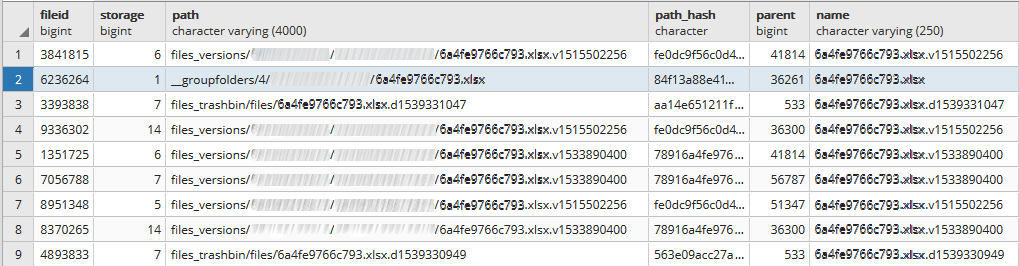
You can see on the last screenshot that one of the path to the file has a __groupfolders prefix. This is from a NextCloud app we used to manage shared folders but it is now uninstalled and we emptied the foldes before using a the dedicated interface to do so.
Curious about how many files were left orphaned in database this way, I searched and found all the files. Meaning that all the files we shared using the "Group Folders" app have now orphaned path entries in database. These things should have been fixed by the occ commands but it feels like the __groupfolders is never scanned.
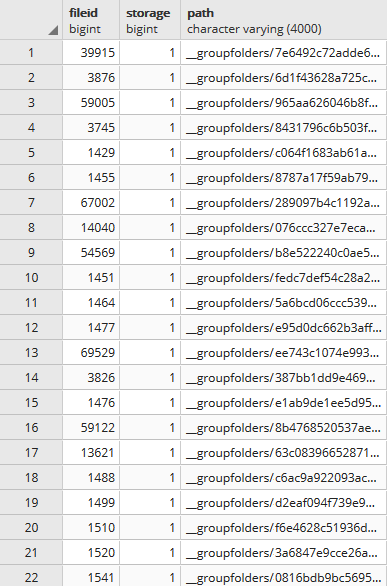
Just to be sure, I logged back inside the server and found the __groupfolders dedicated folder in data and it was indeed empty but still here even though we uninstalled the app a few weeks ago.

Guess on what caused the issue :
- We used to share files using "Group folders" from the app.
- We were unhappy with the lack of activity tracking so we decided to switch to "Shared folders".
- We first completely emptied and uninstalled "Group folders".
- We kept the same file path structures and name with new "Shared folders".
- But "Group folders" file structure remained in
oc_filecacheand occ scan could not fix it. - So when we tried to rename/move files a desynchronisation appeared between files and database
- I think this is what caused the file to appear inside UI but wasn't anywhere on the server.
Solution that worked for us
I removed all entries in database that was linked to the __groupfolders app and the files visible only in web UI that caused local sync errors disappeared and everything went back to normal.
DELETE FROM nextcloud.oc_filecache where path like '__groupfolders%';
_It goes without saying that you should not use this request if you are currently using the group folders app._
P.-S. We use Nextcloud 14.
 JulienLaclaverie
on 17 Oct 2018
JulienLaclaverie
on 17 Oct 2018
@JulienLaclaverie Thank you for this workaround, works for me!
 dr4y
on 12 Nov 2018
dr4y
on 12 Nov 2018
i had the same issue with hidden and ignored files on a windows client, for example .gradle or cache.lock. Those did not appear in the Web GUI.
in my case, solution was to delete them on server and rescan all files with
php occ files:scan --all
 kexonator
on 17 Dec 2018
kexonator
on 17 Dec 2018
Related issues
 blackcrack
·
3Comments
blackcrack
·
3Comments
 MariusBluem
·
3Comments
MariusBluem
·
3Comments
 MorrisJobke
·
3Comments
MorrisJobke
·
3Comments
 ChristophWurst
·
3Comments
ChristophWurst
·
3Comments
 mama21mama
·
3Comments
mama21mama
·
3Comments
Most helpful comment
We encountered the same issue after removing / renaming / moving files locally in folders shared with other users and got the same problems :
Let's take an example with a file named 6a4fe9766c793.xlsx that I renamed and it caused the issue.
First thing I tried to fix it with occ commands (that didn't worked) :
Then I logged inside my server and searched fo the file in all
/html/data.There was no file named 6a4fe9766c793.xlsx remaining in all Nextcloud physical data. However, the file was clearly visible inside web ui (but leading to 404 error if I tried to open it / download it).
So I headed to the NC database to check the
oc_filecachetable.There I found a reference to the file with a path that doesn't exist anymore.
You can see on the last screenshot that one of the path to the file has a
__groupfoldersprefix. This is from a NextCloud app we used to manage shared folders but it is now uninstalled and we emptied the foldes before using a the dedicated interface to do so.Curious about how many files were left orphaned in database this way, I searched and found all the files. Meaning that all the files we shared using the "Group Folders" app have now orphaned path entries in database. These things should have been fixed by the occ commands but it feels like the
__groupfoldersis never scanned.Just to be sure, I logged back inside the server and found the
__groupfoldersdedicated folder in data and it was indeed empty but still here even though we uninstalled the app a few weeks ago.Guess on what caused the issue :
oc_filecacheand occ scan could not fix it.Solution that worked for us
I removed all entries in database that was linked to the
__groupfoldersapp and the files visible only in web UI that caused local sync errors disappeared and everything went back to normal.DELETE FROM nextcloud.oc_filecache where path like '__groupfolders%';_It goes without saying that you should not use this request if you are currently using the group folders app._
P.-S. We use Nextcloud 14.