Server: Duplicated files and folders when moving from one shared folder to another (can reproduce it)
Steps to reproduce
through the web-ui:
- UserA creates FolderA and FolderB
- UserA shares FolderA and FolderB with UserB
on win7 desktop with client v2.2.4.2:
- UserB creates the folder FOO in FolderA
- UserB creates the folder BAR in FolderA/FOO
- Wait for the desktop client to sync these changes
- UserB perform a cut-paste to move FOO directly from FolderA to FolderB (moving FOO on the desktop and then into FolderB does not make the issue to occur)
- Wait for the desktop client to sync this change
- UserB creates the folder POOP in FolderB/FOO/BAR/
- Wait for the desktop client to sync this change
Expected behaviour
Moving content from one share to another should work smoothly
Actual behaviour
The following inconsistency has appeared on the server: through the web-ui UserB can see the BAR folder inexplicably duplicated.
Other Probable side-effects
If FolderA and FolderB is shared with several other users working on them, users keep getting the "Backup Detected" dialog asking wether to keep conflict files or to synchronize normally.
Probable related issues or discussions
https://help.nextcloud.com/t/duplicate-files-delete-not-possible/8869/7
https://github.com/nextcloud/server/issues/741
Server configuration
Operating system:
Ubuntu 16.04
Web server:
Apache 2.4
Database:
Mysql 5.7
PHP version:
v5.6
Nextcloud version: (see Nextcloud admin page)
v10.0.3
Updated from an older Nextcloud/ownCloud or fresh install:
updated from 10.0.0 -> ... -> 10.0.3
Where did you install Nextcloud from:
official tarball
Signing status:
No errors have been found.
List of activated apps:
Enabled:
- activity: 2.3.2
- admin_audit: 1.0.0
- comments: 1.0.0
- dav: 1.0.1
- federatedfilesharing: 1.0.1
- federation: 1.0.1
- files: 1.5.2
- files_external: 1.0.2
- files_pdfviewer: 0.8.1
- files_sharing: 1.0.0
- files_texteditor: 2.1
- files_trashbin: 1.0.0
- files_videoplayer: 0.9.8
- firstrunwizard: 1.1
- gallery: 15.0.1
- notifications: 0.3.0
- password_policy: 1.0.0
- provisioning_api: 1.0.0
- serverinfo: 1.1.1
- survey_client: 0.1.5
- systemtags: 1.0.2
- theming: 1.0.1
- updatenotification: 1.0.1
- workflowengine: 1.0.1
Disabled: - encryption
- external
- files_accesscontrol
- files_automatedtagging
- files_retention
- files_versions
- templateeditor
- user_external
- user_ldap
- user_saml
The content of config/config.php:
{
    "system": {
        "instanceid": "ocq05beinini",
        "passwordsalt": "***REMOVED SENSITIVE VALUE***",
        "secret": "***REMOVED SENSITIVE VALUE***",
        "trusted_domains": [
            "aaa.bbb.net"
        ],
        "datadirectory": "\/var\/www\/nextcloud-data",
        "overwrite.cli.url": "http:\/\/aaa.bbb.net",
        "dbtype": "mysql",
        "version": "9.1.3.2",
        "dbname": "nextcloud",
        "dbhost": "localhost",
        "dbport": "",
        "dbtableprefix": "oc_",
        "dbuser": "***REMOVED SENSITIVE VALUE***",
        "dbpassword": "***REMOVED SENSITIVE VALUE***",
        "logtimezone": "UTC",
        "installed": true,
        "loglevel": 0,
        "memcache.distributed": "\\OC\\Memcache\\Redis",
        "memcache.local": "\\OC\\Memcache\\Redis",
        "memcache.locking": "\\OC\\Memcache\\Redis",
        "redis": {
            "host": "localhost",
            "port": 6379
        },
        "maintenance": false,
        "updater.release.channel": "stable"
    }
}
Are you using external storage, if yes which one: local/smb/sftp/...
No
Are you using encryption: yes/no
No
Are you using an external user-backend, if yes which one: LDAP/ActiveDirectory/Webdav/...
No
Client configuration
Browser:
Chrome 56
Operating system:
Windows 7
 plrunner
All 57 comments
+1 Nextcloud 11.0.1
 Dark-Schnitzel
on 16 Feb 2017
Dark-Schnitzel
on 16 Feb 2017
Clearly locking related @icewind1991 see https://help.nextcloud.com/t/duplicate-files-delete-not-possible/8869/4
 jospoortvliet
on 20 Feb 2017
jospoortvliet
on 20 Feb 2017
+1
had this Problem with Nextcloud 11.0.3 as well.
 mrieser
on 10 May 2017
mrieser
on 10 May 2017
@icewind1991 Can you take a look? This has been reported again at https://help.nextcloud.com/t/files-and-folders-shown-twice-in-web-ui/12416
 LukasReschke
on 10 May 2017
LukasReschke
on 10 May 2017
will the fix be backported to 10 and 11?
thanks
plrunner
on 18 May 2017
will the fix be backported to 10 and 11?
First of all we need to fix it. But 10 is unlikely, because we plan to do a last release for 10 this month and then stop it (because two new mayor version are released and we plan to only support the last two mayor versions).
 MorrisJobke
on 22 May 2017
MorrisJobke
on 22 May 2017
+1
11.0.2 (stable)
 vdeyak
on 26 May 2017
vdeyak
on 26 May 2017
Trying again to summon @icewind1991 💯
jospoortvliet
on 28 May 2017
Maybe it is Possible to set a Timeout for unlocking? After 10 hours or so it will automatically unlock?
Same Error here on Nextcloud 11.0.3
PHP 7.0.19-1~dotdeb+8.1
Debian 8
Dark-Schnitzel
on 30 May 2017
+1
Nextcloud 11.0.3
PHP 5.6.30-0+deb8u1
Debian 8
 skredder
on 30 May 2017
skredder
on 30 May 2017
+1
Nextcloud 12.0.0
 KTim21
on 30 May 2017
KTim21
on 30 May 2017
Is this related to this Bug?
https://github.com/nextcloud/server/issues/1166
Nextcloud Log:
Uncaught Error: Access to undeclared static property: OC\Files\Filesystem::$normalizedPathCache in /var/www/nextcloud/lib/private/Files/Filesystem.php:806 Stack trace: #0 /var/www/nextcloud/lib/private/Files/View.php(2018): OC\Files\Filesystem::normalizePath('/Henrik/files/K...') #1 /var/www/nextcloud/lib/private/Files/View.php(1156): OC\Files\View->unlockFile('/Kunden/Uniserv...', 1) #2 [internal function]: OC\Files\View->OC\Files\{closure}() #3 /var/www/nextcloud/3rdparty/icewind/streams/src/CallbackWrapper.php(109): call_user_func(Object(Closure)) #4 [internal function]: Icewind\Streams\CallbackWrapper->stream_close() #5 {main} thrown at /var/www/nextcloud/lib/private/Files/Filesystem.php#806
Dark-Schnitzel
on 2 Jun 2017
+1
Nextcloud 11.0.3
 brotkiste
on 6 Jun 2017
brotkiste
on 6 Jun 2017
+1
Nexcloud 12.0.0
 rmader
on 13 Jun 2017
rmader
on 13 Jun 2017
Summoning @icewind1991 the fourth time 🙏
LukasReschke
on 13 Jun 2017
+1
Nexcloud 12.0.0
 bcoory
on 14 Jun 2017
bcoory
on 14 Jun 2017
Summoning @icewind1991 the fifth time
 blizzz
on 14 Jun 2017
blizzz
on 14 Jun 2017
In the meantime, is any workaround possible other than forbidding users to move folders from a share to another?
plrunner
on 14 Jun 2017
+1
Nextcloud 12.0
PHP 7

 bat553
on 14 Jun 2017
bat553
on 14 Jun 2017
Can reproduce, looking into it
 icewind1991
on 15 Jun 2017
icewind1991
on 15 Jun 2017
Fix is here: https://github.com/nextcloud/server/pull/5424
Thanks @plrunner for the detailed reproduction steps
icewind1991
on 15 Jun 2017
Will this fix also fix problems if the files have NOT been shared but just moved from one folder to another through the desktop client and regular explorer in windows..? I'm having this error:
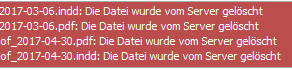
Even rescanning the filesystem did not change anything.
 christianromeni
on 21 Jun 2017
christianromeni
on 21 Jun 2017
@christianromeni yeah, I've seen that too once or twice, not sure if it is related. Can't reproduce it either, it just happens sometimes. Copying the file to that location and removing it again fixes the complaints.
jospoortvliet
on 24 Jun 2017
Seems fix #5424 works only partly for this issue. Tested on latest stable 12.
Files can be deleted now, but I still see some duplicates, some duplicates are not seen anymore.
 JiriMON
on 29 Jun 2017
JiriMON
on 29 Jun 2017
Files can be deleted now, but I still see some duplicates, some duplicates are not seen anymore.
Mmmmh ... could you open this in a separate ticket and describe how you got those duplicates? Because it could also have a different cause. For multiple instances the problem described in here was solved by the PR. Thanks
MorrisJobke
on 6 Jul 2017
Seems the fix was not complete. Re-opening for @icewind1991 to fix.
 oparoz
on 18 Jul 2017
oparoz
on 18 Jul 2017
New fix is in #5770
MorrisJobke
on 18 Jul 2017
Still not enough ;)
oparoz
on 18 Jul 2017
Same problem on latest 12.0, Will the fix if any be for version 12 or shall we have to wait till version NC13?
I have succeeded fixing the issue by removing the share, delete the folder then recreated and re-share it.
But this is far from a permanent solution.
 tedd77
on 21 Jul 2017
tedd77
on 21 Jul 2017
Fixed in 12.0.1 and 13.
MorrisJobke
on 21 Jul 2017
None of these versions are out yet.
Since there are some bug fixes, If I drag an empty folder from my computer into nextcloud it does not show, nor produce an error message.
The workaround is to sftp into nextcloud and copy the folder/folders or mkdir the folder then scan with occ.
This has been there since early days but now it is becoming urgent.
tedd77
on 21 Jul 2017
None of these versions are out yet.
But 12.0.1 is planned for next week
MorrisJobke
on 21 Jul 2017
Great thank you.
Could you please look into the empty folder issue ?
tedd77
on 21 Jul 2017
Could you please look into the empty folder issue ?
Could you please open a new ticket for this (and first search if there is already one)
MorrisJobke
on 21 Jul 2017
done thank you
https://github.com/nextcloud/server/issues/5828
tedd77
on 21 Jul 2017
A other user of my cloud told me , that he had this bug a couple of days. I dont know if on this time i had updated to 12.0.1 (12.0.2) already. I had the Bug about 3 times , but that was before Version 12.
 JonathanTreffler
on 17 Aug 2017
JonathanTreffler
on 17 Aug 2017
This bug existed before version 12.0.1 .
It should not be there if you have done the upgrade to 12.0.1
tedd77
on 17 Aug 2017
thanks for than info
JonathanTreffler
on 17 Aug 2017
This bug is also in 12.0.0
 mikeschdesign
on 29 Sep 2017
mikeschdesign
on 29 Sep 2017
This bug is also in 12.0.0
Then upgrade to 12.0.3 - as written: it was fixed in 12.0.1
MorrisJobke
on 29 Sep 2017
+1
I got this bug:
https://help.nextcloud.com/t/duplicate-files-delete-not-possible/8869/7
741
The upgrade to 12.0.3 didn't solve the problem @MorrisJobke. FYI i had the 12.0.2 version when i got the same problem @tedd77.
The semi-solution that consist of clearing file_lock didn't work too @jospoortvliet.
Thanks for your help if someone found the solution
 jonasdumas
on 29 Sep 2017
jonasdumas
on 29 Sep 2017
Same here with 12.0.3
 fprina
on 4 Oct 2017
fprina
on 4 Oct 2017
@icewind1991 Regression in 12.0.3? Or missing repair step?
oparoz
on 4 Oct 2017
I had this but also in 12.0.2 no idea early versions
fprina
on 4 Oct 2017
@icewind1991
I can repoduce the issue on a clean installation of 12.0.4.
The problem still occurs while using shared folders from the groupfolders app.
There are no problems with regular shared folders!
 thammerbacher
on 6 Dec 2017
thammerbacher
on 6 Dec 2017
Groupfolders has known issues with sharing, you can try and see if https://github.com/nextcloud/server/pull/7323 fixes that problem
icewind1991
on 6 Dec 2017
Still seeing this issue in 12.0.4

 DP19
on 16 Jan 2018
DP19
on 16 Jan 2018
@DP19 the PR mentioned by Icewind will be in 12.0.5 - let us know if that fixes it (12.0.5 should come out in a week or two)
jospoortvliet
on 16 Jan 2018
In a just upgreaded 12.0.5 the propblem seems still to exist
 nklamann
on 25 Jan 2018
nklamann
on 25 Jan 2018
I am on 12.0.5 and just observed the same issue. The symptoms are also very well described here: https://help.nextcloud.com/t/files-and-folders-shown-twice-in-web-ui/12416
Workaround that fixed it for me was:
- on OS level: move (mv) the directory away
- on OS level: put a new copy (cp) in place of the very same directory and files (same location of course)
-- I accidentally forgot to set proper permissions for "www-data"- tried to delete that folder from users web ui -> err'd out because of lacking filesystem permission for webserver user
-- initially I wanted to follow the workaround described here:
https://help.nextcloud.com/t/csync-error-windows-client/8285/9- out of curiosity I just browsed into the folder (users web ui) and now the folder was showing proper filenames and no duplicates anymore already
-- yet it was showing a warning about lacking permission to change data inside that folder
-- decided to save the extra mile of the delete and just keep the folder and files as the symptom was gone- corrected permissions with chown & chmod
- ran files:scan on that folder to get rid of that (now false positive) permission warning
I am not sure, but if a "move out" and "copy back" just did the trick, then maybe a simple "touch" on all affected files and folders would be sufficient to fix/workaround that duplicate display issue.
Maybe someone with insight into the code could confirm whether the changed timestamp of the folder(s) and files or the permission issue caused NC to "fall back on its feet" / reset its view about the local filesystem - or was it the failed delete? There must be some code path that I triggered which re-evaluated the state of the FS and corrected the DB entries :)
Correction of workaround (did not properly recall the steps I went through, so please ignore the quoted text above):
- on OS level: move (mv) the affected directory away
- try to delete the folder from UI
-- this err'd out but the folder and all files inside are wiped from DB
-- reload on UI will confirm the folder is gone- on OS level: move (mv) original folder back in place
-- make sure it has proper FS permissions- run files:scan on that folder
HTH
 sock3t
on 28 Jan 2018
sock3t
on 28 Jan 2018
From my experience, upgrading to a newer version of Nextcloud does not solve the problem for those folder already affected. This would explain why there are still people reporting the bug as open.
So the question for those still having the problem: does the creation time of your affected folders go back to when you were using a bugged Nextcloud version?
plrunner
on 29 Jan 2018
@icewind1991 ^
blizzz
on 29 Jan 2018
occ maintenance:repair --include-expensive should repair the invalid entries that were caused by this issue
icewind1991
on 29 Jan 2018
on nextcloud 13.0 i've always same error, i've also do that command occ maintenance:repair --include-expensive but nothing change.
 fferraro87
on 13 Mar 2018
fferraro87
on 13 Mar 2018
I am seeing this identical behavior with NextCloud v13.0.4.
 scrow
on 24 Jul 2018
scrow
on 24 Jul 2018
@scrow did you do what icewind suggested:
occ maintenance:repair --include-expensive
jospoortvliet
on 30 Jul 2018
I did, and it did not make any difference. I ended up abandoning NextCloud mainly due to the flaky external storage support, so to that end, I consider the issue "resolved."
scrow
on 31 Jul 2018
Related issues
 ghost
·
3Comments
ghost
·
3Comments
 georgehrke
·
3Comments
georgehrke
·
3Comments
 dl5rcw
·
3Comments
dl5rcw
·
3Comments
 blackcrack
·
3Comments
blackcrack
·
3Comments
 Django-BOfH
·
3Comments
Django-BOfH
·
3Comments
Most helpful comment
+1
Nexcloud 12.0.0