Serenity: Shortcut Keys [Hot Keys] for Editor buttons
Hi @volkanceylan @minhhungit
Can you guys please guide me how I can assign a shortcut Key [hotkey] to Editor Button till now I have tried following and it doesn't work. It is very important to get this functionality for the project I am working on.
// *** Add Select Button to Grid Editor ***
            buttons.push({
                title: "Select Items",
                cssClass: "add-button",
                hotkey: "Alt+K",
                onClick: () => {}
});
Thank you for your support
Regards,
Arvind
 reach2rv
All 9 comments
Any suggestions or workaround??
reach2rv
on 7 Sep 2020
I am not sure about "editor button", what is that
 minhhungit
on 7 Sep 2020
minhhungit
on 7 Sep 2020
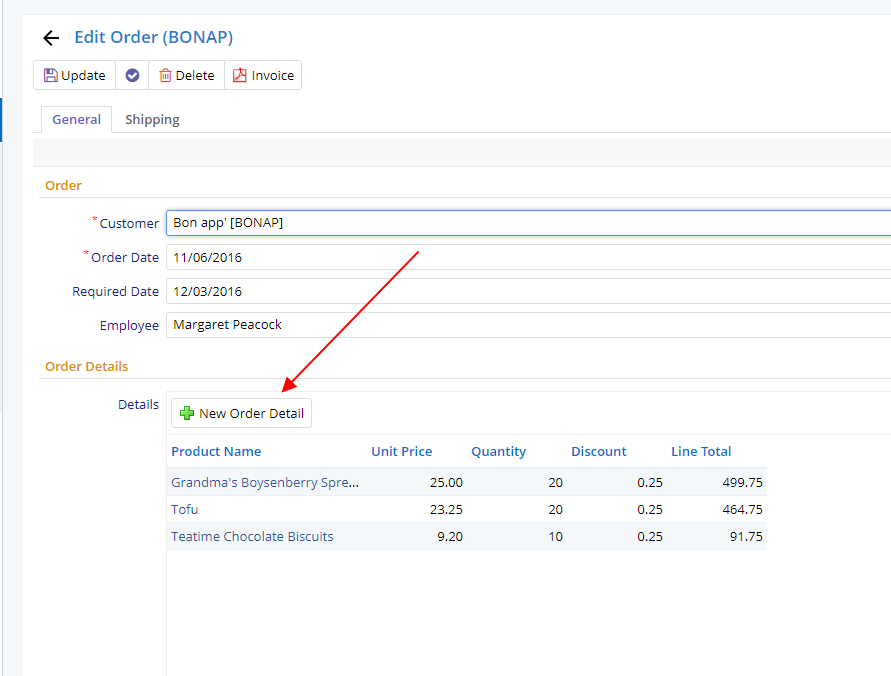
@reach2rv you mean button on inline grid editor ?
minhhungit
on 7 Sep 2020
@reach2rv you mean button on inline grid editor ?
yes
reach2rv
on 7 Sep 2020
@minhhungit
I have tried following code too to make it focusable but onclick and shortcut key still doesn't work
this.element.find('.add-button').attr("role", "button");
this.element.find('.add-button').attr("tabindex", "0");
var addbutton = this.element.find('.add-button');
$('document').bind('keypress', function (e) {
var alt = false;
if (e.keyCode == 18)
alt = true;
if (alt == true && e.keyCode == 75)
addbutton.trigger('click');
});
@reach2rv where did you put the code on?, grid, dialog or inline grid on dialog
minhhungit
on 7 Sep 2020
inline grid Editor constructor
reach2rv
on 7 Sep 2020
@reach2rv ah I see your comment, try this code
put this on your editor.ts
protected createToolbar(buttons: Serenity.ToolButton[]): void {
            var toolbarDiv = $('<div class="grid-toolbar"></div>').appendTo(this.element);
            this.toolbar = new Serenity.Toolbar(toolbarDiv, { buttons: buttons, hotkeyContext: document.getElementsByTagName('body')[0] });
        }

        getButtons() {
            let buttons = super.getButtons();

            buttons.push({
                title: "Test shortkey",
                hotkey: "alt+k",
                //hotkeyContext: document.getElementsByTagName('body')[0],
                onClick: () => {
                    Q.notifyInfo("Hello");
                }
            })

            return buttons;
        }
@minhhungit the above code works. I do get a notification. Thank you!!
reach2rv
on 7 Sep 2020
Related issues
 newyearsoft
·
3Comments
newyearsoft
·
3Comments
 chintankukadiya18
·
3Comments
chintankukadiya18
·
3Comments
 StefanTheiner
·
3Comments
StefanTheiner
·
3Comments
 dudeman972
·
3Comments
dudeman972
·
3Comments
 ahsansolution
·
3Comments
ahsansolution
·
3Comments
Most helpful comment
@reach2rv ah I see your comment, try this code
put this on your editor.ts