Serenity: Inspector [Not responding] when try to inspect any process
When I'm playing around with Inspector, I observed weird behaviour. Follow below steps to reproduce.
- Open Inspector
- Open Calculator [same case with any application] from the System menu
- Inspector won't show the calculator application. So, close it
- Close the opened application as well
- Reopen the Inspector
- You can see that Calculator is still running you can also see another instance of Inspector too in the table. Weird
- When try to inspect, that Inspector instance will show Not responding title
I'm not sure why the Calculator process is still running.
I'm new to Serenity and want to fix it myself. Please guide me to fix it
 umasankar-yedida
All 16 comments
I can't seem to be able to reproduce this with most applications with the latest code, but I did find one that caused this:
[UserName.MenuApplet(19:19)]: Has not pledged accept
[UserName.MenuApplet(19:19)]: 0x00000000  EventLoop.cpp +0

[UserName.MenuApplet(19:19)]: 0xc0160070  _ZN6Kernel7Process5crashEijb +1044
[UserName.MenuApplet(19:19)]: 0xc0177674  _ZN6Kernel7Process10sys$acceptEiP8sockaddrPj +124
[UserName.MenuApplet(19:19)]: 0xc0164ed8  syscall_handler +1320
[UserName.MenuApplet(19:19)]: 0xc0164921  syscall_asm_entry +49
[UserName.MenuApplet(19:19)]: 0x080a25bb  _ZN4Core11LocalServer6acceptEv +67
[UserName.MenuApplet(19:19)]: 0x0809d535  _ZNK2AK8FunctionIFvvEE15CallableWrapperIZN4Core9EventLoop16start_rpc_serverEvEUlvE_E4callEv +41
[UserName.MenuApplet(19:19)]: 0x080a2f06  _ZN4Core6Object14dispatch_eventERNS_5EventEPS0_ +74
[UserName.MenuApplet(19:19)]: 0x0809cde5  _ZN4Core9EventLoop4pumpENS0_8WaitModeE +307
[UserName.MenuApplet(19:19)]: 0x0809cf63  _ZN4Core9EventLoop4execEv +43
[UserName.MenuApplet(19:19)]: 0x08048575  main +397
[UserName.MenuApplet(19:19)]: 0x08048dbe  _start +94
Not knowing how Inspector works, I'm not sure why this it trigger additional code in the target process to run. Shouldn't it query the servers about this process directly, without requiring any interaction of the target process?
 tomuta
on 3 Aug 2020
tomuta
on 3 Aug 2020
Inspector connects directly to an RPC socket opened by all programs that use Core::EventLoop. The socket is opened in Libraries/LibCore/EventLoop.cpp
The problem described above seems to be about zombie processes. If you run ps -ef after launching and quitting the Calculator app via the system menu, you can see one in the ps output in the zombie state. This most likely means that we're forgetting to wait() on programs launched by the system menu :)
 awesomekling
on 3 Aug 2020
awesomekling
on 3 Aug 2020
Furthermore, perhaps the ProcessChooser widget should update the process selection table every now and then, to show any new processes started.
awesomekling
on 3 Aug 2020
Closed by mistake. Sorry
umasankar-yedida
on 3 Aug 2020
The problem described above seems to be about zombie processes. If you run
ps -efafter launching and quitting the Calculator app via the system menu
Forgot to mention this in steps. I did open the application from System menu. I didn't try to open it from Terminal. I've updated it in description.
umasankar-yedida
on 3 Aug 2020
I think part of the problem at least with UserName.MenuApplet is that the connect never fails when the target process crashes due to the pledge violation.
tomuta
on 3 Aug 2020
The problem described above seems to be about zombie processes. If you run
ps -efafter launching and quitting the Calculator app via the system menu, you can see one in thepsoutput in thezombiestate. This most likely means that we're forgetting towait()on programs launched by the system menu :)
Oh wow, Calculator disappears in System Monitor but still shows up with ps -ef. I didn't realize System Monitor was hiding zombies. That seems like a bug, too ;-)
tomuta
on 3 Aug 2020
Furthermore, perhaps the
ProcessChooserwidget should update the process selection table every now and then, to show any new processes started.
I've done this change by adding a timer to poll if any new process being created in ProcessChooser as suggested.
Also, Whenever we get the process list in RunningProcessModel->update method, I've added a filter to ignore the Zombie processes. @awesomekling does this make sense?
I don't quite understand about wait part :(
umasankar-yedida
on 4 Aug 2020
I don't quite understand about wait part :(
We now have a way to disown, which avoids the entire issue of waiting for the child. I believe SystemMenu already uses it, so this part should be resolved. Can you confirm?
 BenWiederhake
on 12 Aug 2020
BenWiederhake
on 12 Aug 2020
Yes, disown solved the issue.
Furthermore, perhaps the
ProcessChooserwidget should update the process selection table every now and then, to show any new processes started.
I will push these changes soon
umasankar-yedida
on 14 Aug 2020
This is great news!
This hides the symptoms in many cases, but doesn't fix the underlying issues:
- A zombie process shouldn't have any fifos/pipes/etc open anymore. (Come to think of it: Who cleans up the sockets in
/tmpwhen a process dies unexpectedly?) - When the inspector connects to an unresponsive process, this shouldn't hang the Inspector, too.
BenWiederhake
on 14 Aug 2020
- When the inspector connects to an unresponsive process, this shouldn't hang the Inspector, too.
I have found few places where it becomes unresponsive is, one is when we don't have any permission to read the PID file (I handled this one). And, another one is when we try to inspect the Inspector itself because we are not filtering it out in ProcessChooser. Are there any scenarios where a process can become unresponsive? or? any ways to identify a process is unresponsive?
umasankar-yedida
on 15 Aug 2020
I created #3159 to give you an example. It works by creating a socket (so that the Inspector can attempt to connect to it), and then just never reads/writes to the socket. Thus, when the Inspector tries to talk to the misbehaving app, it hangs the Inspector, too, because the Inspector uses blocking reads/writes:
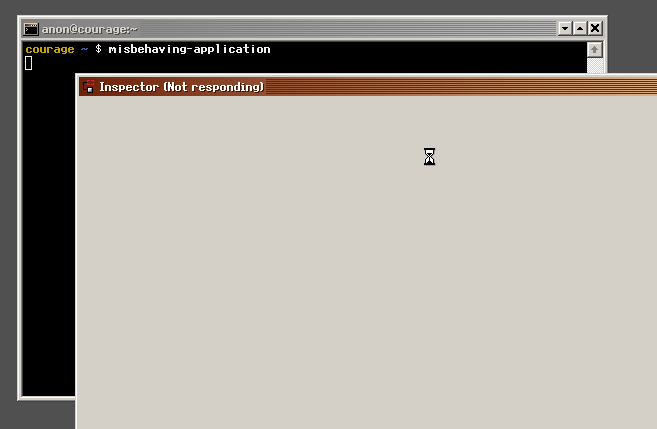
3159 does this with malice. However, this can also happen unintentionally when a program is just "busy" decoding a large file or some other task that doesn't return control to the main loop in time.
I'm not sure how to fix this. Maybe the Inspector should only use non-blocking reads/writes, or do blocking r/w with timeouts. And while no new data can be displayed, maybe show (fetching ...) instead?
Or maybe I'm just too evil, and you decide to "wontfix" this issue ^^
BenWiederhake
on 15 Aug 2020
@BenWiederhake Thanks for the help. I'm looking into it.
I'm understanding the concepts and flow around this. Bear with me, It'll take some time for me to provide an update on this.
umasankar-yedida
on 18 Aug 2020
@umasankar-yedida No stress! Take all the time you need, it's just a project for fun. And to be honest it's "just" a silly hang-propagation. I wanted to demonstrate the "pure" bug, not put any kind of pressure on you ^^'
BenWiederhake
on 18 Aug 2020
@BenWiederhake I've followed the example that you have given earlier and can see it become Not responding. I debugged the code and I identified where it is getting stuck which is at Kernel/Net/LocalSocket.cpp line 179. I understood that the process that we are trying to inspect is doing some busy operation and hence our LocalSocket is blocked or unable to make a successful connection. I'm thinking that if we can implement the socket connection with timeout, we will know that the process is busy and we can't connect to the respective socket then we can display a meaningful message in Inspector window.
umasankar-yedida
on 2 Sep 2020
Related issues
 ZyorYT
·
6Comments
umasankar-yedida
·
8Comments
ZyorYT
·
6Comments
umasankar-yedida
·
8Comments
 linusg
·
3Comments
linusg
·
3Comments
 danboid
·
5Comments
danboid
·
6Comments
danboid
·
5Comments
danboid
·
6Comments