Serenity: Serene install with vs2019
i am trying to update the latest version to visual studio 2019 version 313.54. it is failing to update saying ie its already installed.
Kindly fix it so i can update visual studio 2019. i have the community version of visual studio 2019. you can contact me at [email protected] or 917-941-1794. it would be appreciative that the problem be corrected.
 clalbert
All 30 comments
Hi @clalbert ,
I just created a new project with latest available template 3.13.5. This worked fine. Inplace project updates are - in my personal opinion according to my experience with such tries - not recommended.
If you want to update all components of an existing serenity-based project, please
1) create an empty, new serenity-based project
2) migrate your custom code (modules, web content items (images, css, etc)) from your old into your new project.
This has always worked very well for me and the effort is amazingly relatively low - I had to do this for a project with about 20 modules and it took me under 2 hours to upgrade from a V2.9.x to a 3.9.something project.
With kind regards,
John
 JohnRanger
on 29 Jul 2020
JohnRanger
on 29 Jul 2020
right now i am just updating Serene App to VS2019 - the latest version is not able to take in VS2019 and needs to be corrected.
No project yet.
clalbert
on 30 Jul 2020
@clalbert
unfortunately I don't fully understand exactly what is your exact problem. Do you have a problem updating Visual Studio itself - or do you have problems updating an existing Serene project (even a demo project) to newest Serene version - or what else?
With kind regards,
John
JohnRanger
on 30 Jul 2020
I think clalbert cannot update the Serene extension in Visual Studio.
It's not a problem - you can still use the second-latest version. Unless there is something critical he needs in the latest fix but I doubt that having seen the changelog.
 edwardch
on 30 Jul 2020
edwardch
on 30 Jul 2020
I just tested this within a VM with recently fresh installed win10, newest VS 2019 Community and newest Serene Template.
I then upgraded to the newest components of Serenity via visual Studio:
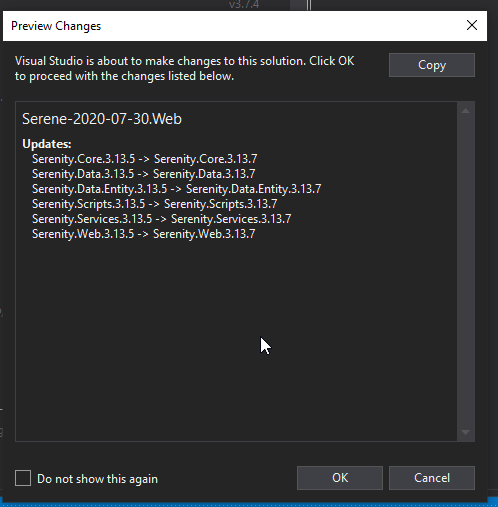
No problem.
With kind regards,
John
JohnRanger
on 30 Jul 2020
When i upgrade to Serene version 3.13.54 - i get error message to the effect of saying - components already installed an the app still shows up in the update as if this version did not take. If it took then it wouldn't appear in the update area. So it needs to be corrected or if it has been applied - i need the way to verify the version is there and for visual studio to stop giving me this app needs to be updated - i will also look and see "preview changes" Thank you in advance
clalbert
on 30 Jul 2020
how do you see preview changes that you illustrated because it looks like once i get my error messages - you can't see preview
please help
clalbert
on 30 Jul 2020
Hi @clalbert ,
I did it like this:
1)
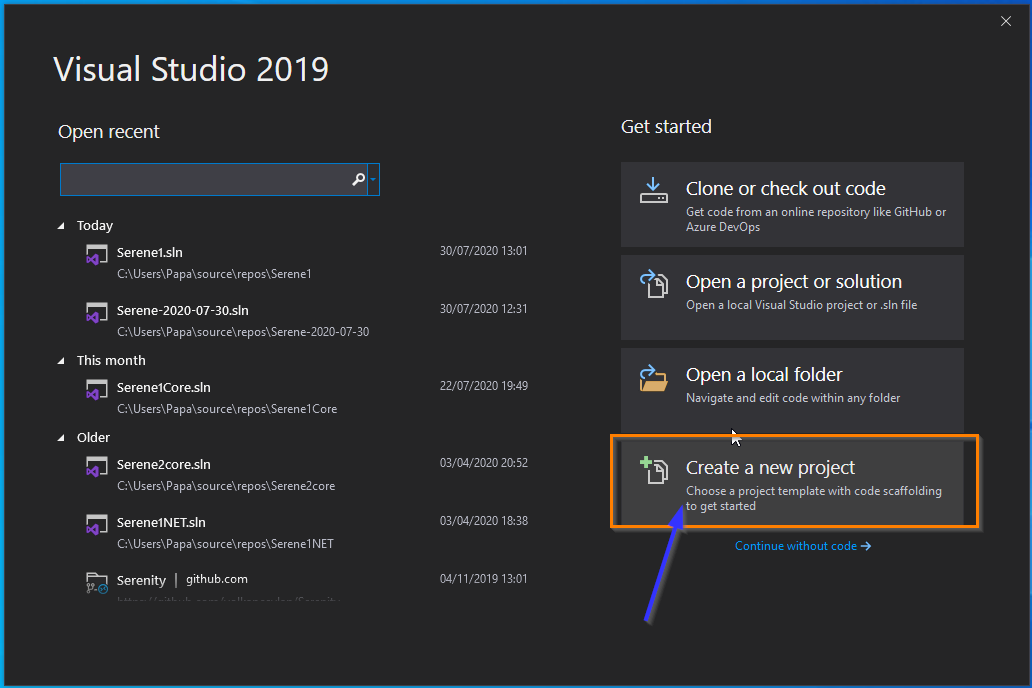
2)
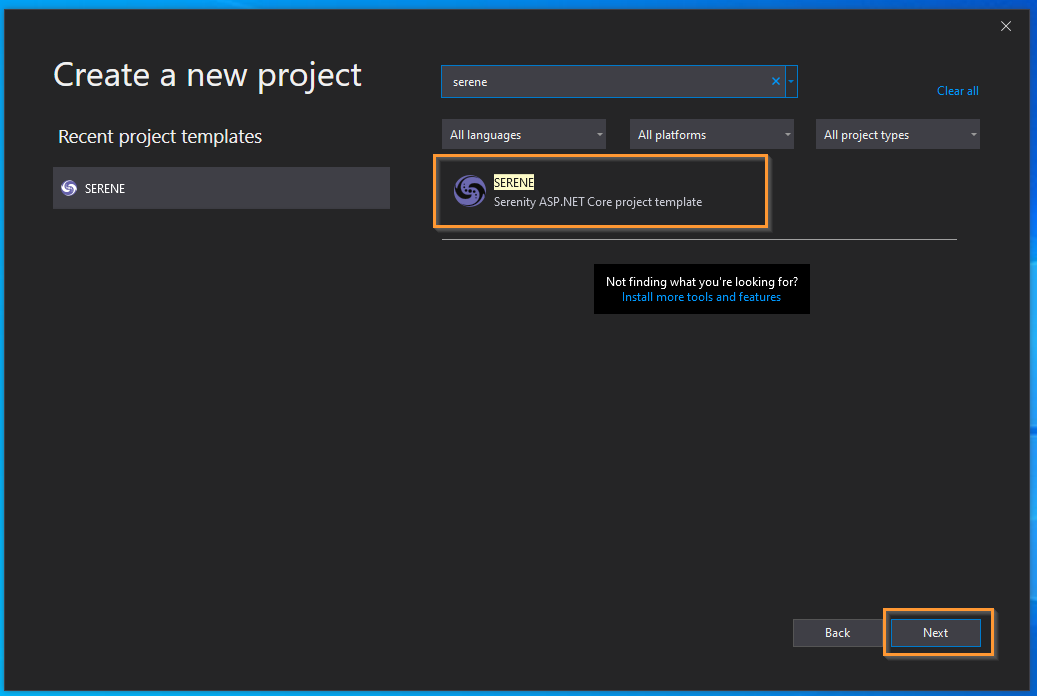
3)
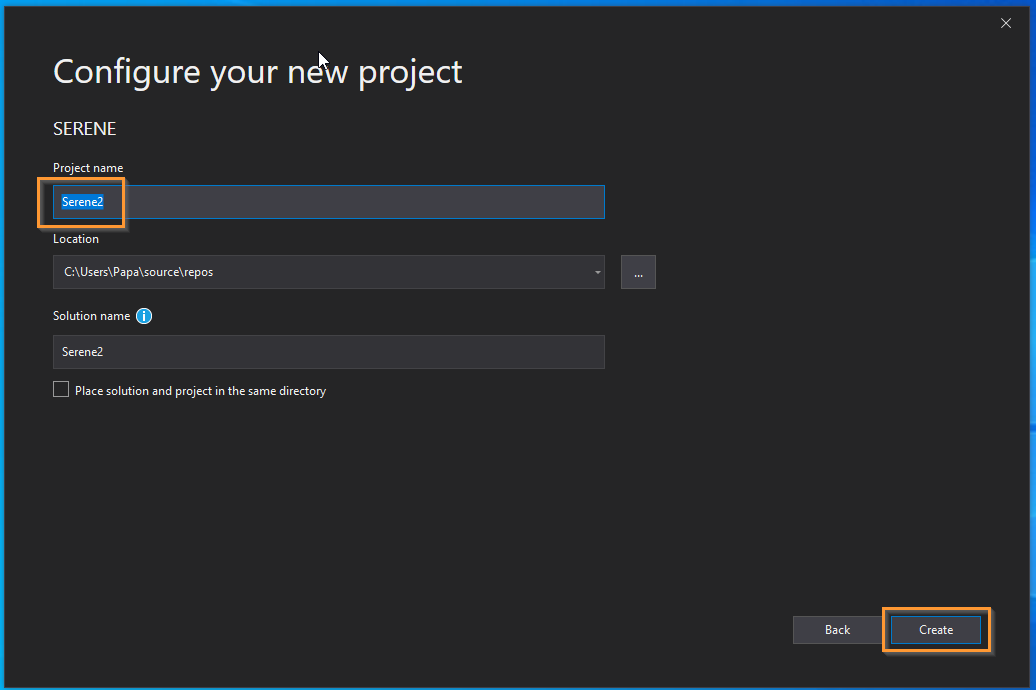
4)
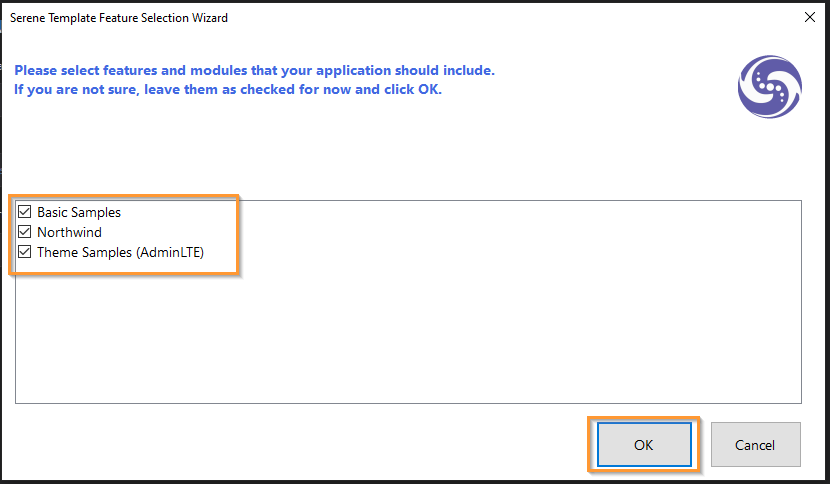
5)
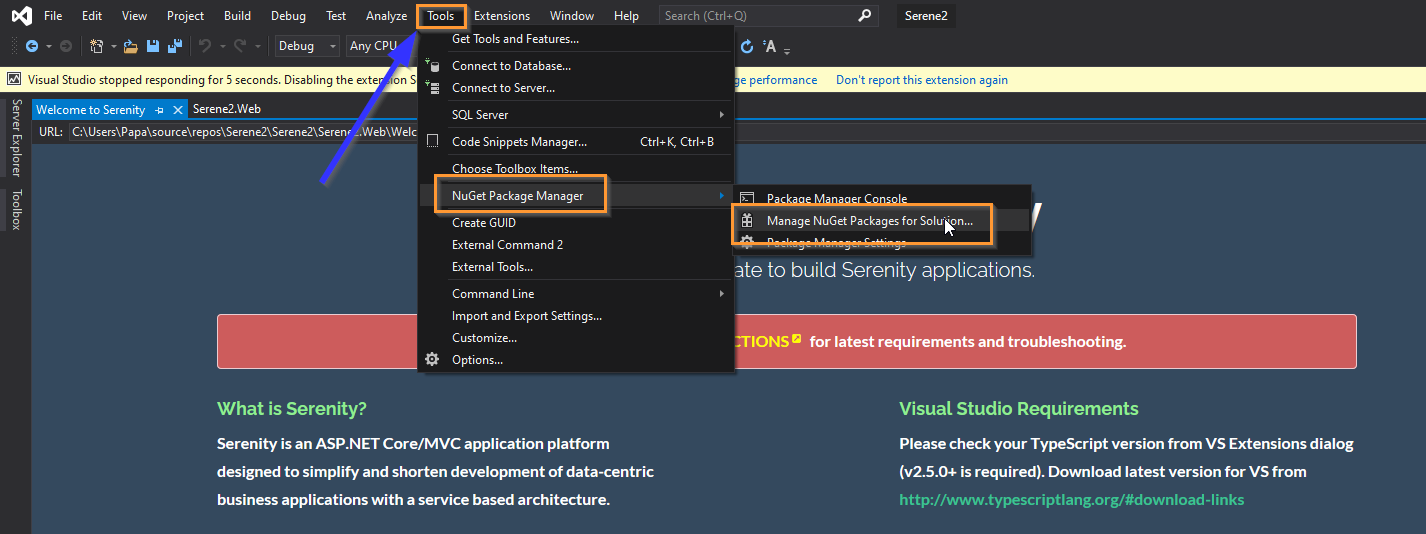
6)
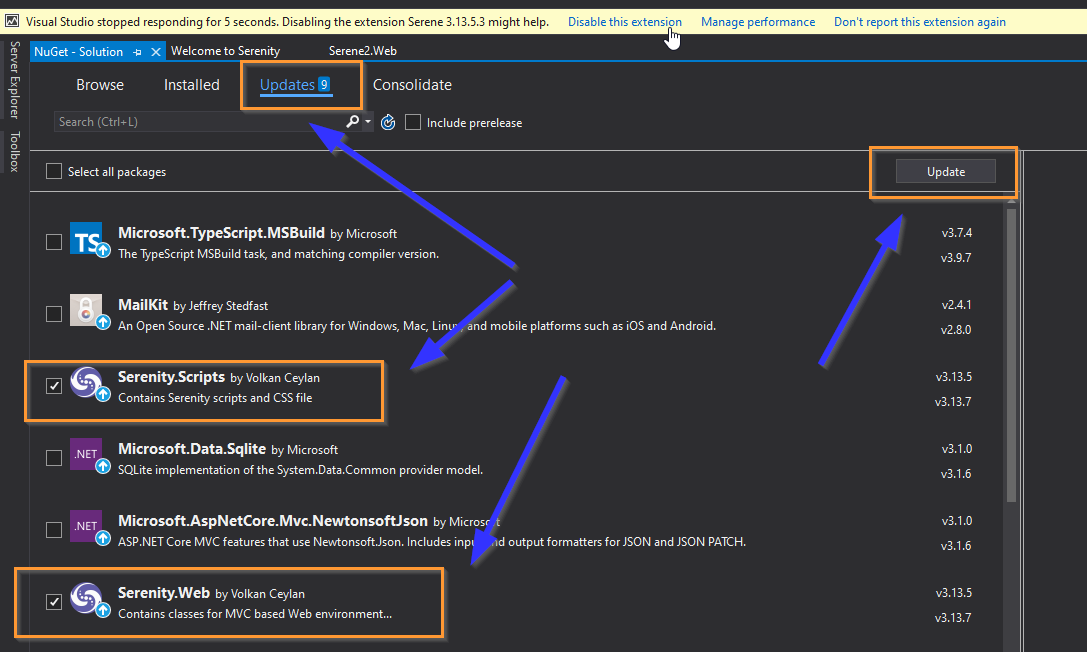
7)
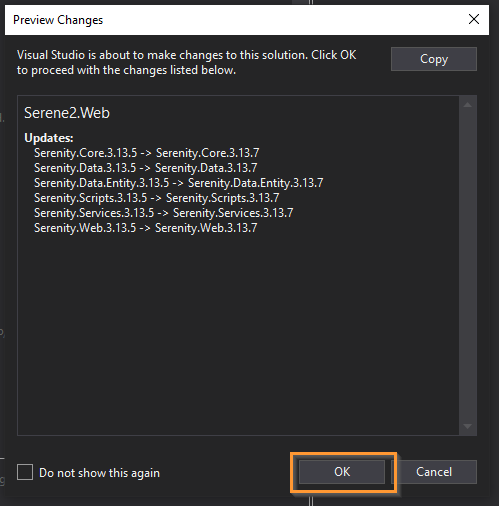
Hope, this helps.
With kind regards,
John
JohnRanger
on 30 Jul 2020
thanks john - i think i will disable old version, then update to new version - otherwise i will look at your diagrams and try a new project as illustrated
clalbert
on 30 Jul 2020
thank you for your email - what else in the community i should look at - i just tried to disable previous version and attempted update and i get message saying to the effect all is installed but the update doesn't go away. i used Administrator version as well as without it - would you see log in email? i think i will - glad to see the author of this App. i will send you log shortly.
Charles L. Albert
On Thursday, July 30, 2020, 2:36:22 PM EDT, JohnRanger <[email protected]> wrote:
Hi @clalbert ,
I did it like this:
- -
Hope, this helps.
With kind regards,
John
—
You are receiving this because you were mentioned.
Reply to this email directly, view it on GitHub, or unsubscribe.
clalbert
on 30 Jul 2020
sorry there is no log of this when i tried to install update - please advise where i can this log
Charles L. Albert
On Thursday, July 30, 2020, 4:32:17 PM EDT, CHARLES ALBERT <[email protected]> wrote:
thank you for your email - what else in the community i should look at - i just tried to disable previous version and attempted update and i get message saying to the effect all is installed but the update doesn't go away. i used Administrator version as well as without it - would you see log in email? i think i will - glad to see the author of this App. i will send you log shortly.
Charles L. Albert
On Thursday, July 30, 2020, 2:36:22 PM EDT, JohnRanger <[email protected]> wrote:
Hi @clalbert ,
I did it like this:
- -
Hope, this helps.
With kind regards,
John
—
You are receiving this because you were mentioned.
Reply to this email directly, view it on GitHub, or unsubscribe.
clalbert
on 30 Jul 2020
attached is my log of my last attempt
Charles L. Albert
On Thursday, July 30, 2020, 4:37:49 PM EDT, CHARLES ALBERT <[email protected]> wrote:
sorry there is no log of this when i tried to install update - please advise where i can this log
Charles L. Albert
On Thursday, July 30, 2020, 4:32:17 PM EDT, CHARLES ALBERT <[email protected]> wrote:
thank you for your email - what else in the community i should look at - i just tried to disable previous version and attempted update and i get message saying to the effect all is installed but the update doesn't go away. i used Administrator version as well as without it - would you see log in email? i think i will - glad to see the author of this App. i will send you log shortly.
Charles L. Albert
On Thursday, July 30, 2020, 2:36:22 PM EDT, JohnRanger <[email protected]> wrote:
Hi @clalbert ,
I did it like this:
- -
Hope, this helps.
With kind regards,
John
—
You are receiving this because you were mentioned.
Reply to this email directly, view it on GitHub, or unsubscribe.
clalbert
on 30 Jul 2020
First uninstall old version, download new version, and install. Serene has two versions now .NET Core and MVC (Obsolete).
 volkanceylan
on 30 Jul 2020
volkanceylan
on 30 Jul 2020
i just went through the log and just forward u the issue - please correct your update please
7/30/2020 4:35:38 PM - Skipping 'C:\Users\clalbert\AppData\Local\Microsoft SDKs' as it doesn't exist7/30/2020 4:35:39 PM - An extension with a matching Identifier is already installed to this product.
7/30/2020 4:35:39 PM - Microsoft.VisualStudio.ExtensionManager.AlreadyInstalledException: This extension is already installed to all applicable products.
you didn't include deleting old version - hence the above message - you need to allow for update when existing version is there
Charles L. Albert
On Thursday, July 30, 2020, 4:47:24 PM EDT, CHARLES ALBERT <[email protected]> wrote:
attached is my log of my last attempt
Charles L. Albert
On Thursday, July 30, 2020, 4:37:49 PM EDT, CHARLES ALBERT <[email protected]> wrote:
sorry there is no log of this when i tried to install update - please advise where i can this log
Charles L. Albert
On Thursday, July 30, 2020, 4:32:17 PM EDT, CHARLES ALBERT <[email protected]> wrote:
thank you for your email - what else in the community i should look at - i just tried to disable previous version and attempted update and i get message saying to the effect all is installed but the update doesn't go away. i used Administrator version as well as without it - would you see log in email? i think i will - glad to see the author of this App. i will send you log shortly.
Charles L. Albert
On Thursday, July 30, 2020, 2:36:22 PM EDT, JohnRanger <[email protected]> wrote:
Hi @clalbert ,
I did it like this:
- -
Hope, this helps.
With kind regards,
John
—
You are receiving this because you were mentioned.
Reply to this email directly, view it on GitHub, or unsubscribe.
clalbert
on 30 Jul 2020
because serene was said it was updated but it was not and i tried updates through github - and there was nothing to update or install
Charles L. Albert
On Thursday, July 30, 2020, 5:41:51 PM EDT, CHARLES ALBERT <[email protected]> wrote:
i just went through the log and just forward u the issue - please correct your update please
7/30/2020 4:35:38 PM - Skipping 'C:\Users\clalbert\AppData\Local\Microsoft SDKs' as it doesn't exist7/30/2020 4:35:39 PM - An extension with a matching Identifier is already installed to this product.
7/30/2020 4:35:39 PM - Microsoft.VisualStudio.ExtensionManager.AlreadyInstalledException: This extension is already installed to all applicable products.
you didn't include deleting old version - hence the above message - you need to allow for update when existing version is there
Charles L. Albert
On Thursday, July 30, 2020, 4:47:24 PM EDT, CHARLES ALBERT <[email protected]> wrote:
attached is my log of my last attempt
Charles L. Albert
On Thursday, July 30, 2020, 4:37:49 PM EDT, CHARLES ALBERT <[email protected]> wrote:
sorry there is no log of this when i tried to install update - please advise where i can this log
Charles L. Albert
On Thursday, July 30, 2020, 4:32:17 PM EDT, CHARLES ALBERT <[email protected]> wrote:
thank you for your email - what else in the community i should look at - i just tried to disable previous version and attempted update and i get message saying to the effect all is installed but the update doesn't go away. i used Administrator version as well as without it - would you see log in email? i think i will - glad to see the author of this App. i will send you log shortly.
Charles L. Albert
On Thursday, July 30, 2020, 2:36:22 PM EDT, JohnRanger <[email protected]> wrote:
Hi @clalbert ,
I did it like this:
- -
Hope, this helps.
With kind regards,
John
—
You are receiving this because you were mentioned.
Reply to this email directly, view it on GitHub, or unsubscribe.
clalbert
on 31 Jul 2020
i like the sample code i received the other date to see if updated app was really applied. Actually i could not see the 2 serenity packages to update. It wasn't there. So please correct your app so i can properly update serene app.
Charles L. Albert
On Thursday, July 30, 2020, 7:53:20 PM EDT, CHARLES ALBERT clalbert@flash.net wrote:
because serene was said it was updated but it was not and i tried updates through github - and there was nothing to update or install
Charles L. Albert
On Thursday, July 30, 2020, 5:41:51 PM EDT, CHARLES ALBERT <[email protected]> wrote:
i just went through the log and just forward u the issue - please correct your update please
7/30/2020 4:35:38 PM - Skipping 'C:\Users\clalbert\AppData\Local\Microsoft SDKs' as it doesn't exist7/30/2020 4:35:39 PM - An extension with a matching Identifier is already installed to this product.
7/30/2020 4:35:39 PM - Microsoft.VisualStudio.ExtensionManager.AlreadyInstalledException: This extension is already installed to all applicable products.
you didn't include deleting old version - hence the above message - you need to allow for update when existing version is there
Charles L. Albert
On Thursday, July 30, 2020, 4:47:24 PM EDT, CHARLES ALBERT <[email protected]> wrote:
attached is my log of my last attempt
Charles L. Albert
On Thursday, July 30, 2020, 4:37:49 PM EDT, CHARLES ALBERT <[email protected]> wrote:
sorry there is no log of this when i tried to install update - please advise where i can this log
Charles L. Albert
On Thursday, July 30, 2020, 4:32:17 PM EDT, CHARLES ALBERT <[email protected]> wrote:
thank you for your email - what else in the community i should look at - i just tried to disable previous version and attempted update and i get message saying to the effect all is installed but the update doesn't go away. i used Administrator version as well as without it - would you see log in email? i think i will - glad to see the author of this App. i will send you log shortly.
Charles L. Albert
On Thursday, July 30, 2020, 2:36:22 PM EDT, JohnRanger <[email protected]> wrote:
Hi @clalbert ,
I did it like this:
- -
Hope, this helps.
With kind regards,
John
—
You are receiving this because you were mentioned.
Reply to this email directly, view it on GitHub, or unsubscribe.
clalbert
on 31 Jul 2020
I think clalbert cannot update the Serene extension in Visual Studio.
It's not a problem - you can still use the second-latest version. Unless there is something critical he needs in the latest fix but I doubt that having seen the changelog.
It still works and nothing is stopping you from getting your app up and running. I have the latest version of VS Community and I am still able to do all my work without any problems.
edwardch
on 31 Jul 2020
yes please update app - i posted you my log of the result when i tried and VS2019 still show app to be updated - please, please, please correct
Charles L. Albert
On Friday, July 31, 2020, 1:55:01 PM EDT, Edward <[email protected]> wrote:
I think clalbert cannot update the Serene extension in Visual Studio.
It's not a problem - you can still use the second-latest version. Unless there is something critical he needs in the latest fix but I doubt that having seen the changelog.
It still works and nothing is stopping you from getting your app up and running. I have the latest version of VS Community and I am still able to do all my work without any problems.
—
You are receiving this because you were mentioned.
Reply to this email directly, view it on GitHub, or unsubscribe.
clalbert
on 31 Jul 2020
@clalbert ,
if the update does not work for you, then it is most probably a problem with your dev environment.
I have invested here quite some effort to test if the deployment and upgrade of Serene does work on a clean windows 10 and VS2019 - and it does - as you can see documented with above screenshot series.
Please test it in a clean environment (either in a virtual machine (e.g. use free Virtualbox) with freshly setuped Win10 and VS 2019 or reinstall your windows 10 and VS2019 community but make sure your existing windows settings and data are not preserved - of course make a separate backup of your data before you reinstall and restore only the essential stuff from your backup to your new win10 installation).
This is the minimum effort we can expect from you - as I have already taken the same effort on my side ;-)
With kind regards,
John
JohnRanger
on 3 Aug 2020
no can do because it will take days to redo my systems. There are 2 windows 10 operating systems, 1 window server 2012 operating system. All else appears to working fine. i keep up with the updates on a regular basis. i do have the vmplayer from which i will attempt bringing that upto date amd tthen
test it out. i might just delete the entire app until you come up with the next release.
It will be nice if you place the new version as a download in visual studio marketplace. Right now it is the old version. That might resolve everything.
Charles L. Albert
On Sunday, August 2, 2020, 10:28:29 PM EDT, JohnRanger <[email protected]> wrote:
@clalbert ,
if the update does not work for you, then it is most probably a problem with your dev environment.
I have invested here quite some effort to test if the deployment and upgrade of Serene does work on a clean windows 10 and VS2019 - and it does - as you can see documented with above screenshot series.
Please test it in a clean environment (either in a virtual machine (e.g. use free Virtualbox) with freshly setuped Win10 and VS 2019 or reinstall your windows 10 and VS2019 community but make sure your existing windows settings and data are not preserved - of course make a separate backup of your data before you reinstall and restore only the essential stuff from your backup to your new win10 installation).
This is the minimum effort we can expect from you - as I have already taken the same effort on my side ;-)
With kind regards,
John
—
You are receiving this because you were mentioned.
Reply to this email directly, view it on GitHub, or unsubscribe.
clalbert
on 3 Aug 2020
i further would like to say - your initial response is unacceptable in a production environment. In a developer's environment yes - i should do what you say but when you are dealing with a production system - this software would not pass production standards. You can probably ensure a perfect system to get any software installed. Please correct problem with the noted error problem and fix it PLEASE.
Charles L. Albert
On Monday, August 3, 2020, 10:14:59 AM EDT, CHARLES ALBERT <[email protected]> wrote:
no can do because it will take days to redo my systems. There are 2 windows 10 operating systems, 1 window server 2012 operating system. All else appears to working fine. i keep up with the updates on a regular basis. i do have the vmplayer from which i will attempt bringing that upto date amd tthen
test it out. i might just delete the entire app until you come up with the next release.
It will be nice if you place the new version as a download in visual studio marketplace. Right now it is the old version. That might resolve everything.
Charles L. Albert
On Sunday, August 2, 2020, 10:28:29 PM EDT, JohnRanger <[email protected]> wrote:
@clalbert ,
if the update does not work for you, then it is most probably a problem with your dev environment.
I have invested here quite some effort to test if the deployment and upgrade of Serene does work on a clean windows 10 and VS2019 - and it does - as you can see documented with above screenshot series.
Please test it in a clean environment (either in a virtual machine (e.g. use free Virtualbox) with freshly setuped Win10 and VS 2019 or reinstall your windows 10 and VS2019 community but make sure your existing windows settings and data are not preserved - of course make a separate backup of your data before you reinstall and restore only the essential stuff from your backup to your new win10 installation).
This is the minimum effort we can expect from you - as I have already taken the same effort on my side ;-)
With kind regards,
John
—
You are receiving this because you were mentioned.
Reply to this email directly, view it on GitHub, or unsubscribe.
clalbert
on 3 Aug 2020
@clalbert The community is trying to help and you are responding unreasonably. We are all trying to help eachother in our spare time and in return we learn, get help, or new ideas. Maybe you should consider buying a license or seeking paid-for support.
It sounds like you only have a problem with the Visual Studio extension, nothing else.
The good news is:
- Your app will work
- Visual Studio will also work
@volkanceylan BTW I tried to update the Serenity _extension_ the other day and it said it was successful, then afterwards the Visual Studio still said the extension update was available. I can still develop my app using Serenity - no problem.
I will try again tomorrow and confirm. Today I'm on another OS using VSCode.
edwardch
on 3 Aug 2020
yes it is a visual studio problem - they forward me to github - that;s how i reached you.- when an update reaches me on visual studio - i assume it is fully tested in a production environment -this is my first time i am using github. If necessary forward me with a contact in Serene for me tell them the problem
Charles L. Albert
On Monday, August 3, 2020, 1:04:22 PM EDT, Edward <[email protected]> wrote:
@clalbert The community is trying to help and you are responding unreasonably. We are all trying to help eachother in our spare time and in return we learn, get help, or new ideas. Maybe you should consider buying a license or seeking paid-for support.
It sounds like you only have a problem with the Visual Studio extension, nothing else.
The good news is:
- Your app will work
- Visual Studio will also work
@volkanceylan BTW I tried to update the Serenity extension the other day and it said it was successful, then afterwards the Visual Studio still said the extension update was available. I can still develop my app using Serenity - no problem.
I will try again tomorrow and confirm. Today I'm on another OS using VSCode.
—
You are receiving this because you were mentioned.
Reply to this email directly, view it on GitHub, or unsubscribe.
clalbert
on 3 Aug 2020
did their website go down - i can't find when i googled it - i did find serenity software and called themthey said 6 mos ago - they tried and couldn't find a website - so even if i buy license - no reference to them - so it looks like microsoft is allowing apps that may or may not work. Now i retry microsft.
Charles L. Albert
On Monday, August 3, 2020, 1:23:23 PM EDT, CHARLES ALBERT <[email protected]> wrote:
yes it is a visual studio problem - they forward me to github - that;s how i reached you.- when an update reaches me on visual studio - i assume it is fully tested in a production environment -this is my first time i am using github. If necessary forward me with a contact in Serene for me tell them the problem
Charles L. Albert
On Monday, August 3, 2020, 1:04:22 PM EDT, Edward <[email protected]> wrote:
@clalbert The community is trying to help and you are responding unreasonably. We are all trying to help eachother in our spare time and in return we learn, get help, or new ideas. Maybe you should consider buying a license or seeking paid-for support.
It sounds like you only have a problem with the Visual Studio extension, nothing else.
The good news is:
- Your app will work
- Visual Studio will also work
@volkanceylan BTW I tried to update the Serenity extension the other day and it said it was successful, then afterwards the Visual Studio still said the extension update was available. I can still develop my app using Serenity - no problem.
I will try again tomorrow and confirm. Today I'm on another OS using VSCode.
—
You are receiving this because you were mentioned.
Reply to this email directly, view it on GitHub, or unsubscribe.
clalbert
on 3 Aug 2020
i just reported as a microsoft problem
the problem with Serene updates is that there is no company with a website that allows feedback and software updates from this App does not exist. It therefore it behooves me that software given to visual studio through updates is take as is. Microsoft should do a full test on updates before it is given - because softwareshould be set to go in a production environment after looking it over in visual studio. Microsoft is obvious not doing this
Charles L. Albert
On Monday, August 3, 2020, 1:51:42 PM EDT, CHARLES ALBERT <[email protected]> wrote:
did their website go down - i can't find when i googled it - i did find serenity software and called themthey said 6 mos ago - they tried and couldn't find a website - so even if i buy license - no reference to them - so it looks like microsoft is allowing apps that may or may not work. Now i retry microsft.
Charles L. Albert
On Monday, August 3, 2020, 1:23:23 PM EDT, CHARLES ALBERT <[email protected]> wrote:
yes it is a visual studio problem - they forward me to github - that;s how i reached you.- when an update reaches me on visual studio - i assume it is fully tested in a production environment -this is my first time i am using github. If necessary forward me with a contact in Serene for me tell them the problem
Charles L. Albert
On Monday, August 3, 2020, 1:04:22 PM EDT, Edward <[email protected]> wrote:
@clalbert The community is trying to help and you are responding unreasonably. We are all trying to help eachother in our spare time and in return we learn, get help, or new ideas. Maybe you should consider buying a license or seeking paid-for support.
It sounds like you only have a problem with the Visual Studio extension, nothing else.
The good news is:
- Your app will work
- Visual Studio will also work
@volkanceylan BTW I tried to update the Serenity extension the other day and it said it was successful, then afterwards the Visual Studio still said the extension update was available. I can still develop my app using Serenity - no problem.
I will try again tomorrow and confirm. Today I'm on another OS using VSCode.
—
You are receiving this because you were mentioned.
Reply to this email directly, view it on GitHub, or unsubscribe.
clalbert
on 3 Aug 2020
@volkanceylan to confirm my previous comment, I updated the extension from here
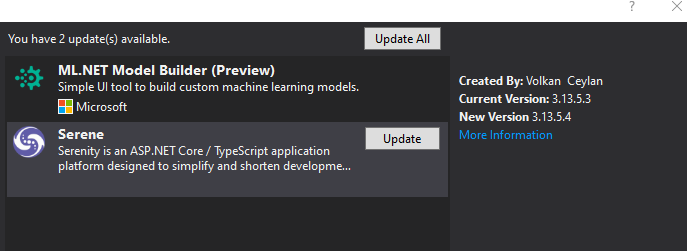
And I get a VSIX Installer message saying "This extension is already installed to all applicable products.".
@clalbert like I said you can still continue your work - please don't panic.
This extension is only for _creating_ new projects based on the Serene template and Serenity framework. That's it. You can update your individual apps/projects like @JohnRanger has spent time showing you.
If you browse this code repository you will be able to run it yourself, learn a bit, and contribute to this project. So many of us use and rely on Serene/Serenity every day, thanks to the countless hours (years) given by Volkan and the community.
This open source project home page has links on it to help you get started, and if you can't find it look here: https://serenity.is/
Spend a bit of time around here and you will learn a lot. Positivity helps especially.
Good luck!
edwardch
on 4 Aug 2020
This is just a invalid update warning from Visual Studio marketplace, i think the version in VSIX and the marketplace metadata did not match somehow possibly due to a server error on their side during uploading. This guy has strange comments and unfair criticism while he is using mail to respond to your answers making it hard to follow and complaining while you are all trying to help. I'm closing this issue.
P.S. I have uploaded a new version of Serene to marketplace, and this should solve the update problem as i tested it.
volkanceylan
on 5 Aug 2020
Now you see the potential problem with people dealing with visual studio. It would be nice to make another update that might correct problem. what you telling me - it is a work around, see the update is available and live with it until somebody within the team corrects the problem with visual studio and if i don't like it i don't have the request for update and wait for the next update from your implementation
i can see your link to source page - do you know who makes the releases. Can you forward me to the person doing the updates and correct this visual studio issue ?? Thank you in advance.
Charles L. Albert
On Wednesday, August 5, 2020, 6:51:30 AM EDT, Volkan Ceylan <[email protected]> wrote:
This is just a invalid update warning from Visual Studio marketplace, i think the version in VSIX and the marketplace metadata did not match somehow possibly due to a server error on their side during uploading. This guy has strange comments and unfair criticism while he is using mail to respond to your answers making it hard to follow and complaining while you are all trying to help. I'm closing this issue.
P.S. I have uploaded a new version of Serene to marketplace, and this should solve the update problem as i tested it.
—
You are receiving this because you were mentioned.
Reply to this email directly, view it on GitHub, or unsubscribe.
clalbert
on 6 Aug 2020
it looks like microsoft had several updates to windows 10 with .net and when applied, serene was just there already installed version 3.13.70 and no requesting updates of serene. Now i can try your sample run-through. -- Probably typical microsoft saying to contact source of app which happen to be you. i think all is resolved with windows 10. Next comes windows server 2012
Charles L. Albert
On Thursday, August 6, 2020, 1:57:35 PM EDT, CHARLES ALBERT <[email protected]> wrote:
Now you see the potential problem with people dealing with visual studio. It would be nice to make another update that might correct problem. what you telling me - it is a work around, see the update is available and live with it until somebody within the team corrects the problem with visual studio and if i don't like it i don't have the request for update and wait for the next update from your implementation
i can see your link to source page - do you know who makes the releases. Can you forward me to the person doing the updates and correct this visual studio issue ?? Thank you in advance.
Charles L. Albert
On Wednesday, August 5, 2020, 6:51:30 AM EDT, Volkan Ceylan <[email protected]> wrote:
This is just a invalid update warning from Visual Studio marketplace, i think the version in VSIX and the marketplace metadata did not match somehow possibly due to a server error on their side during uploading. This guy has strange comments and unfair criticism while he is using mail to respond to your answers making it hard to follow and complaining while you are all trying to help. I'm closing this issue.
P.S. I have uploaded a new version of Serene to marketplace, and this should solve the update problem as i tested it.
—
You are receiving this because you were mentioned.
Reply to this email directly, view it on GitHub, or unsubscribe.
clalbert
on 7 Aug 2020
all is done on window server 2012 - your source software assumed latest updtate in visual studio.
Charles L. Albert
On Friday, August 7, 2020, 1:18:54 PM EDT, CHARLES ALBERT <[email protected]> wrote:
it looks like microsoft had several updates to windows 10 with .net and when applied, serene was just there already installed version 3.13.70 and no requesting updates of serene. Now i can try your sample run-through. -- Probably typical microsoft saying to contact source of app which happen to be you. i think all is resolved with windows 10. Next comes windows server 2012
Charles L. Albert
On Thursday, August 6, 2020, 1:57:35 PM EDT, CHARLES ALBERT <[email protected]> wrote:
Now you see the potential problem with people dealing with visual studio. It would be nice to make another update that might correct problem. what you telling me - it is a work around, see the update is available and live with it until somebody within the team corrects the problem with visual studio and if i don't like it i don't have the request for update and wait for the next update from your implementation
i can see your link to source page - do you know who makes the releases. Can you forward me to the person doing the updates and correct this visual studio issue ?? Thank you in advance.
Charles L. Albert
On Wednesday, August 5, 2020, 6:51:30 AM EDT, Volkan Ceylan <[email protected]> wrote:
This is just a invalid update warning from Visual Studio marketplace, i think the version in VSIX and the marketplace metadata did not match somehow possibly due to a server error on their side during uploading. This guy has strange comments and unfair criticism while he is using mail to respond to your answers making it hard to follow and complaining while you are all trying to help. I'm closing this issue.
P.S. I have uploaded a new version of Serene to marketplace, and this should solve the update problem as i tested it.
—
You are receiving this because you were mentioned.
Reply to this email directly, view it on GitHub, or unsubscribe.
clalbert
on 8 Aug 2020
Related issues
 GitHubOrim
·
3Comments
GitHubOrim
·
3Comments
 AmuthaKondusamy
·
3Comments
AmuthaKondusamy
·
3Comments
 Pinellus
·
3Comments
Pinellus
·
3Comments
 gfo2007
·
3Comments
JohnRanger
·
3Comments
gfo2007
·
3Comments
JohnRanger
·
3Comments
Most helpful comment
Hi @clalbert ,
I did it like this:
1)

2)

3)

4)

5)

6)

7)

Hope, this helps.
With kind regards,
John