Serenity: Quickfilter Master-Detail
Hi,
I have a master-detail relationship. MIRegister is the master entity and MIHeading is the detail entity. Is there a way to create a quickfilter of MIHeading on the MIRegister grid? That is does anyone have a code-snippet where one can use a detail column to filter a master grid?
Please kindly help.
 gfo2007
All 5 comments
I know you asked for a code example - I don't have one right now - but maybe I can give you some hints of things to look into
on your XYZRow , for the DetailsList
Place [QuickFilter()] Also you have [ QuickFilterOption("oKey", "" )]
You can also look into SearchFilter(SearchType.Contains)
Set your filter field, filtervalue = DetailsList.MyFilterField
 stixoffire
on 3 Apr 2020
stixoffire
on 3 Apr 2020
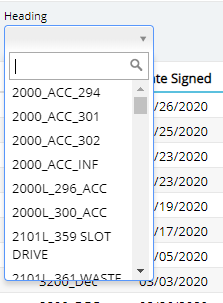
@stixoffire the code below displays the filter for the detail entity and its values. However, I don't know how to handle the request through the Repository of the master entity.
MIRegisterGrid.ts
getQuickFilters(): any {
            var filters = super.getQuickFilters();

            filters.push({
                field: headingFld.MiHeadingId,
                type: Serenity.LookupEditor,
                title: "Heading",
                cssClass: "quick-filter-width-250",
                options: {
                    lookupKey: "Survey.MiHeading"
                }
            });

            return filters;
        }
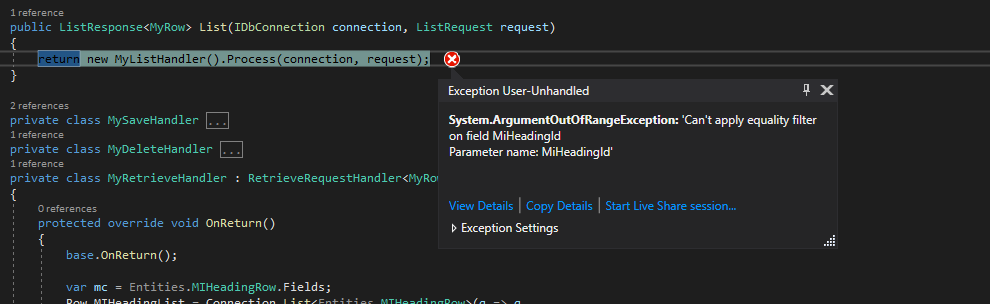
When I select a heading, the error that shows is in the image below.
gfo2007
on 4 Apr 2020
Hi,
I have been able to implement it and I thought I would share what I did with the community.
Filter the Master Grid using values from the Details entity in a Master-Detail Implementation
In the grid.ts file of the master, put this code
MIRegisterGrid.ts
//import the fields for the details entity
import headingFld = Survey.MIHeadingRow.Fields;

//add the filter component to the grid. In doing so, use the Master entity's Id which the foreign key //in the details entity as the field value inside the filter.push properties.
getQuickFilters(): any {
            var filters = super.getQuickFilters();

            filters.push({
                field: headingFld.MiId,
                type: Serenity.LookupEditor,
                title: "Heading",
                cssClass: "quick-filter-width-250",
                options: {
                    lookupKey: "Survey.MIHeadingNew"
                }
            });

            return filters;
        }
I then created a lookup class of the details entity which serves as the lookup key value in the grid.ts code since I needed to apply some conditions to my lookup data. If no extra conditions are needed, you can simply put a LookupScript attribute on the details Row and use it in the grid.ts of the master entity.
MIHeadingNewLookup.cs
//Use the Id of the Master entity which is the foreign key in the Details entity as the IdField in the //Lookup Class

[LookupScript("Survey.MIHeadingNew", Permission = "?")]
    public class MIHeadingNewLookup : RowLookupScript<MIHeadingRow>
    {
        public MIHeadingNewLookup()
        {
            IdField = "MiId";
            TextField = "MiHeadingName";
        }

        protected override void PrepareQuery(SqlQuery query)
        {
            //base.PrepareQuery(query);
            var fld = MIHeadingRow.Fields;

            query
            .Select(fld.MiId, fld.MiHeadingName)
            //.Where(new Criteria(fld.SiteId) == 17)
            .Where(new Criteria(fld.Obsolete) == 0);
        }

        protected override void ApplyOrder(SqlQuery query)
        {
        }
    }
Hope this helps someone.
Thank you
gfo2007
on 6 Apr 2020
@gfo2007 I am glad you figured that out .
stixoffire
on 10 Apr 2020
@gfo2007 ,
and a special "thank you" for posting your solution back here. Especially the part with how to create an xyzLookup.cs - as this was one the tasks on my learning list.
With kind regards,
John
 JohnRanger
on 11 Apr 2020
JohnRanger
on 11 Apr 2020
Related issues
 AmuthaKondusamy
·
3Comments
AmuthaKondusamy
·
3Comments
 Amitloh
·
3Comments
Amitloh
·
3Comments
 Shraddha996
·
3Comments
Shraddha996
·
3Comments
 newyearsoft
·
3Comments
newyearsoft
·
3Comments
 Pinellus
·
3Comments
Pinellus
·
3Comments