Serenity: Pass param to MySaveHandler
Hi all,
I'm triyng to create a family and automaticaly create first member in that family.
ResidentRow is my table with all th persons.
FamilleRow is my Family table.
ResidentNnFamille is my Link table (I need this third table because a resident can enter and quit a family several times and I nedd to no when. This is a kind of history table).
So, from my ResidentForm when I create a family, I would like to create a ResidentNnFamilleRow with codeFamille, codeResident and date.
I'm triyng to do that in "afterSave()" void in MySaveHandler but I don't find how to pass codeResident to it.
Any clue ?
`
private class MySaveCreateHandler : SaveRequestHandler
{
        protected override void AfterSave()
        {

            base.AfterSave();
            {
                new SqlInsert("ResidentNnFamille")
                    .Set("Famille_code", Row.CodeFamille)
                    .Set("Resident_code", HERE IS THE PROBLEM)
                    .Set("ResponsableResidentNnFamille", 1)
                    .Set("LienFamille_code", 1)
                    .Set("dateDebutResidentNnFamille", System.DateTime.Now)
                    .Execute(this.Connection);
            }
        }
    }
`
If needed, I can be more specific (with code and tables)
Thank's
 fremar83
All 10 comments
2 days without any answer.
So maybe being more specific ?
Here are my three tables
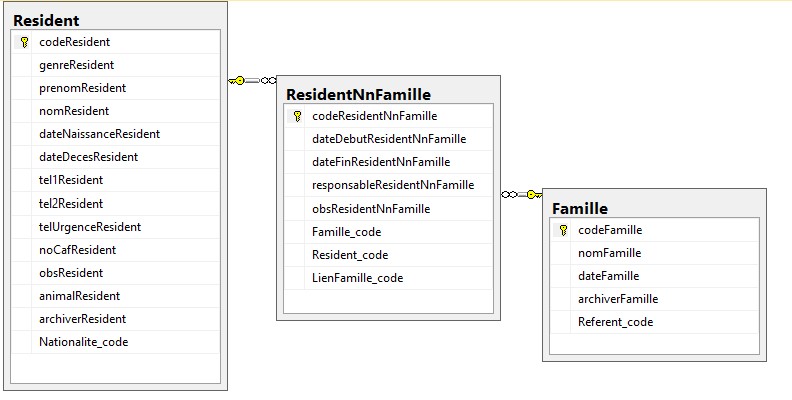
From ResidentForm, I create a new Famille (masterDetailRelation).
I want to force adding of a ResidentNnFamille with codeResident and codeFamille.
I pass codeResident from ResidentDialog to FamilleDialog (via FamilleEditor).
I created a "FamilleSaveRequest" (extended from SaveRequest) with a new property (ResidentCode)
`
namespace Serenity.Services
{
public class FamilleSaveRequest : SaveRequest
{
public Int32 ResidentCode { get; set; }
}
}
`
Now I have to :
1) put ResidentCode in FamilleSaveRequest from FamilleDialog.
In the Famille Dialog,
`
protected getToolbarButtons(): Serenity.ToolButton[] {
let buttons = super.getToolbarButtons();
        if (this.entity.ReferentCode == null && this.codeResidentDeFamilleDialog != 0) {// si création Famille et depuis résidentFiche

            buttons.splice(Q.indexOf(buttons, x => x.cssClass == "save-and-close-button"), 1);

            buttons.push({
                title: 'save-and-close',
                cssClass: 'save-and-close-button',
                icon: 'fa-save',

                onClick: () => {
                    var request = this.getSaveRequest();
                    FamilleService.Create(
                        {
                            Entity: request.Entity,
                            ResidentCode: this.codeResidentDeFamilleDialog
                        }
                    )
                }
            });
        }

        return buttons;
    }
`
2) Modify my create method on repository
 public SaveResponse Create(IUnitOfWork uow, FamilleSaveRequest request)
        {
            if (request.ResidentCode != 0)
            {
                return new MySaveCreateHandler().Process(uow, request, SaveRequestType.Create);
            }
            else
            {
                return new MySaveHandler().Process(uow, request, SaveRequestType.Create); // si créé depuis la liste des Famille
            }
        }
3) Insert my new row from AfterSave() in MysSaveHandler method.
`
private class MySaveCreateHandler : SaveRequestHandler
{
protected override void AfterSave()
{
base.AfterSave();
{
new SqlInsert("ResidentNnFamille")
.Set("Famille_code", Row.CodeFamille)
.Set("Resident_code", I NEED TO PASS THE CODE HERE )
.Set("ResponsableResidentNnFamille", 1)
.Set("LienFamille_code", 1)
.Set("dateDebutResidentNnFamille", System.DateTime.Now)
.Execute(this.Connection);
}
}
}
`
Maybe a simpler way can acheive this. So Don't hesitate!
Thank's
fremar83
on 18 Jan 2020
why not using a trigger database ?
 kilroyFR
on 21 Jan 2020
kilroyFR
on 21 Jan 2020
Hi @kilroyFR ,
Because I can't pass my param (ResidentCode) to the trigger.
I finaly found where was my problem.
I only had to change the SaveRequestHandler like this :
`
private class MySaveCreateHandler : SaveRequestHandler
{
protected override void AfterSave()
{
            base.AfterSave();
            {
                new SqlInsert("ResidentNnFamille")
                    .Set("Famille_code", Row.CodeFamille)
                    .Set("Resident_code", this.Request.ResidentCode)
                    .Set("ResponsableResidentNnFamille", 1)
                    .Set("LienFamille_code", 1)
                    .Set("dateDebutResidentNnFamille", System.DateTime.Now)
                    .Execute(this.Connection);
            }
        }
    }
`
Thank's for your concern.
fremar83
on 21 Jan 2020
Just for the records, I had to place a reponse in the "onClick create" in the dialog like this :
`
protected getToolbarButtons(): Serenity.ToolButton[] {
let buttons = super.getToolbarButtons();
        if (this.entity == null && this.codeResidentDeFamilleDialog != 0) {// si création Famille et depuis résidentFiche

            buttons.splice(Q.indexOf(buttons, x => x.cssClass == "save-and-close-button"), 1);

            buttons.push({
                title: 'save-and-close',
                cssClass: 'save-and-close-button',
                icon: 'fa-save',

                onClick: () => {
                    var request = this.getSaveRequest();
                    FamilleService.Create(
                        {
                            Entity: request.Entity,
                            ResidentCode: this.codeResidentDeFamilleDialog

                        },
                        response => {
                            this.dialogClose();
                            window.setTimeout(() => Q.notifySuccess(Q.text('Famille créée ')), 0);
                            window.document.location.reload(true);

                        }
                    );
                }
            });
        }

        return buttons;
    }
`
fremar83
on 21 Jan 2020
The "reload" line is just here because I call FamilleColumns form a simple page (chtml).
fremar83
on 21 Jan 2020
Because I can't make diference between on Save and Update Buttons (same CSS class), I had to identify the two cases In my button push :
`
protected getToolbarButtons(): Serenity.ToolButton[] {
let buttons = super.getToolbarButtons();
buttons.splice(Q.indexOf(buttons, x => x.cssClass == "save-and-close-button"), 1);
buttons.push({
title: 'save-and-close',
cssClass: 'save-and-close-button',
icon: 'fa-save',
onClick: () => {
var request = this.getSaveRequest();
if (this.isNew()) { // si c'est une création)
FamilleService.Create(
{
Entity: request.Entity,
ResidentCode: this.codeResidentDeFamilleDialog // passage du code résident au FamilleSaveRequest
},
response => {
this.dialogClose();
window.document.location.reload(true); // refresh de ResidentFiche (html) ou FamilleGrid
}
);
}
else { // si en modif))
FamilleService.Update({
Entity: request.Entity,
},
response => {
this.dialogClose();
window.document.location.reload(true); // refresh de FamilleGrid
})
}
}
});
        return buttons;
    }
`
Any other way to do it ?
fremar83
on 25 Jan 2020
By the way, why is my code presented like if I did not use the "code quotes" ?
Thank's
fremar83
on 25 Jan 2020
@fremar83 ,
thanks for answering your own question here. this is always a good practice when no one answers :-)
As this is github, we don't know exactly why your code above didn't auto-format. Are you sure that you did 3 back-ticks directly before the beginning of your code and that you added TS after this - and then after the end of you code, did you also apply 3 back-ticks?
With kind regards,
John
 JohnRanger
on 31 Jan 2020
JohnRanger
on 31 Jan 2020
Hi @JohnRanger
I just use the code icon.
fremar83
on 1 Feb 2020
Ah I never use the code icon but do it like this:
1) 3 backticks (`), directly followed by the programming language (e.g. TS, JS, CS, CSS, HTML, etc)
2) Insert as many code lines as you want
3) close your code with 3 backticks (without specifying the language again)
That always works fine (got that tip once from Volkan :-))
With kind regards,
John
JohnRanger
on 7 Feb 2020
Related issues
 newyearsoft
·
3Comments
newyearsoft
·
3Comments
 Pinellus
·
3Comments
Pinellus
·
3Comments
 gfo2007
·
3Comments
gfo2007
·
3Comments
 dkontod
·
3Comments
JohnRanger
·
3Comments
dkontod
·
3Comments
JohnRanger
·
3Comments
Most helpful comment
@fremar83 ,
thanks for answering your own question here. this is always a good practice when no one answers :-)
As this is github, we don't know exactly why your code above didn't auto-format. Are you sure that you did 3 back-ticks directly before the beginning of your code and that you added TS after this - and then after the end of you code, did you also apply 3 back-ticks?
With kind regards,
John