Serenity: [Tutorial] How to create a slider dialog
Currently, Serenity just have 2 types of dialog, they are a generic dialog (using jquery dialog) and panel dialog.
With Startsharp version, they also provide you a feature that you can open dialog directly on grid (side by side), it’s called Entity Grid Dialog
I personality want to use new style - a slider which I can open dialog directly from menu button on header (like open a Setting panel)
Demo

and

Okay so here is how to implement :
We will use slideReveal library, so firstly we must include it into project
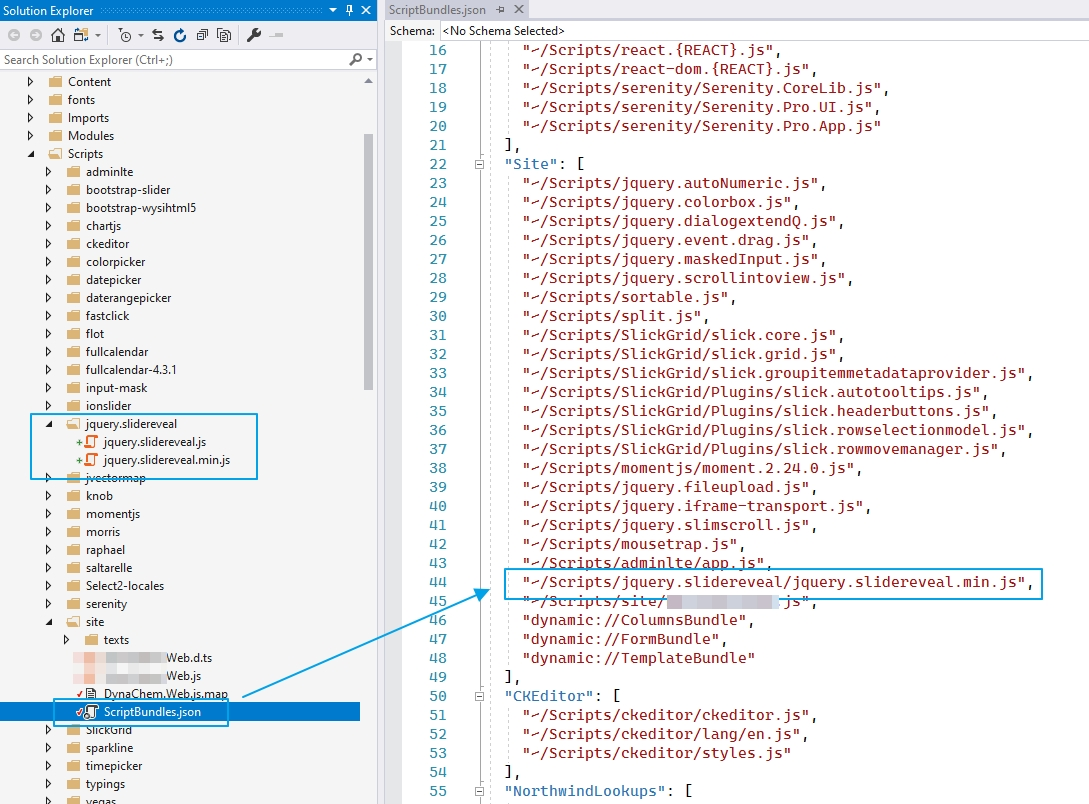
/Content/site/site.less
.slider-container .s-Panel {
    box-shadow: none !important
}

.slider-dialog-force-show-target{
    display: block !important;
}
/Modules/Common/Helpers/MySlilerReveal.ts
Create MySlilerReveal.ts file and put it into ~/Modules/Common/Helpers
namespace YOUR_NAMESPACE.Common {

    export class MySlilerRevealOptions {
        target: JQuery;
        initDialog: () => Serenity.EntityDialog<any, any>;
        onDataChangeCallback?: () => void;
        sliderWidth?: any;
        entityOrId: any;
    }

    @Serenity.Decorators.registerClass()
    export class MySlilerReveal extends Serenity.TemplatedWidget<MySlilerRevealOptions> {

        private slider: JQuery;
        private overlayDiv: JQuery = $(`<div class="custom-slide-reveal-overlay" style="position: fixed; top: 0px; left: 0px; height: 100%; width: 100%; background-color: rgba(0, 0, 0, 0.5); display: block !important;"></div>`);
        private dlg: Serenity.EntityDialog<any, any>;

        constructor(container: JQuery, opt?: MySlilerRevealOptions) {
            super(container, opt);

            let target = this.getTargetElement();
            target.addClass("slider-dialog-force-show-target");

            if (!$(".s-DataGrid").hasClass("panel-hidden")) {
                $(".s-DataGrid").addClass("slider-dialog-force-show-target");
            }

            this.dlg = this.options.initDialog();

            container.appendTo(target);

            if ($(".custom-slide-reveal-overlay").length > 0) {
                this.overlayDiv.css("opacity", 0.2);
            }

            this.overlayDiv.insertBefore(this.element);

            this.overlayDiv.click(e => {
                (this.slider as any).slideReveal('hide');
            });

            let targetCurIndex = 0;
            try {
                targetCurIndex = Q.parseInteger(target.css("z-index"));
            } catch{ }

            targetCurIndex = targetCurIndex.toString() == "NaN" ? 0 : targetCurIndex;
            targetCurIndex = targetCurIndex <= 0 ? 1101 : targetCurIndex;

            this.overlayDiv.css("z-index", targetCurIndex);
            this.element.css("z-index", targetCurIndex);


            this.element.css("position", "relative");

            this.dlg.element.addClass("flex-layout");

            let nbrExistedSlider = $(".slider-container").length;

            //let topHeight = $('header.main-header').height();
            this.slider = (this.byId("sliderContainer") as any).slideReveal({
                push: false,
                position: 'right',
                zIndex: 1100,
                overlay: false,
                autoEscape: true,
                //top: topHeight,
                width: Q.coalesce(this.options.sliderWidth, `calc(50% - ${nbrExistedSlider * 40}px`),
                trigger: this.byId("sliderCloseButton"),
                show: (slider, trigger) => {

                },
                shown: (slider, trigger) => {
                    $(slider).css("right", "-10px");
                },
                hide: (slider, trigger) => {

                },
                hidden: (slider, trigger) => {
                    this.byId("sliderContainer").remove();

                    let target = this.getTargetElement();
                    $(".slider-dialog-force-show-target").removeClass("hidden").removeClass("panel-hidden");

                    target.removeClass("slider-dialog-force-show-target");

                    try {
                        this.overlayDiv.remove();
                    } catch {

                    }

                    try {
                        //this.dlg.dialogClose();
                        //Serenity.TemplatedDialog.closePanel(this.dlg.element);
                    } catch {

                    }
                }
            });

            this.dlg.element.bind('panelclose', () => {
                (this.slider as any).slideReveal('hide');
            });

            this.dlg.element.on("ondatachange", (x, data) => {
                this.options.onDataChangeCallback && this.options.onDataChangeCallback();
            });
        }

        private getTargetElement(): JQuery {
            if (this.options.target.hasClass("s-Panel")) {
                return this.options.target;
            }

            if (this.options.target.hasClass("ui-dialog-content")) {
                return this.options.target.parent();
            }

            if (this.options.target.hasClass("s-DataGrid")) {
                return this.options.target;
            }

            return this.options.target;
        }

        public handleEditItem() {
            if (typeof this.options.entityOrId == "string") {
                this.loadByIdAndOpenSlider(this.options.entityOrId);
                Q.Router.dialog(this.element, this.dlg.element, () => 'edit/' + this.options.entityOrId.toString());
            }
            else {
                Q.Router.dialog(this.element, this.dlg.element, () => "new");
                this.loadNewAndOpenSlider();
            }
        }

        public loadByIdAndOpenSlider(id: any) {

            this.dlg.loadById(id,
                response => window.setTimeout(() => {

                    this.dlg.dialogOpen(true);
                    this.slider.parent().removeClass("hidden").removeClass("panel-hidden");
                    this.dlg.element.find(".panel-titlebar").remove();

                    this.dlg.element.appendTo(this.byId("panelContainer"));

                }, 0),
                () => {
                    try {
                        (this.slider as any).slideReveal('close');
                    } catch{

                    }

                    if (!this.element.is(':visible')) {
                        this.element.remove();
                    }
                });

            this.injectDialogIntoPanel(id);
        }

        public loadNewAndOpenSlider() {

            this.dlg.loadNewAndOpenDialog(true);
            this.slider.parent().removeClass("hidden").removeClass("panel-hidden");
            this.dlg.element.find(".panel-titlebar").remove();
            this.dlg.element.find(".apply-changes-button").hide();

            this.dlg.element.appendTo(this.byId("panelContainer"));

            this.injectDialogIntoPanel();
        }

        private injectDialogIntoPanel(id?: any) {
            var nbrRetry = 0;

            var self = this;
            (function appendDialogIntoPanel() {
                setTimeout(function () {
                    nbrRetry++;

                    if (nbrRetry >= 100) {
                        return;
                    }

                    if (self.slider.find(".s-TemplatedDialog").length === 1) {
                        (self.slider as any).slideReveal('toggle');
                    }
                    else {
                        appendDialogIntoPanel();
                    }

                }, 100);
            })();

        }

        getTemplate() {
            return `<div id="~_sliderContainer" class="slider-container" style="background-color:#fff; position:relative; border-left: solid 1px #c9c9c9">
                        <div id="~_sliderCloseButton" style="width:25px; height: 25px; position: absolute; top: 10px; right: 13px;color: red; cursor: pointer">
                        <i class="fa fa-lg fa-times" aria-hidden="true"></i>
                        </div>
                        <div id="~_panelContainer">

                        </div>
                    </div>`;
        }
    }
}
Dialog.ts or Grid.ts
getToolbarButtons() {
    let buttons = super.getToolbarButtons();

    buttons.push({
        title: "test",
        onClick: () => {
            let sliderContainer: JQuery = $("<div />");
            let slider = new Common.MySlilerReveal(sliderContainer, {
                target: this.element,
                entityOrId: {},
                initDialog: () => {
                    return new ProductDialog();
                }
            });

            slider.loadByIdAndOpenSlider(1);
        }
    });

    return buttons;
}
Note:
Be careful to use this, because you will not know what will be happen if Serenity update its code
 minhhungit
All 26 comments
Much Awesome ! very nice feature, thanks for sharing
 kilroyFR
on 29 Sep 2019
kilroyFR
on 29 Sep 2019
To replace current dialog when user click on EditLink, use bellow code:
/// <reference path="../../common/helpers/myslilerreveal.ts" />
namespace [YOUR_NAMESPACE].Supplier {
@Serenity.Decorators.registerClass()
export class SupplierGrid extends Serenity.EntityGrid<SupplierRow, any> {
protected getColumnsKey() { return 'Supplier.Supplier'; }
protected getDialogType() { return SupplierDialog; }
protected getIdProperty() { return SupplierRow.idProperty; }
protected getLocalTextPrefix() { return SupplierRow.localTextPrefix; }
protected getService() { return SupplierService.baseUrl; }
constructor(container: JQuery) {
super(container);
}
private slider: Common.MySlilerReveal;
protected editItem(entityOrId) {
this.slider = new Common.MySlilerReveal($("<div />"), {
target: this.element,
initDialog: () => new SupplierDialog(),
onDataChangeCallback: () => {
this.refresh();
},
entityOrId: entityOrId,
});
this.slider.handleEditItem();
}
}
}
Very nice, thank you!
 Estrusco
on 30 Sep 2019
Estrusco
on 30 Sep 2019
Great alternative to current Entity Grid Dialog implementation but do you think it could be possible to enable PREVIOUS + NEXT (row) buttons to the form to avoid switching from grid to form ?
kilroyFR
on 30 Sep 2019
@kilroyFR I think we can, I saw some people asked about it, I will try to implement
minhhungit
on 1 Oct 2019
@kilroyFR here is new code
Note: I implemented this very quick so there is still some issues but I hope it will give you some ideas and let complete it for yourself
namespace [YOUR_NAME_SPACE].Common {
export class MySlilerRevealOptions {
target: JQuery;
initDialog: () => Serenity.EntityDialog<any, any>;
onDataChangeCallback?: () => void;
sliderWidth?: any;
entityOrId?: any;
grid?: Serenity.DataGrid<any, any>;
showNextPreviousButtons?: boolean;
}
@Serenity.Decorators.registerClass()
export class MySlilerReveal extends Serenity.TemplatedWidget<MySlilerRevealOptions> {
private slider: JQuery;
private overlayDiv: JQuery = $(`<div class="custom-slide-reveal-overlay" style="position: fixed; top: 0px; left: 0px; height: 100%; width: 100%; background-color: rgba(0, 0, 0, 0.5); display: block !important;"></div>`);
private dlg: Serenity.EntityDialog<any, any>;
constructor(container: JQuery, opt?: MySlilerRevealOptions) {
super(container, opt);
let target = this.getTargetElement();
target.addClass("slider-dialog-force-show-target");
if (!$(".s-DataGrid").hasClass("panel-hidden")) {
$(".s-DataGrid").addClass("slider-dialog-force-show-target");
}
this.dlg = this.options.initDialog();
container.appendTo(target);
if (this.options.showNextPreviousButtons) {
this.byId("btnPre").show();
this.byId("btnNext").show();
}
if ($(".custom-slide-reveal-overlay").length > 0) {
this.overlayDiv.css("opacity", 0.2);
}
this.overlayDiv.insertBefore(this.element);
this.overlayDiv.click(e => {
this.dlg.dialogClose();
(this.slider as any).slideReveal('hide');
});
//let targetCurStyle = target.attr("style");
//if (Q.trimToNull(targetCurStyle) == null) {
// target.attr('style', 'display: block !important');
//}
//else {
// target.attr('style', targetCurStyle + 'display: block !important');
//}
let targetCurIndex = 0;
try {
targetCurIndex = Q.parseInteger(target.css("z-index"));
} catch{ }
targetCurIndex = targetCurIndex.toString() == "NaN" ? 0 : targetCurIndex;
targetCurIndex = targetCurIndex <= 0 ? 1101 : targetCurIndex;
//console.log(targetCurIndex);
this.overlayDiv.css("z-index", targetCurIndex);
this.element.css("z-index", targetCurIndex);
this.element.css("position", "relative");
this.dlg.element.addClass("flex-layout");
let nbrExistedSlider = $(".slider-container").length;
//let topHeight = $('header.main-header').height();
this.slider = (this.byId("sliderContainer") as any).slideReveal({
push: false,
position: 'right',
zIndex: 1100,
overlay: false,
autoEscape: true,
//top: topHeight,
width: Q.coalesce(this.options.sliderWidth, `calc(50% - ${nbrExistedSlider * 40}px`),
trigger: this.byId("sliderCloseButton"),
show: (slider, trigger) => {
},
shown: (slider, trigger) => {
$(slider).css("right", "-10px");
},
hide: (slider, trigger) => {
},
hidden: (slider, trigger) => {
this.byId("sliderContainer").remove();
let target = this.getTargetElement();
$(".slider-dialog-force-show-target").removeClass("hidden").removeClass("panel-hidden");
//$(".panel-hidden").not(".s-DataGrid").removeClass("hidden").removeClass("panel-hidden");
target.removeClass("slider-dialog-force-show-target");
try {
this.overlayDiv.remove();
} catch {
}
try {
//this.dlg.dialogClose();
//Serenity.TemplatedDialog.closePanel(this.dlg.element);
} catch {
}
}
});
this.dlg.element.bind('panelclose', () => {
//console.log("closing");
(this.slider as any).slideReveal('hide');
});
this.dlg.element.on("ondatachange", (x, data) => {
//console.log(data);
this.options.onDataChangeCallback && this.options.onDataChangeCallback();
});
//this.options.dlg.element.one('dialogclose panelclose', () => {
// let nbrRetry = 0;
// var self = this;
// (function reActiveGrid() {
// if (nbrRetry >= 10) {
// return;
// }
// //console.log(nbrRetry);
// setTimeout(function () {
// nbrRetry++;
// let grid = $(".s-DataGrid");
// if (grid !== null && typeof grid !== 'undefined' && (grid as any).length !== 0) {
// grid.removeClass('hidden')
// .removeClass('panel-hidden')
// .addClass('s-Panel')
// .trigger('panelopen');
// }
// else {
// reActiveGrid();
// }
// }, 100);
// })();
//});
this.byId("btnPre").click(e => {
let self = this;
(function back(loadedNewPage?: boolean) {
let listIds = self.options.grid.view.getItems().map(x => x[(self.options.grid as any).getIdProperty()]);
if (self.options.grid !== null && typeof self.options.grid !== 'undefined') {
if (loadedNewPage) {
let preId = listIds[listIds.length - 1];
self.options.entityOrId = preId;
self.loadByIdAndOpenSlider(preId);
(self.slider as any).slideReveal('show');
}
else {
let currentEntityId = (self.dlg as any).entityId;
if (currentEntityId !== null && typeof currentEntityId !== 'undefined') {
let currentIdIndex = listIds.indexOf(currentEntityId);
if (currentIdIndex <= 0) {
self.backToPreviousPage(() => back(true), listIds[0]);
}
else {
let preId = listIds[currentIdIndex - 1];
self.options.entityOrId = preId;
self.loadByIdAndOpenSlider(preId);
(self.slider as any).slideReveal('show');
}
}
}
}
})();
});
this.byId("btnNext").click(e => {
let self = this;
(function next(loadedNewPage?: boolean) : void{
let listIds = self.options.grid.view.getItems().map(x => x[(self.options.grid as any).getIdProperty()]);
if (self.options.grid !== null && typeof self.options.grid !== 'undefined') {
if (loadedNewPage) {
let nextId = listIds[0];
self.options.entityOrId = nextId;
self.loadByIdAndOpenSlider(nextId);
(self.slider as any).slideReveal('show');
}
else {
let currentEntityId = (self.dlg as any).entityId;
if (currentEntityId !== null && typeof currentEntityId !== 'undefined') {
let listIds = self.options.grid.view.getItems().map(x => x[(self.options.grid as any).getIdProperty()]);
let currentIdIndex = listIds.indexOf(currentEntityId);
if (currentIdIndex >= listIds.length - 1) {
self.goToNextPage(() => next(true), listIds[0]);
}
else {
let nextId = listIds[currentIdIndex + 1];
self.options.entityOrId = nextId;
self.loadByIdAndOpenSlider(nextId);
(self.slider as any).slideReveal('show');
}
}
}
}
})();
});
}
private backToPreviousPage(callback?: () => void, firstIdOfOldPage?: any) {
let currentPage = parseInt($(".slick-pg-current").val());
let prePage = currentPage - 1;
let isFirstPage = false;
if (prePage < 1) {
prePage = 1;
isFirstPage = true;
}
this.options.grid.view.seekToPage = prePage;
this.options.grid.refresh();
if (!isFirstPage) {
let self = this;
(function execCallback() {
setTimeout(function () {
if (self.options.grid.view.getItems()[0] !== firstIdOfOldPage) {
callback && callback();
}
else {
execCallback();
}
}, 500);
})();
}
}
private goToNextPage(callback?: () => void, firstIdOfOldPage?: any) {
let currentTotalPage = parseInt($(".slick-pg-total").text());
let currentPage = parseInt($(".slick-pg-current").val());
let nextPage = currentPage + 1;
let isLastPage = false;
if (nextPage > currentTotalPage) {
nextPage = currentTotalPage;
isLastPage = true;
}
this.options.grid.view.seekToPage = nextPage;
this.options.grid.refresh();
if (!isLastPage) {
let self = this;
(function execCallback() {
setTimeout(function () {
if (self.options.grid.view.getItems()[0] !== firstIdOfOldPage) {
callback && callback();
}
else {
execCallback();
}
}, 500);
})();
}
}
private getTargetElement(): JQuery {
if (this.options.target.hasClass("s-Panel")) {
return this.options.target;
}
if (this.options.target.hasClass("ui-dialog-content")) {
return this.options.target.parent();
}
if (this.options.target.hasClass("s-DataGrid")) {
return this.options.target;
}
return this.options.target;
}
public handleEditItem() {
if (this.options.entityOrId !== null && typeof this.options.entityOrId == "string") {
this.loadByIdAndOpenSlider(this.options.entityOrId);
Q.Router.dialog(this.element, this.dlg.element, () => 'edit/' + this.options.entityOrId.toString());
}
else {
Q.Router.dialog(this.element, this.dlg.element, () => "new");
this.loadNewAndOpenSlider();
}
}
public loadByIdAndOpenSlider(id: any) {
this.dlg.loadById(id,
response => window.setTimeout(() => {
this.dlg.dialogOpen(true);
this.slider.parent().removeClass("hidden").removeClass("panel-hidden");
this.dlg.element.find(".panel-titlebar").remove();
this.dlg.element.appendTo(this.byId("panelContainer"));
}, 0),
() => {
try {
(this.slider as any).slideReveal('close');
} catch{
}
if (!this.element.is(':visible')) {
this.element.remove();
}
});
this.injectDialogIntoPanel(id);
}
public loadNewAndOpenSlider() {
this.byId("btnPre").hide();
this.byId("btnNext").hide();
this.dlg.loadNewAndOpenDialog(true);
this.slider.parent().removeClass("hidden").removeClass("panel-hidden");
this.dlg.element.find(".panel-titlebar").remove();
this.dlg.element.find(".apply-changes-button").hide();
this.dlg.element.appendTo(this.byId("panelContainer"));
this.injectDialogIntoPanel();
}
private injectDialogIntoPanel(id?: any) {
var nbrRetry = 0;
var self = this;
(function appendDialogIntoPanel() {
setTimeout(function () {
nbrRetry++;
//console.log(nbrRetry);
if (nbrRetry >= 100) {
return;
}
if (self.slider.find(".s-TemplatedDialog").length === 1) {
(self.slider as any).slideReveal('show');
//self.options.grid.element.removeClass('hidden').removeClass('panel-hidden');
}
else {
appendDialogIntoPanel();
}
}, 100);
})();
}
getTemplate() {
return `<div id="~_sliderContainer" class="slider-container" style="background-color:#fff; position:relative; border-left: solid 1px #c9c9c9">
<div id="~_sliderCloseButton" style="width:25px; height: 25px; position: absolute; top: 10px; right: 13px;color: red; cursor: pointer">
<i class="fa fa-lg fa-times" aria-hidden="true"></i>
</div>
<div id="~_toolbar"><button id="~_btnPre" style="display: none">Previous</button><button id="~_btnNext" style="display: none">Next</button></div>
<div id="~_panelContainer">
</div>
</div>`;
}
}
}
And this is new code for Grid.ts
private slider: Common.MySlilerReveal;

        protected editItem(entityOrId) {

            this.slider = new Common.MySlilerReveal($("<div />"), {
                target: this.element,
                initDialog: () => new ProductDialog(),
                onDataChangeCallback: () => {
                    this.refresh();
                },
                entityOrId: entityOrId,
                grid: this,
                showNextPreviousButtons: true
            });

            this.slider.handleEditItem();
        }
You should use a diff text tool to compare the changes
The idea is it will roll on items on current page, if current item is last one or first one, it will go to next page or back to previous page and repeat...
Hope it helps
minhhungit
on 1 Oct 2019
Wow - absolutely amazing. Thank you very much, @minhhungit .
If I find time, I will make a wiki entry out of this.
With kind regards,
John
 JohnRanger
on 1 Oct 2019
JohnRanger
on 1 Oct 2019
Wow many thanks @minhhungit, yes i asked this previous/next feature several times as it's common stuff in apps with no luck. will give it a try.
kilroyFR
on 1 Oct 2019
Hi all,
I have made a wiki entry out of this - see here: https://github.com/volkanceylan/Serenity/wiki/UI:-Slider-dialog-(poor-man's-EntityGridDialog)
Hope this helps somebody.
@minhhungit : If you ever fix the issues you mentioned here - may I kindly ask you to update the wiki entry as well? :-)
With kind regards,
John
JohnRanger
on 2 Oct 2019
@JohnRanger thanks
Currently I see an issue when we reload page if we are opening slider, the grid behind it will be shrank
Still don't know how to fix it, but I will update wiki too if I resolve it.
minhhungit
on 2 Oct 2019
Btw, I suggest that we should create a new wiki page that we can organize posts better, I like gitbook
Wiki page on github is too simple
minhhungit
on 2 Oct 2019
According to my understanding, It would only make sense if Volkan would actively support this - as it should be linked from his page "serenity.is" and from the Serenity Github project so that everybody interested in SF can easily find it.
As for me personally, markdown with the possibility to upload files/images to Github (within a fake issue or post - without actually saving the issue or post) and then just copy the generated url over into the wiki article is sufficient for my current documentation needs - and the additional files are then properly hosted on Github "somewhere".
But improvement is always welcome :-)
What do you actively miss in Github's Wiki which could be beneficial to our Serenity Community?
Regards,
John
JohnRanger
on 2 Oct 2019
@JohnRanger, @kilroyFR I updated new code:
https://gist.github.com/minhhungit/f0ad993d37b25ccb7cfd7d07a322de69#file-myslilerreveal-part-3-ts
For more detail I created a post here
https://minhhungit.github.io/2019/10/03/how-to-create-slider-dialog-in-serenity-part-3/
If you have time can you please update the wiki, thank you
minhhungit
on 3 Oct 2019
@minhhungit,
really - really cool - thanks @minhhungit
wiki is updated.
Regards,
John
JohnRanger
on 3 Oct 2019
Wow thanks. Last version is complete and fully working. Much appreciated.
Found one issue thought. When you click on LOCALIZATION button then get back to form, next/prev buttons have disappeared.
That's great addition to serenity components.
kilroyFR
on 5 Oct 2019
@kilroyFR can you post your code about Localization, I did not test that case
minhhungit
on 5 Oct 2019
@kilroyFR nevermind, give me a bit time, I will update code for next/prev buttons
minhhungit
on 5 Oct 2019
I reviewed localization feature, I will try to implement it in future when I have more time
btw there is a bug with slider and I updated code for it
minhhungit
on 5 Oct 2019
WOW, absolutely amazing thanks so much for sharing.
 Mohammad-Yasfo
on 7 Oct 2019
Mohammad-Yasfo
on 7 Oct 2019
Thanks @minhhungit !
 marcobisio
on 17 Oct 2019
marcobisio
on 17 Oct 2019
To fix serenity router issues try to add this on hide function
Q.Router.replaceLast("");
 ademc
on 21 Oct 2019
ademc
on 21 Oct 2019
@ademc can you provide some steps to reproduce and update wiki please
minhhungit
on 21 Oct 2019
@minhhungit I changed the code.
ademc
on 23 Oct 2019
@ademc thank you
but I still don't clear about why we need Q.Router.replaceLast("")
minhhungit
on 23 Oct 2019
When we close the dialog, url hash stays there. In this case if you refresh (cmd+R, f5) the page, dialog will be open. But according actual routing, dialog has to be gone.
The code i have added changes the hash params when dialog close.
ademc
on 23 Oct 2019
got it thank you 👍
minhhungit
on 23 Oct 2019
Related issues
 GitHubOrim
·
3Comments
GitHubOrim
·
3Comments
 gfo2007
·
3Comments
gfo2007
·
3Comments
 Shraddha996
·
3Comments
Shraddha996
·
3Comments
 ga5tan
·
3Comments
ga5tan
·
3Comments
 StefanTheiner
·
3Comments
StefanTheiner
·
3Comments
Most helpful comment
@kilroyFR here is new code
Note: I implemented this very quick so there is still some issues but I hope it will give you some ideas and let complete it for yourself
And this is new code for Grid.ts
You should use a diff text tool to compare the changes
The idea is it will roll on items on current page, if current item is last one or first one, it will go to next page or back to previous page and repeat...
Hope it helps