Serenity: What's the right way to add a new field after code has already been generated for table?
I have an existing project written with serenity, but we are having some difficulty on understanding how to properly maintain this project when we need to add new fields to existing tables.
When we need to create a new screen, it's pretty easy to just use sergen and it will generate all the code for this screen. Ok. But when we need to add a new field to an existing screen, we just don't know which is the proper way to do that.
Because, if we use sergen to regenerate the code for the table again, we end up losing all the custom code we've implemented for that table, which we just can't afford to do so. On the other hand, if we make the changes manually, following the existing fields as a guide, the changes are lost when we build the project, and/or also if someone runs sergen for that table the changes will also be lost.
So, how do we solve this? How to properly maintain existing tables on sereniy? How to add fields so that sergen and the build process won't override our work done on the code after code has already been generated for the table?
 UlyssesAlves
All 9 comments
- Add a column to the table using a migration
- Add the field manually in your xyzRow.cs (use another field with same data type as an example)
- Add this field manually to xyzColumn.cs and xyzForm.cs
- Transform T4 templates
- Profit
You shouldn’t rerun sergen (unless you specify a new class name because want a a new class with new repositories and interactions). I think the docs mention that you shouldn’t rerun sergen on a table...
 edwardch
on 24 Sep 2019
edwardch
on 24 Sep 2019
- Transform T4 templates
@edwardch Could you please provide a link or some guidelines on how to make this T4 templates transformation? I've never heard about this topic and I haven't seen it on the docs either.
I think the docs mention that you shouldn’t rerun sergen on a table...
Yes, the docs say that, but I wasn't sure which would be the proper way besides doing it that way.
UlyssesAlves
on 24 Sep 2019
Hi @UlyssesAlves ,
this is basic functionality within Visual Studio (at least is in 2017 and higher). In the Build menu in the lower part of the menu, there is an entry called "Transform T4 templates".
This must always be run after you do a change on server side code (e.g. *.cs files). First, you have to do a full build as the T4 Transform is done from the compiled DLLs.
What this does is to transport these server-side classes to the client-side - so that when you add a field within xyz.Row.cs (server-side) this field is then also known on client-side (e.g. in the *.ts files).
Hope this makes sense.
With kind regards,
John
 JohnRanger
on 24 Sep 2019
JohnRanger
on 24 Sep 2019
Hope this makes sense.
@JohnRanger it makes perfect sense, thanks.
this is basic functionality within Visual Studio (at least is in 2017 and higher). In the Build menu in the lower part of the menu, there is an entry called "Transform T4 templates".
The only problem is that there's no such an option on my Visual Studio, neither in the instances of Visual Studio installed in my coworkers' machines.
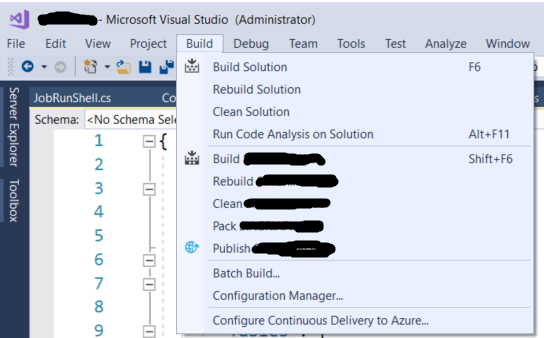
I'm searching for how to somehow enable this feature, but it doesn't look like to be something trivial. Meanwhile, if you or someone else also has some thoughts on how to turn this feature on on Visual Studio, please feel free to share. Thanks.
UlyssesAlves
on 24 Sep 2019
Hi @UlyssesAlves ,
I just have installed the Community Version of VS 2019 - newest 16.3 build. With the ASP.NET feature set.
And then made a fresh project with Serene 3.9.x (.net).
After that, the build menu shows like this:
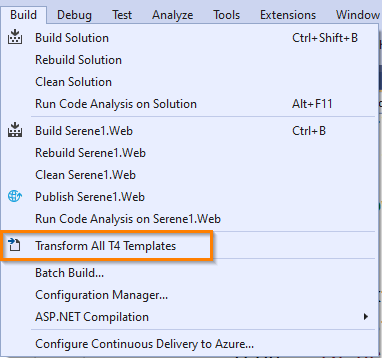
Do you have control over the VS-setup on your machine - or is this something which your IT department provides to you as a software package or so?
If you have it under your own control (and are allowed to do so by your company's IT and work policy), just uninstall the current vs studio, download the most current VS 2019 community edition (or if your company has professional or enterprise licenses, download the correct paid version) and then do a full installation with all the workloads you will need in the near and medium future (especially the ASP.NET MVC workload) and then check if the T4 menu option shows up in your Serenity project. If it still does not, then try to create a fresh Serene project from the newest available serene template.
And if the T4 option still does not show up then there must be something in your user profile or an Active Directory GPO setting (or something similar like appsense or so) which cripples your and your coworker's Visual Studio.
Please let us know how your resolve process is going on .
With kind regards,
John
JohnRanger
on 24 Sep 2019
@JohnRanger , I've downloaded Visual Studio 2019 and the "Transform All T4 Templates" option does appear on the Build menu on Serenity Web project downloaded from Serenity github repository, but this option still doesn't show up on my Web Project which uses Serenity.
So it might be something related with my project settings. It's an ASP.NET Core 2.0 project.
Is there another way to run this same command, or to get the effect it would, maybe from the command line or something like that? If that's not the case, is there some setting I should apply to my web project so that it would make Visual Studio show the option on build menu?
UlyssesAlves
on 24 Sep 2019
Ah right, I didn’t see you mention .NET Core...
The T4 transform is run automatically in the build process of the .NET Core version.
After rebuilding your project you should have access to your new field in your *.ts files with Intellisense.
edwardch
on 25 Sep 2019
Thank you all guys. I've now been able to add the field to the page by following the instructions given by you on this discussion.
So, the process is just like @edwardch described yesterday, with the "T4 Templates Transformation" step being automatically run by Visual Studio build process when your project uses .NET Core.
Cheers.
UlyssesAlves
on 25 Sep 2019
@UlyssesAlves @edwardch @JohnRanger
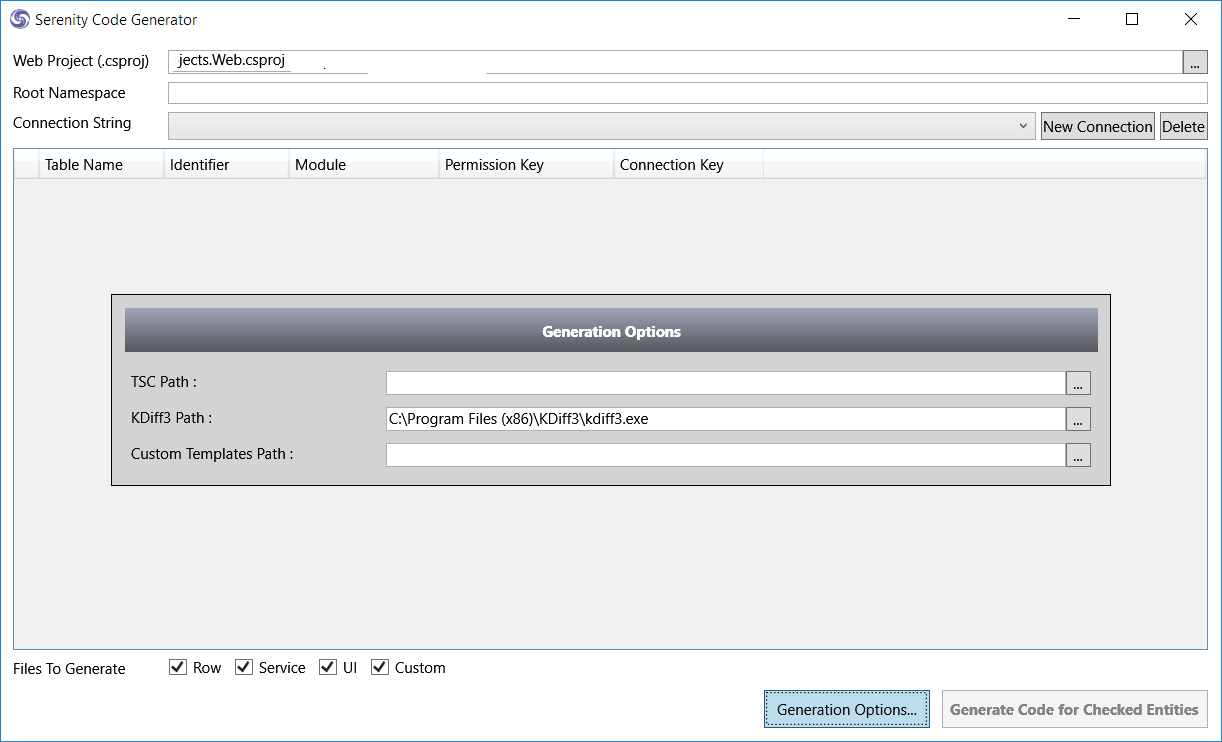
For others looking how to add or change tables after the XYZ classes have already been generated / modified - you can run sergen even if you have existing XYZRow - the documentation states to use KDIFF as your difference engine.
When you configure Sergen - you will notice on the bottom of the Sergen Program UI you have Generation Options button.
Click that and you can see the KDiff3 Path.
C:\Program Files (x86)\KDiff3\kdiff3.exe
 stixoffire
on 1 Jun 2020
stixoffire
on 1 Jun 2020
Related issues
 GitHubOrim
·
3Comments
JohnRanger
·
3Comments
GitHubOrim
·
3Comments
JohnRanger
·
3Comments
 Amitloh
·
3Comments
Amitloh
·
3Comments
 dudeman972
·
3Comments
dudeman972
·
3Comments
 john20xdoe
·
3Comments
john20xdoe
·
3Comments
Most helpful comment
You shouldn’t rerun sergen (unless you specify a new class name because want a a new class with new repositories and interactions). I think the docs mention that you shouldn’t rerun sergen on a table...