Serenity: Chart in dialog to Dashboard
I tried how to make chart in dialog and it's success,
but how to replace chart of admin LTE dashboard ? could somebody give me a solution? thank you so much
 resitaufan
All 4 comments
Very easy actually with Serenity, that's the magic of this framework.
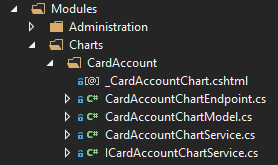
This is way i did on my app:
I wanted to display panels with charts + icon to be able to refresh panel content.
Basically i use partial view of MVC.
1/ Create a service provider (endpoint) for data to be displayed
My endpoint looks like this :
```
[RoutePrefix("Services/Charts/CardAccounts")]
public class CardAccountChartController : Controller
{
///
/// Get Card Account Statistics
///
[Route("refresh")]
[HttpGet]
public ActionResult Refresh()
{
var model = Dependency.Resolve
  return PartialView("~/Modules/Charts/_CardAccountChart.cshtml", model);
}
}
2/ I have created a Model of data to be displayed
Basically a key values classical model
 ```
 public class CardAccountChartModel
  {
    public List<string> Keys { get; set; }
    public List<int> Values { get; set; }
  }
3/ An interface that define my unique method to refresh data source
  public interface ICardAccountChartService
  {
    /// <summary>
    /// Refresh Card Accounts
    /// </summary>
    /// <returns></returns>
    CardAccountChartModel Refresh();
  }
4/ A class implementing the Refresh Service
In this example i am calling a view to get data
```
public class CardAccountChartService : ICardAccountChartService
{
public CardAccountChartModel Refresh()
{
var model = new CardAccountChartModel();
  using (var connection = SqlConnections.NewByKey("DBServices"))
  {
    var results = connection.Query(
            new SqlQuery()
                .From("V_BOL_CHART_CARD_ACCOUNTS")
                .Select("CARD_SCHEME", "CARD_SCHEME")
                .Select("NB_ITEMS", "NB_ITEMS"));

    model.Keys = new List<string>();
    model.Values = new List<int>();

    foreach (IDictionary<string, object> row in results)
    {
      model.Keys.Add(((Enums.CardScheme)Int16.Parse(row["CARD_SCHEME"].ToString())).ToString());
      model.Values.Add(Int32.Parse(row["NB_ITEMS"].ToString()));
    }

    return model;
  }
}
}
5/ A partial View (in .cshmtl) to manage panel update
@model SOM.GUI.Modules.Charts.CardAccountChartModel
Comptes Cartes Actifs
6/ Now last step is to include this panel into main dashboard

In DashboardIndex.cshmtl
@{
Html.RenderPartial(MVC.Views.Charts.CardAccount._CardAccountChart, Model.CardAccountChart);
}
```
And that's it !
The more i use this framework the more i find it the best software i have ever used. So powerful.
 kilroyFR
on 22 Aug 2019
kilroyFR
on 22 Aug 2019
thank a lot @kilroyFR , I will try later , I very apreciated you and of course i'm so glad about your solution . but my issue just solved I see #2342
resitaufan
on 23 Aug 2019
@kilroyFR ,
this would make up a great wiki entry (https://github.com/volkanceylan/Serenity/issues/4572). Would you mind to put it into the wiki for others to easily find it? :-)
Would be great.
With kind regards,
John
 JohnRanger
on 5 Sep 2019
JohnRanger
on 5 Sep 2019
I recommend using D3 as it is more powerful and popular. It has a steep learning curve but it's worth it.
 Febriantos
on 9 Oct 2019
Febriantos
on 9 Oct 2019
Related issues
 john20xdoe
·
3Comments
john20xdoe
·
3Comments
 ahsansolution
·
3Comments
ahsansolution
·
3Comments
 gfo2007
·
3Comments
gfo2007
·
3Comments
 stixoffire
·
3Comments
stixoffire
·
3Comments
 Akarsh03
·
3Comments
Akarsh03
·
3Comments
Most helpful comment
Very easy actually with Serenity, that's the magic of this framework.
This is way i did on my app:

I wanted to display panels with charts + icon to be able to refresh panel content.
Basically i use partial view of MVC.
1/ Create a service provider (endpoint) for data to be displayed().Refresh();
My endpoint looks like this :
```
[RoutePrefix("Services/Charts/CardAccounts")]
public class CardAccountChartController : Controller
{
///
/// Get Card Account Statistics
///
[Route("refresh")]
[HttpGet]
public ActionResult Refresh()
{
var model = Dependency.Resolve
}
3/ An interface that define my unique method to refresh data source
4/ A class implementing the Refresh Service
In this example i am calling a view to get data
```
public class CardAccountChartService : ICardAccountChartService
{
public CardAccountChartModel Refresh()
{
var model = new CardAccountChartModel();
}
@model SOM.GUI.Modules.Charts.CardAccountChartModel
Comptes Cartes Actifs
@{
Html.RenderPartial(MVC.Views.Charts.CardAccount._CardAccountChart, Model.CardAccountChart);
}
```
And that's it !
The more i use this framework the more i find it the best software i have ever used. So powerful.