Serenity: Line break and in the right position
I modified a form with css properties like this :
    [HalfWidth, FormCssClass("line-break-sm")]
    public Decimal SubTotal { get; set; }
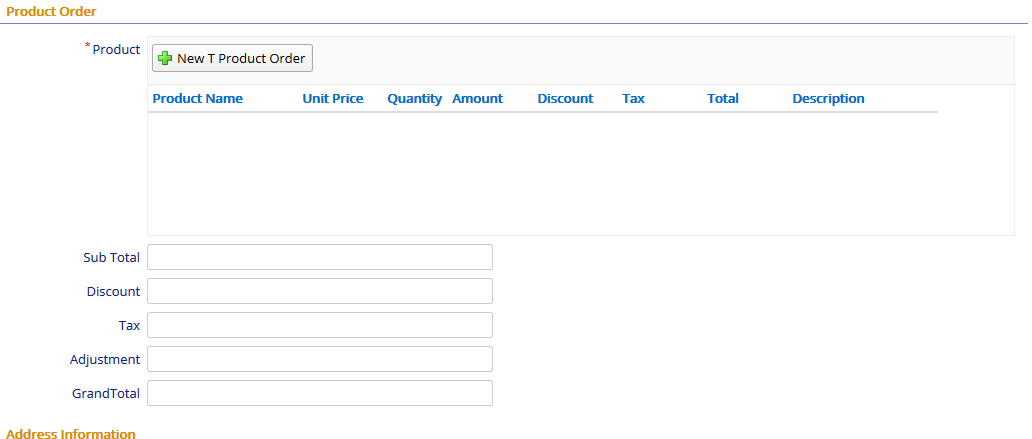
then,
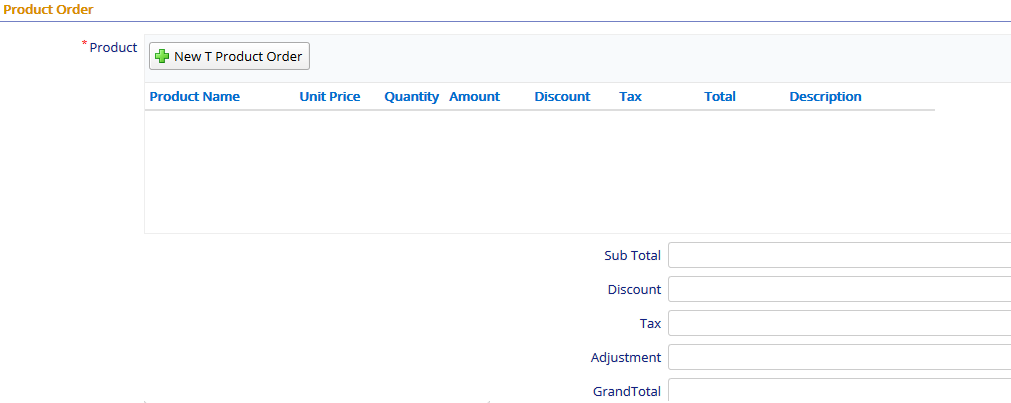
how to put forms with break and in the right position as like below?
 resitaufan
All 6 comments
Hi, you can put before each field :
[HalfWidth]
[DisplayName(""), LabelWidth(0)]
[StaticTextBlock()]
public String StaticText0 { get; set; }
in the form.cs.
Best Regards.
Roberto
 rcruzfalcon
on 14 Aug 2019
rcruzfalcon
on 14 Aug 2019
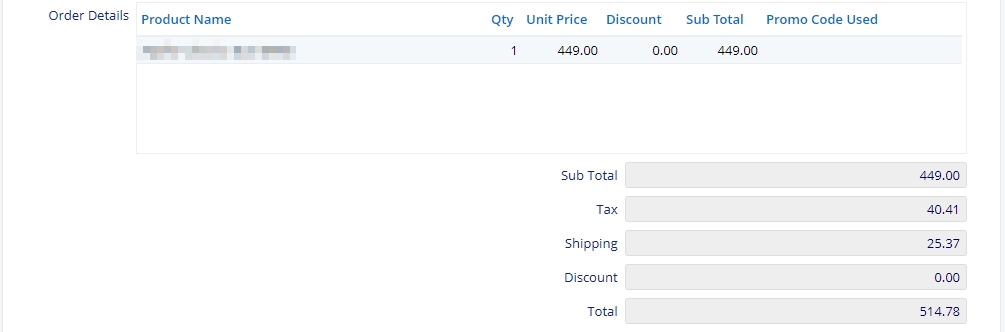
You can use bootstrap css classes to control the position.
This is how I did in my previous project.
[CssClass("col-md-6 col-md-offset-6")]
public Decimal SubTotal { get; set; }
[CssClass("col-md-6 col-md-offset-6")]
public Decimal Tax { get; set; }
[CssClass("col-md-6 col-md-offset-6")]
public Decimal Shipping { get; set; }
[CssClass("col-md-6 col-md-offset-6")]
public Decimal Discount { get; set; }
[CssClass("col-md-6 col-md-offset-6")]
public Decimal Total { get; set; }
 wezmag
on 15 Aug 2019
wezmag
on 15 Aug 2019
Hi, you can put before each field :
    [HalfWidth]
    [DisplayName(""), LabelWidth(0)]
    [StaticTextBlock()]
    public String StaticText0 { get; set; }
in the form.cs.
Best Regards.
Roberto
thank you @rcruzfalcon but I got an error because the form unavailable in row.

resitaufan
on 15 Aug 2019
You can use bootstrap css classes to control the position.
This is how I did in my previous project.[CssClass("col-md-6 col-md-offset-6")] public Decimal SubTotal { get; set; } [CssClass("col-md-6 col-md-offset-6")] public Decimal Tax { get; set; } [CssClass("col-md-6 col-md-offset-6")] public Decimal Shipping { get; set; } [CssClass("col-md-6 col-md-offset-6")] public Decimal Discount { get; set; } [CssClass("col-md-6 col-md-offset-6")] public Decimal Total { get; set; }
thank you, It's so usefull,and just solved .
resitaufan
on 15 Aug 2019
very helpful post - quick question - how did you get the text in the subtotal, tax etc to align right within the field?
 chrisomeara
on 28 Oct 2020
chrisomeara
on 28 Oct 2020
very helpful post - quick question - how did you get the text in the subtotal, tax etc to align right within the field?
apply text-align: right; to the .s-DecimalEditor in your css file.
wezmag
on 29 Oct 2020
Related issues
 AmuthaKondusamy
·
3Comments
AmuthaKondusamy
·
3Comments
 chintankukadiya18
·
3Comments
chintankukadiya18
·
3Comments
 JohnRanger
·
3Comments
JohnRanger
·
3Comments
 Shraddha996
·
3Comments
Shraddha996
·
3Comments
 kilroyFR
·
3Comments
kilroyFR
·
3Comments
Most helpful comment
You can use bootstrap css classes to control the position.
This is how I did in my previous project.