Serenity: The given path's format is not supported. When using {3} as file name format
I've trying to add current date and time in filename:
[FileUploadEditor(FilenameFormat = "PurchaseRequest/{1:0000}/{0:00000000}_{2}_{3}_{4}", CopyToHistory = true, OriginalNameProperty = "ScanPrName", DisplayFileName = true)]
An error occured:
The given path's format is not supported.
Anyone here face same issue?
 wildanmuhlis2
All 7 comments
colon in file name not allowed
 Zahar661
on 13 Feb 2019
Zahar661
on 13 Feb 2019
As @Zahar661 mentioned. Therefore you have to replace the ":" with for example "-".
 JohnRanger
on 13 Feb 2019
JohnRanger
on 13 Feb 2019
@Zahar661 , @JohnRanger
The colon is allowed filename format
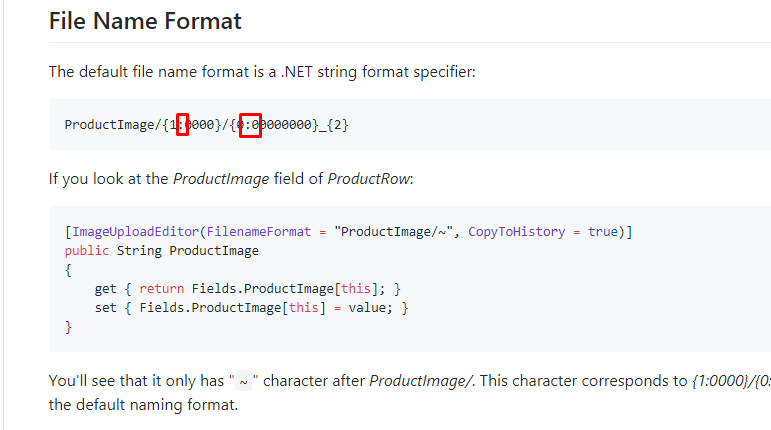
I refer the filename from this link:
https://github.com/volkanceylan/Serenity-Blog/blob/master/2017-11-02-upload-file-name-formats.md
wildanmuhlis2
on 18 Feb 2019
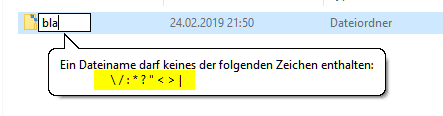
No - it is not - at least not under Windows. See above Screenshot from when I tried to type a colon (":").
With kind regards,
John
JohnRanger
on 24 Feb 2019
You have to test how far your path string works - e.g. does
ProductImage/{1:0000}/{0:0000}
work?
If yes, try:
ProductImage/{1:0000}/{0:0000}_{2}
If this does not work anymore, there must be an invalid character within {2}.
Compare {2} with the un-allowed characters in my above post.
If it still works with {2} added, continue to test with {3} added - and so forth.
With kind regards,
John
JohnRanger
on 24 Feb 2019
You have to provide a custom date format string for the 3rd argument, like
{3:yyyyMMddHHmmss} or {3:yyyy-MM-dd_HH-mm-ss}
BTW, the format is applied in UploadHelper.FormatDbFileName()
The default conversion from DateTime.Now produces characters not allowed in filenames (i.e. colon)
 hannesb
on 26 Feb 2019
hannesb
on 26 Feb 2019
Exactly what I need. Thank you @hannesb :+1:
wildanmuhlis2
on 1 Mar 2019
Related issues
 stixoffire
·
3Comments
stixoffire
·
3Comments
 Shraddha996
·
3Comments
Shraddha996
·
3Comments
 GitHubOrim
·
3Comments
GitHubOrim
·
3Comments
 chintankukadiya18
·
3Comments
chintankukadiya18
·
3Comments
 dkontod
·
3Comments
dkontod
·
3Comments
Most helpful comment
You have to provide a custom date format string for the 3rd argument, like
{3:yyyyMMddHHmmss} or {3:yyyy-MM-dd_HH-mm-ss}
BTW, the format is applied in UploadHelper.FormatDbFileName()
The default conversion from DateTime.Now produces characters not allowed in filenames (i.e. colon)