Serenity: Single row selection (radio button like behavior)
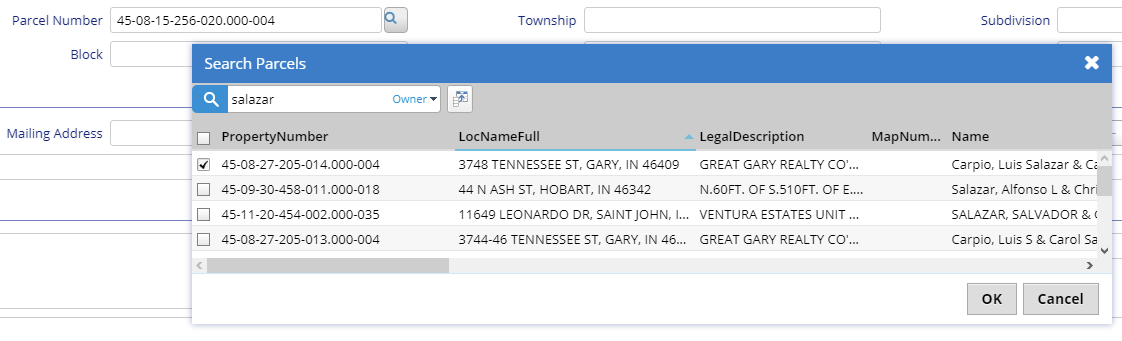
I would like to be able to force selection of only one row using GridRowSelectionMixin. When checkbox is checked the other checkboxes need to be unchecked. I know that there is "Enabling Row Selection" sample which is close but I am not sure how to use it. Any help would be greatly appreciated.
 c9482
c9482
All 7 comments
Hi @c9482 ,
sorry the question - but why would you want that? This is already the standard behavior by clicking on one of the values in the columns of a row when they have the [editlink] tag in xyzColumns.cs.
It takes that one row and presents it for editing. Or do you not want to edit that one entry and do something else with that record?
With kind regards,
John
 JohnRanger
on 11 Sep 2018
JohnRanger
on 11 Sep 2018
Hello @JohnRanger ,
This particular dialog is used to search for records and allow the user to select only one and then click OK to return selected row to the parent form. I hope this makes sense.
c9482
on 11 Sep 2018
I created one based on serenity GridRowSelectionMixin, maybe it can help
namespace M {
    @Serenity.Decorators.registerClass('Custom.GridRadioSelectionMixin')
    export class GridRadioSelectionMixin {

        private idField: string;
        private include: Q.Dictionary<boolean>;
        private grid: Serenity.IDataGrid;

        constructor(grid: Serenity.IDataGrid) {

            this.include = {};
            this.grid = grid;
            this.idField = (grid.getView() as any).idField;

            grid.getGrid().onClick.subscribe((e, p) => {
                if ($(e.target).hasClass('rad-select-item')) {
                    e.preventDefault();
                    var item = grid.getView().getItem(p.row);
                    var id = item[this.idField].toString();

                    if (this.include[id] == true) {
                        (ss as any).clearKeys(this.include);
                    }
                    else {
                        (ss as any).clearKeys(this.include);
                        this.include[id] = true;
                    }

                    for (var i = 0; i < (grid.getView() as any).getLength(); i++) {
                        grid.getGrid().updateRow(i);
                    }
                }
            });
        }

        clear(): void {
            (ss as any).clearKeys(this.include);
        }

        resetCheckedAndRefresh(): void {
            this.include = {};
            this.grid.getView().populate();
        }

        getSelectedKeys(): string[] {
            return Object.keys(this.include);
        }

        getSelectedAsInt32(): number[] {
            return Object.keys(this.include).map(function (x) {
                return parseInt(x, 10);
            });
        }

        getSelectedAsInt64(): number[] {
            return Object.keys(this.include).map(function (x) {
                return parseInt(x, 10);
            });
        }

        setSelectedKeys(keys: string[]): void {
            this.clear();
            for (var k of keys) {
                this.include[k] = true;
            }
        }

        static createSelectColumn(getMixin: () => M.GridRadioSelectionMixin): Slick.Column {
            return {
                name: '',
                toolTip: ' ',
                field: '__select__',
                width: 26,
                minWidth: 26,
                headerCssClass: '',
                sortable: false,
                formatter: function (row, cell, value, column, item) {
                    var mixin = getMixin();
                    if (!mixin) {
                        return '';
                    }

                    var isChecked = mixin.include[item[mixin.idField]];
                    return '<input type="radio" name="radio-selection-group" class="rad-select-item no-float" style="cursor: pointer;width: 13px; height:13px;" ' + (isChecked ? ' checked' : '') + ' /> ';
                }
            };
        }
    }
}
How to use: (in grid.ts)
/// <reference path="../../common/gridmixins/gridradioselectionmixin.ts" />

private radRowSelection: M.GridRadioSelectionMixin;

constructor(container: JQuery) {
    super(container);
}

protected createToolbarExtensions() {
    super.createToolbarExtensions();
    this.radRowSelection = new M.GridRadioSelectionMixin(this);
}

protected getButtons() {
    return [{
        title: 'Test',
        cssClass: 'send-button',
        onClick: () => {
            if (!this.onViewSubmit()) {
                return;
            }
                       Q.alert(JSON.stringify(this.radRowSelection.getSelectedKeys()));
        }
    }, {
        title: 'Reset',
        cssClass: 'send-button',
        onClick: () => {
            if (!this.onViewSubmit()) {
                return;
            }
                        this.radRowSelection.resetCheckedAndRefresh();
        }
      }];
}

protected getColumns() {
    var columns = super.getColumns();
    columns.splice(0, 0, M.GridRadioSelectionMixin.createSelectColumn(() => this.radRowSelection));
    return columns;
}

 minhhungit
on 11 Sep 2018
minhhungit
on 11 Sep 2018
@minhhungit ,
This looks exactly like what I am looking for. I will give it a try. I appreciate you sharing the code.
c9482
on 11 Sep 2018
@minhhungit ,
This works perfectly, thank you very much again for sharing your solution.
c9482
on 13 Sep 2018
I created a post on wiki at here: Grid-Radio-Row-Selection-Mixin
minhhungit
on 14 Sep 2018
Thank you @minhhungit ! :D
 Estrusco
on 17 Sep 2018
Estrusco
on 17 Sep 2018
Related issues
 ahsansolution
·
3Comments
ahsansolution
·
3Comments
 gfo2007
·
3Comments
gfo2007
·
3Comments
 StefanTheiner
·
3Comments
StefanTheiner
·
3Comments
 stixoffire
·
3Comments
stixoffire
·
3Comments
 Amitloh
·
3Comments
Amitloh
·
3Comments
Most helpful comment
I created one based on serenity GridRowSelectionMixin, maybe it can help
How to use: (in grid.ts)