Serenity: How to add inline button in Dialog.ts next to a textbox
Hi;
I would like to add a button after a textbox. As you can see in the following image I would like to add it after Filling Date(Shamsi) but it shows next to toolbar buttons. What I need is to add similar to date picker.
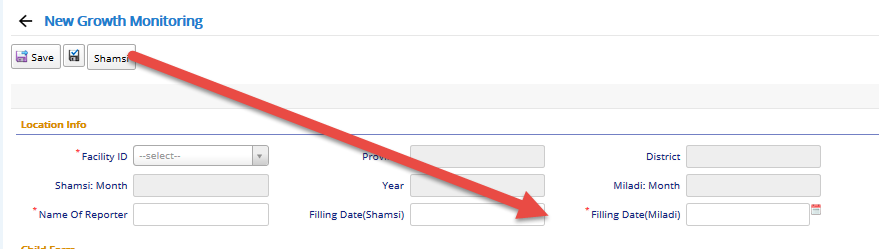
I have this could code to start but now working
    protected getToolbarButtons(): Serenity.ToolButton[] {
        let buttons = super.getToolbarButtons();

        buttons.push({
            title: "Shamsi",
            hint: "Another date picker",
            cssClass: "'dd-note-button",
            icon: "fa-pencil",
            onClick: () => { }
        })
        return buttons;
    }
 ms4hafiz
All 8 comments
Hi @ms4hafiz , put this into your dialog
protected afterLoadEntity() {
    super.afterLoadEntity();

    $('<a class="inplace-button inplace-create"><b><\/b><\/a>')
         .insertAfter(this.form.YOUR_FIELD_HERE.element)  // <======================
         .click(() => this.myFunction());
}

private myFunction() {
    Q.alert("clicked");
}
 minhhungit
on 2 Jun 2018
minhhungit
on 2 Jun 2018
thank you @minhhungit
It is helping and now I can bind the button next the textbox I want.
I would like to make some more binding to the button as following:
    <button class="btn btn-default" data-mddatetimepicker="true" data-targetselector="#dateWithFormat" data-enabletimepicker="true"
      data-placement="left" data-mdformat="dddd dd MMMM ">
      <span class="glyphicon glyphicon-calendar"></span>
    </button>
How can i do it . I am new and learning
ms4hafiz
on 2 Jun 2018
@ms4hafiz sorry I am not sure what you want to do. Can you explain with more detail
minhhungit
on 2 Jun 2018
Thank you @minhhungit
What I want is to fire and get value of a date picker. The date picker is available here https://github.com/Mds92/MD.BootstrapPersianDateTimePicker
In MVC 5, I call the date picker using the following
                                     @Html.EditorFor(model => model.ComitmentDate, new
                                    {
                                        htmlAttributes = new
                                        {
                                            data_mddatetimepicker = "true",
                                            data_trigger = "click",
                                            data_targetselector = "#ComitmentDate",
                                            data_enabletimepicker = "false",
                                            data_placement = "bottom",
                                            data_disablebeforetoday = "false",
                                            data_isgregorian = "false",
                                            data_englishnumber = "true",
                                            @class = "form-control"
                                        }
                                    })
But in serenity, I cannot figure it out how to activate the date picker or use the above code in dialog.ts.
ms4hafiz
on 2 Jun 2018
I think the best way is you should create a custom editor for yourself
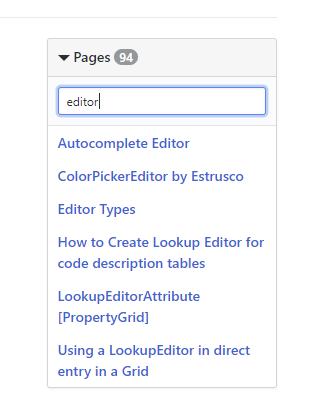
check this: DateTimeEditor
check more editor examples on wiki
minhhungit
on 2 Jun 2018
Thank you
I will look at it but is it possible without creating additional editor?
ms4hafiz
on 2 Jun 2018
I think there is another way, but I never try to do it.
Anyway I think creating custom editor is the best choice, it helps us maintain application easier
minhhungit
on 7 Jun 2018
Thank you
I am working to learn how to create custom editor for my special need. I am not sure if I will succeed.
ms4hafiz
on 7 Jun 2018
Related issues
 Shraddha996
·
3Comments
Shraddha996
·
3Comments
 stixoffire
·
3Comments
stixoffire
·
3Comments
 ga5tan
·
3Comments
ga5tan
·
3Comments
 StefanTheiner
·
3Comments
StefanTheiner
·
3Comments
 dkontod
·
3Comments
dkontod
·
3Comments
Most helpful comment
Hi @ms4hafiz , put this into your dialog