Serenity: LookupScript & Typescript Generator
Hello team, sorry if someone ask about this before.
- Right now, I see that if Row class has LookupScript attribute, Serenity will generate
lookupKeyandgetLookup()

If we don't define that attribute, it will not generate typescript code. I think that's fine although it will be better if Serenity can generate default lookup key (by row name, namespace...).
- BTW, can Serenity generate lookup key & getLookup() for custom lookup class, for example I have custom lookup classes like bellow:
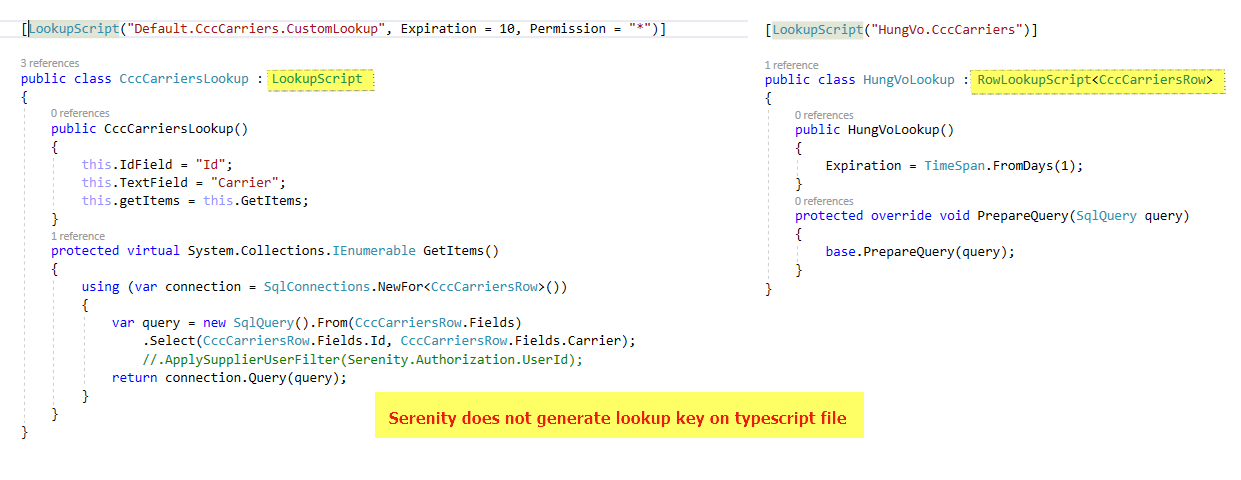
Agree that I can use Q.getLookup('something_key') but this can cause typo issues. So any chance Serenity generate it for us?
My Serenity version is 3.5.5 and typescritp 2.7.2
Thanks!
 minhhungit
All 13 comments
If you don't add a LookupScript attribute, that means row doesn't have a lookup, not all rows has or should have lookups.
 volkanceylan
on 13 Apr 2018
volkanceylan
on 13 Apr 2018
@volkanceylan yeah, but how about custom lookup, can serenity generate all custom lookup into a file or something like that.
I also think if a custom look inherited from Row which used RowLookupScript
minhhungit
on 13 Apr 2018
It can, as long as some conditions matched, see these tests:
volkanceylan
on 13 Apr 2018
Thank you sir, I will check
minhhungit
on 14 Apr 2018
@volkanceylan After checked it, I think a ROW just have only one lookupKey, right ?
Serenity will generate lookupkey if:
- we use a [LookupScript] on Row class
- Row class use an external script, from a custom lookup class (RowLookupScript
)
Whatever, it always need [LookupScript] attribute and we can not have duplicate [LookupScript] attribute
So, problem is how a Row can have multiple lookup, for example, pretend I need 3 Product lookup data, like:
- list product with qty > 0
- list product for a special catalog
- all products
How can I do it 😳
minhhungit
on 14 Apr 2018
@minhhungit Maybe you can create a table with those options then create a lookup called say "options" them depending the selected change of the option you can filter the source of your lookup achieving what you wan't without the need to further create more lookups to the same row.
 brunobola
on 14 Apr 2018
brunobola
on 14 Apr 2018
thank you @brunobola , can you give me a quick sample, I'm still don't clear your idea
minhhungit
on 14 Apr 2018
You can have multiple lookups, just one of them, which has reference on row will be the lookupKey. You can reference others as string.
volkanceylan
on 14 Apr 2018
I will try to create a pull request to generate custom lookups, something like:
[HasCustomLookup(typeof(CustomLookup_Without_Key_Lookup))]
[HasCustomLookup(typeof(CustomLookup_With_Key_Lookup))]
[LookupScript] // primary lookup
public class RowForCustomLookupRow : Row
{
    public class RowFields : RowFieldsBase
    {
    }

    public static RowFields Fields = new RowFields().Init();

    public RowForCustomLookupRow() : base(Fields)
    {
    }
}

[LookupScript]
public class CustomLookup_Without_Key_Lookup : LookupScript
{
}

[LookupScript("This.is.custom.lookup.key")]
public class CustomLookup_With_Key_Lookup : LookupScript
{
}
and Row.ts maybe like:
export const lookupKey = 'Default.CccCarriers';  // primaryKey

export function getLookup(): Q.Lookup<CccCarriersRow> {
    return Q.getLookup<CccCarriersRow>('Default.CccCarriers');
}

// custom lookup generated code here which I don't know for now
// Maybe I will try to use the way we generated service.ts
// ...
typescript code generated will be something like
export namespace RssChannelsRow {
    export const idProperty = 'Id';
    // ...

    export const lookupKey = 'Default.CccCarriers'; // primary lookup

    export function getLookup(): Q.Lookup<CccCarriersRow> {
        return Q.getLookup<CccCarriersRow>('Default.CccCarriers');
    }

    // custom
    export declare function CustomLookup_First(): Q.Lookup<{}>;
    export declare function CustomLookup_Second(): Q.Lookup<{}>;

    export enum CustomLookupKeys {
        CustomLookup_First = "CustomLookup_Without_Key_Lookup",
        CustomLookup_Second = "CustomLookup_With_Key_Lookup"
    }

    Object.keys(CustomLookupKeys).forEach(x => {
        (<any>RssChannelsRow)[x] = function () {
            return Q.getLookup(CustomLookupKeys[x]);
        }
    });

    export declare const enum Fields {}
@volkanceylan I created PR https://github.com/volkanceylan/Serenity/pull/3484
Can you review it please
minhhungit
on 15 Apr 2018
I will later implement that with a Lookups class generated on client side, this version didn't seem Serenity-ish to me
volkanceylan
on 1 May 2018
okay @volkanceylan, sounds interesting. I'm waiting for your push
minhhungit
on 1 May 2018
Related issues
 dkontod
·
3Comments
dkontod
·
3Comments
 StefanTheiner
·
3Comments
StefanTheiner
·
3Comments
 dudeman972
·
3Comments
dudeman972
·
3Comments
 chintankukadiya18
·
3Comments
chintankukadiya18
·
3Comments
 stixoffire
·
3Comments
stixoffire
·
3Comments
Most helpful comment
@minhhungit Maybe you can create a table with those options then create a lookup called say "options" them depending the selected change of the option you can filter the source of your lookup achieving what you wan't without the need to further create more lookups to the same row.