Serenity: Quickfilter dropdown; show colors instead of text
Dear all,
I currently have a quickfilter which lets the user select an error level color (blue,green,yellow, red) which then filters a grid which has in one of the columns a color showing the "error level" of user's printer mappings.

I would like now to dynamically change the appearance of the select2 options to effectively represent the colors (rendered with html) like this:
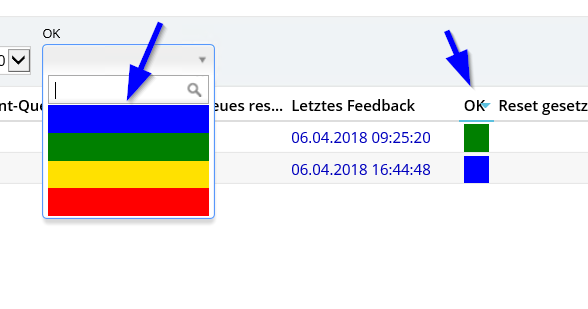
I know that select2 actually could do this very simple via the html property instead of the text property
(see this: https://jsfiddle.net/the94air/awzqtd4w/ )
Most preferrably I want to feed the HTML for the coloring from the lookup table.
How could this be done elegantly with Serenity Framework without hard-coding the select2 options?
Thanks for any hints in the right direction.
With kind regards,
John
 JohnRanger
All 6 comments
I would like to know it too
 ga5tan
on 7 Apr 2018
ga5tan
on 7 Apr 2018
I think writing a custom lookup editor is good.
 dfaruque
on 8 Apr 2018
dfaruque
on 8 Apr 2018
Hi @dfaruque,
thanks for your always valued input :-)
I already tried this - but I have not found a way to control the select2 dropdown from the custom lookup editor in a way to achieve this.
I only find 2 methods which I can override from the class the Editor is derived from - one of it is getItemText (Serene has some good examples to change the text within the options) - but anything of the output I change within getItemText is then html-encoded (see my first screenshot).
As I am only an Admin with a bit of dev ambitions but do not fully understand the full stack of Serenity Framework (especially the acts which are done by the SF behind the scene from xyzGrid.ts to the browser DOM regarding the setup and filling of the quickfilter select2 options) I don't know how to start.
May I ask if you have any "concrete" starting point within xyzGrid.ts for me how to intercept the filling of the quickfilter select2 in order to use the html attribute instead of the text attribute when creating the options of the select2 field? :-)
With kind regards,
John
JohnRanger
on 8 Apr 2018
You take as example the https://github.com/volkanceylan/Serenity/wiki/How-to-Create-Lookup-Editor-for-code-description-tables wiki entry.
You can custom it for your target.
In myFormatResult() and myFormatSelection() you can create your own html to format the rows in the select2.
 Estrusco
on 11 Apr 2018
Estrusco
on 11 Apr 2018
Hi @Estrusco ,
thanks - perfect! This was exactly the missing piece :-)
Somehow I have missed to recognize this wiki article to be the solution for what I wanted and didn't look into it at all.
I will post here the final editor when I have it working.
With kind regards,
John
JohnRanger
on 11 Apr 2018
Hi all (and @ga5tan),
as promised, here the solution to show HTML content within the quickfilter dropdown options:
Please note that this lookupEditor is hardcoded to return the lookups from Administration.FeedbackStateRow. Please Exchange this with the lookup table of your choice or optimise this code here to accept a dynamic lookup table as parameter. --> If you have such a general solution, please post it here :-)
Create a new LookupEditor like this (exchange
namespace <your namespace>.Common {

    @Serenity.Decorators.registerEditor()
    export class LookupEditor_FeedbackState extends Serenity.LookupEditorBase<Serenity.LookupEditorOptions, Administration.FeedbackStateRow> {

        constructor(container: JQuery, options: Serenity.LookupEditorOptions) {
            super(container, options);
        }

        protected getLookupKey() {
            return Administration.FeedbackStateRow.lookupKey;
        }

        public getSelect2Options() {
            var selec2Options = super.getSelect2Options();
            selec2Options.formatResult = this.myFormatResult;
            selec2Options.formatSelection = this.myFormatSelection;
            return selec2Options;
        }

        protected myFormatResult(item: Serenity.Select2Item) {
           return item.text;
        }

        protected myFormatSelection(item: Serenity.Select2Item): string {
            if (item === undefined)
                return null;

            return item.text;
        }
    }

}
Compile and do a T4 transform to publish the new lookupeditor to the server side.
In your xyzRow.cs (where you have a field which should use this new lookupEditor instead of the standard lookupEditor), do like this:
.
using <your namespace.Common;
.

      #region feedbackState
        [LookupEditor_FeedbackState]
        [DisplayName("Db.ResetClientPrintQueues.ResetClientPrintQueues.feedbackState"), Column("feedbackState"), ForeignKey("[dbo].[FeedbackState]", "FeedbackStateID"), LeftJoin("jFeedbackState"), TextualField("Meaning"), QuickFilter]
        public Int32? feedbackState
        {
            get { return Fields.feedbackState[this]; }
            set { Fields.feedbackState[this] = value; }
        }
As HTML data in your table, use something like this to style an option with color:
<div style="background-color:red; width:100%; height:100%"> </div>
Please note:
The ability to style the color of the text (text-color) is not given as the select2 widget sets this attribute to simulate hover/endhover.
From now on you can send HTML to the so brushed-up quickfilter dropdown items by simply putting the HTML in the field which is represented by "NameField".
Hope this helps someone.
With kind regards,
John
JohnRanger
on 11 Apr 2018
Related issues
ga5tan
·
3Comments
 GitHubOrim
·
3Comments
GitHubOrim
·
3Comments
 AmuthaKondusamy
·
3Comments
AmuthaKondusamy
·
3Comments
 Pinellus
·
3Comments
Pinellus
·
3Comments
 stepankurdylo
·
3Comments
stepankurdylo
·
3Comments
Most helpful comment
Hi all (and @ga5tan),
as promised, here the solution to show HTML content within the quickfilter dropdown options:
Please note that this lookupEditor is hardcoded to return the lookups from Administration.FeedbackStateRow. Please Exchange this with the lookup table of your choice or optimise this code here to accept a dynamic lookup table as parameter. --> If you have such a general solution, please post it here :-)
Create a new LookupEditor like this (exchange with the namespace of your project):
Compile and do a T4 transform to publish the new lookupeditor to the server side.
In your xyzRow.cs (where you have a field which should use this new lookupEditor instead of the standard lookupEditor), do like this:
As HTML data in your table, use something like this to style an option with color:
Please note:
The ability to style the color of the text (text-color) is not given as the select2 widget sets this attribute to simulate hover/endhover.
From now on you can send HTML to the so brushed-up quickfilter dropdown items by simply putting the HTML in the field which is represented by "NameField".
Hope this helps someone.
With kind regards,
John