Serenity: How to Implement button click
Hi,
I want to implement the following csharp code on a button click. Iam able to get button on Dialog.
Please help to execute the following code on button click.
private void btnSend_Click(object sender, EventArgs e)
{
        String ApiKey = "api";
        String ContactNumber = mobilenumber; (from Dialog)
        String Message = Message; (from Dialog)

        using (var wb = new WebClient())
        {
            byte[] response = wb.UploadValues("https://api.in/send/", new NameValueCollection()
            {
            {"apikey" , ApiKey},
            {"numbers" , ContactNumber},
            {"message" , Message},
            {"sender" , "ABCD"}
            });
            string result = System.Text.Encoding.UTF8.GetString(response);
            return;
        }
    }
 srinivas1910
All 24 comments
MyEndpoints.cs
namespace MyProject.MyModule.Endpoints
{
....
    public class MyController : ServiceEndpoint
    {
       ......
        [HttpPost]
        public MyActionResponse MyAction(IDbConnection connection, MyActionRequest request)
        {
            connection.Open();
            var myrow= connection.ById<MyRow>(request.MyId);


           String ApiKey = "api";
        String ContactNumber = myrow.mobilenumber; (from Dialog)
        String Message = myrow.Message; (from Dialog)

        using (var wb = new WebClient())
        {
            byte[] response = wb.UploadValues("https://api.in/send/", new NameValueCollection()
            {
            {"apikey" , ApiKey},
            {"numbers" , ContactNumber},
            {"message" , Message},
            {"sender" , "ABCD"}
            });
            string result = System.Text.Encoding.UTF8.GetString(response);
            return;
        }

            var r = new MyActionResponse();
            r.Rezult = true;
            return r;
        }
    }
MyDialog.ts
namespace MyProject.MyModule {
    export class MyRowDialog extends Serenity.EntityDialog<MyRow, any> {
        ........

        getToolbarButtons() {
            var buttons = super.getToolbarButtons();
            buttons.push({
                title: 'MyActionName',
                cssClass: 'synchronize-button',
                onClick: () => this.myAction()

            });
            return buttons;
        }
           private myAction() {
            MtrSchetService.MyAction(
                {
                    MyId: this.get_entityId(),
                },
                response => { Q.notifySuccess("Success! ", '', null) });
        }
}
Create new MyModel.cs
namespace MyProject.MyModule
{

    using Serenity.Services;
    using System;

    public class MyActionRequest : ServiceRequest
    {
        public int MyId { get; set; }
    }
    public class MyActionResponse : ServiceResponse
    {
        public bool Rezult { get; set; }
    }
}
 Zahar661
on 23 Mar 2018
Zahar661
on 23 Mar 2018
Thank you @Zahar661 mostly done will execute the same and let you know
srinivas1910
on 23 Mar 2018
Hi @Zahar661 ,
I tried the above code but getting some errors.
- In Dialog getting the error Cannot find the name "MtrSchetService".
- In Endpoint getting the following errors.
var r = new MyActionResponse();
r.Rezult = true;
return r;
Unreachable Code Detected
and
An object of a type convertible to 'MyActionResponse'
Please guide me how to rectify these errors
Thank you
srinivas1910
on 23 Mar 2018
1) MtrSchetService->MyRowService
2)
public MyActionResponse MyAction(IDbConnection connection, MyActionRequest request)
        {
            connection.Open();
            var myrow= connection.ById<MyRow>(request.MyId);


           String ApiKey = "api";
        String ContactNumber = myrow.mobilenumber; (from Dialog)
        String Message = myrow.Message; (from Dialog)

            var r = new MyActionResponse();

        using (var wb = new WebClient())
        {
            byte[] response = wb.UploadValues("https://api.in/send/", new NameValueCollection()
            {
            {"apikey" , ApiKey},
            {"numbers" , ContactNumber},
            {"message" , Message},
            {"sender" , "ABCD"}
            });
            r.Rezult =  System.Text.Encoding.UTF8.GetString(response);

        }
        return r;
   }
public bool Rezult { get; set; }
replace
public string Rezult { get; set; }
Zahar661
on 23 Mar 2018
is there some demo for this?
I guess not, otherwise you would have mentioned it.
 ga5tan
on 23 Mar 2018
ga5tan
on 23 Mar 2018
was me example "ImportExcel"
Zahar661
on 23 Mar 2018
Hi @Zahar661
Thanks for your Support, Every thing is OK except at MyRowService. Below am posting the entire code of main please guide me to rectify this.
Dialog.ts
namespace sms.SMS {
@Serenity.Decorators.registerClass()
export class Sms1Dialog extends Serenity.EntityDialog<Sms1Row, any> {
    protected getFormKey() { return Sms1Form.formKey; }
    protected getIdProperty() { return Sms1Row.idProperty; }
    protected getLocalTextPrefix() { return Sms1Row.localTextPrefix; }
    protected getNameProperty() { return Sms1Row.nameProperty; }
    protected getService() { return Sms1Service.baseUrl; }


    protected form = new Sms1Form(this.idPrefix);

    protected getToolbarButtons(): Serenity.ToolButton[] {
        let buttons = super.getToolbarButtons();

        buttons.splice(Q.indexOf(buttons, x => x.cssClass == "send-button"), 1);

        buttons.push(
            {
                title: 'SendSMS',
                cssClass: 'send-button',
                onClick: () => this.myAction()

            });

        return buttons;
    }
    private myAction() {
               MyRowService.MyAction(
            {
                MyId: this.get_entityId(),
            },
            response => { Q.notifySuccess("Success! ", '', null) });

    }


}
}
srinivas1910
on 24 Mar 2018
Endpoint.cs
[HttpPost]
public ListResponse
{
return new MyRepository().List(connection, request);
}
    [HttpPost]

    public MyActionResponse MyAction(IDbConnection connection, MyActionRequest request)
    {
        connection.Open();
        var myrow = connection.ById<MyRow>(request.MyId);


        String ApiKey = "api";
        String ContactNumber = myrow.MobileNumber.ToString();
        String Message = myrow.Message;


        var r = new MyActionResponse();

        using (var wb = new WebClient())
        {
            byte[] response = wb.UploadValues("https://api.in/send/", new NameValueCollection()
        {
        {"apikey" , ApiKey},
        {"numbers" , ContactNumber},
        {"message" , Message},
        {"sender" , "ABCD"}
        });
            r.Rezult = System.Text.Encoding.UTF8.GetString(response);

        }
        return r;
    }
Model.cs
using System;
using Serenity.Services;
namespace sms.Modules.SMS.Sms1
{
public class MyActionRequest : ServiceRequest
{
    public int MyId { get; set; }
}
public class MyActionResponse : ServiceResponse
{
    public String Rezult { get; set; }
}
}
srinivas1910
on 24 Mar 2018
Transform All T4
Zahar661
on 24 Mar 2018
Hi @Zahar661
Transformed all T4 earlier and transformed now also but getting the error at myrowservice as cannot find name myrowservice.
thank you
srinivas1910
on 24 Mar 2018
SMSService ro SMSRowService
You don't look at the names as a panacea. they need to edit for your module and Row
Zahar661
on 24 Mar 2018
Transform All T4 after compile project
Zahar661
on 24 Mar 2018
Thank you @Zahar661 its done for me.
Will be trying the same to a grid with custom list handler and radio button for row selection. Please guide me with a reference or an example if available.
Thanks in Advance
srinivas1910
on 24 Mar 2018
Zahar661
on 25 Mar 2018
Thank you very much @Zahar661 for your code and guidance will try the code with grid based on the example given by you and let you know once am done with it.
srinivas1910
on 28 Mar 2018
Hi @Zahar661 ,
Tried the above action on grid selection but not able to get the action in to work made some changes to the code and executed with the grid selection. Getting action success for the selected rows but its performing the action. Find the attached code. Followed the example CancellableBulkAction.
BulkAction.ts
///
namespace sms.SMS {
export class SmsBulkAction extends Common.BulkServiceAction {
    private rowSelection: Serenity.GridRowSelectionMixin;

    /**
     * This controls how many service requests will be used in parallel.
     * Determine this number based on how many requests your server
     * might be able to handle, and amount of wait on external resources.
     */
    protected getParallelRequests() {
        return 10;
    }

    /**
     * These number of records IDs will be sent to your service in one
     * service call. If your service is designed to handle one record only,
     * set it to 1. But note that, if you have 5000 records, this will
     * result in 5000 service calls / requests.
     */
    protected getBatchSize() {
        return 5;
    }

    /**
     * This is where you should call your service.
     * Batch parameter contains the selected order IDs
     * that should be processed in this service call.
     */
    protected executeForBatch(batch) {
        Sms1Service.SmsBulkAction(
            {


                MyIds: batch.map(x => Q.parseInteger(x)),

            },

            response => this.set_successCount(this.get_successCount() + batch.length),
            {

                blockUI: false,
                onError: response => this.set_errorCount(this.get_errorCount() + batch.length),
                onCleanup: () => this.serviceCallCleanup()


            });

    }


}
}
MyModel.cs
public class SmsBulkActionRequest : ServiceRequest
{
public List
public int MyId { get; set; }
public List
}
public class SmsBulkActionResponse : ServiceResponse
{
    public String Result { get; set; }
}
MyEndpoint.cs
[HttpPost]
public SmsBulkActionResponse SmsBulkAction(IUnitOfWork uow, IDbConnection connection, SmsBulkActionRequest request)
{
request.CheckNotNull();
        var random = new Random();

        // fail randomly with 3 percent chance
        if (random.Next(100) < 3)
            throw new ValidationError("Failed randomly!");


        foreach (var x in request.MyIds)

        {

            using (connection = SqlConnections.NewFor<MyRow>())

            {

            var myrow = connection.ById<MyRow>(x);
            String ApiKey = "qZ8xkHowN/s-iplIAplcLZ8IL0n2H4J60GJZ8PWAKD";
            String ContactNumber = myrow.MobileNumber;
            String message = HttpUtility.UrlEncode(myrow.Message);


            var r = new SmsBulkActionResponse();

            using (var wb = new WebClient())
            {
                byte[] response = wb.UploadValues("https://api.textlocal.in/send/", new NameValueCollection()
        {
        {"apikey" , ApiKey},
        {"numbers" , ContactNumber},
        {"message" , message},
        {"sender" , "S3"}
        });
                r.Result = System.Text.Encoding.UTF8.GetString(response);

            }

            }

        }

            return new SmsBulkActionResponse();

        }
    }
Please help me get it done.
Thanks,
Srinivas
srinivas1910
on 9 Apr 2018
 var random = new Random();

        // fail randomly with 3 percent chance
        if (random.Next(100) < 3)
            throw new ValidationError("Failed randomly!");
it's delete!
Is there an error? Or what does not work?
Zahar661
on 9 Apr 2018
Thanks for the Response
Deleted the Code.
var random = new Random();
    // fail randomly with 3 percent chance
    if (random.Next(100) < 3)
        throw new ValidationError("Failed randomly!");
No errors and getting the following messages but no action performed. where check for the faults.
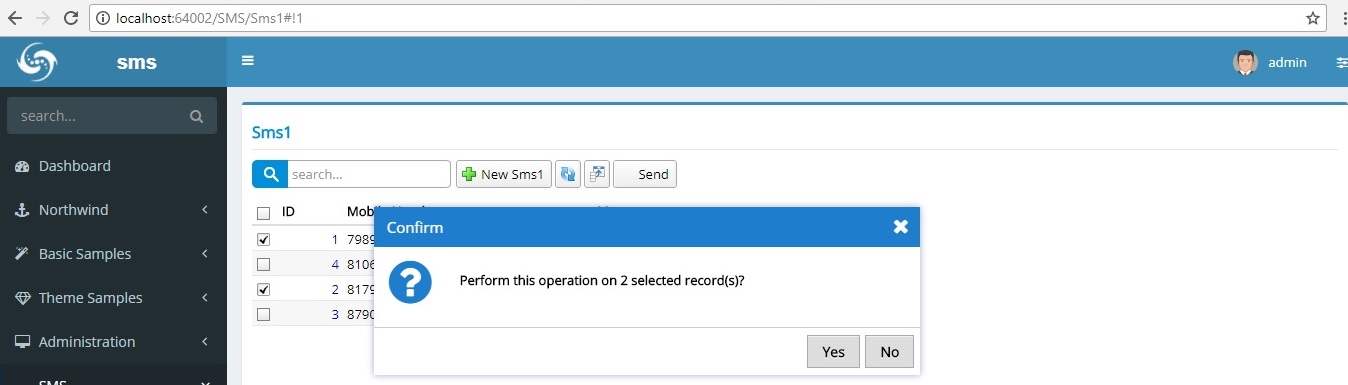

srinivas1910
on 9 Apr 2018
You did the right thing. only your function is unclear what should return.
```
foreach (var x in request.MyIds)
    {

        using (connection = SqlConnections.NewFor<MyRow>())

        {
        var myrow = connection.ById<MyRow>(x);
        String ApiKey = "qZ8xkHowN/s-iplIAplcLZ8IL0n2H4J60GJZ8PWAKD";
        String ContactNumber = myrow.MobileNumber;
        String message = HttpUtility.UrlEncode(myrow.Message);

        var r = new SmsBulkActionResponse();

        using (var wb = new WebClient())
        {
            byte[] response = wb.UploadValues("https://api.textlocal.in/send/", new NameValueCollection()
    {
    {"apikey" , ApiKey},
    {"numbers" , ContactNumber},
    {"message" , message},
    {"sender" , "S3"}
    });
            r.Result = System.Text.Encoding.UTF8.GetString(response);
        }
        }
    }
        return new SmsBulkActionResponse();
}
```
Zahar661
on 9 Apr 2018
Hi changed my code as below
[HttpPost]
public SmsBulkActionResponse SmsBulkAction(IUnitOfWork uow, IDbConnection connection, SmsBulkActionRequest request)
{
request.CheckNotNull();
        foreach (var x in request.MyIds)

        {

            using (connection = SqlConnections.NewFor<MyRow>())

            {

                var myrow = connection.ById<MyRow>(x);
                String ApiKey = "qZ8xkHowN/s-iplIAplcLZ8IL0n2H4J60GJZ8PWAKD";
                String ContactNumber = myrow.MobileNumber;
                String message = HttpUtility.UrlEncode(myrow.Message);


                var b = new SmsBulkActionResponse();

                using (var wb = new WebClient())
                {
                    byte[] response = wb.UploadValues("https://api.textlocal.in/send/", new NameValueCollection()
                    {
                    {"apikey" , ApiKey},
                     {"numbers" , ContactNumber},
                    {"message" , message},
                    {"sender" , "S3"}
                    });

                    b.Result = System.Text.Encoding.UTF8.GetString(response);

                }

                return b;
             }
        }
getting the below error
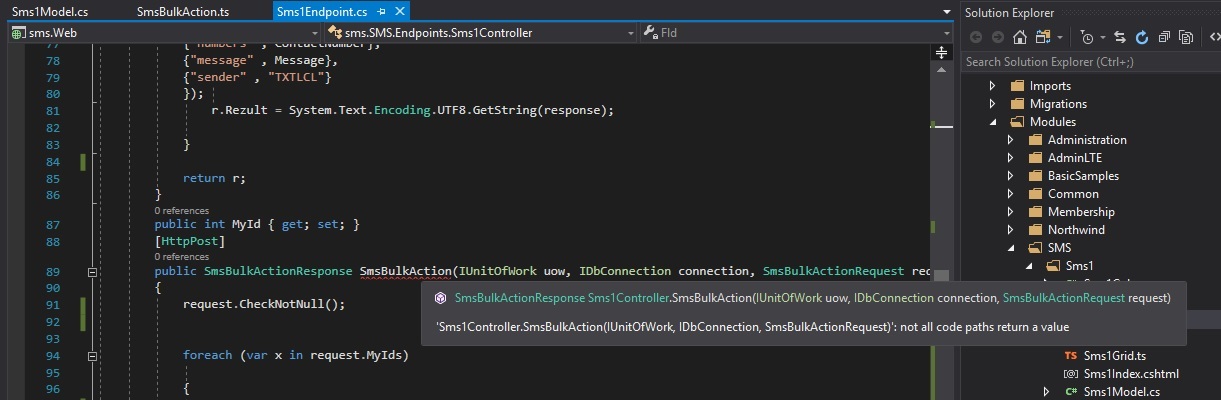
srinivas1910
on 10 Apr 2018
It was not necessary to change the code, it is necessary to think over it, it does not revert the result to anybody.
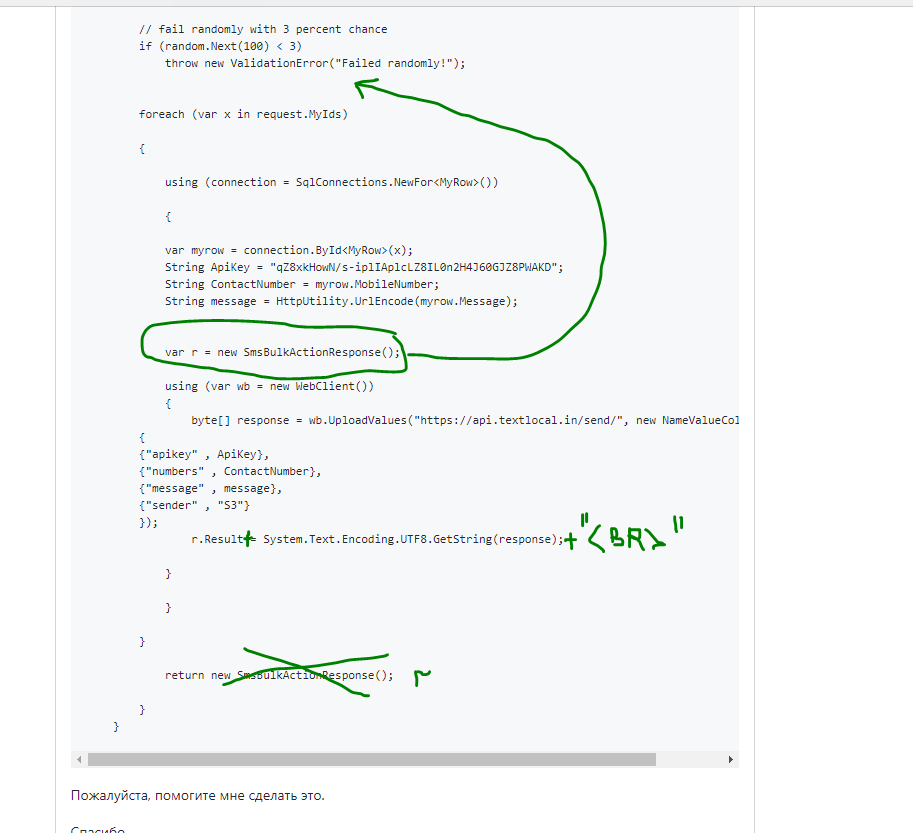
or breakpoint, test the result
Zahar661
on 10 Apr 2018
@Zahar661 Thank you for your quick help in getting the issue solved its done for me there is a problem with the API Key which is being resolved by breakpoint.
srinivas1910
on 10 Apr 2018
Related issues
 JohnRanger
·
3Comments
JohnRanger
·
3Comments
 moostafaa
·
3Comments
ga5tan
·
3Comments
moostafaa
·
3Comments
ga5tan
·
3Comments
 kilroyFR
·
3Comments
kilroyFR
·
3Comments
 StefanTheiner
·
3Comments
StefanTheiner
·
3Comments
Most helpful comment
MyEndpoints.cs
MyDialog.ts
Create new MyModel.cs