Hi,
I want to disable a editor in my page.
I have used this below code
Serenity.EditorUtils.setReadonly(this.element.find('.editor'), true);
But this can only disable the editor section. The add button and entries in grid are not get disabled.
can anyone please help me ?
 AmuthaKondusamy
All 14 comments
why not removing the buttons ?
protected getToolbarButtons(): Serenity.ToolButton[] {
let buttons = super.getToolbarButtons();
// *** Remove default buttons ***
buttons.splice(Q.indexOf(buttons, x => x.cssClass == "save-and-close-button"), 1);
buttons.splice(Q.indexOf(buttons, x => x.cssClass == "apply-changes-button"), 1);
buttons.splice(Q.indexOf(buttons, x => x.cssClass == "delete-button"), 1);
buttons.splice(Q.indexOf(buttons, x => x.cssClass == "undo-delete-button"), 1);
buttons.splice(Q.indexOf(buttons, x => x.cssClass == "clone-button"), 1);
buttons.splice(Q.indexOf(buttons, x => x.cssClass == "add-button"), 1);
}
 kilroyFR
on 6 Mar 2018
kilroyFR
on 6 Mar 2018
Hi,
Thanks @kilroyFR .
But I don't want to remove the button. Is there any way to disable it?
And also I want to disable the entries in the grid.
AmuthaKondusamy
on 7 Mar 2018
To disable a button (still being displayed), try something like this :
buttons[Q.indexOf(buttons, x => x.cssClass == "add-button")].cssClass += " disabled";
kilroyFR
on 7 Mar 2018
Hi,
@kilroyFR I have tried above suggested line of code. Since I am trying to disable the Editor's add-button, It is not able to find the button from MasterDialog. So can you suggest where I can place the code so that it can identify the editor's add-button?
AmuthaKondusamy
on 9 Mar 2018
in the master dialog. try something like this
protected updateInterface() {
super.updateInterface();
this.form.detailEditor.element.find('.add-button').addClass('disabled');
}
}
 dfaruque
on 11 Mar 2018
dfaruque
on 11 Mar 2018
Hi @dfaruque ,
Thank you so much. It works fine.
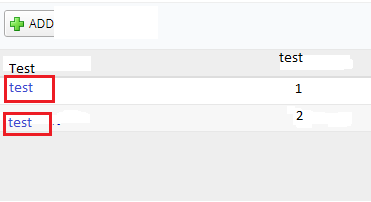
can you please tell me how to disable the already added items hyperlink in editor's grid?
AmuthaKondusamy
on 12 Mar 2018
Is there anyway to disable all the fields in a page?
AmuthaKondusamy
on 12 Mar 2018
you may use the following utilities to do the job.
dfaruque
on 12 Mar 2018
Hi @dfaruque,
I tried to use this.setReadOnly(true); But it is showing error that setReadOnly() is not a function and not in XYZDialog.ts
AmuthaKondusamy
on 14 Mar 2018
This is myFunction to Set ReadOnly Dialog
export function setDialogReadOnly(dlg: any, isReadonly: boolean ) {
if (isReadonly == true || isReadonly == undefined) {
Serenity.EditorUtils.setReadonly(dlg.element.find('.editor'), true);
Serenity.EditorUtils.setReadonly(dlg.element.find('.emaildomain'), true);
dlg.applyChangesButton.hide();
dlg.saveAndCloseButton.hide();
dlg.toolbar.element.hide();
}
else {
Serenity.EditorUtils.setReadonly(dlg.element.find('.editor'), false);
Serenity.EditorUtils.setReadonly(dlg.element.find('.emaildomain'), false);
this.applyChangesButton.show();
this.saveAndCloseButton.show();
this.toolbar.element.show();
}
}
In xxxDialog.ts u call
this.setDialogReadOnly(this, true);
 hairangsua
on 15 Mar 2018
hairangsua
on 15 Mar 2018
Hi @hairangsua,
Thank you. It disables all the field but not my editor links. Only the editor dialog get disabled. Please have a look at the attached image.
AmuthaKondusamy
on 15 Mar 2018
If you want to disable editLink u can try this way. Place this code in your xxxGrid.ts
` protected getColumns(): Slick.Column[] {
var columns = super.getColumns();
        var fld = xxxRow.Fields;

        Q.first(columns, x => x.field == fld.Test).format =
            ctx => ctx.value);

        return columns;
    }`
It's work for me @hairangsua
 PedroHFranco
on 11 Apr 2018
PedroHFranco
on 11 Apr 2018
Piggybacking on @hairangsua's excellent suggestion.
I ran into issues implementing this in conjunction with the PdfExportHelper button. It kept returning an Uncaught TypeError whenever the table contained NULL values. So for anyone looking to conditionally disable the editLink while preserving the rest of the formatting, I found that overriding propertyItemsToSlickColumns within xyzGrid.ts is a useful solution:
protected propertyItemsToSlickColumns(propertyItems: Serenity.PropertyItem[]): Slick.Column[] {
  if (!this.canModify()) {
    for (var i = 0; i < propertyItems.length; i++) {
      propertyItems[i].editLink = false;
    }
  }
  return super.propertyItemsToSlickColumns(propertyItems);
}
Or, perhaps more kosher:
private disableEditLink(propertyItems: Serenity.PropertyItem[]): void {
  if (!this.canModify()) {
    for (var i = 0; i < propertyItems.length; i++) {
      propertyItems[i].editLink = false;
    }
  }
}

protected getColumns(): Slick.Column[] {
  var propertyItems = this.getPropertyItems();
  this.disableEditLink(propertyItems);
  return this.propertyItemsToSlickColumns(propertyItems);
}

protected getColumnsAsync(): PromiseLike<Slick.Column[]> {
  return this.getPropertyItemsAsync().then(propertyItems => {
    this.disableEditLink(propertyItems);
    return this.propertyItemsToSlickColumns(propertyItems);
  }, null);
}
 tyleximus
on 21 Aug 2018
tyleximus
on 21 Aug 2018
Related issues
 Amitloh
·
3Comments
Amitloh
·
3Comments
 dudeman972
·
3Comments
dudeman972
·
3Comments
 Akarsh03
·
3Comments
Akarsh03
·
3Comments
 Shraddha996
·
3Comments
Shraddha996
·
3Comments
 JohnRanger
·
3Comments
JohnRanger
·
3Comments
Most helpful comment
If you want to disable editLink u can try this way. Place this code in your xxxGrid.ts
` protected getColumns(): Slick.Column[] {
var columns = super.getColumns();