Serenity: button inline with condition
Dear,
I am adding in xyzGrid.ts an inline button, but I would like this button to be displayed only if it answers there is a condition, the condition would be checking dates, if the date recorded in bd is greater than or equal to the current date the button will be displayed, if it is smaller it will not be displayed.
I tried to do this:
protected getColumns () {
var columns = super.getColumns ();
var datahoje = Date.now;
if (Management.EventoRow.Fields.DtCancelamento.toString> = datahoje.toString) {
columns.unshift ({
field: 'Delete Row',
name: '',
format: ctx => '' +
' ',
width: 24,
minWidth: 24,
maxWidth: 24
});
}
return columns;
 juliermefelix
All 20 comments
your condition code should be in format : ctx => {}
 minhhungit
on 22 Feb 2018
minhhungit
on 22 Feb 2018
for example:
format: ctx => {
    var curItem = <OrderRequestCccRow>ctx.item;

    var divId : string = "";
    if (curItem.id > 10)
        divId = "<div>greater than 10</div>";
    else
        divId = "<div>else</div>";

    return divId;
},
I need to compare the date it is written to the DB with the current date, if the date recorded in the DB is greater than or equal to the current date then it should show the inline button, if it is smaller it does not show the button.
So I guess the condition has to be before presenting the button.
Example: I am comparing the date of 02/24/2018 with the current date today 23/02/2018 as it is larger than the button.
protected getColumns() {
var columns = super.getColumns();
        var datahoje = new Date();

        if ("24/02/2018" >= datahoje.toLocaleDateString()) {
            columns.unshift({
                field: 'Delete Row',
                name: '',
                format: ctx =>
                    '<a class="inline-action delete-row" title="Excluir">' +
                    '<i class="fa fa-trash-o text-red"></i></a>',
                width: 24,
                minWidth: 24,
                maxWidth: 24

            });
}
Image
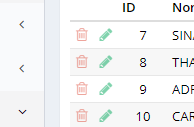
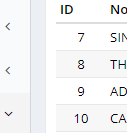
now compare with the date being 2/21/2018 or less than the current date the button is viewed.
protected getColumns() {
var columns = super.getColumns();
        var datahoje = new Date();

        if ("21/02/2018" >= datahoje.toLocaleDateString()) {
            columns.unshift({
                field: 'Delete Row',
                name: '',
                format: ctx =>
                    '<a class="inline-action delete-row" title="Excluir">' +
                    '<i class="fa fa-trash-o text-red"></i></a>',
                width: 24,
                minWidth: 24,
                maxWidth: 24

            });
}
image
juliermefelix
on 23 Feb 2018
Your condition just check to show/hide column, but your requirement is hide/show delete button on rows of that column. Is that right ?
So, if you just want to show/hide delete button then my suggestion shoud work for you :)
curItem.id is field of your date ("21/02/2018")
minhhungit
on 23 Feb 2018
I tried but I could not because he should not have done the condition.
how could it display information from the DB field in an alert for example to check if it is fetching DB data.
columns.unshift({
field: 'Delete Row',
name: '',
format: ctx => {
                    var curItem = <InscritosRow>ctx.item;
                    var datahoje = new Date();
                    var divId: string = " ";


                    if (curItem.IdEventoDtCancelamento.toString() >= datahoje.toLocaleDateString())
                        divId = '<a class="inline- action delete-row" title= "Excluir" >' +
                            '<i class="fa fa-trash-o text-red"></i></a>';

                    else
                        divId = "Periodo de cancelamento encerrado";

                return divId;


                },

                width: 24,
                minWidth: 24,
                maxWidth: 24,

            });
Closing due to inactivity.
 AlperanQ
on 19 Mar 2018
AlperanQ
on 19 Mar 2018
Please reopen the question, why there is still no solution ... waiting for help from the community.
juliermefelix
on 19 Mar 2018
@juliermefelix but what is the problem?
Have you checked if curItem.IdEventoDtCancelamento.toString() and datahoje.toLocaleDateString() variables contains the correct data?
Are you sure the test you done is correct with two string?
 Estrusco
on 19 Mar 2018
Estrusco
on 19 Mar 2018
When I specify the date directly as in the code below I get the desired one.
I think I'll have to do a foreach to fetch the corresponding date and then compare it to the current date. But I can not do foreach inside the grid.ts
I have to search the table for the date that is referring to a registered event. I think I would have to make an array on the table to fetch the specific date of that event so it compares it to the current date.
'protected getColumns() {
var columns = super.getColumns();
    var datahoje = new Date();

    if ("24/02/2018" >= datahoje.toLocaleDateString()) {
        columns.unshift({
            field: 'Delete Row',
            name: '',
            format: ctx =>
                '<a class="inline-action delete-row" title="Excluir">' +
                '<i class="fa fa-trash-o text-red"></i></a>',
            width: 24,
            minWidth: 24,
            maxWidth: 24

        });
}'
juliermefelix
on 19 Mar 2018
sorry I don't understand what you mean.
you want to hide entire 'Delete Row' column or just hide some cell of that column if today smaller than "24/02/2018"
minhhungit
on 19 Mar 2018
I think I'll have to do a foreach to fetch the corresponding date and then compare it to the current date
I think this is what I suggested for you
minhhungit
on 19 Mar 2018
as shown in the screenshot above, trying to hide only the inline buttons according to the table field "dtCancelamento"
In other words, hide the entire column delete line.
juliermefelix
on 19 Mar 2018
if you want to hide the entire column why you need to do a foreach
And what does your mean about corresponding date, does that mean "a field date of rows"
Why you need to care about corresponding date
minhhungit
on 19 Mar 2018
btw, I think you should check date like this: new Date('2018-02-24') >= new Date()
minhhungit
on 19 Mar 2018
is a registration system that allows me to cancel the subscribers until a certain date, so until the established date the delete button should appear, after the cancellation date the button can no longer appear, indicating that I can no longer cancel .
table of events:

registration table
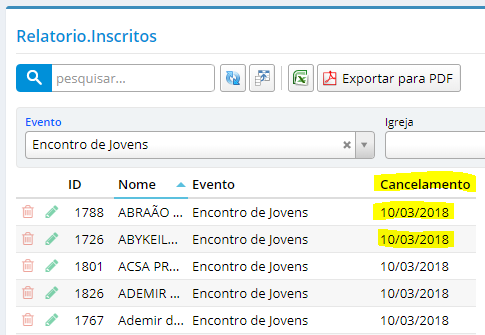
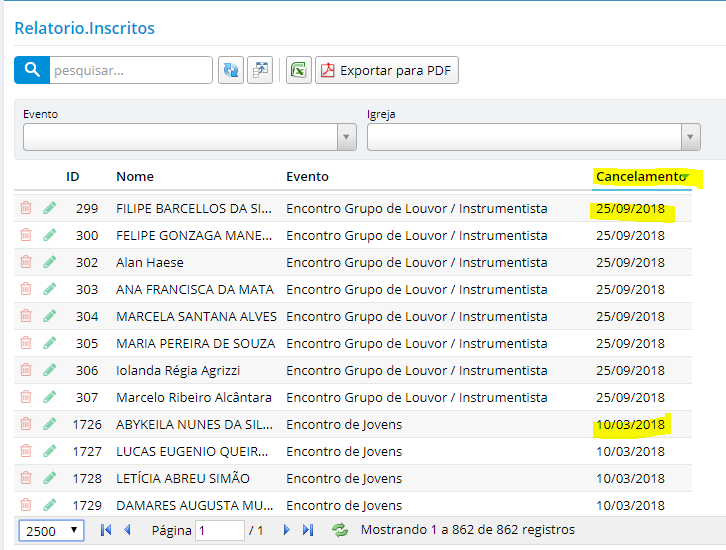
So I need to compare the "DtCancelamento" field with the current date.
juliermefelix
on 19 Mar 2018
if you need to compare date field of row, you need to check it inside format property
field: 'Delete Row',
name: '',
format: ctx => {
    var curItem = <YOUR ROW CLASS  HERE>ctx.item;

    var divId : string = "";
    if (curItem.DtCancelamento> something)  // <======= check DtCancelamento at here
        divId = "<div>this is where you will create delete button</div>";
    else
        divId = "";

    return divId;
},
I did according to the code below, but it finds the first row of the grid and makes the comparison.
How to make the foreach for it to go through the rows of the grid and run the code along the lines of the grid.
columns.unshift({
field: 'Delete Row',
name: '',
format: ctx => {
                   var curItem = <InscritosRow>ctx.item;
                    var datahoje = new Date();
                   var divId: string = " ";


                    if (curItem.IdEventoDtCancelamento <= datahoje.toLocaleDateString())
                     divId =
                    '<a class="inline- action delete-row" title= "Excluir" >' +
                           '<i class="fa fa-trash-o text-red"></i></a>'

                    else
                       divId = "Periodo de cancelamento encerrado";

                return divId;


                }
                ,

                width: 24,
                minWidth: 24,
                maxWidth: 24,

            });
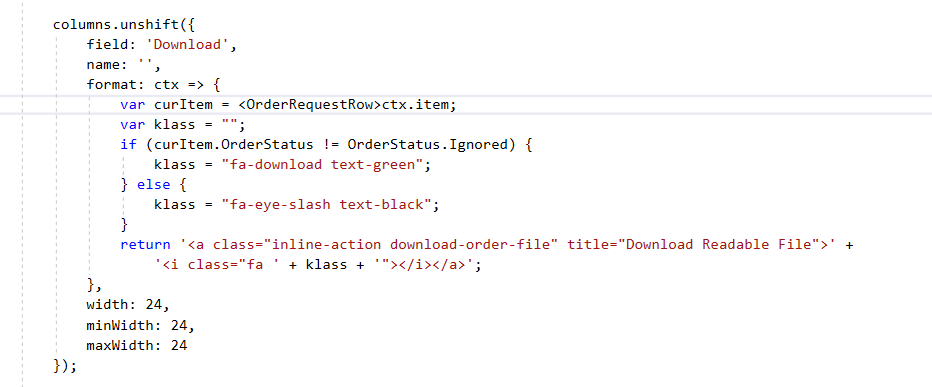
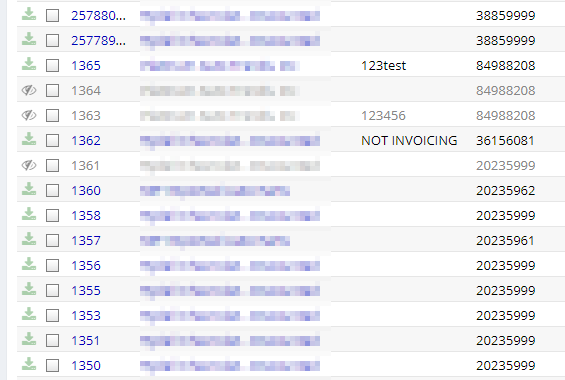
Then you have to debug it, check your data, it works for me for my project, pretend hide delete button is eye icon
minhhungit
on 20 Mar 2018
I noticed that the date of the table was in the format different from the date of the datahoje field, so I added the line below.
var dt = Q.formatDate (curItem.IdEventoDtCancelamento, "dd / MM / yyyy");
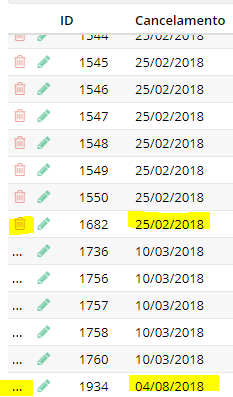
Now the button is appearing or not, but I realized that he is comparing only the day and not the complete date.
Example: Today is 03/20/2018 in the table has the date 04/08/2018 as 04 is less than 20 it did not display the delete button.
How do I compare the date in full.
Here is the complete code:
columns.unshift({
field: 'Delete Row',
name: '',
format: ctx => {
var curItem =
var datahoje = new Date();
var divId: string = " ";
var dt = Q.formatDate(curItem.IdEventoDtCancelamento, "dd/MM/yyyy");
                   if (dt >= datahoje.toLocaleDateString()) {
                       divId = '<a class="inline-action delete-row" title= "Cancelar" >' +
                           '<i class="fa fa-trash-o text-red"></i></a>';
                   }

                   else {
                       divId =
                           '<a title= "Periodo de cancelamento encerrado" >' +
                           '<i class="fa fa-eye-slash text-black"></i></a>';
                   }

                   return  divId;


                }
                ,

                width: 24,
                minWidth: 24,
                maxWidth: 24,

            });
in the image below it is verified for example that the date 25/02/2018 has passed and is displaying the button and the date 04/08/2018 did not display, precisely because the comparison is only in the day and not in the whole date.
juliermefelix
on 20 Mar 2018
Date comparison is tricky in every language. Why not compare day, month and year part separately?
like,
IF(daypart(dt) == daypart(datahoje) AND monthpart(dt) == monthpart(datahoje) AND yearpart(dt) == yearpart(datahoje))
{
// do something
}
Though line of code will increase but it has guarantee.
 Moheeb-U
on 1 May 2018
Moheeb-U
on 1 May 2018
Related issues
 chintankukadiya18
·
3Comments
chintankukadiya18
·
3Comments
 Pinellus
·
3Comments
Pinellus
·
3Comments
 dkontod
·
3Comments
dkontod
·
3Comments
 stixoffire
·
3Comments
stixoffire
·
3Comments
 john20xdoe
·
3Comments
john20xdoe
·
3Comments
Most helpful comment
for example: