Serenity: Row Detail Page / Dashboard
I am trying to implement a Dashboard like detail page for a row/entity type.
My plan is to create a dialog, (separate from the edit dialog) that is full page. I have successfully done this. I have a action button in my grid view to launch the full page dialog. That is where I am at so far.
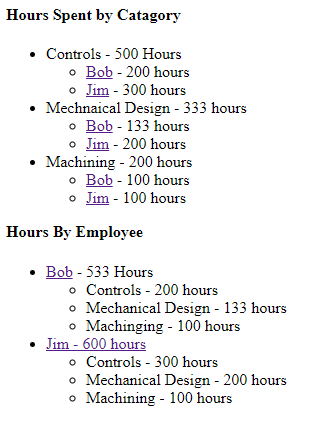
The entity/table I am doing this for is Job, I have a separate table for Time Spent Entries, Employees, and Time Spent Categories. I would like to create a nested list with total time spent for the job, grouped but categories, then under categories with will be broken down again by user. Then I would like to do a second list doing the same but with the reverse.
Then I would like to have 2 bar graphs populated with this information.
I can't find any examples that actually do something like this with real data. Can someone help me get going in the right direction?
this is the starting code I have for my Detail Dialog
namespace BetzIntranetApplication.Betz {

    //@Serenity.Decorators.registerClass()
    //@Serenity.Decorators.responsive()
    @Serenity.Decorators.panel()
    export class JobDetails extends Serenity.EntityDialog<JobRow, any> {
        protected getFormKey() { return JobForm.formKey; }
        protected getIdProperty() { return JobRow.idProperty; }
        protected getLocalTextPrefix() { return JobRow.localTextPrefix; }
        protected getNameProperty() { return JobRow.nameProperty; }
        protected getService() { return JobService.baseUrl; }

        protected form = new JobForm(this.idPrefix);

    }
}
This is my JobDetail.Template.chtml Mock up code
<body>
<div id="HoursByCatagory">
    <h4 style='margin-top: 0px;'>Hours Spent by Catagory</h4>
    <ul>
        <li>Controls - 500 Hours
            <ul>
                <li><a href="">Bob</a> - 200 hours</li>
                <li><a href="">Jim</a> - 300 hours</li>
            </ul>
        </li>
        <li>Mechnaical Design - 333 hours
            <ul>
                <li><a href="">Bob</a> - 133 hours</li>
                <li><a href="">Jim</a> - 200 hours</li>
            </ul>
        </li>

        <li>Machining - 200 hours
            <ul>
                <li><a href="">Bob</a> - 100 hours</li>
                <li><a href="">Jim</a> - 100 hours</li>
            </ul>
        </li>
    </ul>
</div>
<div id="HoursByEmployee">
    <h4 style='margin-top: 0px;'>Hours By Employee</h4>
    <ul>
        <li><a href="">Bob</a> - 533 Hours
            <ul>
                <li>Controls - 200 hours</li>
                <li>Mechanical Design - 133 hours</li>
                <li>Machinging - 100 hours</li>
            </ul>
        </li>
        <li><a href="">Jim - 600 hours</a>
    <ul>
        <li>Controls - 300 hours</li>
        <li>Mechanical Design - 200 hours</li>
        <li>Machining - 100 hours</li>
    </ul>
</li>
    </ul>
</div>
</body>
 TheColonel2688
All 11 comments
Something similar https://github.com/volkanceylan/Serene/tree/master/Serene/Serene.Web/Modules/Organization/BusinessUnit
 Zahar661
on 27 Nov 2017
Zahar661
on 27 Nov 2017
or SlickGrid Group https://github.com/volkanceylan/Serene/tree/master/Serene/Serene.Web/Modules/BasicSamples/Grids/GroupingAndSummariesInGrid
and function
buttons.push({
                title: 'По договорам и типам',
                cssClass: 'expand-all-button',
                onClick: () => (this.view.setGrouping(
                    [{
                        formatter: x => x.value + ' <div class="agr_group"><span class="totals_debet_group">' + (Math.round(x.totals.sum.Debet * 100) / 100).toFixed(2).replace(/(\d)(?=(\d{3})+\.)/g, '$1,') + "</span>" + '<span class="totals_credit_group">' + (Math.round(x.totals.sum.Credit * 100) / 100).toFixed(2).replace(/(\d)(?=(\d{3})+\.)/g, '$1,') + "</span></div>",
                        getter: 'DogovorNumber'
                    },
                    {
                        formatter: x => x.value + ' <div class="agr_group"><span class="totals_debet_group">' + (Math.round(x.totals.sum.Debet * 100) / 100).toFixed(2).replace(/(\d)(?=(\d{3})+\.)/g, '$1,') + "</span>" + '<span class="totals_credit_group">' + (Math.round(x.totals.sum.Credit * 100) / 100).toFixed(2).replace(/(\d)(?=(\d{3})+\.)/g, '$1,') + "</span></div>",
                        getter: 'TypePayName'
                        }]),
                this.view.collapseAllGroups(1),
                this.view.collapseAllGroups(0), opt.rowsPerPage = 10000)
            });
Zahar611, Thank you for your response. Those are for grids though, can the Business Unit example be adapted to be placed in a widget like component?
I'm looking do this for an individual Job row, so if they click on say Job number 501, it will give them a detail page for just that job. The first "Widget" I would like to put on there is a small tree view of the hours spent on that job. Really what I want to do is have a dashboard an individual Job row, with Graphs and other ideas. the hours spent tree is just the first step.
P.S. I'm doing this as a hobby/to learn. Nobody is paying me, I just want to learn. So help is very appreciated.
TheColonel2688
on 28 Nov 2017
I have a similar solution, but not very beautiful
var model = new DashboardPageModel();

            string html_text = "";

            int OrgID = 0;
            int CategId = 1;
            var s = ServicesRow.Fields;
            string cat = "";
            using (var connection = SqlConnections.NewFor<ServicesRow>())
            {

                if (Convert.ToInt32(Authorization.UserId) > 0)
                    using (var connectionUser = SqlConnections.NewFor<UserRow>())
                    {
                        UserRow user = connectionUser.TryById<UserRow>(Convert.ToInt32(Authorization.UserId));
                        OrgID = Convert.ToInt32(user.OrganizationID);
                    }
                if (OrgID > 0)
                    using (var connectionOrg = SqlConnections.NewFor<OrganizationRow>())
                    {
                        OrganizationRow organization = connectionOrg.TryById<OrganizationRow>(OrgID);
                        model.Organization = organization;
                        CategId = Convert.ToInt32(organization.CategoryClientId);
                    }
                SqlQuery queryServices = new SqlQuery();
                queryServices.Select(s.ServiceId, s.Name, s.Price, s.Description, s.Limitation, s.Value,s.ServiceGroupId)
                .From(s)
                .Where(s.ServiceStateId == 1 & s.CategoryClientId.Like("%"+CategId+"%"))
                .OrderBy(s.ServiceGroupId,s.Cod,s.Name);

                var queryResult = connection.Query<ServicesRow>(queryServices);
                int ro = 0;
                int i = 0;
                /*
                <div class="tab-content">
                    <div class="tab-pane active" id="history">
                </div>
                 */

                string activ = " active";
                int gId = 0;
                foreach (var servis in queryResult)
                {
                  if (servis.ServiceGroupId!= gId) {
                        cat += servis.ServiceGroupId + ",";
                        if (ro > 0) html_text += "</div>";
                        if (gId != 0) html_text += "</div>";
                        html_text += "<div class=\"tab-pane" + activ + "\" id=\"group_" + servis.ServiceGroupId + "\">";
                        activ = "";
                        if(servis.ServiceGroupId!=null) gId = (int)servis.ServiceGroupId;
                        ro = 0;
                    }

                    if (ro == 0) html_text += "<div class='row'>";
                    html_text += "<div class='col-lg-6 col-xs-12'><div class='box box-primary collapsed-box'><div class='box-header with-border'>";
                    html_text += "<h3 class='box-title'>" + servis.Name + "</h3> <span>" + servis.Value + "</span></div>";
                    html_text += "<div class='box-body' style='display: none;'>";
                    html_text += "<span  class='pull-right'>" + Convert.ToDouble(servis.Price).ToString("#,0") + " руб.</span>";
                    html_text += "<span class='pull-left'>Срок: " + servis.Limitation + "</span><br>";
                    html_text += "<span class='info-box-number'>Описание</span>" + servis.Description + "</div>";
                    html_text += "<div class='small-box-footer'><button class='btn btn-box-tool pull-left' data-widget='collapse'>Подробнее</button><a href='javascript:new TSRUTS.LK.SIOClientDialog().loadEntityAndOpenDialog({ServiceId: " + servis.ServiceId + "})' class='order-link btn btn-box-tool pull-right' data-key=" + servis.ServiceId + " >Заказать</a></div>";//javascript:new TSRUTS.LK.ServiceInOrganizationDialog().loadNewAndOpenDialog()
                    html_text += "</div></div>";

                    ro++;
                    i++;
                    if (i >= color.Length) i = 0;
                    if (ro == 2)
                    {
                        html_text += "</div>";
                        ro = 0;
                    }
                }
                if (ro > 0) html_text += "</div>";
                html_text += "</div>";
                model.ServiseRow = new HtmlString(html_text);
            }

            var sg = ServiceGroupRow.Fields;
            using (var connection = SqlConnections.NewFor<ServiceGroupRow>())
            {
                string[] cat_Arr = cat.Trim(',').Split(',');
                html_text = "";
                string activ = " class=\"active\"";
                foreach (var c in cat_Arr)
                {
                    var sG = connection.ById<ServiceGroupRow>(c);
                    html_text += "<li" + activ + "><a href=\"#group_" + sG.ServiceGroupId + "\" data-toggle=\"tab\" aria-expanded=\"true\"><div class=\"icon\"><img src=\"/upload/" + sG.UrlImage + "\"></div><div class=\"title\">" + sG.Name + "</div></a></li>";
                    activ = "";
                }
                model.ServiceGroup = new HtmlString(html_text);
            }

            return View(MVC.Views.Common.Dashboard.DashboardIndex, model);
.shtml
<div class="LKservice tab-pane" id="service">
                        <div class="nav-tabs-custom">
                            <ul class="nav nav-tabs">
                                @Model.ServiceGroup
                            </ul>
                            <div class="tab-content">
                                @Model.ServiseRow
                            </div>
                        </div>
                    </div>
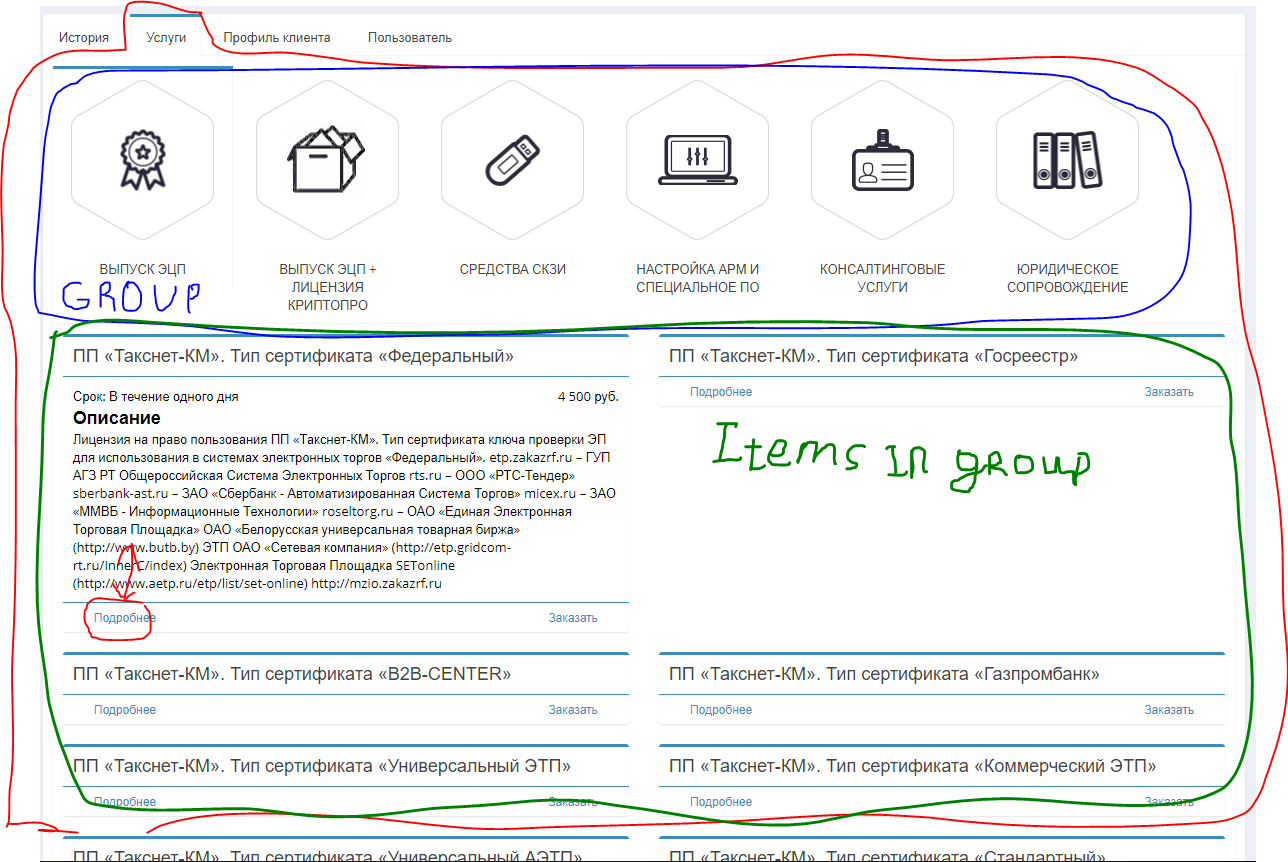
Zahar661
on 28 Nov 2017
Thank you very much Zahar661. I believe that is the direction I needed. It will probably be this weekend before I can try it myself though.
TheColonel2688
on 28 Nov 2017
@Zahar661 I assume you meant not very elegant, cause I find your screeshot beatiful. I want to have interface like that, cause my boss does not like "admin"/wordpress-like interface.
How did u achieve that layout?
Did you ditch default theme completely?
 ga5tan
on 9 Mar 2018
ga5tan
on 9 Mar 2018
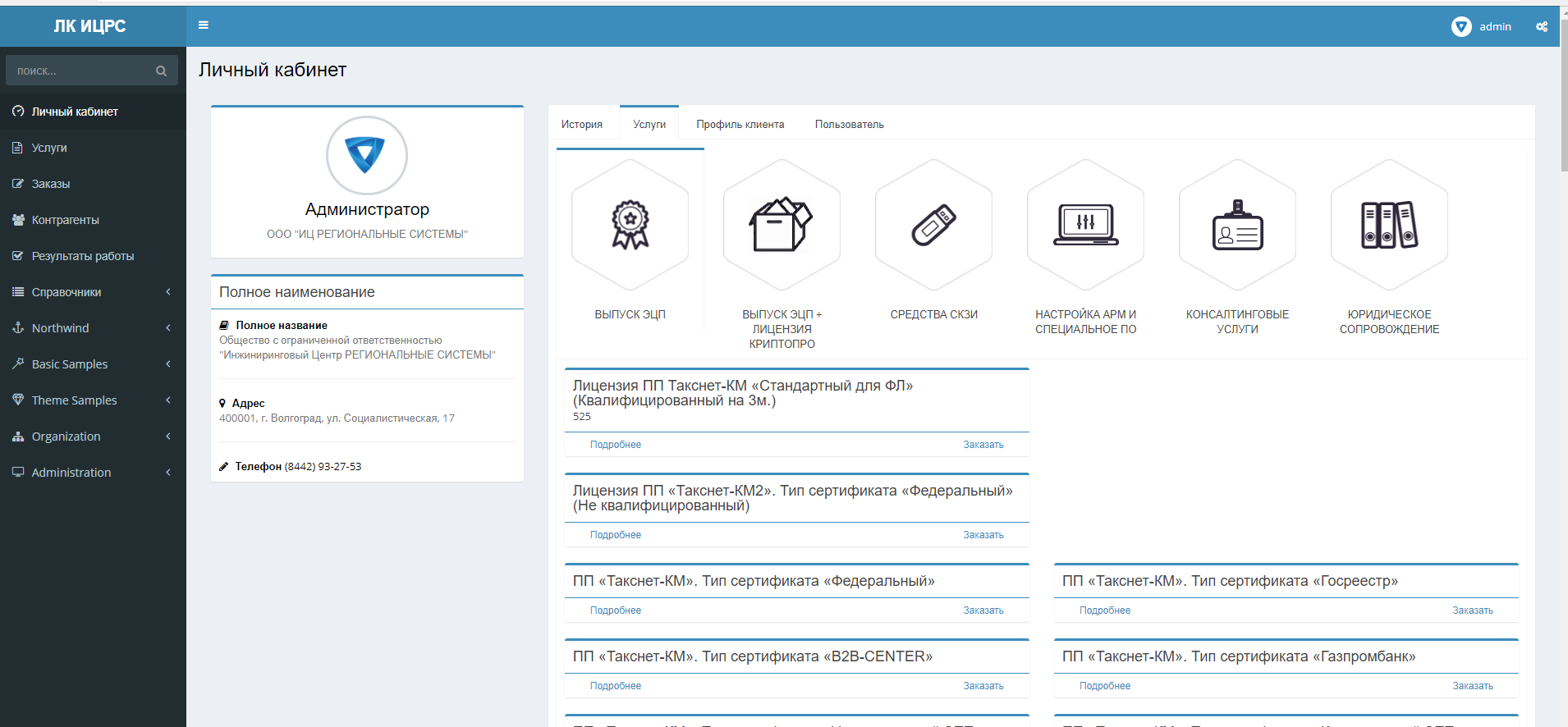
this default theme. just the layout of the page
Zahar661
on 9 Mar 2018
oh. no matter. still looks good. If only I could hide left menu for certain class of users.
Is this a Dash Board? (my Russian is dusty:)
I assume you have tabs on top. What do Icons do?
The items below icons are blog?
Can I put Sergen generated forms on tabs?
ga5tan
on 9 Mar 2018
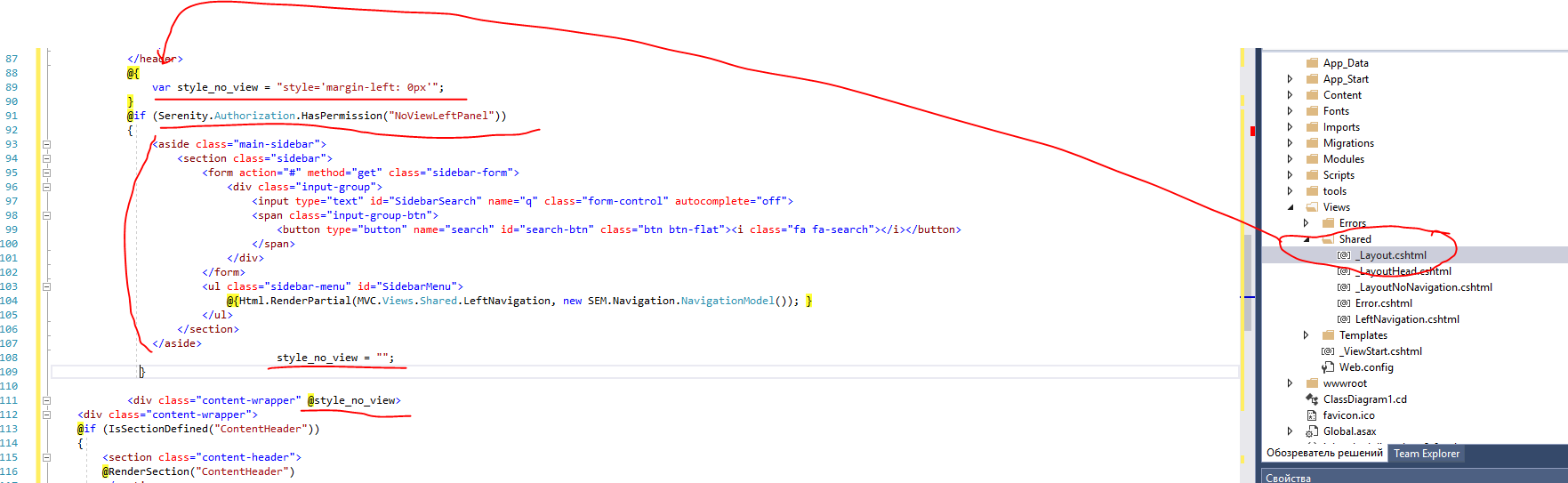
so you can hide the left panel for some users
Zahar661
on 9 Mar 2018
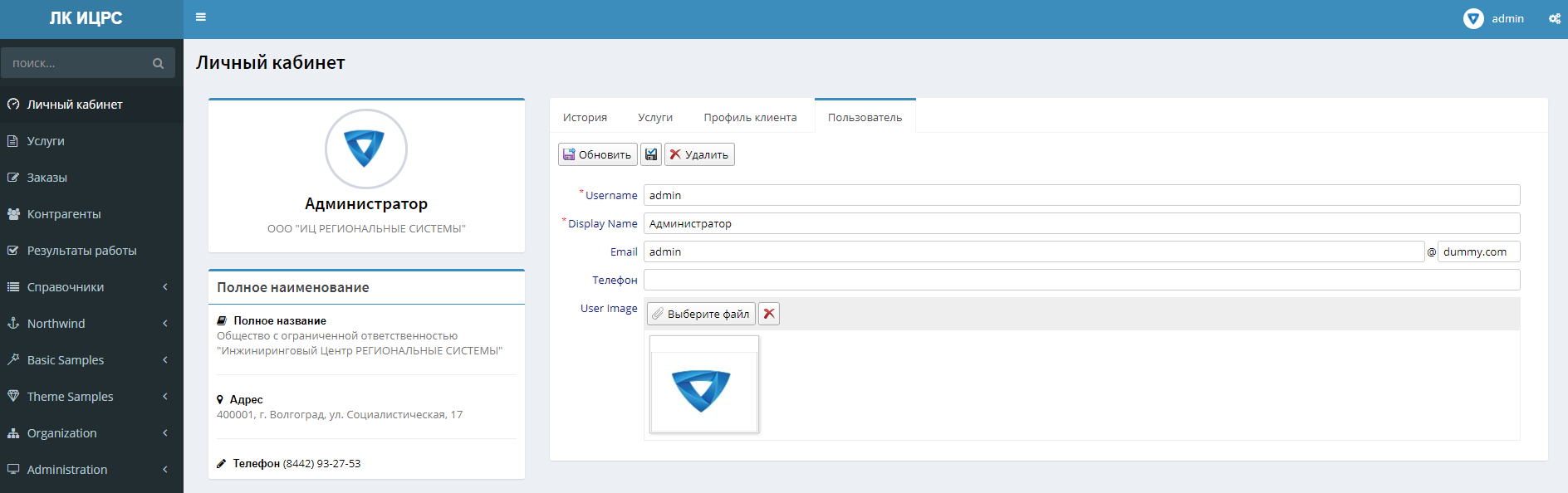
Sergen generated forms on tabs
Zahar661
on 9 Mar 2018
@Zahar661 This would make a nice wiki article - beautiful or not - looks pretty good to me ..
 stixoffire
on 27 Mar 2020
stixoffire
on 27 Mar 2020
Related issues
 Shraddha996
·
3Comments
Shraddha996
·
3Comments
 john20xdoe
·
3Comments
stixoffire
·
3Comments
john20xdoe
·
3Comments
stixoffire
·
3Comments
 Pinellus
·
3Comments
Pinellus
·
3Comments
 StefanTheiner
·
3Comments
StefanTheiner
·
3Comments