Serenity: Sample: Token Authentication Required for Exposing Service Endpoint to Mobile Apps
Hello Volkanceylan,
Can you guide me where to write authentication filter for token authentication which can work seamlessly with existing forms ( cookie) authentication in Serenity Application
Api layer should get accessed by Mobile (Android / iOS) using token authentication
Thanks,
Sameer
 samdubey
All 13 comments
Cookie auth is also a token authentication. I dont have a sample for this. Any MVC token auth filter you find in internet should work with Serenity as well.
 volkanceylan
on 3 May 2016
volkanceylan
on 3 May 2016
Hello @samdubey, have you any solution for this question? I used serenity API in kotlin android(retrofit). using that API login successfully done. but, In another API for fetching data, I got Authorization is required for this request!.
 NikunjGadhiya07
on 17 Jul 2019
NikunjGadhiya07
on 17 Jul 2019
@NikunjGadhiya07 I have successfully implemented Serenity in Android Application, I am using CookieContainer to store cookie which i am using to pass along with api request to access the data.
samdubey
on 31 Jul 2019
@NikunjGadhiya07 I have successfully implemented Serenity in Android Application, I am using CookieContainer to store cookie which i am using to pass along with api request to access the data.
Can you please share with us the android code used to consume serenity API !! and if you have to authenticate first for every single request ???
 mjacoup
on 26 Aug 2019
mjacoup
on 26 Aug 2019
Hi guys,
Did you make it?
 baliuzao
on 26 Dec 2019
baliuzao
on 26 Dec 2019
Hello @baliuzao @NikunjGadhiya07 @mjacoup
I have successfully implemented token authentication with Serenity
Option 1:
Using serenity as it is using Cookie Authentication, where we use CookieContainer class to store cookies after authentication is successful and passing same cookie in every subsequent request.
Option 2: Token Authentication
Implemented JWT Token Authentication with Serenity where I will be generating First Token by passing username and password and retrieving AuthToken from Service
Then passing this AuthToken in every subsequent request to get data / post data to serenity services.
Option 3: I have successfully implemented Identity Server 4 for Serenity with Existing cookie Authentication yet to implement token authentication with IdentityServer and Serenity.
I will post code for all above option soon, may write wiki section.
samdubey
on 30 Dec 2019
@samdubey thanks,When can I release the code?
 ILAOHE
on 9 Jan 2020
ILAOHE
on 9 Jan 2020
Hello @baliuzao @NikunjGadhiya07 @mjacoup
I have successfully implemented token authentication with SerenityOption 1:
Using serenity as it is using Cookie Authentication, where we use CookieContainer class to store cookies after authentication is successful and passing same cookie in every subsequent request.
Option 2: Token Authentication
Implemented JWT Token Authentication with Serenity where I will be generating First Token by passing username and password and retrieving AuthToken from Service
Then passing this AuthToken in every subsequent request to get data / post data to serenity services.
Option 3: I have successfully implemented Identity Server 4 for Serenity with Existing cookie Authentication yet to implement token authentication with IdentityServer and Serenity.
I will post code for all above option soon, may write wiki section.
Code For Option 1:
https://github.com/samdubey/SerenityApiAccessCookieAuthentication
Code For Option 2:
https://github.com/samdubey/SerenityApiAccessTokenAuthentication
Code for Option 3:
https://github.com/samdubey/Serenity-IdentityServer4-Integration
In Visual Studio Run Multiple Projects together:
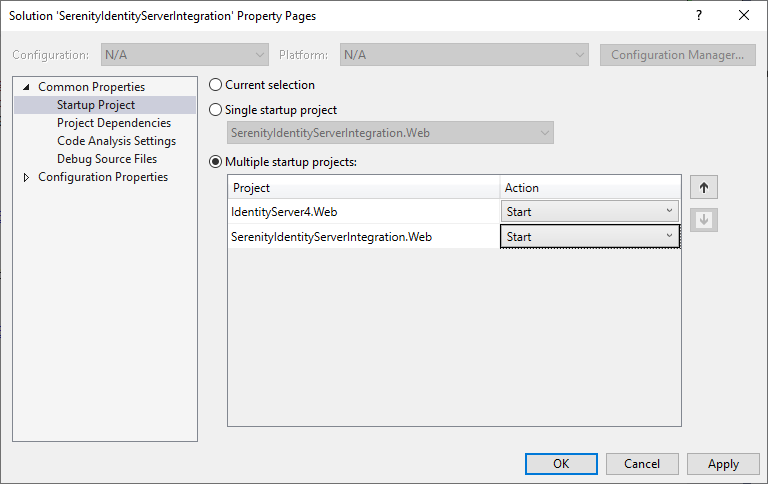
Find Options:

samdubey
on 9 Jan 2020
@samdubey
I have tried with your solution https://github.com/samdubey/SerenityApiAccessTokenAuthentication
I have success got the token. But when I try to post another API with send token back, I always got Error Code with NotLoggedIn.
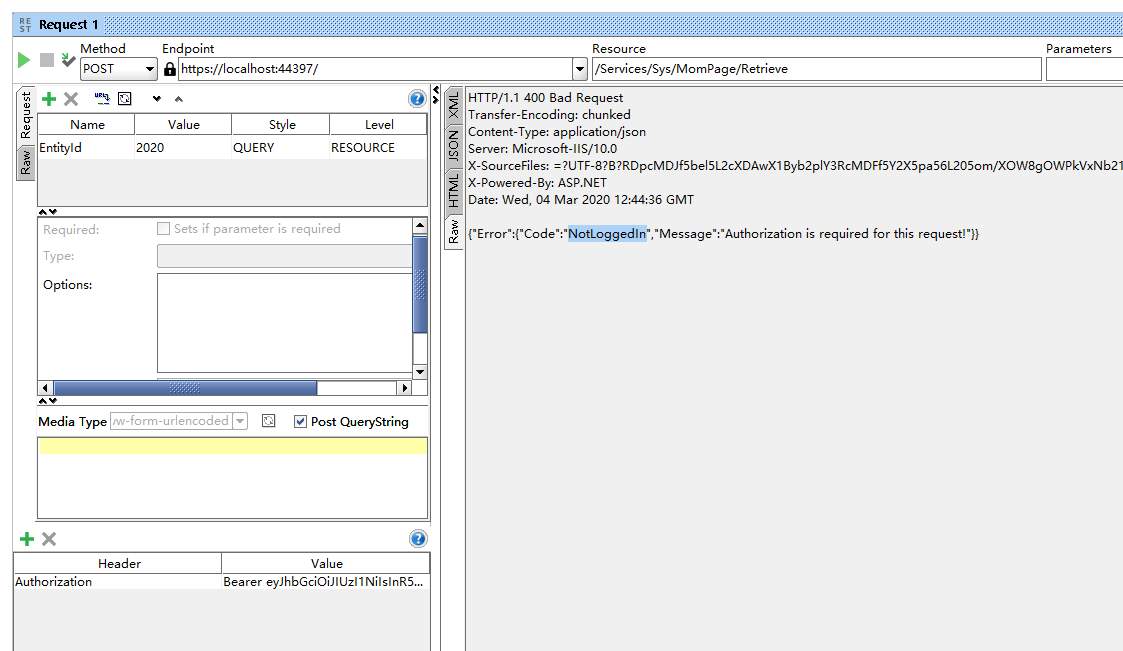
Do you have any idea where I am wrong?
 Nathan2020-0126
on 4 Mar 2020
Nathan2020-0126
on 4 Mar 2020
I also tried with your code, also got the same error.
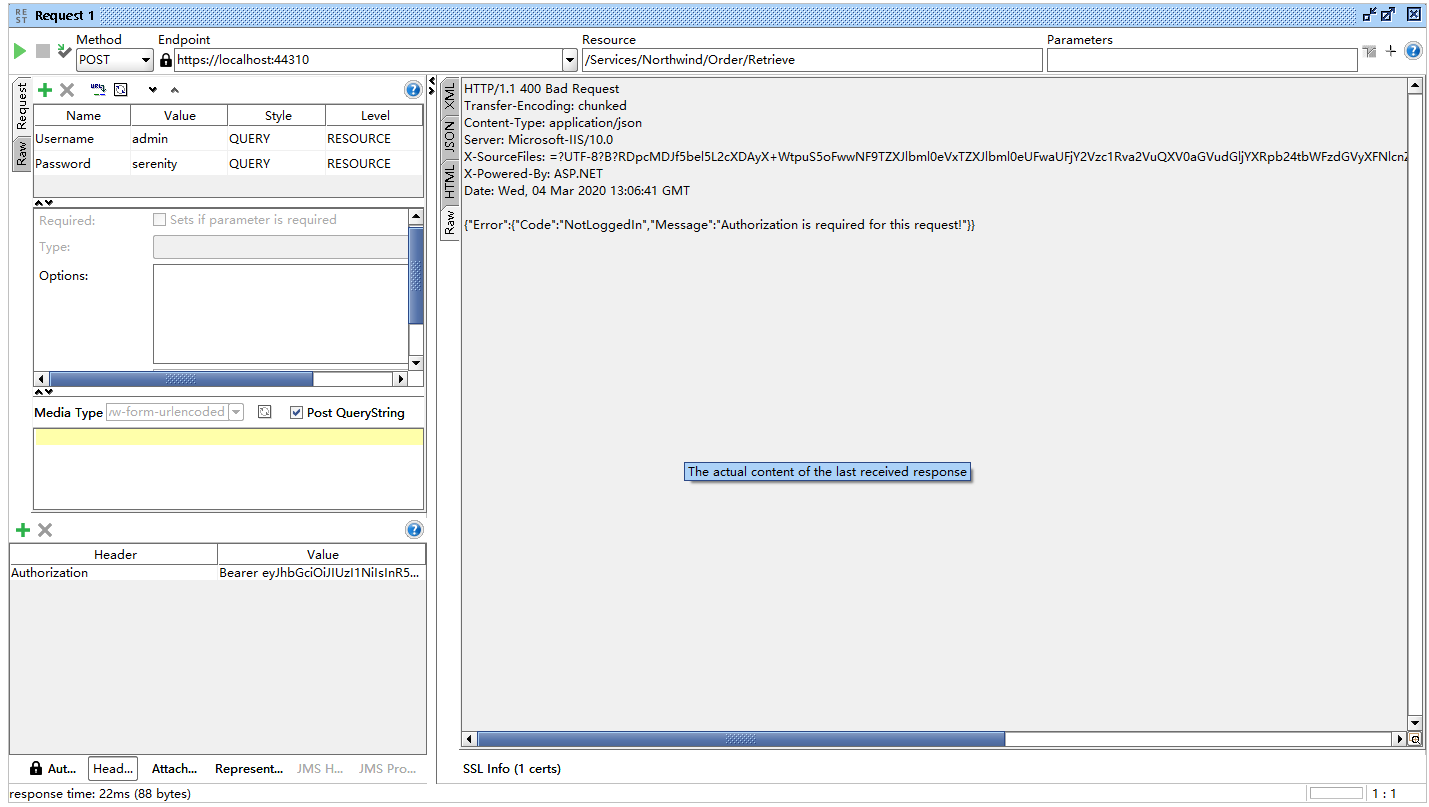
Nathan2020-0126
on 4 Mar 2020
you must create another endpoint from existing CustomerEndPoint as below:
You need to add following and remove existing permissions from Serenity to make it work
[Authorize(AuthenticationSchemes = JwtBearerDefaults.AuthenticationScheme)]
[Route("Api/Services/Northwind/Customer/[action]")]
[ConnectionKey(typeof(MyRow))]
public class CustomerApiController : ServiceEndpoint
{
samdubey
on 5 Mar 2020
@samdubey really Thanks a lot for your help.
Replace the _ServiceAuthorize_ AuthroizationSchemes with _Authorize(AuthenticationSchemes = JwtBearerDefaults.AuthenticationScheme)_ has any influence on the authorization check?
Nathan2020-0126
on 5 Mar 2020
It has no effect on Authorization, It works flawlessly
It only enables you to use Token Authentication for that service
samdubey
on 6 Mar 2020
Related issues
 Amitloh
·
3Comments
Amitloh
·
3Comments
 ahsansolution
·
3Comments
ahsansolution
·
3Comments
 stixoffire
·
3Comments
stixoffire
·
3Comments
 JohnRanger
·
3Comments
JohnRanger
·
3Comments
 stepankurdylo
·
3Comments
stepankurdylo
·
3Comments
Most helpful comment
Hello @baliuzao @NikunjGadhiya07 @mjacoup
I have successfully implemented token authentication with Serenity
Option 1:
Using serenity as it is using Cookie Authentication, where we use CookieContainer class to store cookies after authentication is successful and passing same cookie in every subsequent request.
Option 2: Token Authentication
Implemented JWT Token Authentication with Serenity where I will be generating First Token by passing username and password and retrieving AuthToken from Service
Then passing this AuthToken in every subsequent request to get data / post data to serenity services.
Option 3: I have successfully implemented Identity Server 4 for Serenity with Existing cookie Authentication yet to implement token authentication with IdentityServer and Serenity.
I will post code for all above option soon, may write wiki section.