Serenity-js: Serenty-js 2.0 == > Step definition files not found while execution
Hello @jan-molak !
Your answer on our previous issue has helped! There is another issue that we are stuck up with.
The protractor.conf.js uses cucumberOptions like this:
cucumberOpts: {
   require: [
     "features/step_definitions/**/*.ts",
     "core/common-util/hooks.ts",
     "core/persona.ts",
     "core/stage.ts",
   ],
   format: 'pretty',               // enable console output
   compiler: 'ts:ts-node/register'   // interpret step definitions as TypeScript
 },
On execution, we learn that it is unable to find the location for step_definition files. The error reads:
[test:acceptance] [16:27:53] E/launcher - Error: Error: ENOENT: no such file or directory, lstat 'C:\gitrepo\WebFX\XXX\features\step_definitions\**'
[test:acceptance]     at Object.realpathSync (fs.js:1454:7)
[test:acceptance]     at Object.expandPathWithExtensions (C:\gitrepo\WebFX\XXX\node_modules\cucumber\lib\cucumber\cli\path_expander.js:14:23)
[test:acceptance]     at C:\gitrepo\WebFX\XXX\node_modules\cucumber\lib\cucumber\cli\path_expander.js:8:27
[test:acceptance]     at Array.map (<anonymous>)
[test:acceptance]     at Object.expandPathsWithExtensions (C:\gitrepo\WebFX\XXX\node_modules\cucumber\lib\cucumber\cli\path_expander.js:7:31)
[test:acceptance]     at Object.expandPaths (C:\gitrepo\WebFX\XXX\node_modules\cucumber\lib\cucumber\cli\support_code_path_expander.js:6:38)
[test:acceptance]     at getSupportCodePaths (C:\gitrepo\WebFX\XXX\node_modules\cucumber\lib\cucumber\cli\configuration.js:73:49)
[test:acceptance]     at Object.getSupportCodeLibrary (C:\gitrepo\WebFX\XXX\node_modules\cucumber\lib\cucumber\cli\configuration.js:125:30)
[test:acceptance]     at Object.getSupportCodeLibrary (C:\gitrepo\WebFX\XXX\node_modules\cucumber\lib\cucumber\runtime.js:44:46)
[test:acceptance]     at Object.start (C:\gitrepo\WebFX\XXX\node_modules\cucumber\lib\cucumber\runtime.js:12:37)
[test:acceptance] [16:27:53] E/launcher - Process exited with error code 100
[test:acceptance] npm ERR! code ELIFECYCLE
[test:acceptance] npm ERR! errno 100
[test:acceptance] npm ERR! [email protected] test:acceptance: `protractor ./protractor.conf.js`
[test:acceptance] npm ERR! Exit status 100
[test:acceptance] npm ERR!
[test:acceptance] npm ERR! Failed at the [email protected] test:acceptance script.
[test:acceptance] npm ERR! This is probably not a problem with npm. There is likely additional logging output above.
Could you please help us with this?
P.S: It is able to find the feature files with . It works when file path is an absolute path (without /*)
Thanks,
Akshaya
 akshayadesh
All 7 comments
Hey @akshayadesh,
The structure of the cucumberOpts has changed a bit with the newer versions of Cucumber, but I don't think that this is what's causing the issue.
Could you see if you can run the following project on your machine?
https://github.com/serenity-js/serenity-js-cucumber-protractor-template
If that works, then you'd need to figure out the difference between the two. If it doesn't then let me know :-)
Best,
Jan
 jan-molak
on 4 Oct 2019
jan-molak
on 4 Oct 2019
Hi @jan-molak , While above project works with recursive wildcard /** in Step definition path. It does not give unimplemented steps warning and Step_definitions code snippet to be implemented.
That's is why we were trying to use old version of cucumber("cucumber": "^1.3.3") where we were facing issues with /**.
For example I tried adding another scenario
Feature: Super Calculator

  In order to learn how to use Serenity/JS with Cucumber and Protractor
  As a Curious Developer
  I'd like to see an example

  Scenario: An actor interacts with a web page

    The ["Super Calculator"](https://juliemr.github.io/protractor-demo/) was developed by Julie Ralph,
    the author of Protractor, to demonstrate what Protractor is capable of.

    By the way, did you notice that with **Serenity/JS** you can use [Markdown](https://en.wikipedia.org/wiki/Markdown)
    to better describe each `Feature` and `Scenario`?

    Given Callie decides to use the Super Calculator
     When she adds 19 and 23
     Then she should see that the result is 42


  Scenario: I am trying with another scenario

    Serenity-js Screenplay - A Step forward towards Meaningful actor centric automation

    Given I am using cucumber 5.1.0
    When I run the unimplemented feature
    Then I should get Unimplemeted exception with a helper code snippet.
Console Log:
[clean] > rimraf target
[clean]
[failsafe] Script 'clean' exited with code 0
[test:execute]
[test:execute] > [email protected] test:execute C:\Users\patilraj\Desktop\koki\temp\serenity-js-cucumber-protractor-template
[test:execute] > protractor ./protractor.conf.js
[test:execute]
[test:execute] [13:06:37] I/launcher - Running 1 instances of WebDriver
[test:execute] [13:06:37] I/direct - Using ChromeDriver directly...

DevTools listening on ws://127.0.0.1:7814/devtools/browser/7c901dc6-1198-4002-8785-ce0c07d529c8
[test:execute] [13:06:47] I/launcher - 0 instance(s) of WebDriver still running
[test:execute] [13:06:47] I/launcher - chrome #01 failed 1 test(s)
[test:execute] [13:06:47] I/launcher - overall: 1 failed spec(s)
[test:execute] [13:06:47] E/launcher - Process exited with error code 1
[test:execute] npm ERR! code ELIFECYCLE
[test:execute] npm ERR! errno 1
[test:execute] npm ERR! [email protected] test:execute: `protractor ./protractor.conf.js`
[test:execute] npm ERR! Exit status 1
[test:execute] npm ERR!
[test:execute] npm ERR! Failed at the [email protected] test:execute script.
[test:execute] npm ERR! This is probably not a problem with npm. There is likely additional logging output above.
[test:execute]
[test:execute] npm ERR! A complete log of this run can be found in:
[test:execute] npm ERR!     C:\Users\patilraj\AppData\Roaming\npm-cache\_logs\2019-10-09T07_36_47_792Z-debug.log
[failsafe] Script 'test:execute' exited with code 1
[test:report]
[test:report] > [email protected] test:report C:\Users\patilraj\Desktop\koki\temp\serenity-js-cucumber-protractor-template
[test:report] > serenity-bdd run --features ./features
[test:report]
[test:report] Spawning: C:/Program Files/Java/jdk1.8.0_221/bin/java.exe -DLOG_LEVEL=warn -Dlogback.configurationFile=C:\Users\patilraj\Desktop\koki\temp\serenity-js-cucumber-protractor-template\node_modules\@serenity-js\serenity-bdd\resources\logback.config.xml -jar node_modules/@serenity-js/cache/serenity-cli-2.1.9-all.jar --features ./features --destination target/site/serenity --source target/site/serenity --project serenity-js-cucumber-protractor-template
[test:report] -------------------------------
[test:report] SERENITY COMMAND LINE INTERFACE
[test:report] -------------------------------
[test:report] Loading test outcomes from target\site\serenity
[test:report] Writing aggregated report to target\site\serenity
[test:report]
[test:report] Report generation done
[failsafe] Script 'test:report' exited with code 0
npm ERR! Test failed.  See above for more details.
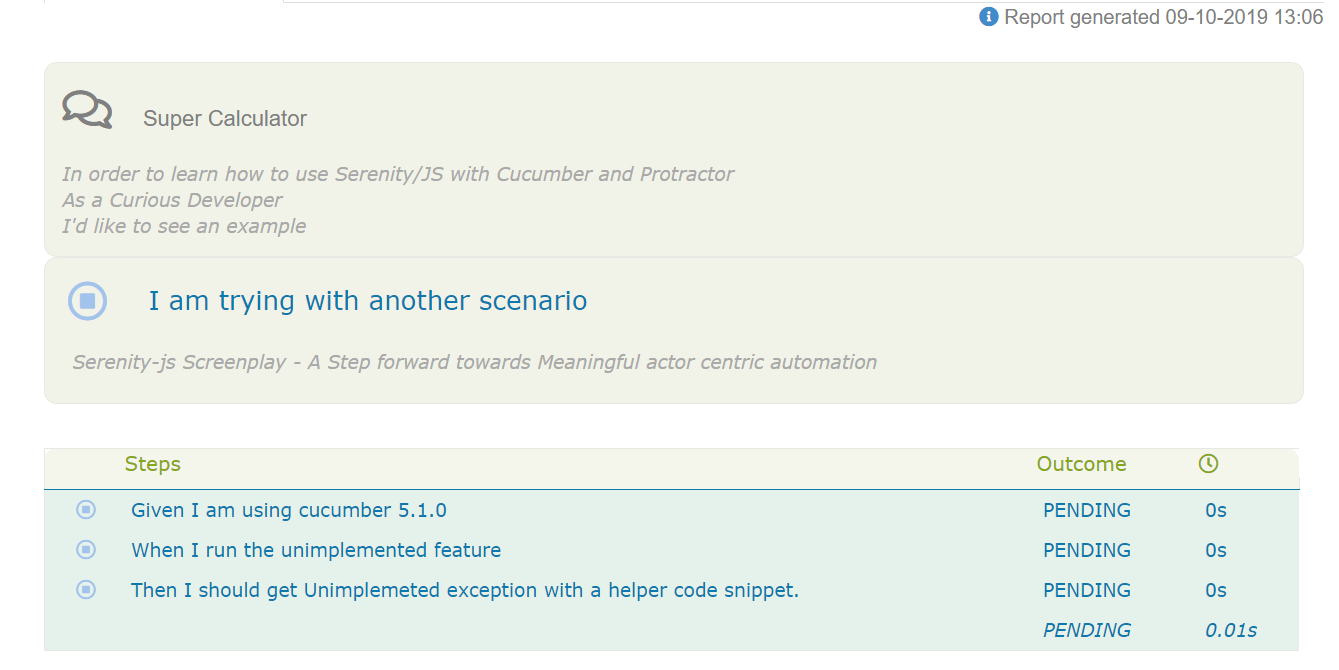
Though Report shows Steps as Pending , It does not provide us with any warning regarding unimplemented steps on Console and does not show any Code Snippet to implemented as normally cucumber shows.
 rajeshwarp
on 9 Oct 2019
rajeshwarp
on 9 Oct 2019
Adding new ConsoleReporter() printed the unimplemented error:
☕Then I should get Unimplemeted exception with a helper code snippet.
[test:execute]         ImplementationPendingError: Step not implemented
 serenity: {
        runner: 'cucumber',
        crew: [
            ArtifactArchiver.storingArtifactsAt('./target/site/serenity'),
            Photographer.whoWill(TakePhotosOfInteractions),     // or Photographer.whoWill(TakePhotosOfFailures),
            new SerenityBDDReporter(),
            new ConsoleReporter()
        ]
    }
But still the I am not able to print helper code snippet that will be of huge help for any developer in implement step definitions.
rajeshwarp
on 10 Oct 2019
Hey @rajeshwarp!
So, _a lot_ has changed in Cucumber since version 1...
TL/DR
In protractor.conf.js add:
    cucumberOpts: {
        require: [ 'features/**/*.ts', ],
        'format': [ 'snippets:snippets.txt' ],
    },
Long answer
Cucumber now ships with several built-in formatters. For example, the snippets formatter prints the code snippets for the pending steps, so that's what you're after.
However, the below config _won't work_:
    cucumberOpts: {
        require: [ 'features/**/*.ts', ],
        'format': [ 'snippets' ],
    },
That's because Cucumber can support only one formatter printing to a given output (where "output" is either the "standard output", a.k.a. the terminal, or a file), and both Serenity/JS and snippets want to print to the same standard output and Serenity/JS wins because it's registered last.
A quick workaround for this problem would be to print the snippets output to a file ( snippets:some-file-name.txt), which means that if there were pending steps, a developer would need to check the file to copy the snippets. Not ideal, but better than not having them.
Having said that, I think that ideally it should be the ConsoleReporter that takes care of both reporting the progress and suggesting any code snippets.
jan-molak
on 14 Oct 2019
Thanks @jan-molak for the workaround ! It works :)
rajeshwarp
on 15 Oct 2019
Cool, I'm glad it helped! And thanks for mentioning this issue, by the way. I'm planning to implement something similar to cucumber's code snippets suggestions in #358
jan-molak
on 17 Oct 2019
Looking forward to #358 im doing some more testing around this currently and will report any findings if not already raised
 testifyqa
on 24 Jan 2020
testifyqa
on 24 Jan 2020
Related issues
 rakeshnambiar
·
5Comments
rakeshnambiar
·
5Comments
 GeeChao
·
6Comments
GeeChao
·
6Comments
 san-ouadghiri
·
6Comments
san-ouadghiri
·
6Comments
 codesandtags
·
4Comments
codesandtags
·
4Comments
 y3rsh
·
4Comments
y3rsh
·
4Comments
Most helpful comment
Hey @akshayadesh,
The structure of the
cucumberOptshas changed a bit with the newer versions of Cucumber, but I don't think that this is what's causing the issue.Could you see if you can run the following project on your machine?
https://github.com/serenity-js/serenity-js-cucumber-protractor-template
If that works, then you'd need to figure out the difference between the two. If it doesn't then let me know :-)
Best,
Jan