Serenity-core: Report Generation takes lot of time
Hi John,
We are using serenity for continuous automation for over 2.5 years in NOKIA for our IOT projects.
We have 2 queries which in our run and results.
Query 1. The automation duration mentioned in the report and the console logs are different.
For example: Report shows 4 hours and console shows 12 hours.
In regard to this we have 2 questions.
a. Why there is a mismatch between console and report time.
b. How to reduce the time taken for run?
During API automation(using Serenity Rest Assured) we had the parallel execution taking place where we had the multiple runner class and we were modifying the
Query 2. Report generation takes around 2 hours for our 1500 test cases. In that pending cases are 750 and it takes almost 45 minutes. Overall automated+manual+pending takes 2 hours for report generation.
Question is: Is there any way to reduce the time for report generation.
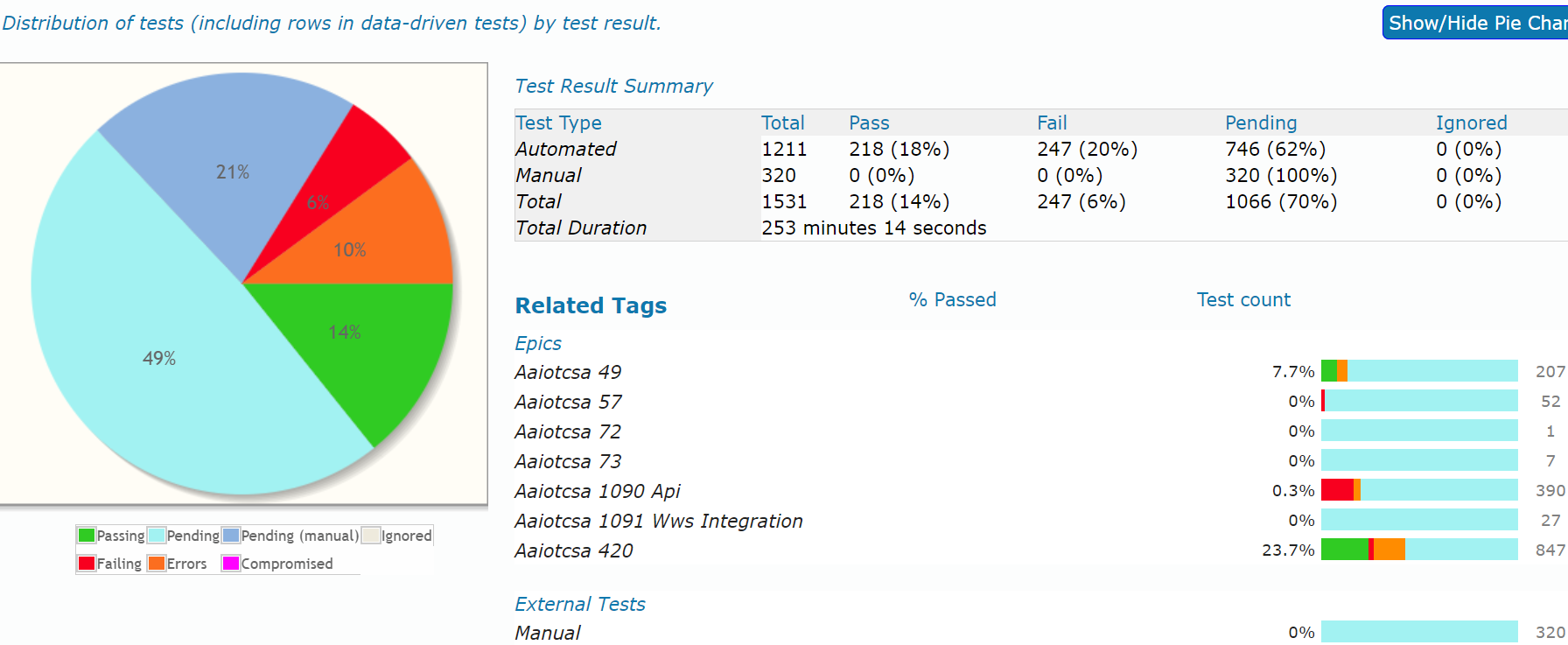
 nshiveg
All 29 comments
Test duration is the sum of the time taken by each test, which may not be the same as the total time of the test suite (it doesn't include report generation for example).
Report generation should not take that long. What test framework are you using? For example we have seen JBehave take a very long time to process large test reports, because of the way it loads the stories into memory before processing (which is one reason why I recommend Cucumber over JBehave).
For UI testing, it sound's like your application does not allow the same user to be connected simultaneously in different sessions? If this is not a deliberate functionality, I would ask for this to be fixed. Otherwise, you can create multiple users and set up a system of pools of users rather than running the tests with a specific user.
For more project-specific support (for example I'd be happy to review your test suite to look for specific strategies to improve the test performance), have you looked at our Enterprise support options (https://johnfergusonsmart.com/serenity-bdd-mentoring/#support)?
 wakaleo
on 9 Aug 2018
wakaleo
on 9 Aug 2018
Hi John,
We are using cucumber framework for automation.
Our requirement does not allow for same user to login. The other logged-in user session will be timed out.
Regards
Nithin H S
nshiveg
on 9 Aug 2018
In that case you should be able to run your UI scenarios in parallel by writing runner classes for each batch or group you want to run, and using the standard Maven support for parallel tests. For more leverage you can set up a Selenium grid (very easy to do with Docker for example)
wakaleo
on 9 Aug 2018
Hi John,
You mean to say we need to group our features and create a runner class for each group so that each login will not interfere with each other.
And for report generation do you think we are doing something wrong? because our code will not be having any connection with the report right?. So is there any way to reduce the time taken?
nshiveg
on 9 Aug 2018
Yes, for the grouping that is correct. Regarding the report generation, I would need to see the project structure and the report generation running to understand what is happening.
wakaleo
on 9 Aug 2018
Hi John,
We will discuss with the management about Enterprise support we need and update you. Because we are thinking about the same, since we have few more questions regarding the XPATH problems.
Before closing this issue(about report time and parallel execution) we will again discuss with team and come back with few more questions regarding the same topic before 10th Aug COB IST. So please don't close the issue.
nshiveg
on 9 Aug 2018
@nshiveg Understood
wakaleo
on 9 Aug 2018
Hi ,
I am using Serenity in my Automation project, While implementing Grid I initiated Remote driver but Inbuilt method of BDD getDriver() method is used in scripts. Remote Driver initiated in Hooks is getting overridden by getDriver() method in Pages.class (inbuilt method from serenity).
Due to this tests are not running on Node.
Hooks.java:
Remotedriver = new RemoteWebDriver(new URL("http://10.128.32.43:4444/wd/hub"), ieOptions);
In scripts :
getDriver().findElement(By.xpath("//input[contains(@data-bind,'closingReferenceId')]")).click();
Thanks for help
Thanks,
Srikanth
 immidisrikanth
on 1 Oct 2018
immidisrikanth
on 1 Oct 2018
@immidisrikanth this question is unrelated to this issue, so it isn't really the right place to raise it. Serenity manages the drivers for you, so this is intentional. If you want to use a remote driver, see http://thucydides.info/docs/serenity-staging/#_running_remote_tests.
wakaleo
on 1 Oct 2018
We faced the same issue with Cucumber API tests. Tests are running 25min. And report generation taken more than 45 min. Is there a way to optimize it? Report generation not even using all CPU resources.
 MichaelVovk
on 13 Aug 2021
MichaelVovk
on 13 Aug 2021
Report generation should take a couple of minutes, max, especially for API tests. I have a test suite with over 2000 API tests that takes only a few minutes to generate. If report generation is slow, it may be an operating system issue. Do you have anti-virus software running on the machine?
wakaleo
on 13 Aug 2021
This happens in any environment. Local or Gitlab CI as well. No Anti-virus. 400 API test only. Logging level="INFO"
MichaelVovk
on 13 Aug 2021
@MichaelVovk can you provide a sample project that reproduces the issue?
wakaleo
on 13 Aug 2021
I'm not sure about it. My report is 3 Gb size is it ok for 400 tests?
MichaelVovk
on 13 Aug 2021
@MichaelVovk it's not the report that would help, it's the project that generates it and takes time to do so. I've never seen this behaviour so have no idea what it could be due to.
wakaleo
on 13 Aug 2021
I'm not sure about it. My report is 3 Gb size is it ok for 400 tests?
are you sure this is correct? 3Gb? a small report is like 10mb because of heavy dependencies.. so 2.99Gb for 400 tests sounds impossible, given each test report should be in the low Kb size
 globalworming
on 18 Aug 2021
globalworming
on 18 Aug 2021
@globalworming yes, size is about 3Gb every time. We use different users and relogin for each FF. It might be connected to that. But I'm not sure. 3Gb and 10Mb is a huge difference .
MichaelVovk
on 19 Aug 2021
Maybe have a look at the contents of the report directory. API tests produce no screenshots, just JSON and HTML, so that size does seem impossible from the Serenity report files alone.
wakaleo
on 19 Aug 2021

Yes only JSON and HTML but 28k files
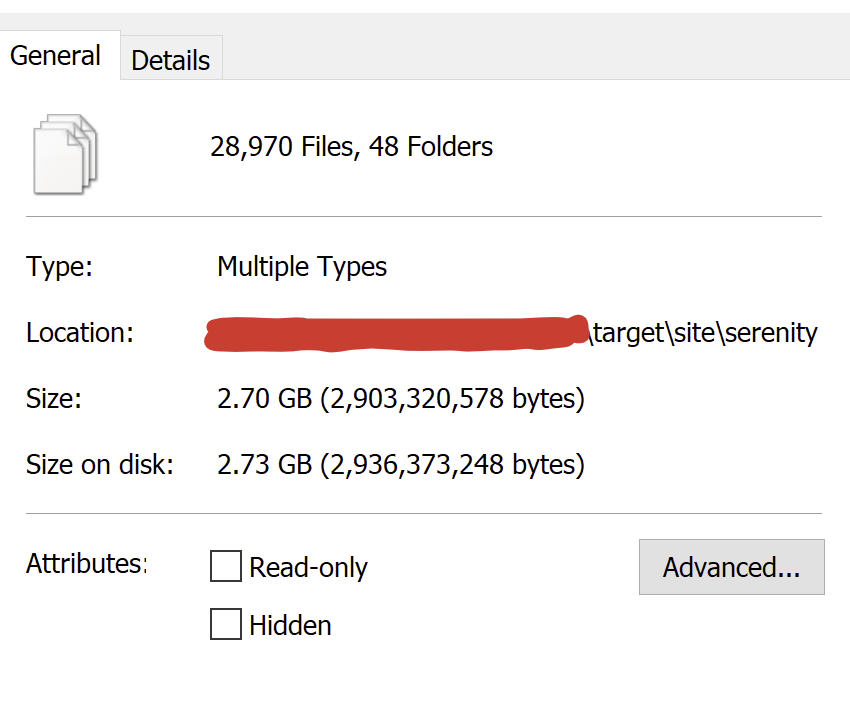
MichaelVovk
on 19 Aug 2021
Can you share the report directory contents?
wakaleo
on 20 Aug 2021
my very small examle report has like 360 files which are mostly static dependencies, with the tests json/html being 16 KiB to 32 KiB in size. I am a bit befuddled how you get 29k files from 400 tests :)
maybe you never run mvn clean?
globalworming
on 22 Aug 2021
@wakaleo I will try
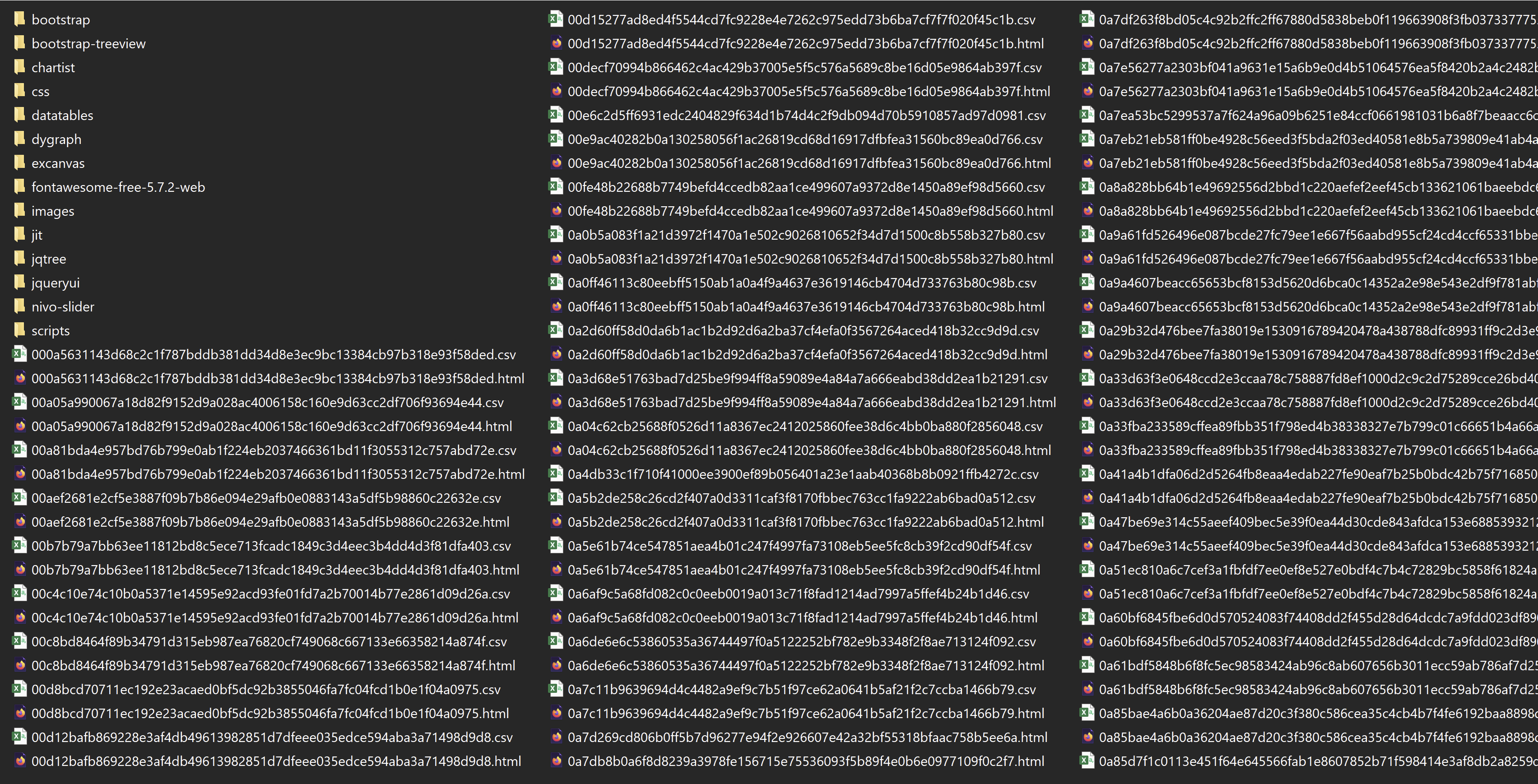
next will go 29k ok csv and html files

MichaelVovk
on 23 Aug 2021
Feels like a combinatorial explosion. Could you set serenity.compressed.filenames=false in your config file and see what gets generated? Also, what version of Serenity are you running?
wakaleo
on 23 Aug 2021
@wakaleo sure will try now. We are using 2.4.34 for Gradle
MichaelVovk
on 23 Aug 2021
@wakaleo same result with serenity.compressed.filenames=false
MichaelVovk
on 23 Aug 2021
But the filenames should be different, so it might give an indication of what reports it is generating.
wakaleo
on 23 Aug 2021
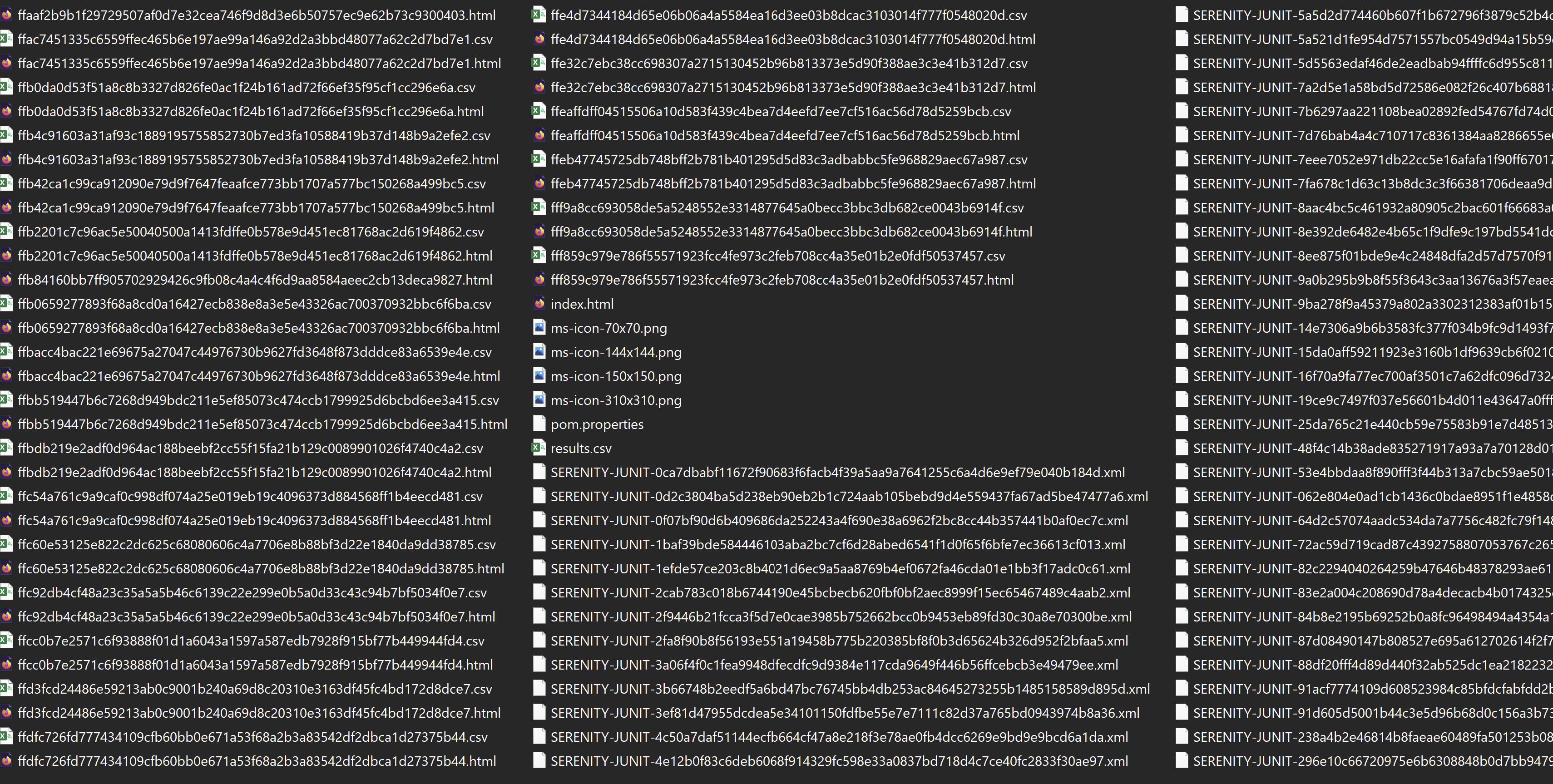
Probably not working,
MichaelVovk
on 23 Aug 2021
Just to make sure: please run mvn clean verify and check if it makes a difference.. Or.. Uhm @wakaleo whats the clean command in gradle? 😅
globalworming
on 23 Aug 2021
@globalworming tried several times on different env. Names are still the same
MichaelVovk
on 24 Aug 2021
Related issues
 PrasadNutalapati
·
7Comments
PrasadNutalapati
·
7Comments
 vikramvi
·
7Comments
vikramvi
·
7Comments
 dineshbalajibingo
·
5Comments
dineshbalajibingo
·
5Comments
 bobby06495
·
7Comments
bobby06495
·
7Comments
 gkushang
·
4Comments
gkushang
·
4Comments