Serenity-core: [WARNING] Failed to load requirements: gherkin.ParserException$CompositeParserException: Parser errors:
We were using serenity + jbehave for our test framework for long but with older version of serenity. Recently we moved to the latest version and although the old tests work fine and reports get generated we are observing a whole lot of exceptions in the console after execution is complete.
Serenity version currently:
Results :

 vaibhav2701
All 8 comments
Interesting. Can you share a sample project that reproduces the issue?
 wakaleo
on 7 Aug 2018
wakaleo
on 7 Aug 2018
Hi.
i cant upload the original project but am uploading a project which has a similar problem. Its a maven project and when i do a 'mvn clean install' from command prompt on it i get that error. It has some other issue because of which it is not finding the feature file but that is not what concerns me right now.
Thanks.
TestXYZ.zip
vaibhav2701
on 7 Aug 2018
Hi @vaibhav2701 ,
I also got hit with the same error. Maybe you can try the Scenario Outline builder.
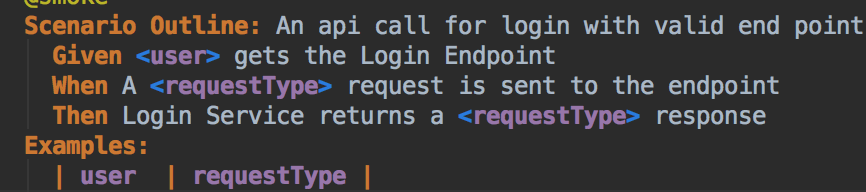
 dtanedo
on 10 Sep 2018
dtanedo
on 10 Sep 2018
Hi,
Any help on this will be appreciated. we are still struggling with those Parser Exceptions - "Failed to load requirements: gherkin.ParserException$CompositeParserException: Parser errors:"
I have attached the demo project in my previous post which shows the errors. Any help will be appreciated
vaibhav2701
on 20 Sep 2018
You are using JBehave story syntax in a .feature file (which should be Cucumber Gherkin syntax). If you have to use JBehave, you need to rename your feature files as .story files.
wakaleo
on 20 Sep 2018
I tried to rename the feature file to .story file but still i am getting the same exception. The exception is clearly mentioning cucumber in it whereas we are using jbehave dependencies in pom. Is it that i have to exclude something from pom that will fix it??
ParserException.txt
pom.xml.txt
vaibhav2701
on 20 Sep 2018
renaming the *.feature file to *.story (and updating the runner class accordingly) fixes the issue: TestXYZ.zip
wakaleo
on 20 Sep 2018
Thanks a lot :). Found the issue which was causing the error even after renaming the file with .story. Finally it worked for me on my real project. In our original pom.xml we had an extra plugin which was not there in the TestXYZ.zip project. When I removed it, the project is now building fine. The plugin was maven-install-plugin.
<plugins>
         <plugin>
            <groupId>org.apache.maven.plugins</groupId>
            <artifactId>maven-surefire-plugin</artifactId>
            <version>2.18.1</version>
            <configuration>
               <skip>true</skip>
               <testFailureIgnore>true</testFailureIgnore>
               <forkCount>0</forkCount>
            </configuration>
         **</plugin>
         <plugin>
            <groupId>org.apache.maven.plugins</groupId>
            <artifactId>maven-install-plugin</artifactId>
            <version>2.5.2</version>
         </plugin>**
         <plugin>
            <artifactId>maven-failsafe-plugin</artifactId>
            <version>2.18.1</version>
            <configuration>
               <includes>
                  <include>**/*TestSuite.java</include>
               </includes>
               <forkCount>3</forkCount>
               <reuseforks>true</reuseforks>
               <threadCount>3</threadCount>
               <argLine>-Xmx512m</argLine>
               <parallel>methods</parallel>
               <systemPropertyVariables>
                  <webdriver.driver>${webdriver.driver}</webdriver.driver>
               </systemPropertyVariables>
            </configuration>
            <executions>
               <execution>
                  <goals>
                     <goal>integration-test</goal>
                     <goal>verify</goal>
                  </goals>
               </execution>
            </executions>
         </plugin>
         <plugin>
            <groupId>org.apache.maven.plugins</groupId>
            <artifactId>maven-compiler-plugin</artifactId>
            <version>3.2</version>
            <configuration>
               <source>1.7</source>
               <target>1.7</target>
            </configuration>
         </plugin>
         <plugin>
            <groupId>net.serenity-bdd.maven.plugins</groupId>
            <artifactId>serenity-maven-plugin</artifactId>
            <version>${serenity.version}</version>
            <executions>
               <execution>
                  <id>serenity-reports</id>
                  <phase>post-integration-test</phase>
                  <goals>
                     <goal>aggregate</goal>
                  </goals>
               </execution>
            </executions>
         </plugin>
      </plugins>
vaibhav2701
on 20 Sep 2018
Related issues
 dineshbalajibingo
·
5Comments
dineshbalajibingo
·
5Comments
 jaalvarezvi
·
4Comments
jaalvarezvi
·
4Comments
 jai4july
·
3Comments
jai4july
·
3Comments
 gkushang
·
4Comments
gkushang
·
4Comments
 scormaq
·
3Comments
scormaq
·
3Comments
Most helpful comment
renaming the *.feature file to *.story (and updating the runner class accordingly) fixes the issue: TestXYZ.zip