Sequel-ace: Using SSH Key is non-functional
- Sequel Ace Version: 2.1.8 (Downloaded from App Store)
- macOS Version: 10.15.6
- MySQL Version: 5.6.45
Description
After selecting SSH Connection, inputting all the details and selecting the SSH Key, Sequel Ace still tries to use the password stored in the field. Deleting the password makes Sequel Ace prompt for a password upon testing connection.
Steps To Reproduce
- Create a new connection
- Select SSH Tab
- Input all the connection details, and select SSH Key
Expected Behaviour
Connection succeeds (This is the current behaviour on Sequel Pro)
Actual Behaviour
Sequel Ace prompts for password. If you type any password before selecting the SSH Key, the password will be used instead of the SSH Key
 alberto-fp-24
All 13 comments
Can you include a screenshot of the connection screen? Please blur out any private info, but if possible I'd like to see what the key selector looks like.
And can you screenshot the password prompt as well?
 Jason-Morcos
on 25 Sep 2020
Jason-Morcos
on 25 Sep 2020
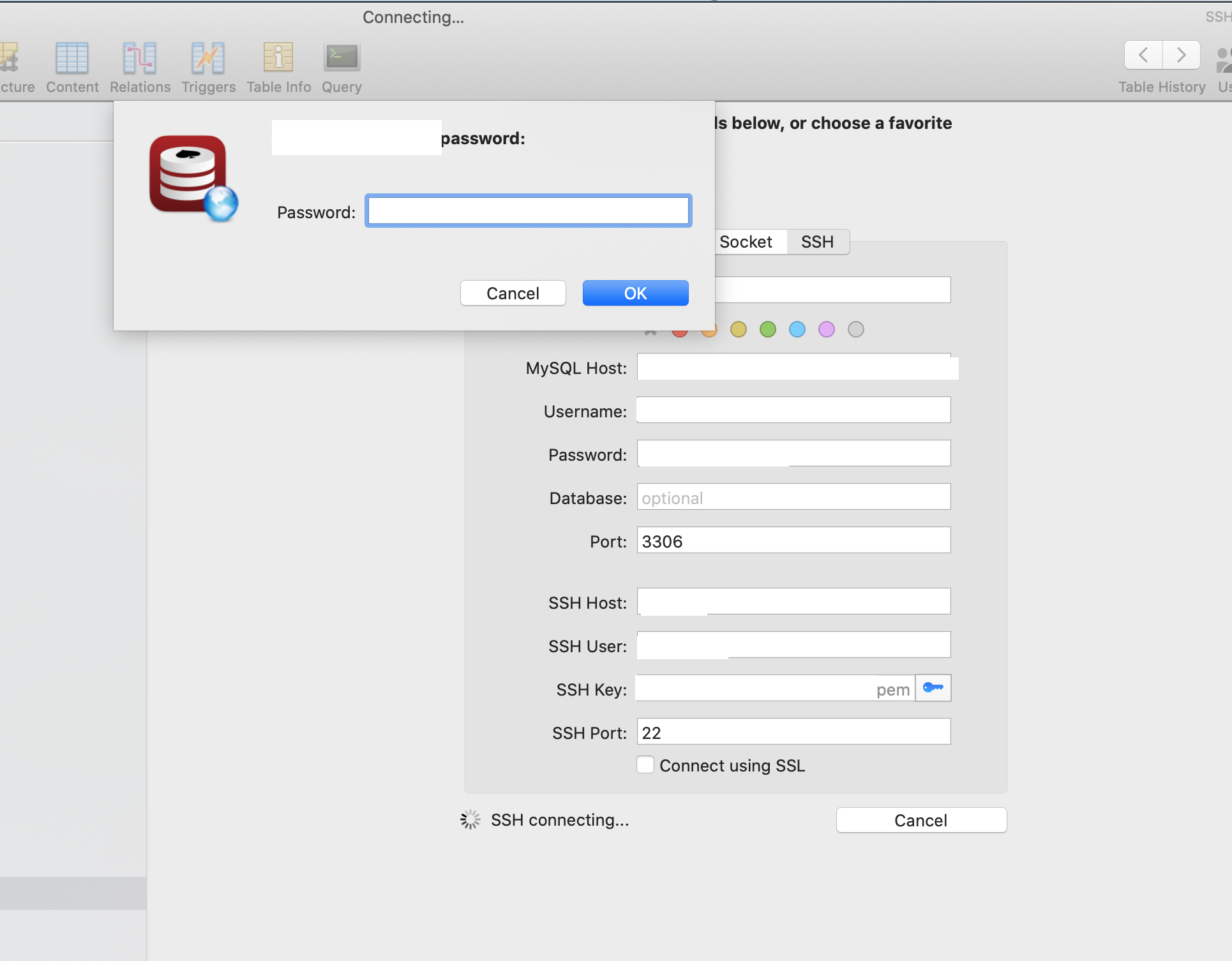
The screenshot above happens if I don't type anything on the SSH Password field before switching to using the key.
If I type anything on the password field, it will try to use that instead of the key to ssh.
alberto-fp-24
on 26 Sep 2020
Could you try the following:
- clear the password and select your SSH key
- enter an incorrect SSH password in the popup
- When you get the "SSH connection failed!" popup, click "Show Detail"
- Paste the contents of the error log here after redacting sensitive info
You can also email the unredacted log to me (rk at recoursive.com) if you're comfortable with that.
 robinkunde
on 27 Sep 2020
robinkunde
on 27 Sep 2020
Used command:  /usr/bin/ssh -v -N -S none -o ControlMaster=no -o ExitOnForwardFailure=yes -o ConnectTimeout=10 -o NumberOfPasswordPrompts=3 -o UserKnownHostsFile=/Users/xxx/Library/Containers/com.sequel-ace.sequel-ace/Data/.keys/ssh_known_hosts_strict -F /Applications/Sequel Ace.app/Contents/Resources/ssh_config -i /Volumes/xxxx/keys/xxx.pem -o TCPKeepAlive=no -o ServerAliveInterval=60 -o ServerAliveCountMax=1 -p 22 xxxx@xxxx -L 53320:xxxx:3306

OpenSSH_8.1p1, LibreSSL 2.7.3
debug1: Reading configuration data /Applications/Sequel Ace.app/Contents/Resources/ssh_config
debug1: /Applications/Sequel Ace.app/Contents/Resources/ssh_config line 1: Applying options for *
debug1: Connecting to xxxxx [xxxxx] port 22.
debug1: fd 5 clearing O_NONBLOCK
debug1: Connection established.
debug1: identity file /Volumes/xxxx/keys/xxxx.pem type -1
debug1: identity file /Volumes/xxxx/keys/xxxx.pem-cert type -1
debug1: identity file /Users/xxxx/.keys/id_rsa type -1
debug1: identity file /Users/xxxx/.keys/id_rsa-cert type -1
debug1: Local version string SSH-2.0-OpenSSH_8.1
debug1: Remote protocol version 2.0, remote software version OpenSSH_7.4p1 Debian-10+deb9u6
debug1: match: OpenSSH_7.4p1 Debian-10+deb9u6 pat OpenSSH_7.0*,OpenSSH_7.1*,OpenSSH_7.2*,OpenSSH_7.3*,OpenSSH_7.4*,OpenSSH_7.5*,OpenSSH_7.6*,OpenSSH_7.7* compat 0x04000002
debug1: Authenticating to xxxxx:22 as 'xxxxx'
debug1: SSH2_MSG_KEXINIT sent
debug1: SSH2_MSG_KEXINIT received
debug1: kex: algorithm: curve25519-sha256
debug1: kex: host key algorithm: ecdsa-sha2-nistp256
debug1: kex: server->client cipher: [email protected] MAC: <implicit> compression: none
debug1: kex: client->server cipher: [email protected] MAC: <implicit> compression: none
debug1: expecting SSH2_MSG_KEX_ECDH_REPLY
debug1: Server host key: xxxxxxxxxx
debug1: Host 'xxxxx' is known and matches the ECDSA host key.
debug1: Found key in /Users/xxxx/Library/Containers/com.sequel-ace.sequel-ace/Data/.keys/ssh_known_hosts_strict:1
debug1: rekey out after 134217728 blocks
debug1: SSH2_MSG_NEWKEYS sent
debug1: expecting SSH2_MSG_NEWKEYS
debug1: SSH2_MSG_NEWKEYS received
debug1: rekey in after 134217728 blocks
debug1: pubkey_prepare: ssh_get_authentication_socket: Operation not permitted
debug1: Will attempt key: /Volumes/xxxx/keys/xxxx.pem  explicit
debug1: Will attempt key: /Users/xxxx/.keys/id_rsa  explicit
debug1: SSH2_MSG_EXT_INFO received
debug1: kex_input_ext_info: server-sig-algs=<ssh-ed25519,ssh-rsa,ssh-dss,ecdsa-sha2-nistp256,ecdsa-sha2-nistp384,ecdsa-sha2-nistp521>
debug1: SSH2_MSG_SERVICE_ACCEPT received
debug1: Authentications that can continue: publickey,password
debug1: Next authentication method: publickey
debug1: Trying private key: /Volumes/xxxx/keys/xxxx.pem
debug1: Authentications that can continue: publickey,password
debug1: Trying private key: /Users/xxxx/.keys/id_rsa
no such identity: /Users/xxxx/.keys/id_rsa: No such file or directory
debug1: Next authentication method: password
debug1: read_passphrase: can't open /dev/tty: Device not configured
debug1: Authentications that can continue: publickey,password
Permission denied, please try again.
debug1: read_passphrase: can't open /dev/tty: Device not configured
debug1: Authentications that can continue: publickey,password
Permission denied, please try again.
debug1: read_passphrase: can't open /dev/tty: Device not configured
debug1: Authentications that can continue: publickey,password
debug1: No more authentication methods to try.
xxxxx@xxxxx: Permission denied (publickey,password).
Is "/Volumes/xxxx/keys/xxxx.pem" the key you've selected in Sequel Ace?
robinkunde
on 28 Sep 2020
Correct
alberto-fp-24
on 28 Sep 2020
From the logs, it looks like the server is rejecting the key since it moves on to the next key after trying it (SSH doesn't have an explicit rejection warning for a key, unless the file permissions are wrong IIRC). Can confirm that you can SSH into the server on the command line with the same key and username?
robinkunde
on 28 Sep 2020
After doing some minor debugging, it seems like the issue lies in this part of the ssh command ran by SequelAce -F /Applications/Sequel Ace.app/Contents/Resources/ssh_config . I am guessing that this config overwrites or supersedes the one in ~/.ssh/config.
If I try to run the command manually, it will fail unless I remove that flag. Also, as a heads up, I did quote the argument to escape the spaces during my manual test.
alberto-fp-24
on 28 Sep 2020
After doing some minor debugging, it seems like the issue lies in this part of the ssh command ran by SequelAce
-F /Applications/Sequel Ace.app/Contents/Resources/ssh_config. I am guessing that this config overwrites or supersedes the one in~/.ssh/config.If I try to run the command manually, it will fail unless I remove that flag. Also, as a heads up, I did quote the argument to escape the spaces during my manual test.
Sequel Ace by default uses an internal ssh config as opposed to your user ssh config. This is because due to the sandbox we cannot access your ssh config without you specifically selecting it, an option you can choose in your sequel Ace preferences.
However, if the selected key is correct, you shouldn't need to select any specific ssh config. Additionally, even if you select your own ssh config in Sequel Ace, we'll only be able to access files you select manually (see the files preferences tab) so unless you grant Sequel Ace access to the correct ssh key, it won't be able to connect.
TLDR: I think your ssh key is the wrong one and you have another ssh key in your .ssh directory that is the correct one that should be selected instead.
Jason-Morcos
on 28 Sep 2020
I will look into it. The connection was exported from SequelPro, and the key I am using is the same one I use there, though.
That said, after setting the config file from the preferences, it works, so I guess this issue could be closed.
alberto-fp-24
on 28 Sep 2020
To elaborate on @Jason-Morcos is saying: What our ssh_config is doing is preventing ssh from grabbing any identifies/key files that were not explicitly specified via the -i parameter, which in turn we set to the selected keyfile. Without that setup, ssh would try all identities from your .ssh folder as well as those that have been added to the ssh agent or are listed in your own ssh_config file.
I'm glad you got it figured out, but we should open another issue to improve the error messages and fallback behavior for Sequel Ace.
robinkunde
on 28 Sep 2020
I will look into it. The connection was exported from SequelPro, and the key I am using is the same one I use there, though.
That said, after setting the config file from the preferences, it works, so I guess this issue could be closed.
Sequel Pro wasn't sandboxed, so it crawled through your .ssh directory and tried all the keys if the selected ssh key didn't work! Lends even more credence to the theory
Jason-Morcos
on 28 Sep 2020
As a final follow, running this command from the terminal
ssh <user>@<host> -i /Volumes/xxx/keys/xxxx.pem
from a user without an .ssh config file succeeds. There could still be some issue with my keys, but I won't worry about it for now.
alberto-fp-24
on 28 Sep 2020
Related issues
 robertoschwald
·
4Comments
robertoschwald
·
4Comments
 advicepyro
·
8Comments
advicepyro
·
8Comments
 gboudreau
·
6Comments
gboudreau
·
6Comments
 gms8994
·
6Comments
gms8994
·
6Comments
 SanderVanLeeuwen
·
3Comments
SanderVanLeeuwen
·
3Comments
Most helpful comment
To elaborate on @Jason-Morcos is saying: What our ssh_config is doing is preventing ssh from grabbing any identifies/key files that were not explicitly specified via the
-iparameter, which in turn we set to the selected keyfile. Without that setup, ssh would try all identities from your .ssh folder as well as those that have been added to the ssh agent or are listed in your own ssh_config file.I'm glad you got it figured out, but we should open another issue to improve the error messages and fallback behavior for Sequel Ace.