Sequel-ace: Opened SPF File Doesn't Restore Query Editor Content
- Sequel Ace Version: 2.1.0
- macOS Version: 10.14.3
- MySQL Version: 5.7.12 (AWS RDS)
Description
When pressing Cmd-S to save the current connection, the file saves as you would expect. However when opening the file, the query editor is empty :(.
Steps To Reproduce
- Open SequelAce
- Click on the query-editor tab
- Type some text
- Save the file
- Open the file
- The text is not there
Expected Behaviour
Queries in the query editor tab should be saved in the .spf file.
Is Issue Present in Latest Beta?
Issue occurs in beta.
Additional Context
When trying to open the file, the file isn't listed in the Open Recent. It's not a big deal, but just figured I would mention it in case it's related.
 yg-dba
All 14 comments
Hmm. I believe that saving the connection should not include the query editor content. There's a separate save menu option to save current query(s), which would export the query editor content as a .sql file, right?
Is there a use case in which you'd need the connection save to include the current query editor content? I tend to think of the query editor as a (private) scratch pad.
 Jason-Morcos
on 6 Jul 2020
Jason-Morcos
on 6 Jul 2020
Would be cool to have this scratchpad, or custom-made "snippets" or something like this in future!
 stychos
on 6 Jul 2020
stychos
on 6 Jul 2020
Thanks for looking at this. I’ve been using SequelPro for years, and this is how it always worked. Saving a .spf in sequelPro did save the queries in the query editor.
I’m attaching a screenshot where you can see the defaulted checked option to “Remember query editor content”.
Thanks so much!
On Jul 6, 2020, at 5:32 PM, Dan Ray notifications@github.com wrote:
Would be cool to have this scratchpad, or custom-made "snippets" or something like this in future!
—
You are receiving this because you authored the thread.
Reply to this email directly, view it on GitHub https://github.com/Sequel-Ace/Sequel-Ace/issues/174#issuecomment-654476249, or unsubscribe https://github.com/notifications/unsubscribe-auth/AOKUVX4UOE3H23HUEPJQVTTR2I7FZANCNFSM4OR2INLA.
yg-dba
on 7 Jul 2020
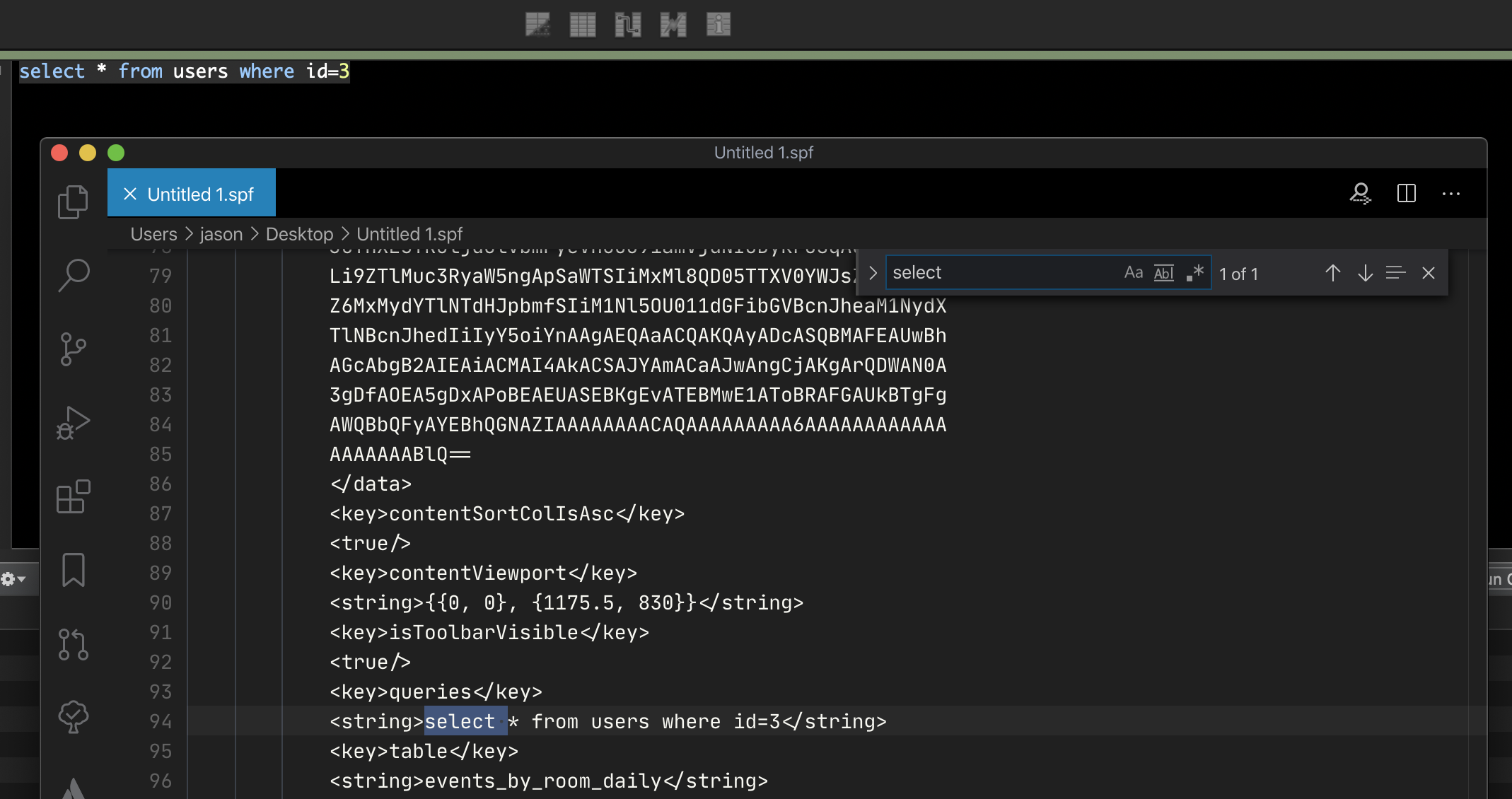
@yg-dba I just tested myself and confirmed that checking the save query editor content switch does cause the content to be saved into the .spf. Can you verify the same? If so, does it not restore the content for you when loading the .spf file?
Jason-Morcos
on 7 Jul 2020
Thank you Jason for debugging this!
Yes I do see the queries in the text file. But when I open the file, it does not restore the content in the query editor view.
On Jul 6, 2020, at 11:35 PM, Jason Morcos notifications@github.com wrote:
@yg-dba https://github.com/yg-dba I just tested myself and confirmed that checking the save query editor content switch does cause the content to be saved into the .spf. Can you verify the same? If so, does it not restore the content for you when loading the .spf file?
https://user-images.githubusercontent.com/10710367/86702829-2c8ca280-bfc8-11ea-95a5-82edb7da938f.png
—
You are receiving this because you were mentioned.
Reply to this email directly, view it on GitHub https://github.com/Sequel-Ace/Sequel-Ace/issues/174#issuecomment-654578943, or unsubscribe https://github.com/notifications/unsubscribe-auth/AOKUVX5FQUTMAU6AYJYR7CLR2KJY3ANCNFSM4OR2INLA.
yg-dba
on 7 Jul 2020
Not sure if this provides a clue - when opening the file, it does not display the file name in the top nav. In SequelPro, the filename displays there.
On Jul 6, 2020, at 11:41 PM, Yael Goldberg ygoldbergnj@gmail.com wrote:
Thank you Jason for debugging this!
Yes I do see the queries in the text file. But when I open the file, it does not restore the content in the query editor view.
On Jul 6, 2020, at 11:35 PM, Jason Morcos <[email protected] notifications@github.com> wrote:
@yg-dba https://github.com/yg-dba I just tested myself and confirmed that checking the save query editor content switch does cause the content to be saved into the .spf. Can you verify the same? If so, does it not restore the content for you when loading the .spf file?
https://user-images.githubusercontent.com/10710367/86702829-2c8ca280-bfc8-11ea-95a5-82edb7da938f.png
—
You are receiving this because you were mentioned.
Reply to this email directly, view it on GitHub https://github.com/Sequel-Ace/Sequel-Ace/issues/174#issuecomment-654578943, or unsubscribe https://github.com/notifications/unsubscribe-auth/AOKUVX5FQUTMAU6AYJYR7CLR2KJY3ANCNFSM4OR2INLA.
yg-dba
on 7 Jul 2020
One more clue - when opening the file, it’s necessary to select the connection again since the password is not saved in the connection. Maybe this is unsetting the file association and causing it to not restore.
On Jul 6, 2020, at 11:35 PM, Jason Morcos notifications@github.com wrote:
@yg-dba https://github.com/yg-dba I just tested myself and confirmed that checking the save query editor content switch does cause the content to be saved into the .spf. Can you verify the same? If so, does it not restore the content for you when loading the .spf file?
https://user-images.githubusercontent.com/10710367/86702829-2c8ca280-bfc8-11ea-95a5-82edb7da938f.png
—
You are receiving this because you were mentioned.
Reply to this email directly, view it on GitHub https://github.com/Sequel-Ace/Sequel-Ace/issues/174#issuecomment-654578943, or unsubscribe https://github.com/notifications/unsubscribe-auth/AOKUVX5FQUTMAU6AYJYR7CLR2KJY3ANCNFSM4OR2INLA.
yg-dba
on 7 Jul 2020
Thanks for the feedback, @yg-dba! I'm away from my main setup on a trip right now so I can't do much investigation in the short-term but perhaps someone else will be able to pop in and take a look! @Sequel-Ace/all
Jason-Morcos
on 8 Jul 2020
This bug is a blocker for me. Not being able to save queries is almost as bad as SequelPro crashing when I close a tab. I lose my unsaved work….
I would appreciate very much if this gets fixed.
On Jul 7, 2020, at 10:44 AM, Yael Goldberg <[email protected] ygoldbergnj@gmail.com> wrote:
One more clue - when opening the file, it’s necessary to select the connection again since the password is not saved in the connection. Maybe this is unsetting the file association and causing it to not restore.
On Jul 6, 2020, at 11:35 PM, Jason Morcos <[email protected] notifications@github.com> wrote:
@yg-dba https://github.com/yg-dba I just tested myself and confirmed that checking the save query editor content switch does cause the content to be saved into the .spf. Can you verify the same? If so, does it not restore the content for you when loading the .spf file?
https://user-images.githubusercontent.com/10710367/86702829-2c8ca280-bfc8-11ea-95a5-82edb7da938f.png
—
You are receiving this because you were mentioned.
Reply to this email directly, view it on GitHub https://github.com/Sequel-Ace/Sequel-Ace/issues/174#issuecomment-654578943, or unsubscribe https://github.com/notifications/unsubscribe-auth/AOKUVX5FQUTMAU6AYJYR7CLR2KJY3ANCNFSM4OR2INLA.
yg-dba
on 15 Jul 2020
I know where this comes from. I'll submit a PR soon.
 gboudreau
on 15 Jul 2020
gboudreau
on 15 Jul 2020
Hold on
I'm just submitting a PR
 jamesstout
on 15 Jul 2020
jamesstout
on 15 Jul 2020
@yg-dba A workaround that might help, until the fix is available to you:
edit your .spf file in a text editor, and add this, before the last 2 lines:
    <key>queryHistory</key>
    <array/>
Result:
...
    <key>queryHistory</key>
    <array/>
</dict>
</plist>
Sadly, this will be removed each time you save again, but at least, you can open a few .spf file if you really need to.
Fix should be available soon, in beta form.
gboudreau
on 15 Jul 2020
Please try the latest beta and let us know if it's fixed now!
Jason-Morcos
on 15 Jul 2020
It works PERFECTLY!! Thank you so much to all of you who are so devoted to the community! It’s really special of you to take of your time to help others.
I always loved SequelPro minus the bugs, and I’m so glad that you’ve created SequelAce to replace it!!
YG
On Jul 15, 2020, at 12:50 PM, Jason Morcos notifications@github.com wrote:
Please try the latest beta and let us know if it's fixed now!
https://github.com/Sequel-Ace/Sequel-Ace/releases https://github.com/Sequel-Ace/Sequel-Ace/releases
—
You are receiving this because you were mentioned.
Reply to this email directly, view it on GitHub https://github.com/Sequel-Ace/Sequel-Ace/issues/174#issuecomment-658877316, or unsubscribe https://github.com/notifications/unsubscribe-auth/AOKUVX2XI4ABIF3X4DM7BTDR3XM3VANCNFSM4OR2INLA.
yg-dba
on 15 Jul 2020
Related issues
 lipatovroman
·
4Comments
lipatovroman
·
4Comments
 salvor-hardin
·
8Comments
salvor-hardin
·
8Comments
 blakeyman
·
5Comments
blakeyman
·
5Comments
 rafmst
·
4Comments
rafmst
·
4Comments
 augusl
·
6Comments
augusl
·
6Comments
Most helpful comment
Please try the latest beta and let us know if it's fixed now!
https://github.com/Sequel-Ace/Sequel-Ace/releases