Sequel-ace: Incorrectly displaying data on table's charset vs column collation charset
- Sequel Ace Version: 2.1.0
- macOS Version: 10.15.5
- MySQL Version: 5.7.30
Description
Data displayed on a table should be using character set by collation of the column, not by the table charset.
Steps To Reproduce
CREATE TABLE t_utf8_utf8 (
value varchar(128) NOT NULL DEFAULT ''
) ENGINE=MyISAM DEFAULT CHARSET=utf8;
INSERT INTO t_utf8_utf8 (value)
VALUES
('Apple iPhone アクセサリ');
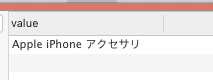
t_utf8_utf8
CREATE TABLE t_utf8_latin (
value varchar(128) CHARACTER SET utf8 NOT NULL DEFAULT ''
) ENGINE=MyISAM DEFAULT CHARSET=latin1;
INSERT INTO t_utf8_latin (value)
VALUES
('Apple iPhone アクセサリ');
t_utf8_latin
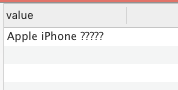
You should see the same on both tables, as the table or the column is defined as uft8, however the client prints ??? for the Japanese characters (probably using the table charset for all the contents vs the COLLATED charset) when utf8 is the collation of the column but latin1 the charset of the table.
Expected Behaviour
I expect to see the same info on both tables.
Additional Context
Including screenshots.
 salvor-hardin
All 11 comments
Seems to use the table encoding, changes the entire connection encoding.
https://github.com/Sequel-Ace/Sequel-Ace/blob/31d930b663a8c56831b6bb45e9ea03c184a6c7b8/Source/SPDatabaseDocument.m#L6937-L6953
If you view your utf8 table, then, in preferences, change AutoDetect to UTF8 Full, then switch to your latin table, then it behaves as you expect. However, that's a hack. phpMyAdmin displays the rows correctly.
 jamesstout
on 29 Jun 2020
jamesstout
on 29 Jun 2020
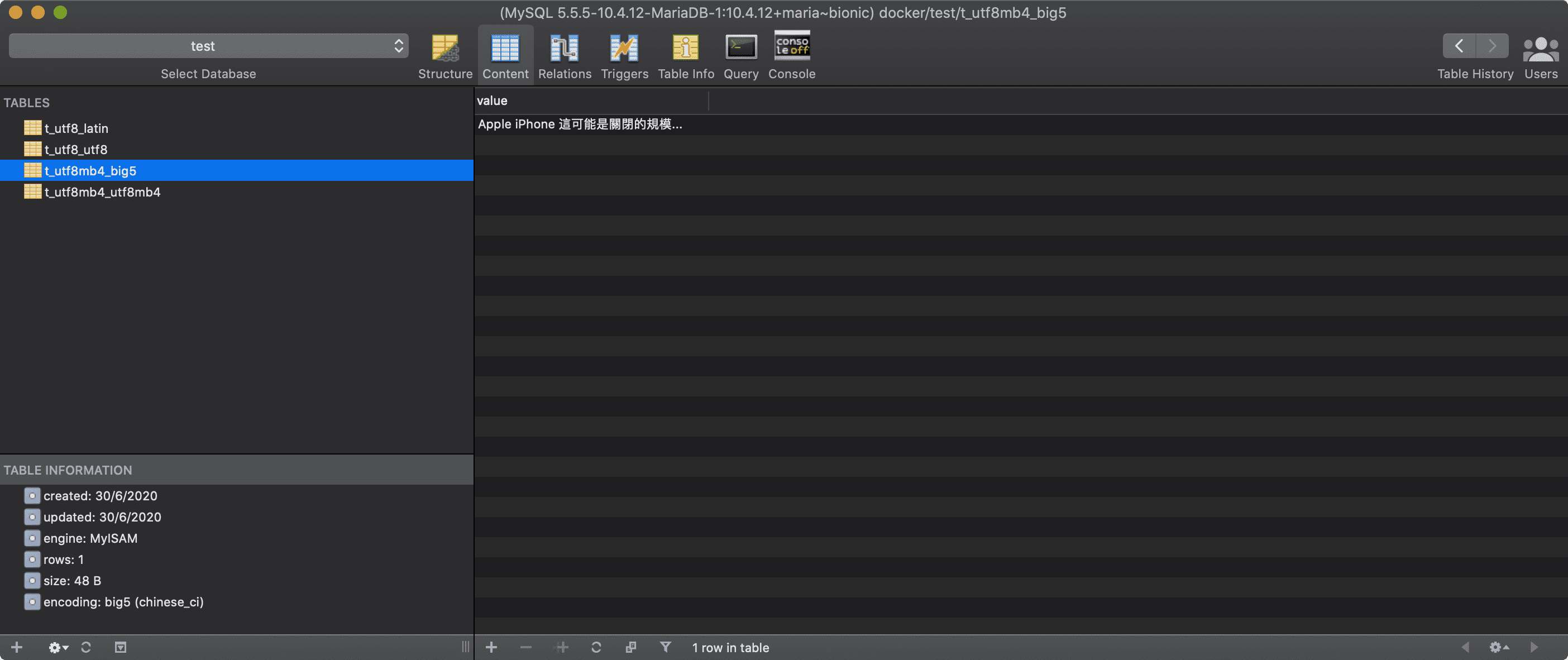
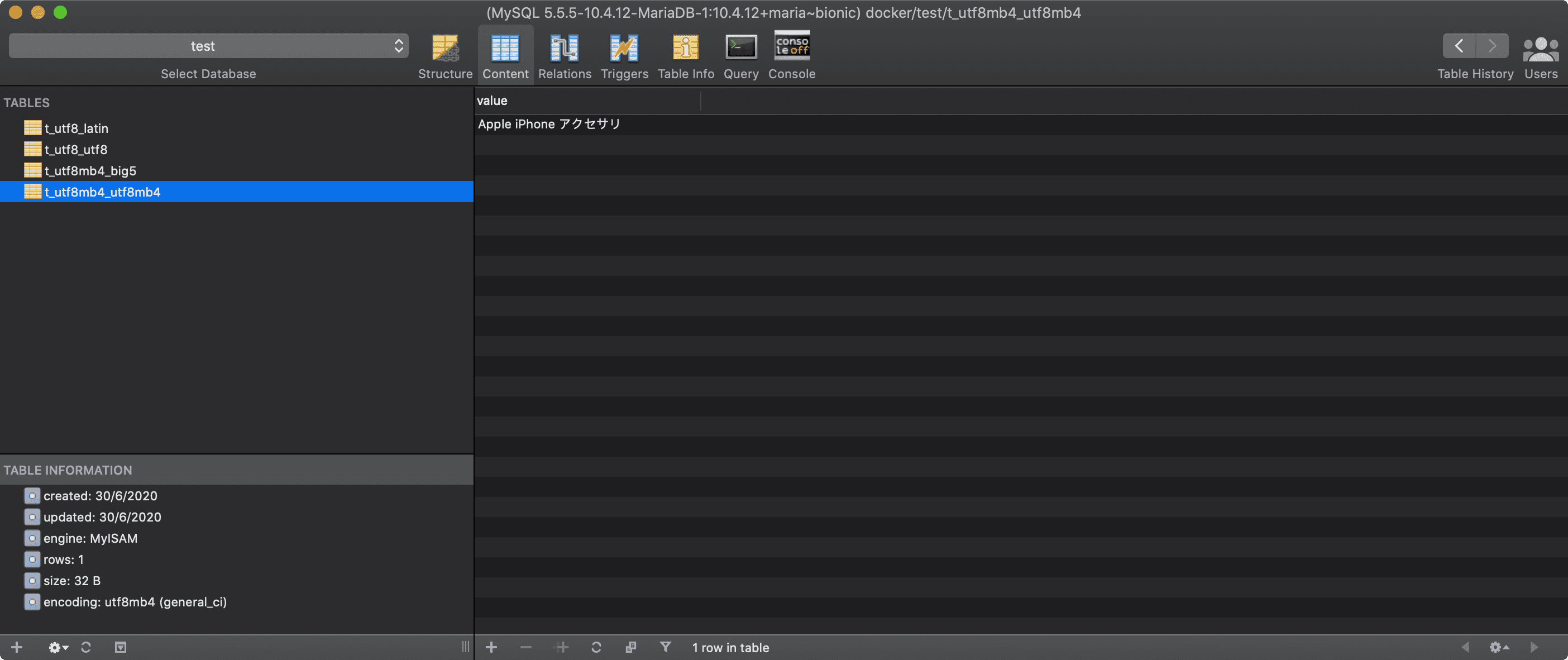
Got something working. But I need to learn a lot more about connection encoding before releasing it.
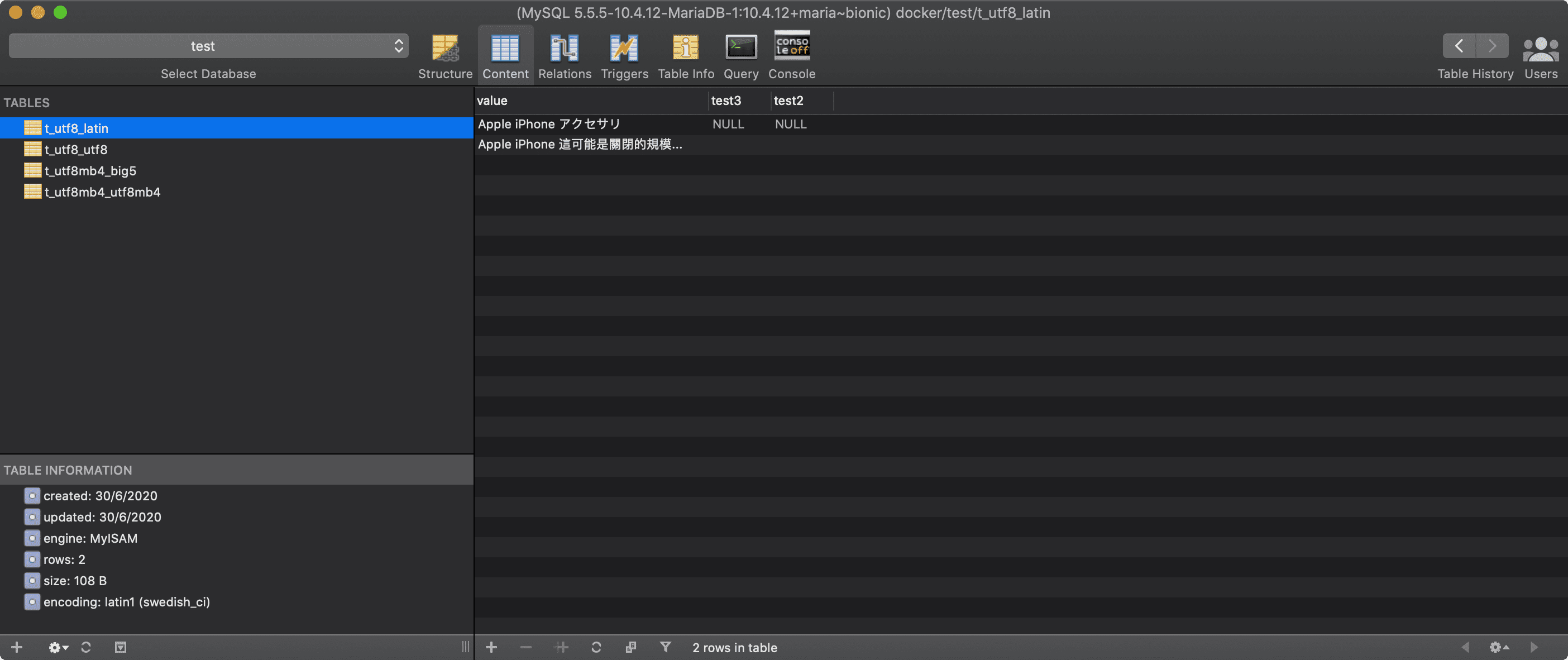
Note the table encoding is still latin1.
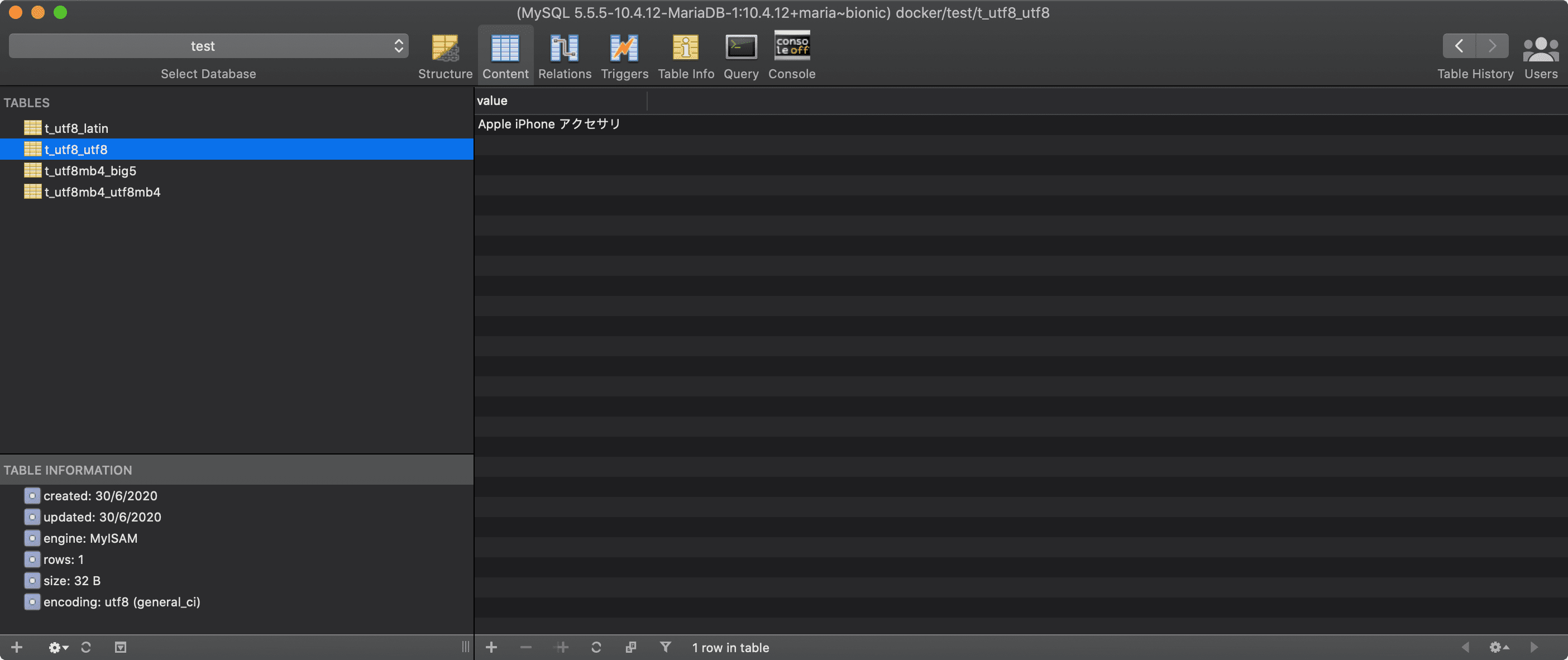
Testing a few other encodings...
jamesstout
on 30 Jun 2020
Key Question: What connection encoding should you use if the table you are querying uses multiple CHARACTER SETs?
As I understood it, charset is the legal characters allowed in the table./column, collation is how to compare values with the same charset?
jamesstout
on 1 Jul 2020
I would say is up to the user to know what they are doing when comparing , right?
Comparisons between different encodings from different tables might need a common cast written in the query.
The issue here is that the app only uses the encoding the table has globally to display characters, but that’s not right as some fields can be described with other encodings and that is what should be used when displaying.
This is the same issue as the upper forked app for Sequel Ace, so just trying to get this sorted here specially helpful for content with non latin or utf8 encodings.
Thanks!
salvor-hardin
on 1 Jul 2020
Quick note, example that might help : you don't need to go too far with japanese/chinese characters.
Same combo of latin table where you insert: "İLETIŞIM"
(that is "Contact" in Turkish) on a UTF8 field, Sequel Ace will put the ? over the nonlatin characters, however, reading with other client will read the nonlatin character ok.
Huge thanks for getting this looked at, it will bring the app to a new level on these optimised tables.
salvor-hardin
on 3 Jul 2020
Key Question: What connection encoding should you use if the table you are querying uses multiple CHARACTER SETs?
I have the same question, and I'm not sure I have an answer... I'm not sure we can get from MySQL all the data in a format that we could use to convert the various columns into the correct characters to display to the end-user. I think we might need to execute a SELECT query for each different encoding type, and merge the results!
I'd be curious to know how others might have solved this issue...
Maybe we could look into the PHPMyAdmin codebase..?
 gboudreau
on 5 Jul 2020
gboudreau
on 5 Jul 2020
Maybe we could SELECT CAST(column_name AS BINARY), and handle the conversion from the binary data we receive, using the column charset..?
gboudreau
on 5 Jul 2020
I think we might need to execute a SELECT query for each different encoding type, and merge the results!
Before every query, SA refreshes table data, I added:
tableStatusResult2 = [mySQLConnection queryString:[NSString stringWithFormat:@"SELECT character_set_name FROM information_schema.`COLUMNS` WHERE table_schema = '%@' and TABLE_NAME = '%@'", escapedDatabaseName, escapedTableName ]];
To get the array of character_set_names used by that table. On a huge table with many character_set_names it would be a nightmare.
casting might be a better solution.
jamesstout
on 5 Jul 2020
I think if we set the connection charset to utf8mb4, MySQL is able to convert all other encodings correctly, and return all texts in their equivalent UTF-8 representation.
CREATE TABLE `test_charsets` (
  `id` int(11) unsigned NOT NULL AUTO_INCREMENT,
  `test_latin1` tinytext CHARACTER SET latin1 DEFAULT NULL,
  `test_utf8` tinytext CHARACTER SET utf8 DEFAULT NULL,
  `test_utf8mb4` tinytext DEFAULT NULL,
  `test_big5` tinytext CHARACTER SET big5 DEFAULT NULL,
  `test_eucjp` tinytext CHARACTER SET ujis DEFAULT NULL,
  PRIMARY KEY (`id`)
) ENGINE=InnoDB DEFAULT CHARSET=utf8mb4;

SET character_set_results = latin1;
INSERT INTO `test_charsets` (`id`, `test_latin1`) VALUES (1, '¢ £ Ç');

SET character_set_results = utf8;
UPDATE `test_charsets` SET `test_utf8` = 'ᚠᛇᚻ᛫ᛒᛦᚦ᛫ᚠᚱᚩᚠᚢᚱ᛫ᚠᛁᚱᚪ᛫ᚷᛖᚻᚹᛦᛚᚳᚢᛗ';

SET character_set_results = utf8mb4;
UPDATE `test_charsets` SET `test_utf8mb4` = '👍';

SET character_set_results = big5;
UPDATE `test_charsets` SET `test_big5` = '民國69年9月行政院國家科學';

SET character_set_results = ujis;
UPDATE `test_charsets` SET `test_eucjp` = '本格的なネットショップを';
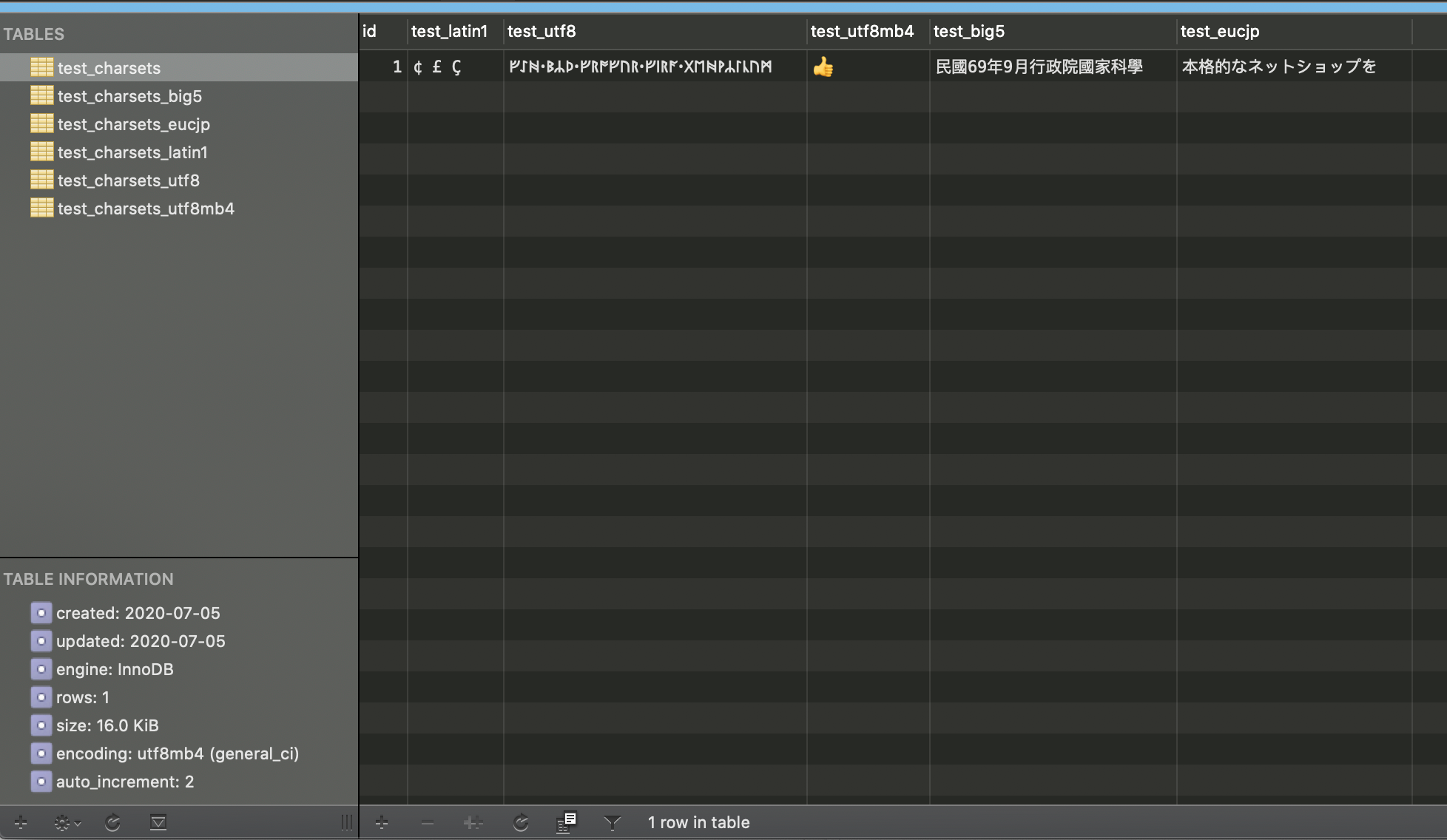
The same data, when the table (and thus the connection) uses different charsets:





So the quick fix would be to always use utf8mb4, when loading data, instead of using the table's charset.
gboudreau
on 5 Jul 2020
@salvor-hardin Please check out the latest 2.1.2 beta and let us know if it's working for you!
https://github.com/Sequel-Ace/Sequel-Ace/releases
 Jason-Morcos
on 7 Jul 2020
Jason-Morcos
on 7 Jul 2020
Thanks Jason, it looks is working as expected! :)
salvor-hardin
on 7 Jul 2020
Related issues
 augusl
·
6Comments
augusl
·
6Comments
 rafmst
·
4Comments
rafmst
·
4Comments
 advicepyro
·
8Comments
advicepyro
·
8Comments
 categoryshell
·
5Comments
categoryshell
·
5Comments
 ChrisGitIt
·
5Comments
ChrisGitIt
·
5Comments