Sequel-ace: Cannot open SSL keys
macOS 10.15.5
Sequel Ace 2.0.1
Cannot open SSH key files from anywhere

 salvor-hardin
All 31 comments
What is shown in the SSH Key field?
Please provide a screenshot like this:

 gboudreau
on 22 Jun 2020
gboudreau
on 22 Jun 2020
Hi:
The file I am trying to read with the keys, same as my export from Sequel Pro.
I have this that works with Sequel Pro:
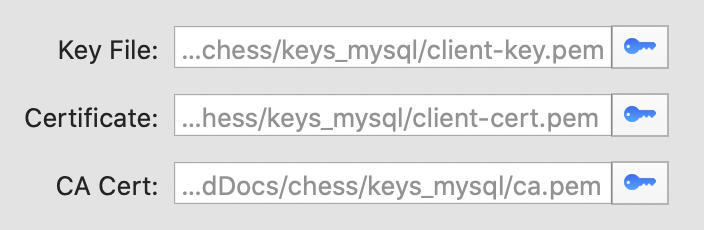
When I try to connect, the key file gets removed as below and I get this:
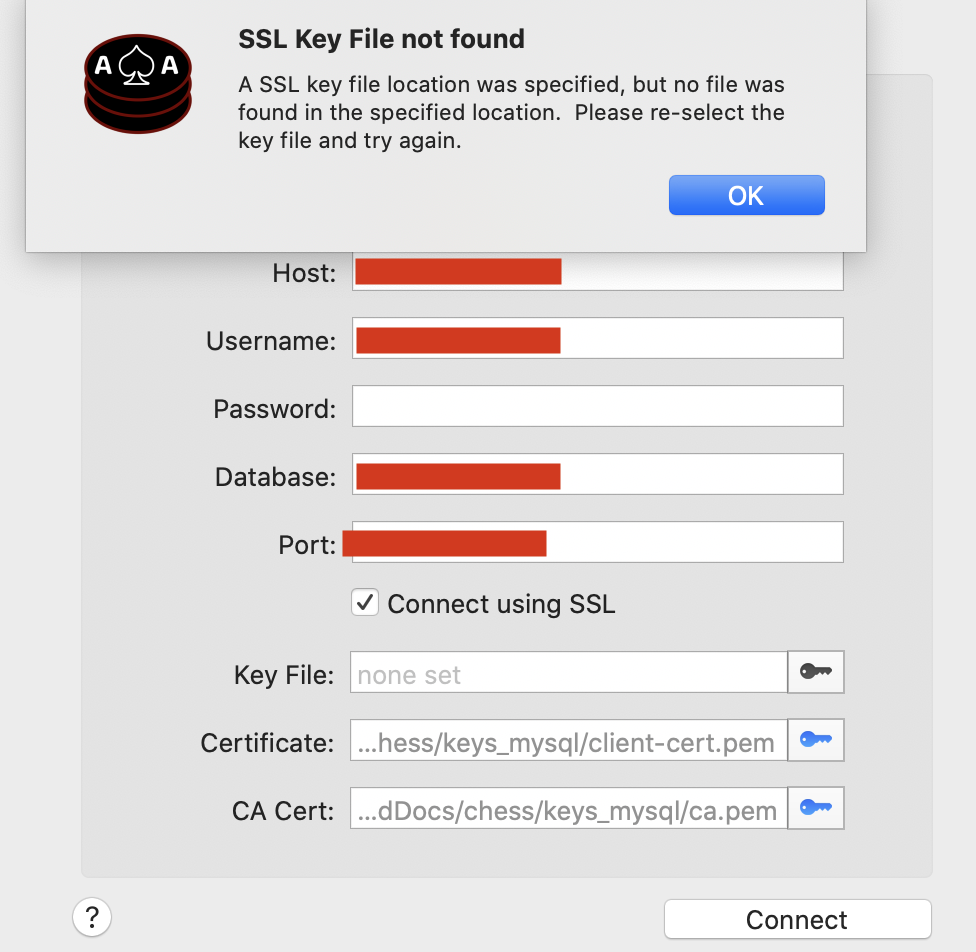
However the file is there, readable. Moved to different locations, same error. Given the tool full disk access, same error…
Thanks.
salvor-hardin
on 22 Jun 2020
Ah, the SSL key/certs, not the SSH Key.
Another sandboxing issue.
gboudreau
on 22 Jun 2020
I'm looking at this now
 jamesstout
on 22 Jun 2020
jamesstout
on 22 Jun 2020
Same problem here, SSH key can not be found when migrating from Sequel Pro, selecting a new one messes the path up.
 chrismaaz
on 22 Jun 2020
chrismaaz
on 22 Jun 2020
Can someone please try out https://github.com/jamesstout/Sequel-Ace/tree/more-permissions
jamesstout
on 22 Jun 2020
In my case, after selecting what is ~/.ssh/my-key.pub, the link in the key field has the container path in it. Is it a problem with the actual private key not being in it?
 mcdado
on 22 Jun 2020
mcdado
on 22 Jun 2020
I get some kind of virtual path (I can't even see the full path), I guess a caveat of the app being in "sandbox mode" still?
chrismaaz
on 22 Jun 2020
debug1: Server accepts key: /Users/David/Library/Containers/com.sequel-ace.sequel-ace/Data/.keys/123456789123456789123-my-key.pub RSA SHA256:..../..+..+.... explicit
Load key "/Users/David/Library/Containers/com.sequel-ace.sequel-ace/Data/.keys/123456789123456789123-my-key.pub": invalid format
debug1: No more authentication methods to try.
[email protected]: Permission denied (publickey).
From the Error Detail screen. I anonymized the values here.
mcdado
on 22 Jun 2020
@mcdado Are you certain the .pub key is correct? I know when I SSH into repos I use a .pem, not .pub key. Are you able to test with a .pem key and see if that works?
 Jason-Morcos
on 22 Jun 2020
Jason-Morcos
on 22 Jun 2020
In my case, after selecting what is ~/.ssh/my-key.pub, the link in the key field has the container path in it. Is it a problem with the actual private key not being in it?
@mcdado @chrismaaz Yes, that's part of sandbox world. When you select a key, it's actually copied into the app's support directory and this copy is the one used for authentication. The path will indeed have all that wildness in it. Perhaps in the future we can make it a little prettier (or use bookmarks instead of copying @jamesstout?)!
Jason-Morcos
on 22 Jun 2020
@mcdado Are you certain the .pub key is correct? I know when I SSH into repos I use a .pem, not .pub key. Are you able to test with a .pem key and see if that works?
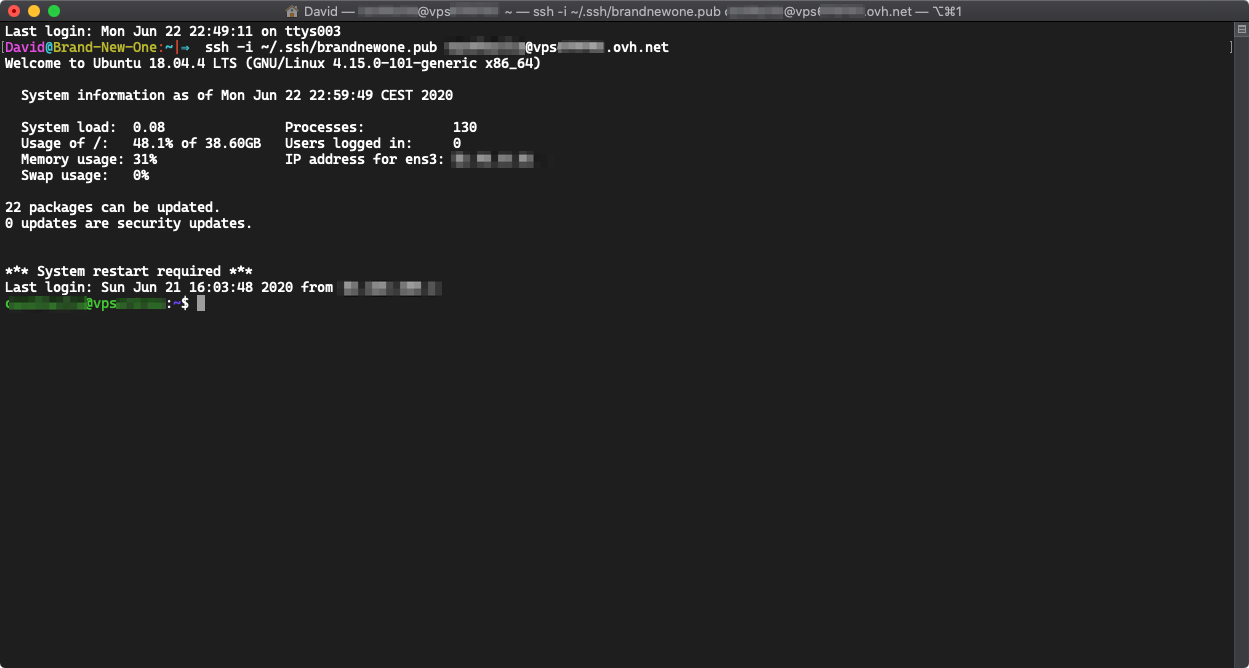
I generated this key in this way: https://help.github.com/en/github/authenticating-to-github/generating-a-new-ssh-key-and-adding-it-to-the-ssh-agent
mcdado
on 22 Jun 2020
@mcdado You need to select the private key, not the public key. The public key is on the server, the private key is the one the client needs.
gboudreau
on 22 Jun 2020
(We really should not let users select .pub files...)
gboudreau
on 22 Jun 2020
@mcdado You need to select the private key, not the public key. The public key is on the server, the private key is the one the client needs.
Sure... in Sequel Pro (Nightly too) i always selected the pub, I guess I'm used to the -i flag in ssh.
mcdado
on 22 Jun 2020
Even with the private key it doesn't work.
Used command:  /usr/bin/ssh -v -N -S none -o ControlMaster=no -o ExitOnForwardFailure=yes -o ConnectTimeout=10 -o NumberOfPasswordPrompts=3 -o UserKnownHostsFile=/Users/David/Library/Containers/com.sequel-ace.sequel-ace/Data/.keys/ssh_known_hosts -o StrictHostKeyChecking=no -i /Users/David/Library/Containers/com.sequel-ace.sequel-ace/Data/.keys/123456-brandnewone -o TCPKeepAlive=no -o ServerAliveInterval=60 -o ServerAliveCountMax=1 -p 22 [email protected] -L 63396:127.0.0.1:3306

OpenSSH_8.1p1, LibreSSL 2.7.3
debug1: Connecting to vps123456.ovh.net [1.2.3.4] port 22.
debug1: fd 5 clearing O_NONBLOCK
debug1: Connection established.
debug1: identity file /Users/David/Library/Containers/com.sequel-ace.sequel-ace/Data/.keys/123456-brandnewone type -1
debug1: identity file /Users/David/Library/Containers/com.sequel-ace.sequel-ace/Data/.keys/123456-brandnewone-cert type -1
debug1: Local version string SSH-2.0-OpenSSH_8.1
debug1: Remote protocol version 2.0, remote software version OpenSSH_7.6p1 Ubuntu-4ubuntu0.3
debug1: match: OpenSSH_7.6p1 Ubuntu-4ubuntu0.3 pat OpenSSH_7.0*,OpenSSH_7.1*,OpenSSH_7.2*,OpenSSH_7.3*,OpenSSH_7.4*,OpenSSH_7.5*,OpenSSH_7.6*,OpenSSH_7.7* compat 0x04000002
debug1: Authenticating to vps123456.ovh.net:22 as 'user'
debug1: SSH2_MSG_KEXINIT sent
debug1: SSH2_MSG_KEXINIT received
debug1: kex: algorithm: curve25519-sha256
debug1: kex: host key algorithm: ecdsa-sha2-nistp256
debug1: kex: server->client cipher: [email protected] MAC: <implicit> compression: none
debug1: kex: client->server cipher: [email protected] MAC: <implicit> compression: none
debug1: expecting SSH2_MSG_KEX_ECDH_REPLY
debug1: Server host key: ecdsa-sha2-nistp256 SHA256:.../.../...//...
debug1: Host 'vps123456.ovh.net' is known and matches the ECDSA host key.
debug1: Found key in /Users/David/Library/Containers/com.sequel-ace.sequel-ace/Data/.keys/ssh_known_hosts:1
debug1: rekey out after 134217728 blocks
debug1: SSH2_MSG_NEWKEYS sent
debug1: expecting SSH2_MSG_NEWKEYS
debug1: SSH2_MSG_NEWKEYS received
debug1: rekey in after 134217728 blocks
debug1: pubkey_prepare: ssh_get_authentication_socket: Operation not permitted
debug1: Will attempt key: /Users/David/Library/Containers/com.sequel-ace.sequel-ace/Data/.keys/123456-brandnewone  explicit
debug1: SSH2_MSG_EXT_INFO received
debug1: kex_input_ext_info: server-sig-algs=<ssh-ed25519,ssh-rsa,rsa-sha2-256,rsa-sha2-512,ssh-dss,ecdsa-sha2-nistp256,ecdsa-sha2-nistp384,ecdsa-sha2-nistp521>
debug1: SSH2_MSG_SERVICE_ACCEPT received
debug1: Authentications that can continue: publickey
debug1: Next authentication method: publickey
debug1: Trying private key: /Users/David/Library/Containers/com.sequel-ace.sequel-ace/Data/.keys/123456-brandnewone
debug1: read_passphrase: can't open /dev/tty: Device not configured
debug1: No more authentication methods to try.
[email protected]: Permission denied (publickey).
ssh -i is actually for the private key too, not the public key:
     -i identity_file
             Selects a file from which the identity (private key) for public key authentication is read.
I think ssh (the executable) is smart enough that if you specify a .pub file, it will actually try to use the associated private key (same filename, minus the .pub). Sequel Ace can't do that, because it only has access to the files you select in the picker, nothing else (because of sandboxing).
Is your SSH private key encrypted? Are you using Sequel Ace 2.0.2 or later?
If your SSH key is encrypted, Sequel Ace will need to ask you for the password to decrypt it, and 2.0.1 and earlier versions have a bug that prevented that.
gboudreau
on 22 Jun 2020
I'm using 2.0.1 (just downloaded from MAS), my SSH has a passphrase but ssh-key agent unlocks it.
mcdado
on 22 Jun 2020
@mcdado try newer version from Releases page or wait until 2.0.2 release in MAS.
 stychos
on 22 Jun 2020
stychos
on 22 Jun 2020
2.0.2 is pending App Store review, but they're never very quick to review new releases. Could be a couple days until out.
Jason-Morcos
on 22 Jun 2020
Yes, 2.0.2 works! It shows a dropdown sheet for password input.
Out of curiosity: because of sandboxing it cannot use ssh-agent to unlock ssh keys?
mcdado
on 22 Jun 2020
@mcdado Probably can't? Not sure. Sandbox is _very_ restricting, but I guess that's kinda the point lol
Jason-Morcos
on 23 Jun 2020
@mcdado @chrismaaz Yes, that's part of sandbox world. When you select a key, it's actually copied into the app's support directory and this copy is the one used for authentication. The path will indeed have all that wildness in it. Perhaps in the future we can make it a little prettier (or use bookmarks instead of copying @jamesstout?)!
You can add key-values to the bookmark (I'm not doing that at the minute), we could probably add the original path/filename to the bookmark and then populate the field with that, or just try the bookmark without copying.
jamesstout
on 23 Jun 2020
What do you prefer:
- Populate original path but use the copied key - quicker fix, but might confuse more advanced users.
- Try bookmarking without copying to
.keys? - slightly longer fix I think, but cleaner.
jamesstout
on 23 Jun 2020
What do you prefer:
Populate original path but use the copied key - quicker fix, but might confuse more advanced users.
Try bookmarking without copying to
.keys? - slightly longer fix I think, but cleaner.
I think 2 is probably the better move long-term?
Jason-Morcos
on 23 Jun 2020
I've implemented 2 in https://github.com/jamesstout/Sequel-Ace/tree/more-permissions.
jamesstout
on 24 Jun 2020
@jamesstout your branch looks great to me! At least worked great locally. PR?
Jason-Morcos
on 24 Jun 2020
Yep, will just sort my branch out and submit.
jamesstout
on 25 Jun 2020
jamesstout
on 25 Jun 2020
Please try the latest beta - this issue should be fixed and will be patched in the 2.1.0 release! https://github.com/Sequel-Ace/Sequel-Ace/releases/tag/2.1.0-rc1
Jason-Morcos
on 26 Jun 2020
Hi:
This issue is now fixed with version 2.1.0
Thanks!
salvor-hardin
on 28 Jun 2020
Related issues
 SanderVanLeeuwen
·
3Comments
SanderVanLeeuwen
·
3Comments
 gms8994
·
6Comments
gboudreau
·
6Comments
gms8994
·
6Comments
gboudreau
·
6Comments
 advicepyro
·
8Comments
advicepyro
·
8Comments
 blakeyman
·
5Comments
blakeyman
·
5Comments