I've enabled the filter feature, my sentry fails to connect to gitlab server (when the server is restarting), so I would to ignore them.
In custom filters -> error messages I've added:
ConnectTimeout
ConnectionError
I still get connection errors:
ConnectionError: SafeHTTPSConnectionPool(host='my.gitlab.server', port=443): Max retries exceeded with url: /oauth/token (Caused by NewConnectionError('<sentry.net.http.SafeHTTPSConnection object at 0x7f94737f46d0>: Failed to establish a new connection: [Errno -3] Temporary failure in name resolution',))
  File "sentry/tasks/check_auth.py", line 80, in check_auth_identity
    provider.refresh_identity(auth_identity)
  File "sentry/auth/providers/oauth2.py", line 196, in refresh_identity
    req = safe_urlopen(self.get_refresh_token_url(), data=data)
  File "sentry/http.py", line 124, in safe_urlopen
    **kwargs
  File "sentry/net/http.py", line 154, in request
    response = _Session.request(self, *args, **kwargs)
  File "requests/sessions.py", line 533, in request
    resp = self.send(prep, **send_kwargs)
  File "requests/sessions.py", line 646, in send
    r = adapter.send(request, **kwargs)
  File "requests/adapters.py", line 516, in send
    raise ConnectionError(e, request=request)
 sherpya
All 14 comments
I am seeing the same problem with our Sentry (self-hosted) as well. The question is: what does the error message refer to? The exception name or the detailed error message?
We're frequently getting disconnect errors (like Network aborted: /api/url/here) and would like to ignore them.
These are my rules:
Request aborted*
Network error*
The documentation states, that these only work for business and enterprise users, but do these restrictions also apply to self-hosted instances?
 spaceemotion
on 26 Feb 2020
spaceemotion
on 26 Feb 2020
Same issue on my side. Is this not working in the free self-hosted instance. You can configure it in the interface.
 mabrahamde
on 11 Mar 2020
mabrahamde
on 11 Mar 2020
The complete lack of action on this error is deafening. What is going on here, is this a feature or not? Do inbound filters work at all and if so under what conditions? Can you give us examples? Why do simple glob patterns not work? What kind of tests do you have in place for this?
 zanemcca
on 20 Jul 2020
zanemcca
on 20 Jul 2020
Just found this snippet that might help some folks. https://help.sentry.io/hc/en-us/articles/360050754633-Filtering-by-Error-Message-is-not-working. I have added it in to my filters I won't know if it worked yet for a while.
zanemcca
on 29 Jul 2020
@zanemcca did that help article help fix your issue?
 BYK
on 26 Oct 2020
BYK
on 26 Oct 2020
@BYK I feel like it works better than it did prior to adding Error: to the start of the string but it is definitely still not working as expected. I have lots of valid glob matchers in there and some of them do not seem to work.
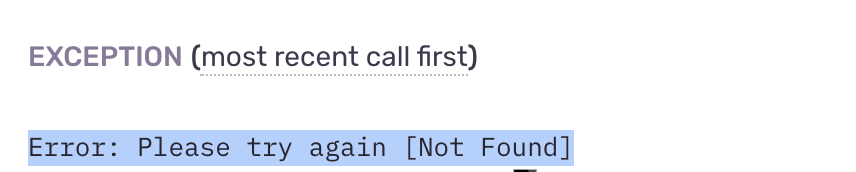
For example I have this line Error: Please try again [Not Found]* but I still get lots of these errors showing in sentry.
zanemcca
on 26 Oct 2020
@zanemcca thanks for the swift response! Would you say this is a duplicate of #17780, a lack of documentation? Or do you think there is a bug in our implementation? (or both??)
BYK
on 26 Oct 2020
@BYK #17780 would help a lot but I feel like there is also a bug in the implementation.
I attached a truncated screenshot of my Not Found error that still shows in Sentry
zanemcca
on 26 Oct 2020
Sending over to @jan-auer and @untitaker for investigation.
Thanks a lot @zanemcca!
BYK
on 26 Oct 2020
This is something we'll primarily have to address in our documentation, and then also update the settings screen with a more helpful description and examples. Also, #17780 will contribute to this, by showing the allowed syntax for glob matching. cc @PeloWriter
There are a few things to note about how inbound data filters work:
- They always match the entire error description. If any "ConnectionError" should be matched, then the filter needs to read
*ConnectionError*. Note that filters are case insensitive, so*connectionerror*is fine, too. - The way our globs are being evaluated, square brackets (
[and]) have a special meaning. To match a square bracked, escape it like so:*please try again \[not found\]*. - If there's an exception like in the original issue description with an exception title (usually the class name) and a description, we join it with a colon. This then becomes the same that it was on the terminal. We recommend not to rely on this, however, and match with wildcards instead.
Example: Exception title "ConnectionError" and description "Max retries exceeded" will join to a literal "ConnectionError: Max retries exceeded" for filter evaluation.
 jan-auer
on 27 Oct 2020
jan-auer
on 27 Oct 2020
@jan-auer I too am having issue with the Inboud Filter for Error Message. I tried filtering by the error title first and then the error description but neither worked. Can someone explain to me how these filters actually work? Which fields of an issue are being pattern matched?
For verifying if my filter is working or not. How long should we expect a filter to go into effect, is it immediate? Thanks.
Example:

Filtering attempts
- "blink", "Error: blink*", "EXCEPTION_ACCESS_VIOLATION_READ", "Fatal Error: EXCEPTION_ACCESS_VIOLATION_READ"
 chensusays
on 2 Dec 2020
chensusays
on 2 Dec 2020
@chensusays This is another limitation that we haven't communicated yet. Error messages from minidumps are not available to inbound filters at the moment. We are aware of this and have this on our mid-term roadmap.
jan-auer
on 2 Dec 2020
@jan-auer is that tracked anywhere we can link to?
BYK
on 2 Dec 2020
It is not on a public roadmap. We'll update this issue when work is being scheduled.
jan-auer
on 3 Dec 2020
Related issues
 jiankunking
·
3Comments
jiankunking
·
3Comments
 dcramer
·
4Comments
dcramer
·
4Comments
dcramer
·
4Comments
dcramer
·
4Comments
 phiresky
·
3Comments
phiresky
·
3Comments
 sul4bh
·
3Comments
sul4bh
·
3Comments