Important Details
How are you running Sentry?
- [ ] On-Premise docker
- [ ] sentry version 9.1.0 - onbuild
- [ ] docker-compose
Description

 webofrxy
All 29 comments
How can someone reproduce this issue?
 markstory
on 17 Apr 2019
markstory
on 17 Apr 2019
I encountered this as well. It happens when you do not specify a URL prefix during setup. Go to sentry shell and run this:
>>> from sentry import options
>>> options.set("system.url-prefix", "http://localhost:8000")
 untitaker
on 17 Apr 2019
untitaker
on 17 Apr 2019
I had this issue, when use db of postgres from old version of sentry.
Fix: renew(remove/create) project
 kolesoffac
on 19 Apr 2019
kolesoffac
on 19 Apr 2019
these commands from sentry shell fixed it for me. The DSN key field in a project's settings was blank. Ran this command and now its there. I was running off the docker instructions on getsentry/onpremise
 thinkocapo
on 23 Apr 2019
thinkocapo
on 23 Apr 2019
@untitaker How to run this scripts when I use Docker with onpremise?
 navono
on 30 Apr 2019
navono
on 30 Apr 2019
It's the root URL in first login settings. I use the domain name, DSN is empty(don't know why), after I change it to IP, it worked.
navono
on 30 Apr 2019
I meet the same problem, can you show me how to fix it too? How can i run the sentry shell , or change the IP?
 kitho-pwc
on 2 May 2019
kitho-pwc
on 2 May 2019
@kitho-pwc As I said, you can set the root URL in first login settings.
navono
on 4 May 2019
I encountered this as well. It happens when you do not specify a URL prefix during setup. Go to
sentry shelland run this:>>> from sentry import options >>> options.set("system.url-prefix", "http://localhost:8000")
if you are using https://github.com/getsentry/onpremise you may just include following to config.yml:
system.url-prefix: https://your.url.prefix.com
 dmugtasimov
on 4 May 2019
dmugtasimov
on 4 May 2019
Does it happen if you do not choose any of option of sending usage statistics?
dmugtasimov
on 5 May 2019
It has happened for me as well both in docker and self-install, is this a bug or something we missed during install?
 coderhs
on 16 May 2019
coderhs
on 16 May 2019
Thanks to @navono , changing to IP fixed the problem
 xhywxtt
on 29 May 2019
xhywxtt
on 29 May 2019
I builded Sentry with docker-sentry, I also encountered DSN is empty problem.
Here is the issue I posted, I really wanted to know how we can solve this problem elegantly.
 kuailezhish
on 31 May 2019
kuailezhish
on 31 May 2019
Same problem here, setup Sentry 9.1.1 using the official Docker container. Everything seems to work but the DSN fields are empty in my project and if I click on "Generate DSN keys" and then reload the page, I get back to the setup wizard's first screen - clicking on Continue there gets me back to the Project page, and the DSN is still empty. Superbuggy...
Update: I tried the suggestion further above, to replace the Root URL with some bogus IP number instead, and then the DSNs are shown.. I guess there is some bug in whatever code parses the Root URL and splits it and splices in the DSN stuff to show as an URL, that doesn't work with a hostname but works with a simple IP like http://127.0.0.1:9000.
It would be helpful to know if that "Root URL" field is actually used for anything in Sentry apart from as a help when showing DSN URLs?
 bwesen
on 4 Jun 2019
bwesen
on 4 Jun 2019
Update 2: it didn't seem to be an issue with host vs IP in the Root URL, it also worked when I swapped out https to a more standard http + port 9000 combo. Maybe the parser assumes a port specification, which I didn't have (or need) for the https case as I then had Sentry behind an SSL nginx front listening to the standard https port.
Then when I switched back the Root URL to https and no port spec, the already generated DSNs are shown correctly in the Project DSN fields, so it also seems it involves the generation of them and not the displaying.
bwesen
on 5 Jun 2019
@bwesen hostname has also been used successfully in my private project, and the generated DSN also contains the hostname not IP. After I reinstall Sentry with Docker again. The hostname solution not work anymore.
I didn't spend much time on it, so don't know why.
navono
on 5 Jun 2019
I've been trying to setup sentry onpremise (9.1.1) locally and ran into this issue as well.
After a bit of experimentation I noticed that the initial setup screen only sends through text fields that you intentionally modify. As a result on the installation screen by default the following is sent as a PUT request from this page:
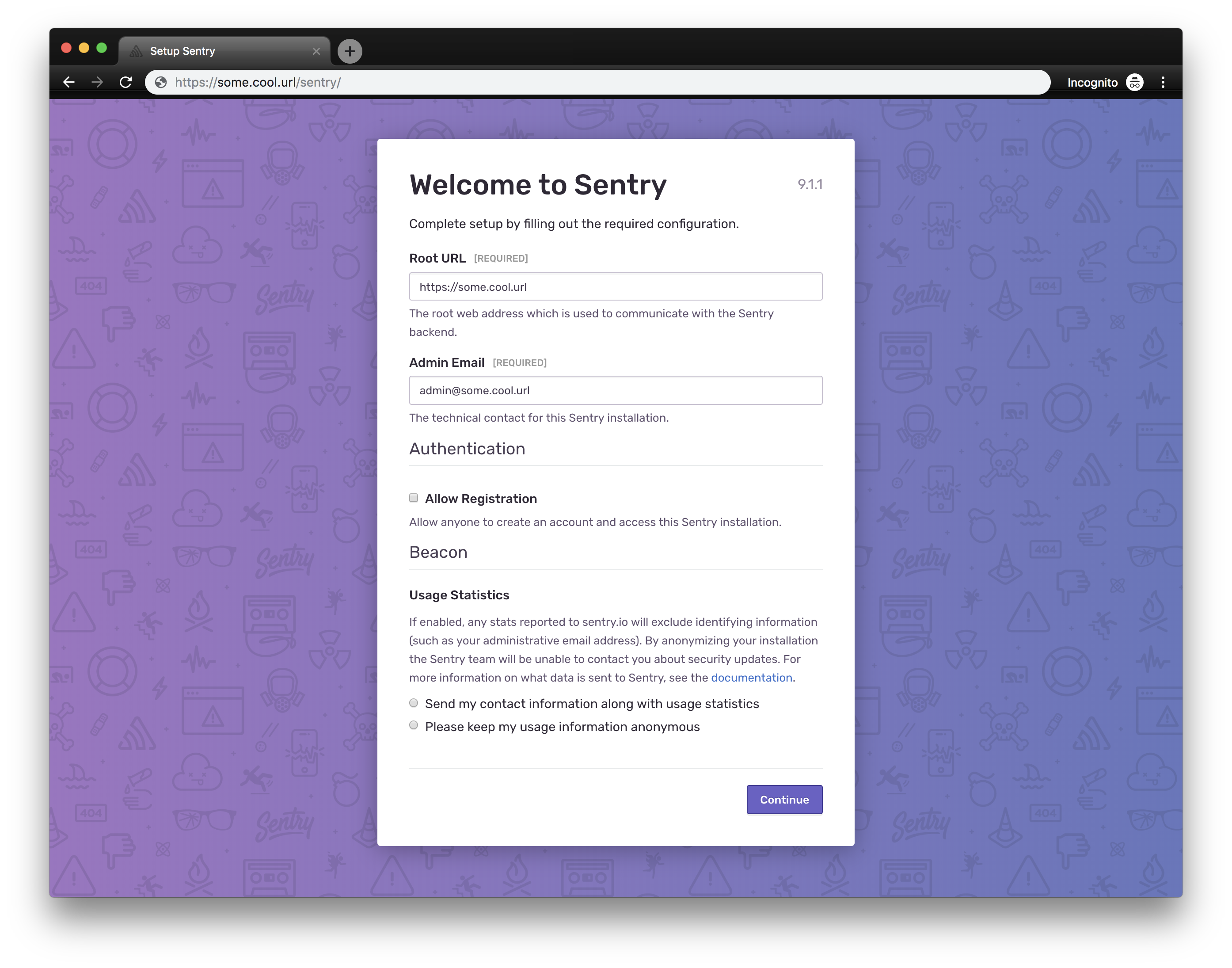
https://some.cool.url/api/0/internal/options/?query=is:required
PUT
{"mail.use-tls":false,"auth.allow-registration":false}
When this occurs the DSN is empty for me, however the /manage/settings/ page shows the correct url, in this case https://some.cool.url. If you modify and save the url on the /manage/settings/ page it persists as you'd expect and everything begins to work.
If, on the other hand, you modify the root url during the initial setup it sends through the following (note this happens even if you re-type the same url into the text field that's already there, in this case https://some.cool.url):
https://some.cool.url/api/0/internal/options/?query=is:required
PUT
{"mail.use-tls":false,"auth.allow-registration":false,"system.url-prefix":"https://some.cool.url","system.admin-email":"[email protected]"}
After manually configuring this url on the setup screen the DSN values appear.
Special notes that may be relevant:
- I configured my sentry installation using the
sentry upgradewith the--noinputflag enabled. - I added my first user using
sentry createuser --email=someemail --password=somepassword --superuser
 Jaspaul
on 6 Jun 2019
Jaspaul
on 6 Jun 2019
When this occurs the DSN is empty for me, however the
/manage/settings/page shows the correct url, in this casehttps://some.cool.url. If you modify and save the url on the/manage/settings/page it persists as you'd expect and everything begins to work.
This part saved me. Thank you!
 crystianwendel
on 11 Jun 2019
crystianwendel
on 11 Jun 2019
I'll take a look at this. @Jaspaul - huge thanks for that last comment explaining many things!
 BYK
on 13 Jun 2019
BYK
on 13 Jun 2019
Sentry.init({
dsn: 'http://public key@localhost:9000/projectid',
maxBreadcrumbs: 50,
debug: true,
})
// project id can be find in settings-> projects-> client keys->configure keys
 railsfactory-robin
on 24 Jun 2019
railsfactory-robin
on 24 Jun 2019
The DSN is blank if the root URL is set to:
http://localhost:9000
However works fine if set to:
http://127.0.0.1:9000
 j-gooding
on 27 Jun 2019
j-gooding
on 27 Jun 2019
@j-gooding the fix is not released yet. You can still use http://localhost:9000, you just need to change the input value a bit first due to a bug. See attached PR which resolved this or the comment above that explains why this happens: https://github.com/getsentry/sentry/issues/12813#issuecomment-499651458
BYK
on 28 Jun 2019
Continuing on @dmug's comment.
If you are running sentry on docker containers.
You can add the following to ENV_CONFIG_MAPPING section of sentry.conf.py and build the image.
'SENTRY_URL_PREFIX': 'system.url-prefix'
By doing the above you should be able to pass SENTRY_URL_PREFIX as an environment variable during docker run that will fix the DSN value.
 sarathn2013
on 5 Jul 2019
sarathn2013
on 5 Jul 2019
The issue is still present, why is this closed?
 okainov
on 16 Jul 2019
okainov
on 16 Jul 2019
@okainov: https://github.com/getsentry/sentry/issues/12813#issuecomment-506687911
BYK
on 16 Jul 2019
Fix this please. Users are not all aware about default web location. (onpremise)
 fabriziosalmi
on 18 Jul 2019
fabriziosalmi
on 18 Jul 2019
I've just done the second installation in 2 months and surprised to see this exact issue again.
As before the comment above helped me: https://github.com/getsentry/sentry/issues/12813#issuecomment-499651458
 tombh
on 22 Sep 2019
tombh
on 22 Sep 2019
Same error here. onpremise 9.1.2
 Vaelor
on 10 Oct 2019
Vaelor
on 10 Oct 2019
@tombh @Vaelor - Let's move this discussion over to the forums as this issue in its known state here is definitely fixed and verified multiple times. I'd love to hear more about your experiences and setup to see if there's anything else we are missing but keeping the discussion under this issue notifies many other people and also makes is hard to trace things back in the future.
I kindly request you to creating a new topic at https://forum.sentry.io/c/on-premise with your full installation story, all the steps you have followed, and the versions of all the things, including Sentry.
Hoping to resolve the issue once and for all with all your help, thanks in advance!
BYK
on 14 Oct 2019
Related issues
 maefinho
·
3Comments
maefinho
·
3Comments
 jiankunking
·
3Comments
jiankunking
·
3Comments
 dcramer
·
4Comments
dcramer
·
4Comments
 fatagun
·
4Comments
fatagun
·
4Comments
 phiresky
·
3Comments
phiresky
·
3Comments
Most helpful comment
I encountered this as well. It happens when you do not specify a URL prefix during setup. Go to
sentry shelland run this: