Sentry: Discord Global Integration or Slack Webhook Global Integration
Summary
With the new Global Integrations feature in Sentry, I've tried to adapt my existing setup that uses Discord's Slack compatible webhooks and found that the new Global Integrations feature uses Slack's oAuth API instead of webhook API. I am thinking that either the integration can be expanded to support Slack webhooks or have a separate integration for Discord.
Motivation
This would improve support for Discord, organizations that do not want to use slack apps and other chat apps that have Slack compatible webhook APIs, depending on the implementation.
Additional Context
- Discord slack webhook docs - https://discordapp.com/developers/docs/resources/webhook#execute-slackcompatible-webhook
 nepeat
All 18 comments
We've moved away from using Slack webhooks as they lacked a lot of flexibility which the (unfortunately now deprecated) workspace tokens provided us.
We don't currently have any plans to provide the webhook Slack interface through any integrations.
 EvanPurkhiser
on 18 Jan 2019
EvanPurkhiser
on 18 Jan 2019
I believe there's been a bit of miscommunication/confusion here. The request is to add Discord webhook integration, which is identical to the now deprecated legacy Slack webhook. This is not asking to use anything related to Slack whatsoever. More here: getsentry/sentry-plugins/#249
 elderlabs
on 27 Apr 2020
elderlabs
on 27 Apr 2020
Correct. At the time I did not realize that the legacy Slack webhook settings were hidden behind the search menu and I made a issue that is definitely unclear now. As the issue's original text stands, I should have split it down to two separate issues.
- Adding an integration for native Discord webhooks.
- Re adding Slack webhooks to the Slack integration to support workgroups that do not wish to use Slack apps or have similar chat services that support Slack webhooks.
I am more interested in the first, like the majority of users but I recognize that the second case is also a thing that would be nice with the potential for future services that implement the Slack hooks API.
nepeat
on 29 Apr 2020
I too want this integration to my Discord. I saw a prior thread mentioned using the Slack (Legacy) integration and modifying the URL's for discord as a work around, but i know longer see that in the integrations search results
Thanks
 ovived
on 30 Apr 2020
ovived
on 30 Apr 2020
+1 on this, if possible it would be appreciated.
 jacc
on 1 May 2020
jacc
on 1 May 2020
+1, good idea !
 StoneSet
on 4 May 2020
StoneSet
on 4 May 2020
+1, it would be great!
 vitormm
on 11 May 2020
vitormm
on 11 May 2020
+1, we need it.
 scrlkx
on 12 May 2020
scrlkx
on 12 May 2020
+1 Would love this
 arjunbazinga
on 13 May 2020
arjunbazinga
on 13 May 2020
+1, good!
 Russia9
on 15 May 2020
Russia9
on 15 May 2020
+1 We need this integration, the webhook plugin is not working correctly with discord and the slack legacy plugin (that we can use for discord) is not in the list anymore.
Can you recheck this issue please? @EvanPurkhiser
 SebastianGiro
on 18 May 2020
SebastianGiro
on 18 May 2020
I should have dropped a note here a few days ago. Sorry folks 😅
You _can_ still use the old Slack Legacy Webhook Integration, but it's hidden. You can find it by navigating to your team/project's settings page and appending /plugins/slack/ to the URL.
Example: https://sentry.io/settings/ORG_ID/projects/PROJECT_NAME/plugins/slack/
From there, you configure the Webhook URL provided from your desired Discord Channel with /slack appended to the end of the URL.
Example: https://canary.discord.com/api/webhooks/###channel-id-here###/###elaborate-webhook-key-here###/slack
I personally have a Bot Name and Tags configured/enabled, but otherwise you should be able to leave the rest of the settings blank.
Don't forget to enable the plugin! Afterwards, it will appear in your integrations as 'Slack (Legacy).'
Enjoy!
elderlabs
on 20 May 2020
I should have dropped a note here a few days ago. Sorry folks 😅
You _can_ still use the old Slack Legacy Webhook Integration, but it's hidden. You can find it by navigating to your team/project's settings page and appending
/plugins/slack/to the URL.Example:
https://sentry.io/settings/###my-team-name-or-whatever###/plugins/slack/From there, you configure the Webhook URL provided from your desired Discord Channel with
/slackappended to the end of the URL.Example:
https://canary.discord.com/api/webhooks/###channel-id-here###/###elaborate-webhook-key-here###/slackI personally have a Bot Name and Tags configured/enabled, but otherwise you should be able to leave the rest of the settings blank.
Don't forget to enable the plugin! Afterwards, it will appear in your integrations as 'Slack (Legacy).'
Enjoy!
Amazing, please leave a // NOTE to never fully remove it, so we can keep using it for discord. Thanks! Working great
SebastianGiro
on 21 May 2020
+1 We need this integration, the webhook plugin is not working correctly with discord and the slack legacy plugin (that we can use for discord) is not in the list anymore.
Can you recheck this issue please? @EvanPurkhiser
I can't speak towards any roadmap on adding Discord, but I do know someone who may be able to!
/cc @jonesphillip to get this on your radar :)
(also I think my comment above may have been my most downvoted comment on github haha)
EvanPurkhiser
on 31 May 2020
I should have dropped a note here a few days ago. Sorry folks 😅
You _can_ still use the old Slack Legacy Webhook Integration, but it's hidden. You can find it by navigating to your team/project's settings page and appending/plugins/slack/to the URL.
Example:https://sentry.io/settings/###my-team-name-or-whatever###/plugins/slack/
From there, you configure the Webhook URL provided from your desired Discord Channel with/slackappended to the end of the URL.
Example:https://canary.discord.com/api/webhooks/###channel-id-here###/###elaborate-webhook-key-here###/slack
I personally have a Bot Name and Tags configured/enabled, but otherwise you should be able to leave the rest of the settings blank.
Don't forget to enable the plugin! Afterwards, it will appear in your integrations as 'Slack (Legacy).'
Enjoy!Amazing, please leave a
// NOTEto never fully remove it, so we can keep using it for discord. Thanks! Working great
Thank you, I just want to add that you should enable the rules for legacy notification for each event happened at project
via : https://sentry.io/settings/YOUR_TEAM_NAME/projects/YOUR_PROJECTS/alerts/

 dkotama
on 2 Jun 2020
dkotama
on 2 Jun 2020
How to add discord webhook to sentry
- Visit this hidden page
https://sentry.io/settings/PROJECT_NAME/plugins/slack/ - Enable the plugin

Add to project

Configure webhook
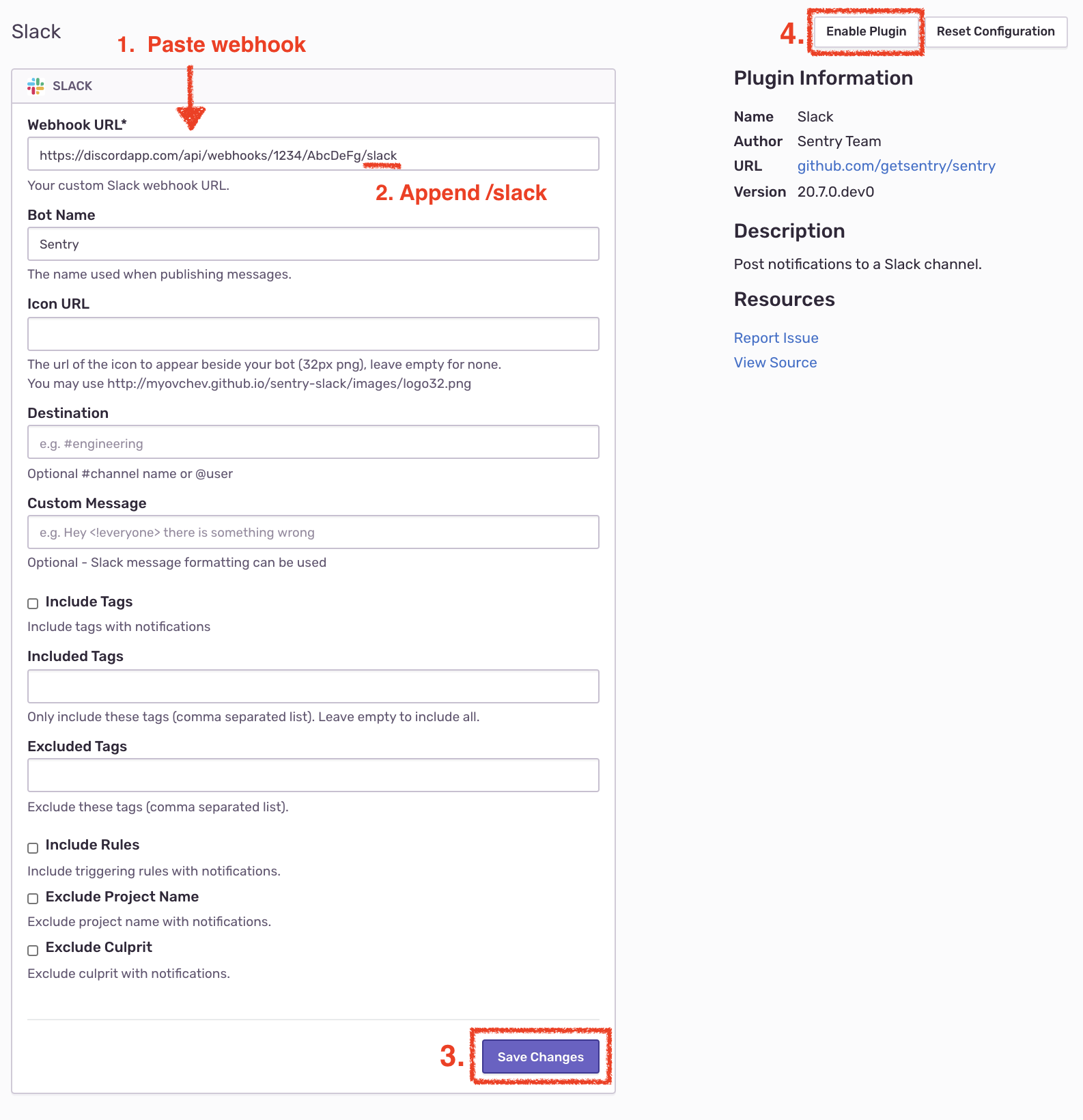
Click Test


Now enable an Alert rule to your project
Navigate to https://sentry.io/settings/ORG/projects/PROJECT/alerts/
 victornpb
on 30 Jun 2020
victornpb
on 30 Jun 2020
I couldn't access webhook configuration page using https://sentry.io/settings/PROJECT_NAME/plugins/slack/
Instead https://sentry.io/settings/ORG_ID/projects/PROJECT_NAME/plugins/slack/ worked.
 noisyblue
on 29 Sep 2020
noisyblue
on 29 Sep 2020
I couldn't access webhook configuration page using
https://sentry.io/settings/PROJECT_NAME/plugins/slack/
Insteadhttps://sentry.io/settings/ORG_ID/projects/PROJECT_NAME/plugins/slack/worked.
@noisyblue updated my post to reflect your correction. Thank you.
elderlabs
on 29 Sep 2020
Related issues
 dcramer
·
4Comments
dcramer
·
4Comments
 fatagun
·
4Comments
fatagun
·
4Comments
 Aletz-Arce
·
3Comments
Aletz-Arce
·
3Comments
 Leroygirl
·
3Comments
Leroygirl
·
3Comments
 bruno-garcia
·
3Comments
bruno-garcia
·
3Comments
Most helpful comment
I should have dropped a note here a few days ago. Sorry folks 😅
You _can_ still use the old Slack Legacy Webhook Integration, but it's hidden. You can find it by navigating to your team/project's settings page and appending
/plugins/slack/to the URL.Example:
https://sentry.io/settings/ORG_ID/projects/PROJECT_NAME/plugins/slack/From there, you configure the Webhook URL provided from your desired Discord Channel with
/slackappended to the end of the URL.Example:
https://canary.discord.com/api/webhooks/###channel-id-here###/###elaborate-webhook-key-here###/slackI personally have a Bot Name and Tags configured/enabled, but otherwise you should be able to leave the rest of the settings blank.
Don't forget to enable the plugin! Afterwards, it will appear in your integrations as 'Slack (Legacy).'
Enjoy!