We've been kicking around ideas internally for Sentry 9. It's still very early, but we thought it would be a good time to loop in the community. We'd like your feedback on the items that follow, as well as ideas on how we may be able to push this further.
In Sentry 9…
The organization dashboard no longer exists
It’s gone in favor of redirecting returning users to the issue stream of the last project they accessed. This removes an unnecessary click between where users are dropped and where they actually want to be 99% of the time. It also has the side benefit of redirecting returning-but-not-configured users into the project onboarding flow.
The sidebar is expanded by default
Organization and user settings, along with my issues, bookmarks, and history remain in the global sidebar. However, with it expandable (and expanded by default) users are shown the labels for these items. This also makes room for items like starred/recent projects and current usage numbers to always be within reach.

Environment is a top-level filter
Issue lists, Issue detail, and Releases are now filterable by environment at the project level. “No issues tagged ‘browser: Chrome’ in production”
Date range is a top-level filter
Issue lists, Issue detail, and Releases are now filterable by date range at the project level. “No issues tagged ‘browser: Chrome’ in production in the past week.”
Teams are no longer for grouping projects.
Teams now function as a way to notify, assign, or mention a group of people.
Settings are redesigned
Org and product settings now exist in their own modal — independent of the main app UI. They are focused, easy to navigate, and clean. Settings autosave rather than submitting changes.

Autosave fields. A handful of simple, yet polished components make up the majority of the settings pages.

Outer chrome (field sets) can be discarded when grouping is unnecessary.


 ckj
ckj
All 45 comments
The organization dashboard no longer exists
Will there still be an "all visible projects/teams" view or are those gone as well?
The sidebar is expanded by default
Love it.
Support/What's new should probably be at the bottom of the sidebar rather than above starred projects.
Current Usage feels very superfluous. It doesn't need to be on screen at all times.
Teams now function as a way to notify, assign, or mention a group of people.
Will this still(?) allow org admins to restrict traceback/user data access to only the teams that work on those projects?
Issues view
I like the changes. While you're redesigning the checkbox area please make sure the clickable area is unambiguous. There's nothing more frustrating in the current issues view than clicking a bunch of issues to merge, then ending up clicking slightly out of bounds which takes the browser to the issue and clears the selection. (Also, shift-clicking multiple issues to do continuous mass selection like in gmail please? :) )
 jleclanche
on 20 Jul 2017
jleclanche
on 20 Jul 2017
@jleclanche
Will there still be an "all visible projects/teams" view or are those gone as well?
We'll likely still have this somewhere though its something we have to think about it. There's def value in seeing the glance of projects/sparklines.
@jleclanche
Will this still(?) allow org admins to restrict traceback/user data access to only the teams that work on those projects?
Yeah. Think GitHub.
 dcramer
on 20 Jul 2017
dcramer
on 20 Jul 2017
I often use the dashboard's "newest open issues" view after environment-wide disturbances to find issues from all projects - for example I'll resolve all new "connection timed out"s after network problems.
Will something similar be available? Maybe even a merged stream for all projects?
 ktosiek
on 20 Jul 2017
ktosiek
on 20 Jul 2017
@ktosiek our plan is to create organization-wide pop outs that are accessible via any project on the sidebar. We dont have the "new issues" one yet, but I dont see any reason we cant add it.
Doing a cross project stream is, unfortunately, more complex at this point. We explicitly forbid full cross project query capabilities to future proof Sentry's ability to scale. It's something we will likely be able to offer at some point in limited fashion, but not until we revamp the core search index.
Additionally, we're going to start looking at doing cross-project data elsewhere. For example, last hack week we experimented with having modals user context, and showing issues that the user has hit across your organization (vs just in the current project).
dcramer
on 20 Jul 2017
@dcramer Is switching to Python 3 a near-term goal?
 ofek
on 21 Jul 2017
ofek
on 21 Jul 2017
@ofek we want to do it but it's we focus on business goals. In spare time and during hack weeks we've been working towards it, but iwere still a small eng team and given our scale it's been pretty challenging. I think we're getting close, but it won't be part of Sentry 9.
dcramer
on 21 Jul 2017
Understood :) So then a bunch of PRs that increase support for Python 3 would be welcome?
ofek
on 21 Jul 2017
@ofek absolutely! One challenge is a couple of our dependencies (like rb) that are a bit less straight forward.
dcramer
on 21 Jul 2017
The organization dashboard no longer exists
Honestly I really dislike that the _recent activity_ view is completely thrown away. Your reasoning might work for users/teams that only have to maintain one or two projects.
With this change we would be falling back to clicking around on every single project to get an overview which feels like the old Sentry again. And then it is necessary again to subscribe for a lot of email subscriptions which just increases email noise.
I wonder where your "99% of the time" number comes from
 klyonrad
on 21 Jul 2017
klyonrad
on 21 Jul 2017
@klyonrad for the record we don't intend to remove those features. We're just going to move them into panels in the sidebar instead and have them always be accessible.
dcramer
on 21 Jul 2017
@klyonrad Just here to echo @dcramer's comments above. I'm going to add 'Activity' and 'New issues' to the mockups and update this thread later today.
ckj
on 21 Jul 2017
One point someone made, that we should make sure we address, is maintaining longer term data accessible in dashboard areas.
e.g. on the event details page we show 30 days back, but elsewhere we don't allow that visibillity. It's pretty easy to support that, and definitely something we should, at the very least, make sure shows up on project dashboard.
dcramer
on 9 Aug 2017
A couple of updates:
- Progress has been made on the sidebar build out in the
new-sidebar-who-disbranch. It currently looks like this:
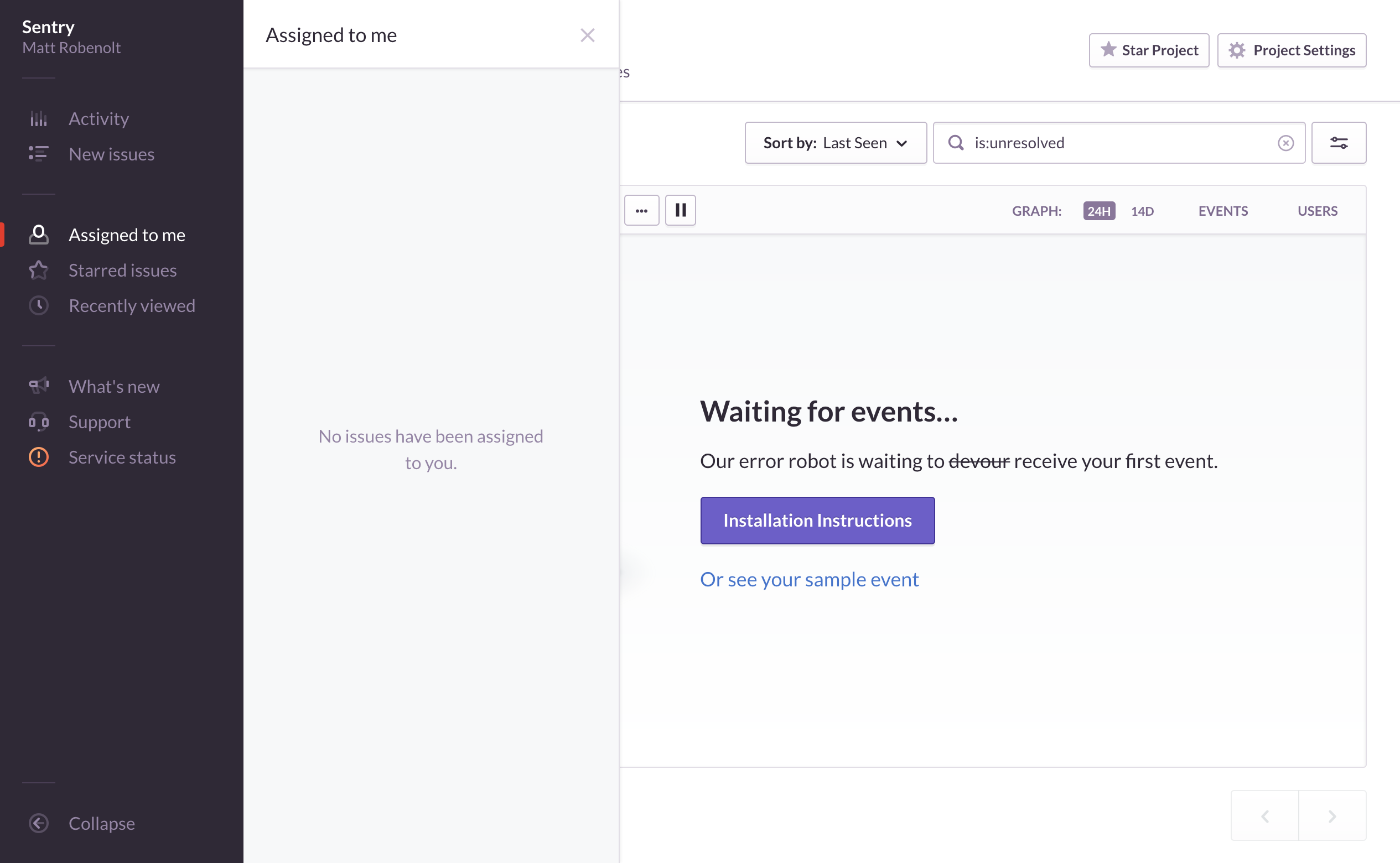
- I've chunked out some of the other tasks here in a GitHub project: https://github.com/getsentry/sentry/projects/2
ckj
on 11 Aug 2017
Environment is a top-level filter
Not sure if I fully grasp the feature here. But generally I am often frustrated by the lack of segregation between environments. Here are my wishes 😄 :
- __weekly email:__ aggregate errors by ENV instead of mixing them (having +200% errors in prod is way different than having it in staging)
- __list of issues:__ show ENV as a first class citizen in the issue list view (similar to owner in your first screenshot)
- __issue notif email:__ add ENV to mail subject and make it more visible in the email
I feel that env is just treated as another tag for an event when it should be put forward.
 tvilon
on 23 Aug 2017
tvilon
on 23 Aug 2017
@tvilon you're spot on for what we are intending, and are right on what it is today
One of our main goals will be to also change all things to be env focused. That is, alerts, digests, deploy notifications, etc all focus on 'default environment', and you can opt-in to notifications for other environments.
Primarily we intend to eliminate the need for the project-per-env pattern.
dcramer
on 23 Aug 2017
I'd like to see search across projects. Often I know there's an issue, but not exactly sure which project it's in or it may be triggering events in multiple projects.
 kmiyashiro
on 23 Aug 2017
kmiyashiro
on 23 Aug 2017
@kmiyashiro this is probably something we could provide, with a bit of a caveat. The implementation would effectively have to:
- Search one project at a time
- Aggregate results back into the UI
- Re-sort, show progress of search
This ensures that we can maintain separation of data, but also future proofs us to keep things partition-aware.
If you can imagine the scope, it makes a bit tricky than just querying the SQL database, which technically would be possible today (but not so much "tomorrow"). So I'd say we'd like to do it, but given the amount of work, it might not happen in the very near term.
dcramer
on 23 Aug 2017
With the new date range filtering, will the number in the "Events" column be based on total events all time? Or the number of events that happened within the range?
Personally, I would like the number of events to be only those within the date range, because that makes it much easier extract pressing recent issues from less important issues that have been around for longer (e.g. issues that have a far smaller occurrence rate, but currently show up with large event counts since they may have been around for a year or more).
 timmfin
on 23 Aug 2017
timmfin
on 23 Aug 2017
@timmfin currently it will behave the same as it does today, with the exception that counts will be paired down to per-environment. We are investing in some technology that will allow us to dynamically return accurate counts based on the search query, but that's a lot farther out. There might be shorter term fixes we come up with, but that's still undecided. For example, we could use the time series datastore to compute these counts and that'd work totally fine (excluding search terms), but the 'sort by frequency' wouldn't work on its own there. We have another solution for the frequency sort, but there's some capacity/scale concerns that we have yet to prioritize before we would be able to use that on its own.
dcramer
on 23 Aug 2017
One thing we are missing now, and I'm curious how it changes given the changes to teams going on: We currently have four teams with five or six projects per team. One thing we haven't been able to get is "show me all recent issues for my team regardless of project". Is there a way to do this in Sentry 9?
 yarian
on 23 Aug 2017
yarian
on 23 Aug 2017
@yarian its not something we've had any discussion about. There's a bunch of stuff we'll want to play out with teams before we would invest into anything like "team specific stats". With the direction we're going it probably makes sense though.
dcramer
on 23 Aug 2017
@dcramer Thanks for the heads up. To be clear, I don't care so much about stats as much as a view that lets a team-specific on-call get an at-a-glance view of what work needs to be done. Excited to see what direction teams take.
yarian
on 23 Aug 2017
Sentry is riddled with UX issues. Removing some shadows from your sidebar is the least of your worries. Your interface is extremely difficult to use and grok.
Two key points that I would like to make
- The monochromatic colour palate has no visual hierarchy, that makes identifying key actions very difficult.
- You show a graph of errors over time that you can't click to drill down to that time period, the only way to access that information is to write a custom query.....
The list could go on, the product itself is great but the interface is so difficult to use that I cannot justify a subscription because everyone on my team can't get the information they need from the interface.
Don't mean to rant in a public forum but you don't have any way to do so in your app.
 nikglavin
on 23 Aug 2017
nikglavin
on 23 Aug 2017
@nikglavin You’re not wrong, there’s a lot more we can do here than apply a new coat of paint. The things I listed off were just a few of the broader things that we have been thinking about. The sidebar iteration may be one of the more visible changes, but it’s likely the least significant. There’s depth here in the new top-level filters, teams revamp, and settings UI that will immensely improve the core UX for most users.
But yeah, that’s the point of this thread. Showing you what’s on our minds while hearing whats on yours. Appreciate your participation in that.
ckj
on 24 Aug 2017
If you allow filtering by environment then the graphs should in dashboard should update based on that. Also when we click on issue after filtering for environment it only show issues for that environment. Some issues are happening in multiple environments but we want to see only the instances of issues in 1 environment
 anshbansal
on 25 Aug 2017
anshbansal
on 25 Aug 2017
FWIW, adding a user to a specific project without giving access to the whole org is the killer feature missing for us (medium company doing dev work for many clients).
 merwok
on 7 Nov 2017
merwok
on 7 Nov 2017
I'm trialing out the beta and one issue I have is that all of our projects are dumped onto a single page, regardless of the team it is associated with. We currently split out error reporting into different teams that represent an environment, which allows us to quickly figure out if an issue is happening in a specific environment and declutters production for those looking at said sentries.
Just a few of the issues I see after playing with it for a bit:
- They are all dumped on the projects page without splitting them up by team.
- They are not in any order, nor are they order-able alphabetically.
- Clicking a project _always_ brings you to the settings page, which isn't what I expected at all.
- There isn't a way to "view issues" from the settings page.
- The short name is used everywhere as a signifier. It was previously only used as a url slug, and the project name was referred to in the ui. This is confusing when the short name (which was basically just an internal url slug) doesn't match what the application is.
This is actually obtuse enough that if it shipped as is, I believe I would get enough backlash in our org to prompt us to move to another solution for error tracking. I'd be happy to speak with someone in the Sentry org to comment on our needs and how the UX might be better improved :).
 josegonzalez
on 16 Mar 2018
josegonzalez
on 16 Mar 2018
@josegonzalez no matter what we do you’re going to have to make some changes. Here’s a few notes:
1) teams can’t be used to categorize things like you’re doing going forward. They can still bucket projects but a project can be part of many teams.
2) environments have been a first class attribute for some time so you’re going to want to use that as we’ve put enormous work into making that useful as part of sentry 9. That said I’m not sure those features are out to early adopters yet.
3) slugs are here to stay but we might do something to help with a transition period. Our objective here to remove overall confusion in a way not all that different than GitHub has achieved.
4) were going to improve project selection as it shouldn’t be “only available via settings”. That said you can also use the drop down up top in the near term.
dcramer
on 16 Mar 2018
@josegonzalez for the team->project thing, as that seems like the biggest short-term concern, what do you think would make sense for the way your org uses it? I'm struggling to have anything other than a better/more accessible "list of projects". One of our goals is really just to get you into a project scoped context now that we've resolved environment concerns.
dcramer
on 16 Mar 2018
@josegonzalez also one last thing -- on the Projects page, while it does go to settings, theres a "View Issues" action. Was that just not obvious?
dcramer
on 16 Mar 2018
@dcramer I think a large part of this is going to either necessitate code changes to make environments work as expected across all services (woof) as well as changing how we interact with Sentry in general, or looking at other products.
Regarding the "View issues" action button, the previous behavior was to click on the name of the project and be brought to the issues page. I think changing application settings is actually a less likely action to be performed by users of Sentry, and if anything the behavior should be switched such that there is a button for _that_.
josegonzalez
on 16 Mar 2018
@josegonzalez we'll come up with something, but I'd definitely suggest future proofing yourself and trying to get the environment passed correctly vs overloading projects. This is going to power an enormous amount of things going forward.
dcramer
on 16 Mar 2018
@josegonzalez whats the structure of your team / project names?
and is your concern:
- project slug is shown over project name
- team prefix is no longer shown
dcramer
on 16 Mar 2018
Teams are named something like "qa", "perf", "prod". Two concerns with using a single "app" and multiple envs within an app is seeing the graph of error spikes at a glance but not being able to dissociate it from a given env.
In regards to the name vs. slug issue, legacy applications use something like sg-api for the slug because the name used to be sg api. We've since renamed those to prod api to denote the environment (so its searchable via ctrl+f on the page), and are using the new naming schema for all applications. I'd rename all slugs to the standard way but that breaks links as you do not handle redirects.
josegonzalez
on 16 Mar 2018
@josegonzalez cool so a few things we're talking about doing:
- a dedicated project selector (IIRC we had this roadmapped anyways, but the whole visual of sentry 9 isnt entirely implemented). this will provide some way to bucket by teams (tbd).
- (potentially) a way to bulk rename projects
- (tbd, ill talk to people) a way to redirect projects at least until the project slug is claimed by another
- (likely, but not in the near term) dedicated team pages to give you a better overview of whats going on in projects
dcramer
on 16 Mar 2018
We'll be using this ticket to aggregate various user-facing changes and concerns for Sentry 9.
dcramer
on 16 Mar 2018
@josegonzalez we just shipped a new Projects & Teams page. It doesnt replace the settings pages that were previously live, but you'll have to intentionally seek those out now (via Settings). This one resembles the previous generation.
dcramer
on 19 Mar 2018
This is a great help! Is there a way to handle project sorting on that page? At the moment, it seems as though things are sorted by some internal id, and not alphabetically or anything.
josegonzalez
on 19 Mar 2018
@josegonzalez doh we'll fix (we also spotted another minor issue there where its showing teams even if you're not a member of them as long as you're a member of a project they're in)
dcramer
on 19 Mar 2018
Please do not remove the organization dashboard.
Actually I found this issue, actually I came here to propose that you add user defined filters to the dashboard. E.g. adding a filter to see all production errors from all projects so they can be easily viewed in the dashboard
 if-fi
on 30 Mar 2018
if-fi
on 30 Mar 2018
In the new dashboard, in the org settings, clicking on "Auth" goes to this page:
https://sentry.io/settings/$org/auth/
Which then redirects to this page:
https://sentry.io/organizations/$org/auth/configure/
And hitting back turns into a redirect loop :(
jleclanche
on 4 May 2018
I noticed that in the new dashboard, deleting a project actually deletes the project but still shows the deleted project in the list of projects under the organization. I confirmed the project was deleted by going to the old User Interface.
 prashanthr
on 4 May 2018
prashanthr
on 4 May 2018
Seeing messed up dropdowns on this page: https://sentry.io/settings/account/notifications/email/

jleclanche
on 21 May 2018
Sentry 9 looks awesome. Congrats. Just curious, but when will 9 hit the releases page?
 nhumrich
on 28 May 2018
nhumrich
on 28 May 2018
nice.
 joshuarli
on 11 Jul 2018
joshuarli
on 11 Jul 2018
Related issues
 maefinho
·
3Comments
maefinho
·
3Comments
 sul4bh
·
3Comments
sul4bh
·
3Comments
 nickolaskraus-wf
·
3Comments
nickolaskraus-wf
·
3Comments
 Leroygirl
·
3Comments
Leroygirl
·
3Comments
 dmnd
·
4Comments
dmnd
·
4Comments
Most helpful comment
Sentry 9 looks awesome. Congrats. Just curious, but when will 9 hit the releases page?