Sentry: after upgrading, sentry upgrade wizard hangs on hidden option mail.use-tls
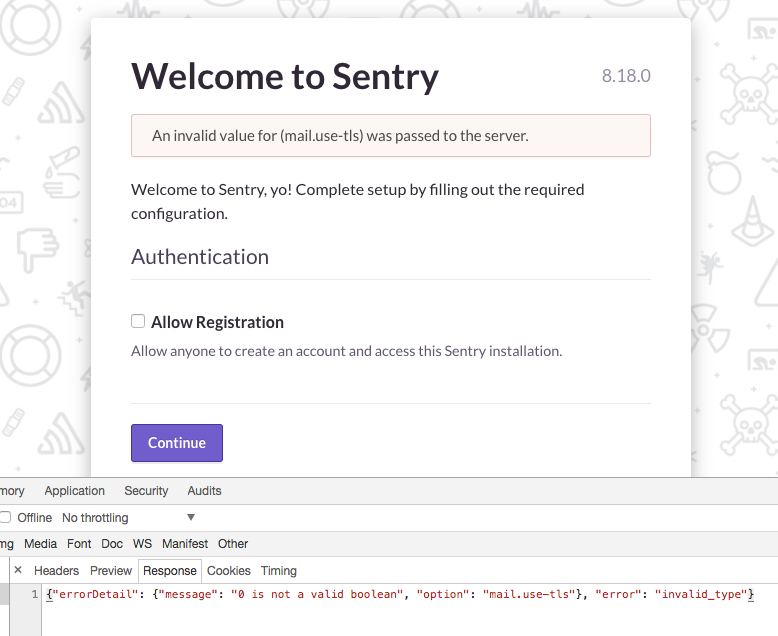
When upgrading my local sentry installation from 8.13 to 8.18 and running bin/sentry upgrade, the first login shows an upgrade/settings wizard. The wizard only asks for the 'allow registration' setting, but when I submit the form I get the following error. (developer tools json response also added in the screenshot).
"An invalid value for (mail.use-tls) was passed to the server."
When I install a new (local developer) sentry from scratch, the sentry setup wizard has a lot more questions in its form, also a number of mail and mail TLS settings.
It seems the setup wizard identifies that the mail settings are already complete (they're in my config.yml file), but incorrectly still demands the mail.use-tls setting being in the form upon submit as a required setting.
Nastier is that I'm now completely shut out of my own sentry installation, because the wizard keeps popping up as a first screen when I try to login? Is there anyway I can disable bypass the setup wizard or specify that everything is done so I can continue to the sentry main screen?
 fredvd
All 19 comments
I've tried commenting all mail related settings in my config.yml (including mail.use-tls). When I restart sentry the upgrade wizard now shows some related mail form wields, but the 'Use TLS?' entry is still not there, and posting the form doesn't work.
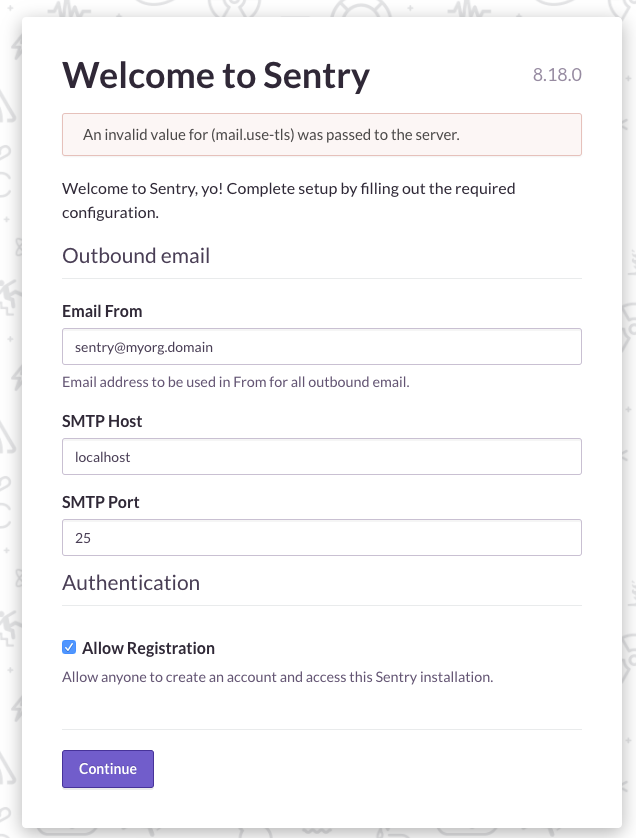
For reference: this is the setup wizard when I do a clean (local) install: Use TLS is available on this screen:
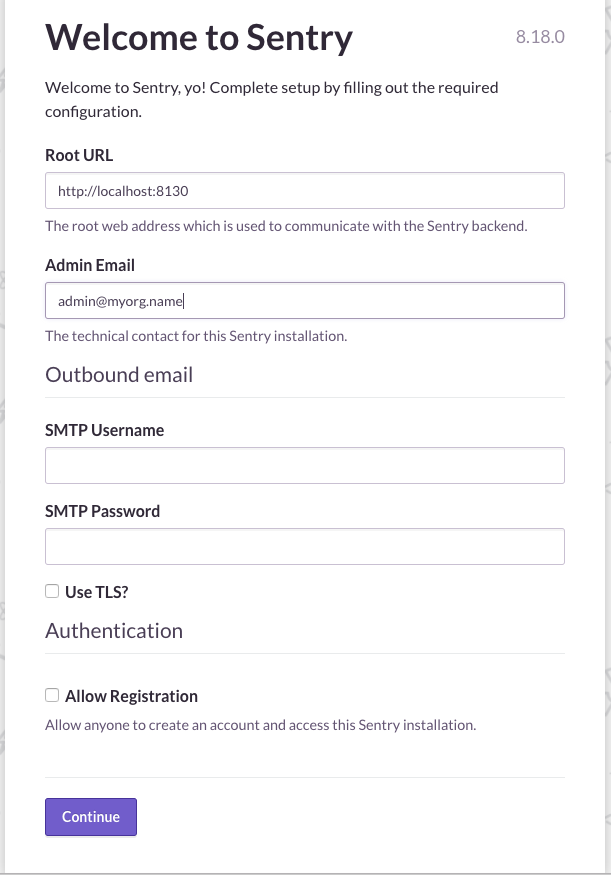
There seems to be some logic in the settings wizard for some fields: if I comment mail.host setting in config.yml, the Mail host field appears on the settings form, if I uncomment it, it disappears again. The same happens for mail.use-tls but the form only continues with a pristine install, upgrading an existing install doesn't work and removing the setting from config.yml doesn't let mail.use-tls reappear on the form when doing an upgrade.
So is broken in the POST field validation of the settings wizard.
fredvd
on 10 Jul 2017
Something is definitely wrong here. I'm OOO this week so someone else is looking into it right now. It is possible to force close the wizard, by overriding the version stored:
options.set('sentry:version-configured', '8.18.0')
 dcramer
on 10 Jul 2017
dcramer
on 10 Jul 2017
@dcramer Thank you for the quick response. I somehow just got past the wizard by removing all mail.* related settings from the sentry_option table in de postgres database and commenting all mail.* settings in the config.yml . Then the Use TLS option appeared as well and I could submit the form wizard.
I assume options.set should be done on the console in the webbrowser devtools to set the option in the React form app? I was already biting my nails that there wasn't an old fashioned
fredvd
on 10 Jul 2017
Also helped making this:

(in text)
SENTRY_OPTIONS['mail.use-tls'] = """Bool(env('SENTRY_EMAIL_USE_TLS', """False"""))"""
in sentry.conf.py
 idchlife
on 14 Jul 2017
idchlife
on 14 Jul 2017
An alternative to @idchlife's suggested fix for sentry.conf.py:
SENTRY_OPTIONS['mail.use-tls'] = env('SENTRY_EMAIL_USE_TLS') == 'True'
Worked for me, upgrading from 8.11.0 to 8.17.0.
 ihinsdale
on 21 Jul 2017
ihinsdale
on 21 Jul 2017
looking into this more today
dcramer
on 21 Jul 2017
Is it possible that mail.use-tls had been set to '0' before?
dcramer
on 21 Jul 2017
I'm struggling to not only reproduce this, but to even figure out how its possible. Any disabled options shouldn't be getting sent to the server.
dcramer
on 21 Jul 2017
So I was able to get into what I can only assume is the same state and still was unable to repro the issue. I'm going to suggest that if anyone has this issue they:
sentry config set mail.use-tls true/false
@dcramer The issue is very weird indeed. I did an upgrade to a second Sentry Install I manage this week, which I had set up in exactly the same way (buildout install, config in templates, same Sentry from/to versions).
I was expecting to do the same dance to get around this bug, but it just didn’t happen. I have no clue what I did differently with the second install, I didn’t AFAIK :-(
fredvd
on 21 Jul 2017
@fredvd my only thought was maybe at some point we were able to store an invalid boolean value for mail.use-tls, and it was complaining about that.
dcramer
on 21 Jul 2017
On Fri, 21 Jul 2017 at 23:05, David Cramer notifications@github.com wrote:
@fredvd https://github.com/fredvd my only thought was maybe at some
point we were able to store an invalid boolean value for mail.use-tls, and
it was complaining about that.—
You are receiving this because you were mentioned.
Reply to this email directly, view it on GitHub
https://github.com/getsentry/sentry/issues/5699#issuecomment-317099696,
or mute the thread
https://github.com/notifications/unsubscribe-auth/AEWgWANSpqt57V-sFHqtJfaTQSEDGwWRks5sQQRzgaJpZM4OS6aP
.try to install on clean ubuntu server with 2 or less gb of ram. Then on 1gb
or less ram, etc. had this issue in those conditions
idchlife
on 22 Jul 2017
For me this occurred with moving from 8.17 to 8.18 Docker. By intercepting the request and changing 0 to false, it fixed it. The other option was right click in chrome network panel and copy as curl. Then just change the 0 to false
 kkirsche
on 26 Jul 2017
kkirsche
on 26 Jul 2017
have the same problem after upgrade to latest 8.18.
"The other option was right click in chrome network panel and copy as curl."
- helped thank you.
 saytik
on 11 Aug 2017
saytik
on 11 Aug 2017
If someone else hits this can you dump the value of he tls option row from the database and post it here? The table is sentry_option.
dcramer
on 11 Aug 2017
SELECT * FROM public.sentry_option where key like '%tls';

9 | mail.use-tls | gAKJLg== | 2017-08-26 11:09:38.589369-06
I upgraded from 8.10 to 8.19
 kneufeld
on 26 Aug 2017
kneufeld
on 26 Aug 2017
As per previous comments, I commented out mail.* from config.yml and then restarted the web server. I then got a config wizard (no tls option shown) and after filling out the form my installation now appears to be working fine.
I now have several new mail.* rows in the sentry_option table.
kneufeld
on 26 Aug 2017
I was able to reproduce this. The web UI sends the mail.use-tls option as 0 instead of false, like so:
{
    "mail.use-tls": 0,
    "mail.username": "",
    "system.admin-email": "[email protected]",
    "mail.password": "",
    "system.url-prefix": "https://sentry.example.com",
    "auth.allow-registration": false
}
The resolution was simple enough; copying the request as cURL from devtools and manually changing the mail.use_tls flag to false after which the wizard happily proceeded.
 aleksihakli
on 31 Aug 2017
aleksihakli
on 31 Aug 2017
@billyvg any chance you could look at whats up with then since you've got a lot of react experience? @mattrobenolt can provide some guidance on how this works, but its in the InstallWizard bits
dcramer
on 31 Aug 2017
Related issues
 dkarlovi
·
4Comments
dcramer
·
4Comments
dkarlovi
·
4Comments
dcramer
·
4Comments
 nickolaskraus-wf
·
3Comments
nickolaskraus-wf
·
3Comments
 benvinegar
·
4Comments
benvinegar
·
4Comments
 phiresky
·
3Comments
phiresky
·
3Comments
Most helpful comment
For me this occurred with moving from 8.17 to 8.18 Docker. By intercepting the request and changing 0 to false, it fixed it. The other option was right click in chrome network panel and copy as curl. Then just change the 0 to false