Hi,
In the project settings section I see there's an "Inbound data filters" option that says "Filter out errors coming from localhost".
This seems to only apply to urls that start with "127.0.0.1". Why you don't include "localhost" as well?
 pensierinmusica
All 22 comments
Have just run into this same issue
 gricey432
on 13 Jan 2017
gricey432
on 13 Jan 2017
The filter here applies to the IP address of the user triggering the exception, so there's no way that this would ever be "localhost".
 mattrobenolt
on 13 Jan 2017
mattrobenolt
on 13 Jan 2017
@mattrobenolt that's the point of the issue, there's no way it would ever be '127.0.0.1' either unless sentry is running on the same machine as the user (which I can't ever imagine happening).
Here's an issue sent to sentry from my local machine with sensitive info blurred.
http://imgur.com/yLfCdil
See how even though I'm testing code on localhost, from sentry's point of view my IP isn't 127.0.0.1
I think the filter should either ignore issues coming from localhost or local ips in the url, not the user's request to sentry.
Should be a simple change of this file, happy to submit a PR if you agree.
https://github.com/getsentry/sentry/blob/master/src/sentry/filters/localhost.py
gricey432
on 13 Jan 2017
Also see this related discussion on the forums where zeeg seems keen on discussing the idea further
https://forum.sentry.io/t/filtering-localhost-requests/79/2
gricey432
on 13 Jan 2017
You're misunderstanding.
This compares the user's IP address that triggered the error relative to your application. Not the IP address that reported the error to our servers.
That's what https://github.com/getsentry/sentry/blob/master/src/sentry/filters/localhost.py#L15 is.
So if you're running your application on localhost, and you hit the error from localhost as well, you'd have the IP address of 127.0.0.1, and this would get sent to us as 127.0.0.1 for the User.
mattrobenolt
on 13 Jan 2017
Then why does that screenshot I attached show the IP address that reported the error to your servers? I'm running my application on localhost and accessing it via localhost, but the filter is accepting it and recording the issue's reporting IP as my public one.
Sentry is incorrectly accepting dozens of issues a day from people breaking things in local development and they all show up that way.
gricey432
on 13 Jan 2017
Interesting. I'm unsure about your scenario then. We take this information from the SDK if it's adding it, if not we guess and add based on the information we have. So the only thing I can say is the SDK isn't adding the user information correctly, or you're not passing this along in configuration.
If you're a sentry.io customer, feel free to open a support ticket and I can look at the issue closer.
If not, it'll depend on configuring your SDK to attach user information, in which you'd be passing along the user's IP address yourself. And this varies depending on which SDK you're using.
But I'm in agreement, that I think we should be sourcing more information to detect this though. I think we should also peek at the URL.
mattrobenolt
on 13 Jan 2017
The issue is that Javascript clients don't have any knowledge of IPs, they only are known by things receiving requests.
The only way I could think to manually provide an IP which is local to the SDK would be if I got it on the server side on page load and inserted it into the returned JS. But I can't see anywhere in the SDK docs on how to manually override the IP, only url and stuff like that.
Another workaround for this would be to just set whitelistUrls to be only your actual production urls and then the SDK wouldn't bother sending anything that comes from localhost.
https://docs.sentry.io/clients/javascript/config/
Thought I'm still in favour of either modifying the server side filter or adding another filter that works off URLs.
gricey432
on 13 Jan 2017
Ah, yeah, this information was left out. :P
In the case of JavaScript, we definitely pull the IP address from the user submitting to us.
We should definitely accommodate this on our file rules though. I'd argue that it'd only be a super partial attempt at the problem since local dev is very rarely at "127.0.0.1" or "localhost". For example, we use dev.getsentry.net ourselves for sentry. And it's common to use other hostnames.
We'll probably always need to suggest whitelisting from the SDK or using a "falsey" DSN. For example, if you did something like:
Raven.config(window.location.href.indexOf('localhost') > -1 ? false : 'dsn').install()
This would configure raven-js as a noop client and it won't report anything. This can also be done in the shouldSendDataCallback setting as well.
mattrobenolt
on 13 Jan 2017
I like that DSN workaround, I'm gonna use that. I completely agree on the local dev urls thing too, maybe this does make more sense to be a custom thing using DSN or whitelisturls on the client side.
That said, for a lot of smaller users there could still be value in a simple toggle. Or at least something in the docs about this.
gricey432
on 13 Jan 2017
That said, for a lot of smaller users there could still be value in a simple toggle. Or at least something in the docs about this.
Yup, we're in agreement here. I was mostly arguing that this is a different issue than what this issue is, and the fix isn't just also filtering on "localhost", since the code here is operating literally on IP addresses and localhost wouldn't exist.
So we should definitely check the url of the request itself if that exists.
mattrobenolt
on 13 Jan 2017
Made a commit but as I mentioned in it, it seems like it's going to be quite the process to get a local sentry set up. Are able to have a look at it @mattrobenolt ? I can turn it into a PR if that makes it easier to discuss
gricey432
on 13 Jan 2017
@gricey432 If you'd prefer, I can also take over and carry it though since we'd need to add tests for this and whatnot before we merge. So it's your call. If you want to submit PR, I can help review and get you going through that stuff. Or you can just hand it off to us and we'll take it over.
mattrobenolt
on 13 Jan 2017
I'm not fussed, I'm not used to there being actual employees on a github project. Just in the habit of "if you raise an issue and you can fix it, fix it" with open source.
I'll submit the PR and if you want to go through the process that's fine, if not, just steal any of the code you want and reject my PR. I'm keen for whatever gets the feature live soonest.
gricey432
on 13 Jan 2017
Gonna leave it to you @mattrobenolt
gricey432
on 13 Jan 2017
@gricey432 thanks!
@mattrobenolt btw in JS very often developers actually use localhost:[port number] as their dev environment address.
So, just to recap, once #4672 is accepted or somehow included in the source code, how should Sentry be set up to avoid reporting errors from localhost?
Thanks!
pensierinmusica
on 17 Jan 2017
Made a quick update to @mattrobenolt 's js disable code to work for 127.0.0.1 as well.
Raven.config(['localhost', '127.0.0.1'].indexOf(window.location.hostname) > -1 ? false : 'dsn').install()
Could be useful to someone in the meantime.
Also, maybe this issue shouldn't be marked as closed until the feature is implemented?
gricey432
on 19 Jan 2017
@gricey432 wouldn't this work too btw?
Raven.config('https://[your token]@sentry.io/[other token]', {
      ignoreUrls: ['localhost', '127.0.0.1']
    }).install();
After scouring docs and github issues, I was informed if you're an admin there is an ignore localhost and IPs in the project settings in the sentry UI console...
Not sure how recent this feature is
 wschaeferiii
on 10 May 2017
wschaeferiii
on 10 May 2017
^ might just be that I can't find it on every single project config page now, ~~but this option looks like it has been removed (the ignore localhost option), and in the last week, from what I can tell. I just thought I'd leave a comment letting you know that the comment above is now outdated.
You can achieve this by setting up your whitelist still (it's logical for Sentry to clean up their UI in this way).
Personal note: it's not clear to me if my project is grandfathered in to the config option that was present before (ignore localhost), or if Sentry moved towards blocking localhost automatically (despite the white list "Allowed Domains" defaulting to *).~~
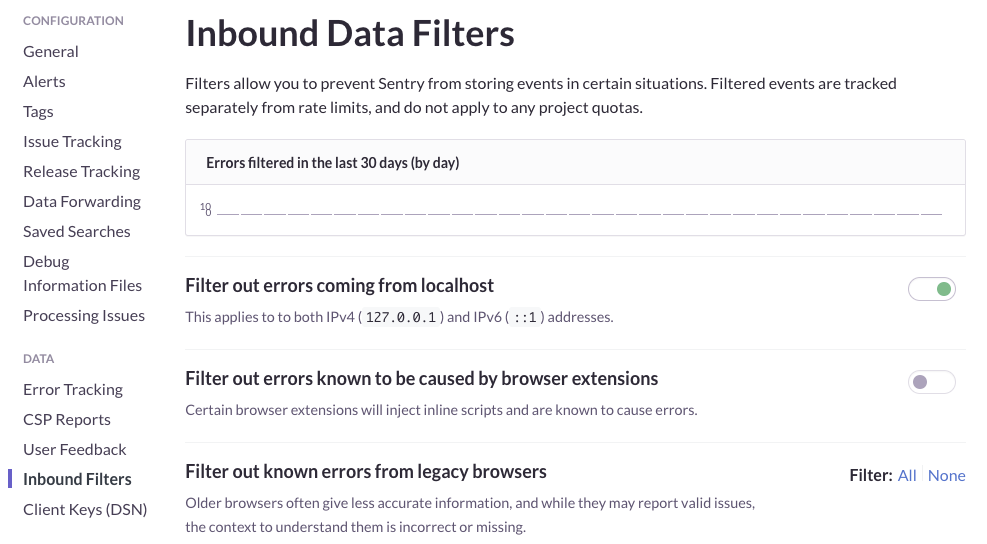
Edit: The option is in the "Inbound Filters" section. In case you're a derp like me:
 gravitypersists
on 5 Sep 2017
gravitypersists
on 5 Sep 2017
@wschaeferiii Yes, there's a toggle. This issue was that the toggle used to not work as expected.
@gravitypersists Are you sure? The option is still there for me on the latest release.
gricey432
on 6 Sep 2017
@gricey432 same here
pensierinmusica
on 6 Sep 2017
Related issues
mattrobenolt
·
3Comments
 gocarlos
·
3Comments
gocarlos
·
3Comments
 chavlin
·
3Comments
chavlin
·
3Comments
 nickolaskraus-wf
·
3Comments
nickolaskraus-wf
·
3Comments
 bruno-garcia
·
3Comments
bruno-garcia
·
3Comments
Most helpful comment
@gricey432 wouldn't this work too btw?