Sentry-react-native: [Question] How to set up sourcemaps and accurate version with Codepush without deprecated setDist and setRelease functions?
This is basically a bug report on the insufficiency of the Manual Codepush setup setup doc.
I tried to fill in the gaps from this comment: https://github.com/getsentry/sentry-react-native/issues/79#issuecomment-573288459
The solution proposed in the comment uses Sentry.setRelease function which is deprecated (along with setDist), while the docs suggests not waiting for codePush.getUpdateMetadata(), because Sentry.init might not be called before any related crash might happen.
I don't have question over how to upload sourcemaps, or create a release, rather what is the source of truth I need to use and is there a preferred order or not (from the docs the only thing clear that the codePush.getUpdateMetadata() solution is not).
As per my understanding, this is the broken solution. Feel free if I misunderstood any part how things work in either react-native or Codepush or Sentry.
The goal: having one source of truth version following semver
I wish to use one semver following version to identify my application version (e.g. 1.2.3) and upload its sourcemaps to Sentry. I use Codepush for minor updates.
After every Codepush update I would like to see Sentry.init being called with this version specified above.
Solution 1: using version from package.json
In this case I bump the version number in package.json. Let's say current version is 1.2.2, I manually bump the version to 1.2.3.
The flow in this case:
- bump version number from
1.2.2inpackage.jsonto1.2.3 - run
appcenter codepush react-release... - run
sentry-cli releases... - and in the application itself
import version from '../package.json'- call
Sentry.init({ release: version })
- and deployed applications update themselves through
codepushupdates
The problem is that version from package.json is not updated!
(see issue: Version from package.json not updated)
This way even though the right version has the right sourcemap the application itself tells otherwise.
Solution 2: hacking version into description of codepush update
In this scenario I pass version from package.json to the description of codepush release:
appcenter codepush release-react --app <my-org/my-app> \
    --description "Version: [<1.2.3>]; my random release information"  # dinamically set it from package.json
    --sourcemap-output
# ...
The flow in this case:
- bump version number from
1.2.2inpackage.jsonto1.2.3 - run
appcenter codepush react-release...with description having the version - run
sentry-cli releases... - and in the application itself
- call
codePush.getUpdateMetadata() - if
localPackageexists unpackversionfrom result through hacky string regexing - if
localPackagedoes not existimport version from '../package.json' - call
Sentry.init({ release: version })
- call
- and deployed applications update themselves through
codepushupdates
At least this solution updates version dynamically.
The problem is using description is hacky. Any new colleague might see description and rewrite it, maybe omitting version altogether, or deciding that [] is ugly not knowing that the regex was looking for it...
Solution 3: creating a random .json file somewhere which contains the version
In this scenario I create a version.json file lying around somewhere, manually bump it for every release and gets updated with every codepush release.
The flow in this case:
- bump version number from
1.2.2inversion.jsonto1.2.3 - run
appcenter codepush react-release... - run
sentry-cli releases...with release name[email protected] - and in the application itself
import version from '../version.json'- call
Sentry.init({ release: 'my-app@' + version })
- and deployed applications update themselves through
codepushupdates
The problem with this scenario that version in package.json and version in version.json might go inconsistent (can you delete version from package.json?). Again, new colleague comes, see the duplication and/or inconsistency, decides to refactor by dropping the duplication and things go 💥 .
Solution 4: using only codepush label
This is tricky again. First I will lose the relevant semver version about my app. Second this solution again only works with hope until the first update.
The flow in this case:
- have a
version.jsoncontaining latestcodepushLabel:{ "latestCodepushLabel": "v13" } - manually bump version number from
"v13"inversion.jsonto"v14"and hope this will coincide with the next label - run
appcenter codepush react-release... - get latest
codepushLabelfromappcenterby runningappcenter codepush deployment list --app <org/project> --output json - run
sentry-cli releases...with release namemy-app@<latestCodepushLabel> - and in the application itself
- call
codePush.getUpdateMetadata() - if
localPackageexists unpacklatestCodepushLabelfrom result - if
localPackagedoes not existimport latestCodepushLabel from '../version.json' - call
Sentry.init({ release: 'my-app@' + latestCodepushLabel })
- call
- the deployed applications update themselves through
codepushupdates and we update continuously thereleaseproperty
Problems
- at first start we can't rely on
codePush.getUpdateMetadata(), therefore we need to bundle the _next_ version label into thecodepusheven before the version label itself exists - we lose
semverversioncompletely as the release string will be something likemy-app@v14; so for identifying the proper version, I need to go digging
Solution 5: use version.json and codepushLabel
This results in the fabled release string: [email protected]+codepush:v14.
In this case we have both of the disadvantages of Solution 3 and Solution 4: semver version comes from version.json while codepushLabel is either coming from version.json or from the latest package, while I need to guess the _next_ codepushLabel version and bundle it into version.json for apps that were not yet updated through codepush.
The questions
- Which solution is the preferred one by the team?
- Is there any way to avoid
codePush.getUpdateMetadata()before I callSentry.initif I specifycodepushversion number?
The reason is that since calling codepush is async code, I might miss crashes that happen before the code completes. For instance if there is a fatal flaw in codepush.getUpdateMetadata function, Sentry.init will never run and I would never get a report.
SDK:
- [x]
@sentry/react-native
SDK version: 2.4.2
react-native version: 0.63.2
Are you using Expo?
- [ ] Yes
- [x] No
Are you using sentry.io or on-premise?
- [x] sentry.io (SaaS)
- [ ] on-premise
 latobibor
All 12 comments
Yes, the issue surrounding this is as long as getUpdateMetadata is async, it wouldn't be a good idea to hold off the Sentry.init call otherwise you could miss out on potential early crashes. Most of the solutions have disadvantages, and in the most ideal world we should be able to just use getUpdateMetadata like CodePush suggests, but as long as it's async it won't work.
To answer your questions,
- The preferred solution by the team is solution 1 or 3. I personally don't fully like 3 either as they're disconnected like you said and adds an extra step. What I'm surprised about however is with your solution 1 that package.json is not updated for you? I've used this solution myself in my own app on the App Store and I have never run into this issue, I also am not able to find any other issues on it, maybe it should be solved now? If the package.json in your bundle isn't updated, then I would also worry about the other jsons and assets packaged in your bundle.
- I don't understand this second question. Can you please clarify? If you specify the CodePush version number yourself you don't have to rely on the method.
 jennmueng
on 6 May 2021
jennmueng
on 6 May 2021
@jennmueng , we have checked the package.json solution and it really is getting updated, so we have known an old issue, thanks for that.
We are currently ironing out this solution, that package.json is the source of truth and we ignore the Codepush versionLabel entirely. I am on sick leave though, so probably I will update this issue on Monday, Tuesday most likely. Thanks for your patience.
latobibor
on 7 May 2021
Alright, sounds good @latobibor if it ends up working when you're back from leave you can close the issue yourself. Get well soon!
jennmueng
on 7 May 2021
@jennmueng
Thank you for your patience and the consistent contact regarding this issue, we greatly appreciate it!
I have implemented solution 1, but we still face wrong labelling of issues pointing to an earlier version.
The test setup we had was this:
- pull latest master
- set version number to
4.0.2inpackage.json - created a test release using
Codepushto our dev environment there - then created an error in the codebase while running a debug build through Metro server (I know that sourcemap won't be accurate here, since I am running a different codebase)
- checked if it is pointing to the right release (it is showing
4.0.0 (1)) - the error was thrown right after
Sentry.initusing the _exact same_ release string I passed into it:
const release = `${packageJson.name}@${packageJson.version}`;
Sentry.init({
// ... private fields
release,
});
Sentry.setTag('appVersion', VersionInfo.appVersion);
throw new Error(`test error for [${release}]`);
Link to the issue:
https://sentry.io/organizations/acasus-bp/issues/2391846871/?project=5465163&query=is%3Aunresolved
Link to the release appearing as it is (sourcemaps are uploaded):
https://sentry.io/organizations/acasus-bp/releases/AcasusData%404.0.2/?project=5465163&statsPeriod=14d&unselectedSeries=Healthy
Screenshot of
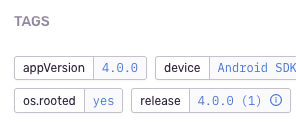
Answer to your second question:
If you specify the CodePush version number yourself you don't have to rely on the method.
As far as I know I can't set the version number for CodePush. If I am creating a release there I will receive an automatically assigned version number, like v13. I have found no flag in the CLI to specify a custom version number. Therefore I will have this version number only after I have bundled and released the code through CodePush already.
latobibor
on 10 May 2021
The version can be modified in beforeSend:
Sentry.init({
beforeSend: async (event) => {
const release = await getFromCodepush();
event.release = release;
return event;
}
});
 hermanho
on 13 May 2021
hermanho
on 13 May 2021
@hermanho Do not do that. The release health sessions and the native layer errors will not be assigned to the correct release.
jennmueng
on 13 May 2021
@jennmueng
Thank you for your patience and the consistent contact regarding this issue, we greatly appreciate it!I have implemented solution 1, but we still face wrong labelling of issues pointing to an earlier version.
The test setup we had was this:
- pull latest master
- set version number to
4.0.2inpackage.json- created a test release using
Codepushto our dev environment there- then created an error in the codebase while running a debug build through Metro server (I know that sourcemap won't be accurate here, since I am running a different codebase)
- checked if it is pointing to the right release (it is showing
4.0.0 (1))- the error was thrown right after
Sentry.initusing the _exact same_ release string I passed into it:const release = `${packageJson.name}@${packageJson.version}`; Sentry.init({ // ... private fields release, }); Sentry.setTag('appVersion', VersionInfo.appVersion); throw new Error(`test error for [${release}]`);Link to the issue:
https://sentry.io/organizations/acasus-bp/issues/2391846871/?project=5465163&query=is%3AunresolvedLink to the release appearing as it is (sourcemaps are uploaded):
https://sentry.io/organizations/acasus-bp/releases/AcasusData%404.0.2/?project=5465163&statsPeriod=14d&unselectedSeries=HealthyScreenshot of
Answer to your second question:
If you specify the CodePush version number yourself you don't have to rely on the method.
As far as I know I can't set the version number for
CodePush. If I am creating a release there I will receive an automatically assigned version number, likev13. I have found no flag in the CLI to specify a custom version number. Therefore I will have this version number only after I have bundled and released the code throughCodePushalready.
I will have to look into this further, I haven't seen this issue with the package version not being updated before.
jennmueng
on 13 May 2021
@jennmueng
After some testing and considerations this is our current solution:
Sentry.init({
dsn: '...',
release: `${packageJson.name}@${packageJson.version}`,
dist: packageJson.version,
});
Without setting an explicit dist the release version was not followed correctly in issues.
latobibor
on 13 May 2021
@jennmueng
After some testing and considerations this is our current solution:Sentry.init({ dsn: '...', release: `${packageJson.name}@${packageJson.version}`, dist: packageJson.version, });Without setting an explicit
distthe release version was not followed correctly in issues.
@latobibor Oh yes you will have to set the dist to for custom releases to work as well. I did not mention that because I assumed it was being set already. Hmm do you have any suggestions for how we can make the docs more clear?
jennmueng
on 13 May 2021
@jennmueng
Yes, after all this I would recommend the following:
Docs that I would change
The entire part between CodePush title and Making releases. However this part needs a lot of clarification on "why do you need to use codePush.getUpdateMetadata".
If you need to use codePush.getUpdateMetadata, you will have to wait to initialize the Sentry SDK until the Promise is resolved.
My version would be
Releases are tracked by matching both the release label and the dist label. These two must be set together. Here you can have several strategies:
1. Use version from package.json
In this case we ignore the version label from CodePush and solely use the version property of package.json (or a custom version file).
Your code would look largely like this:
import packageJson from '../package.json';

Sentry.init({
    dsn: '...',
    release: `${packageJson.name}@${packageJson.version}`,
    dist: packageJson.version,
});
2. Use version from package.json and version label from CodePush
In this case we recommend the following format for release property: ${BUNDLE_ID}@${APP_VERSION}+codepush:${DIST}.
To accurately obtain the version label (named here as DIST) you have to asynchronously obtain it using codePush.getUpdateMetadata(). This solution delays initialization of Sentry, so be cautious that you might lose accurate information on crashes that happen in this time.
import packageJson from '../package.json';
import currentCodePushLabel from '../my-first-codepush-version.json';

async initSentry() {
 const update = await codePush.getUpdateMetadata();

 // before the first update `currentCodePushLabel()` will return null, so you need to set this manually
 const dist =  update ? update.label : currentCodePushLabel;
 Sentry.init({
      // ...
      release: `${packageJson.name}@${packageJson.version}+codepush:${dist}`,
      dist: dist
    });
  }
});
3. Totally custom values
In this case just make sure that both release and dist properties are updated and dist accurately represents the code running currently on the device.
latobibor
on 13 May 2021
@latobibor Thank you so much for the suggestion! I will take exactly this and work it into our docs.
jennmueng
on 17 May 2021
Thank you for the amazing support @jennmueng ! We appreciated it!
latobibor
on 17 May 2021
Related issues
 lwmouneyrac
·
3Comments
lwmouneyrac
·
3Comments
 dht
·
3Comments
dht
·
3Comments
 deathemperor
·
3Comments
deathemperor
·
3Comments
 jussirantala
·
3Comments
jussirantala
·
3Comments
 JonasBAJ
·
3Comments
JonasBAJ
·
3Comments
Most helpful comment
@jennmueng
Yes, after all this I would recommend the following:
Docs that I would change
The entire part between
CodePushtitle andMaking releases. However this part needs a lot of clarification on "why do you need to use codePush.getUpdateMetadata".My version would be
Releases are tracked by matching both the
releaselabel and thedistlabel. These two must be set together. Here you can have several strategies:1. Use
versionfrompackage.jsonIn this case we ignore the version label from CodePush and solely use the
versionproperty ofpackage.json(or a custom version file).Your code would look largely like this:
2. Use
versionfrompackage.jsonand version label from CodePushIn this case we recommend the following format for
releaseproperty:${BUNDLE_ID}@${APP_VERSION}+codepush:${DIST}.To accurately obtain the version label (named here as
DIST) you have to asynchronously obtain it usingcodePush.getUpdateMetadata(). This solution delays initialization of Sentry, so be cautious that you might lose accurate information on crashes that happen in this time.3. Totally custom values
In this case just make sure that both
releaseanddistproperties are updated anddistaccurately represents the code running currently on the device.