Sentry-react-native: What are these <unknown> fatal Segfault errors with no users but many events.
OS:
- [ ] Windows
- [X] MacOS
- [ ] Linux
Platform:
- [ ] iOS
- [X] Android
SDK:
- [X]
@sentry/react-native(>= 1.0.0) - [ ]
react-native-sentry(<= 0.43.2)
SDK version:^1.7.1
react-native version: 0.61.2
Are you using Expo?
- [ ] Yes
- [X] No
Are you using sentry.io or on-premise?
- [X] sentry.io (SaaS)
- [ ] on-premise
If you are using sentry.io, please post a link to your issue so we can take a look:
Link to issue : https://sentry.io/organizations/ekeekaran-ventures/issues/1581216965/
Configuration:
(@sentry/react-native)
Sentry.init({
  dsn: 'https://[email protected]/...'
  // other options
});
I have the following issue:
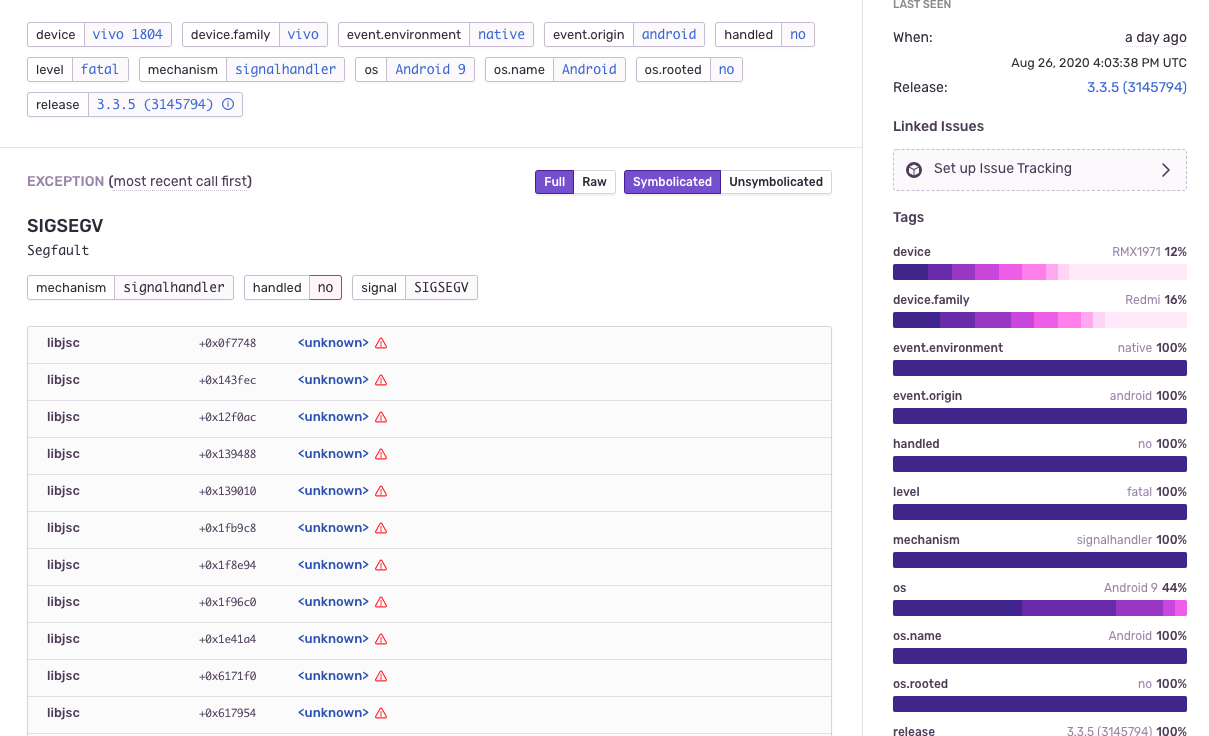
I am having some unknown Segfault errors, which are actually shown as fatal, also there isn't any stack trace shown. In my recent deployed app version, I have 87 events and 0 users. this looks really weird. how events are possible without users being registered to those events.
Expected result:
There should be actual users along with events and proper stack trace, which can help debug the issue.
Attaching the screenshot :
 shubhamdeol
All 11 comments
facing similar issue
 brokestorm
on 27 Aug 2020
brokestorm
on 27 Aug 2020
@shubhamdeol thanks for raising this, can you reproduce this using an emulator or real device?
for proper symbolication, you could integrate our Gradle plugin https://docs.sentry.io/platforms/android/#gradle-integration and enable the flag uploadNativeSymbols
 marandaneto
on 31 Aug 2020
marandaneto
on 31 Aug 2020
@marandaneto
We haven't been able to reproduce it. We will integrate the Gradle plugin and see if it reoccurs. I have created one more project and added sentry, made the first release on play store. That project too is having a lot of such errors, without users being registered to them.
shubhamdeol
on 31 Aug 2020
@shubhamdeol thanks for that.
See this issue/comment: https://github.com/getsentry/sentry-android/issues/174#issuecomment-562047474
Native crashes don't have full sync. of the Scope yet, so it's not really a bug that the user is not registered, either you set the user directly on native code (if you have native code) or set it on the beforeSend callback as the comment suggest., the later might be more difficult or not possible as the RN SDK inits the Android SDK automatically under the hood.
marandaneto
on 31 Aug 2020
@marandaneto
See this screenshot, also the error logs do not show anything about where it is coming from.

Thanks, anyway. hopefully, the integration of the Gradle plugin will help us debug this more.
shubhamdeol
on 31 Aug 2020
@shubhamdeol thanks for sharing, do they have something in common? device brand, model or cpu arch? this is something that would be helpful to test, I can't reproduce it either.
marandaneto
on 1 Sep 2020
@marandaneto I don't see any common device brand or modal, but I see CPU Architecture as arm64-v8a in most of them.
shubhamdeol
on 1 Sep 2020
cc @Swatinem
marandaneto
on 1 Sep 2020
This looks like the JavaScriptCore crash that we are discussing here:
https://github.com/facebook/react-native/issues/25494
Basically, it's a bug deep in the JavaScript runtime environment. It's not showing as much metadata as crash reports from JavaScript code, because it takes place much deeper in the software stack.
See the issue I linked for more info and partial solutions. Some people have luck with this patched version of JSC: https://github.com/facebook/react-native/issues/25494#issuecomment-567855193 and others have better luck if they switch to the Hermes runtime. We haven't found a 100% solution yet.
 danmaas
on 22 Sep 2020
danmaas
on 22 Sep 2020
same issue, no user + crash gets reported in sentry and playstore
 nkpatnis
on 26 Sep 2020
nkpatnis
on 26 Sep 2020
@shubhamdeol thanks for raising this, can you reproduce this using an emulator or real device?
for proper symbolication, you could integrate our Gradle plugin https://docs.sentry.io/platforms/android/#gradle-integration and enable the flag
uploadNativeSymbols
~Hi @marandaneto, where exactly would one set uploadNativeSymbols - I couldn't find it while browsing the linked documentation, thanks in advance~
Sorry, nevermind, I found it in the proguard settings: https://docs.sentry.io/platforms/android/proguard/#gradle-configuration
Thanks 🙇🏿
 ferdicus
on 19 Nov 2020
ferdicus
on 19 Nov 2020
Related issues
 sercanov
·
3Comments
sercanov
·
3Comments
 jussirantala
·
3Comments
jussirantala
·
3Comments
 brainbicycle
·
3Comments
brainbicycle
·
3Comments
 HAMPLENI
·
3Comments
HAMPLENI
·
3Comments
 steverob
·
3Comments
steverob
·
3Comments
Most helpful comment
same issue, no user + crash gets reported in sentry and playstore