Sentry-react-native: Native crash not reported on Android
OS:
MacOS
Platform:
Android
SDK:
@sentry/react-native 1.4.0
react-native version: 0.61.5(Hemes:true)
Are you using Expo?
No
Are you using sentry.io or on-premise?
on-premise
Configuration:
(@sentry/react-native)
Sentry.init({
  dsn: 'https://[email protected]/...'
  // other options
});
I have following issue:
Sentry.captureException(error); capture js error but Sentry.nativeCrash(); don't report any error in ours Self-Hosted Sentry server
Steps to reproduce:
1-install and setup sentry based on https://docs.sentry.io/platforms/react-native https://docs.sentry.io/platforms/react-native
2-call Sentry.nativeCrash(); in production apk
 maleking
All 23 comments
hey @maleking thanks for raising this
could you enable the debug mode and copypasta the logs, please? thanks.
 marandaneto
on 5 Jun 2020
marandaneto
on 5 Jun 2020
how to enable debug mode in sentry @marandaneto ?
maleking
on 7 Jun 2020
@maleking
just pass the debug flag on the SDK init.
Sentry.init({
dsn: 'dsn...',
debug: true
});
this is sentry log in ios simulator and android:
Sentry Logger [Log]: Integration installed: ReactNativeErrorHandlers
Sentry Logger [Log]: Integration installed: Release
Sentry Logger [Log]: Integration installed: InboundFilters
Sentry Logger [Log]: Integration installed: FunctionToString
Sentry Logger [Log]: Integration installed: Breadcrumbs
Sentry Logger [Log]: Integration installed: LinkedErrors
Sentry Logger [Log]: Integration installed: UserAgent
Sentry Logger [Log]: Integration installed: DebugSymbolicator
Sentry Logger [Log]: Integration installed: RewriteFrames
Sentry Logger [Log]: Integration installed: DeviceContext
maleking
on 11 Jun 2020
@maleking this is the log from react-native (JS layer), I'm more interested in the Android logs (from logcat), you can copy-paste that from AS.
I need to understand the output of the error in order to test and reproduce it, thanks.
marandaneto
on 14 Jun 2020
I'm experiencing this issue too - let me get some logs today and post them here.
 crobinson42
on 30 Jun 2020
crobinson42
on 30 Jun 2020
@crobinson42 please share some logs :) thanks
marandaneto
on 2 Jul 2020
@marandaneto I call Sentry.nativeCrash() in release apk and this is AS logs
log.txt
maleking
on 2 Jul 2020
@maleking are you running in release mode?
The log states: TEST - Sentry Client Crash (only works in release mode)
marandaneto
on 3 Jul 2020
yes, i created a signed apk with ./gradlew assembleRelease command and then capture the log with logcat
maleking
on 3 Jul 2020
@maleking this is likely not the right thing, because logcat is not available on release builds.
I have a question though, when you call Sentry.nativeCrash(), do you experience a hard crash or do you get that Redbox screen on your App?
marandaneto
on 3 Jul 2020
@marandaneto I get a hard crash of course because its a release build :)
what do you means logcat not available on release builds ?
i always check logcat for debugging crash in release mode
i add this line in App.tsx
Sentry.init({
dsn: SENTRY_DSN,
debug: true,
});
and then in home screen i define this
<Button
title="crash"
onPress={() => {
Sentry.nativeCrash();
}}
/>
I am seeing this too. Throwing an uncaught JS error or calling Sentry.captureException works, but calling Sentry.nativeCrash() is not reported. Release build, and I open the app again after the crash.
react-native 0.63.2
@sentry/react-native 1.8.2
 tlrobinson
on 29 Sep 2020
tlrobinson
on 29 Sep 2020
Did this issue solved? I am still facing it @^2.1.0
 shubhamkes
on 16 Dec 2020
shubhamkes
on 16 Dec 2020
can you double-check that the flag enableNativeCrashHandling is still true?
@jennmueng could you have a look at this?
marandaneto
on 16 Dec 2020
thought its enabled by default. Though added now but still cant see logs in dashboard
shubhamkes
on 17 Dec 2020
@shubhamkes Just to confirm, does the app actually crash for you and nothing is reported, or does the native crash method do nothing? We have tested this out on our end to confirm that it should be working and if it’s not working for you I believe the issue is most likely with the installation or some configuration.
It would greatly help us if you can provide a producible example in a repo for us to try out to be able to give you a clearer answer.
 jennmueng
on 17 Dec 2020
jennmueng
on 17 Dec 2020
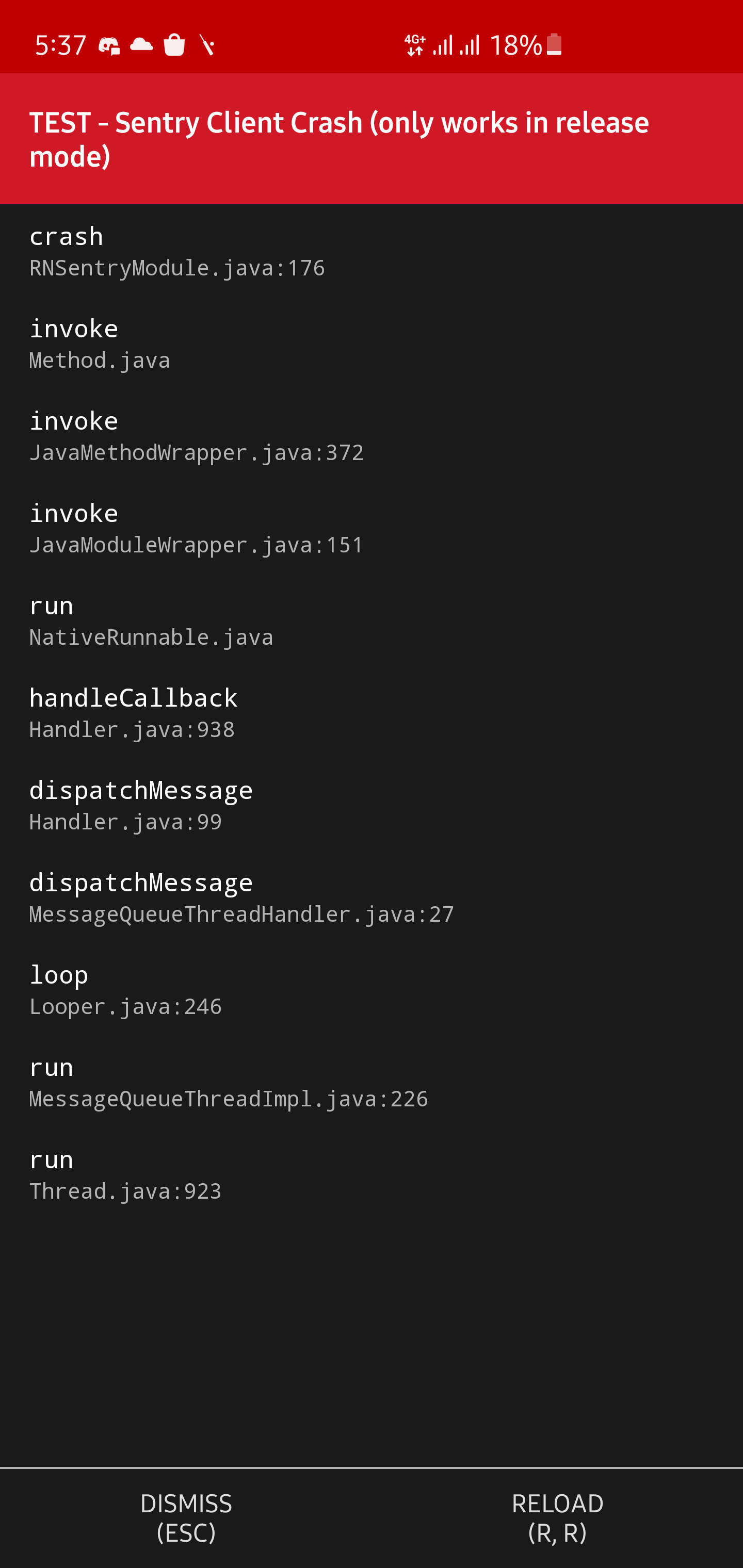
Hi @marandaneto I am facing the same thing on Android and it shows the error in red box. But on iOS it's working
 yasirtrimulabs
on 26 Feb 2021
yasirtrimulabs
on 26 Feb 2021
@yasirtrimulabs well as stated before, and also in the red dialog, it works only on release mode.
marandaneto
on 27 Feb 2021
@jennmueng could you run a hard crash on the latest RN on Android, please? just to be sure it works.
marandaneto
on 27 Feb 2021
@marandaneto I fixed it by following this
yasirtrimulabs
on 4 Mar 2021
@yasirtrimulabs That was what I assumed, as the dev menu should never show on release mode.
jennmueng
on 4 Mar 2021
@jennmueng should we close this issue then?
marandaneto
on 4 Mar 2021
Related issues
 hecontreraso
·
3Comments
hecontreraso
·
3Comments
 poocart
·
3Comments
poocart
·
3Comments
 deathemperor
·
3Comments
deathemperor
·
3Comments
 brainbicycle
·
3Comments
brainbicycle
·
3Comments
 KAMEDAkyosuke
·
3Comments
KAMEDAkyosuke
·
3Comments
Most helpful comment
I am seeing this too. Throwing an uncaught JS error or calling
Sentry.captureExceptionworks, but callingSentry.nativeCrash()is not reported. Release build, and I open the app again after the crash.