Sentry-react-native: Source code was not found
OS:
- [ ] Windows
- [x] MacOS
- [ ] Linux
_Platform:_
- [x] iOS
- [ ] Android
SDK:
- [x]
@sentry/react-native - [ ]
react-native-sentry
react-native version: 1.2.1
Init Code:
Sentry.init({
    dsn: __DEV__ ? Env.DEV_SENTRY_ENDPOINT : Env.SENTRY_ENDPOINT,
    environment: "production",
    loglevel: LogLevel.Debug,
    attachStacktrace: true,
    // debug: true,
    // attachStacktrace: false
    // deactivateStacktraceMerging
})
I have following issue:
When error will be thrown on application (in Simulator or Device) I will see "Source code was not found" error in Sentry panel.
I see that script "Upload Debug Symbols to Sentry" was runned on production build
Steps to reproduce:
throw new Error("Test-1")
Actual result:
-
There was 1 error encountered while processing this event
Source code was not found Expand

Expected result:
- No errors in Sentry panel
 indapublic
All 17 comments
Same issue :c
[UPDATE]
When the app is in release mode work fine... why?
 LcsGrz
on 4 Feb 2020
LcsGrz
on 4 Feb 2020
@LcsGrz If app in release mode that you uploaded Sentry debug symbols during build.
My case about release app
indapublic
on 4 Feb 2020
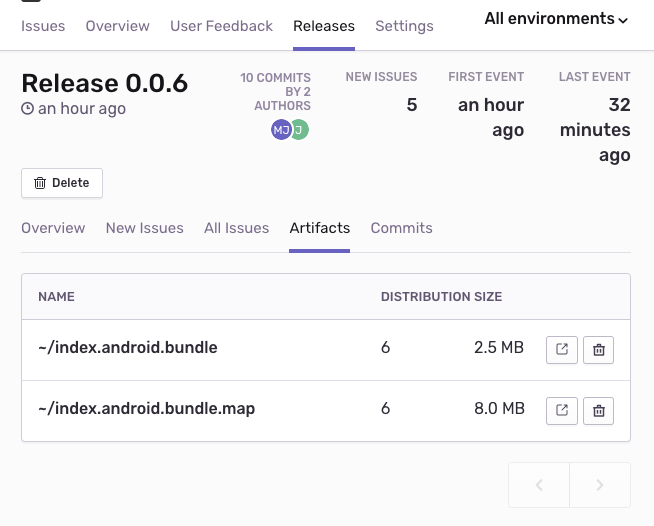
Can you see the artifacts in the project releases panel? If you can see them, check that you can download them. In my case I had issue with storage on self-hosted Sentry instance, and the debug artifacts were corrupted, which resulted in the same message you're getting.
 wodCZ
on 10 Feb 2020
wodCZ
on 10 Feb 2020
@wodCZ Thanks for response! Artifacts are visible and downloadable. But I see several artifacts with same names. Can be a reason?

indapublic
on 11 Feb 2020
@indapublic What's the message when you click expand next to the error "Source code was not found"? Possibly there is a path, something like app://index.android.bundle IIRC - it should match one of your artifact's name.
If you're running self-hosted sentry instance, there is an internal Sentry project. There could be some error logged, which could
wodCZ
on 11 Feb 2020
It's not self-hosted sentry instance.

/private/var/containers/Bundle/Application/55A96EBB-7D58-444D-9964-1F04DF1CCFFF/myapp.app/main.jsbundle
main.jsbundle is presented in artifacts list
indapublic
on 12 Feb 2020
@indapublic - having multiple release artifacts with the same name is fine as long as the distribution value is different - files are matched on the combination of name and dist value.
That said, it seems like the RewriteFrames integration isn't running for you (which would transform that URL into app:///main.jsbundle, allowing it to match ~/main.jsbundle, provided the dist values are also a match). Can you share a link to the issue in question?
 lobsterkatie
on 12 Feb 2020
lobsterkatie
on 12 Feb 2020
Hi @lobsterkatie . Thanks for response. Example
indapublic
on 13 Feb 2020
That event was captured using 1.0.6. Back when 1.x was new I do remember someone having a similar issue, but it hasn't come up since, so I suspect it may have been fixed. Can you please try updating your SDK? Current is 1.3.1.
lobsterkatie
on 13 Feb 2020
Thanks! I will check. Can I see that information (SDK version) in Sentry issues? I have many applications with different versions of SDK integrated, so it can be very helpful
indapublic
on 14 Feb 2020
Yup - all the way at the bottom:
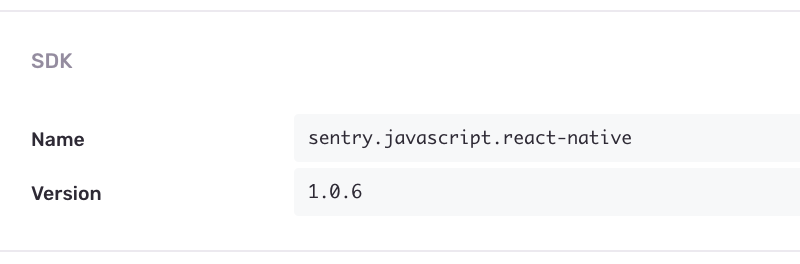
We actually have a system which can show a warning if your SDK is out of date, but it turns out the RN SDK isn't included yet. Here's an issue tracking getting that added in.
lobsterkatie
on 14 Feb 2020
I've got two errors when an exception appear in Sentry:
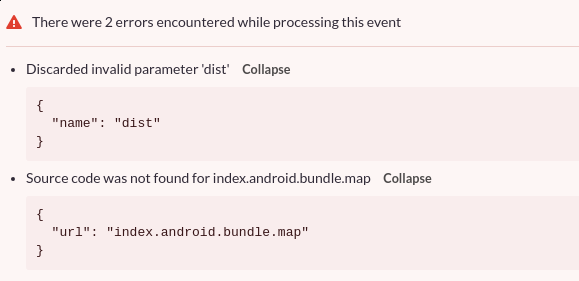
The source map is successfully uploaded for the release and I can see it:

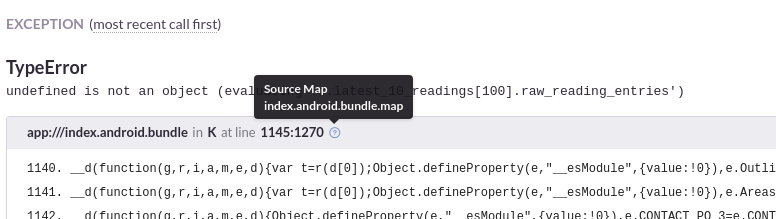
And the linking between the source code & the release works: (as you can see there is hover text)
Sentry server: 8.13.0
@sentry/react-native: 1.3.2
react-native: 0.61.4
 ptgamr
on 2 Mar 2020
ptgamr
on 2 Mar 2020
@ptgamr Sorry we don't support debugging on-premise installations, there can be so many things configured the wrong way that it's hard to help.
Also, your Sentry installation is really old and will not work with Hermes.
 HazAT
on 2 Mar 2020
HazAT
on 2 Mar 2020
Is there actual need to have dist property set ?
sentry-expo package and even expo docs says nothing about that. Even postPublish hook doesnt set it. So my realease has no dist.

But event sent to sentry contains dist
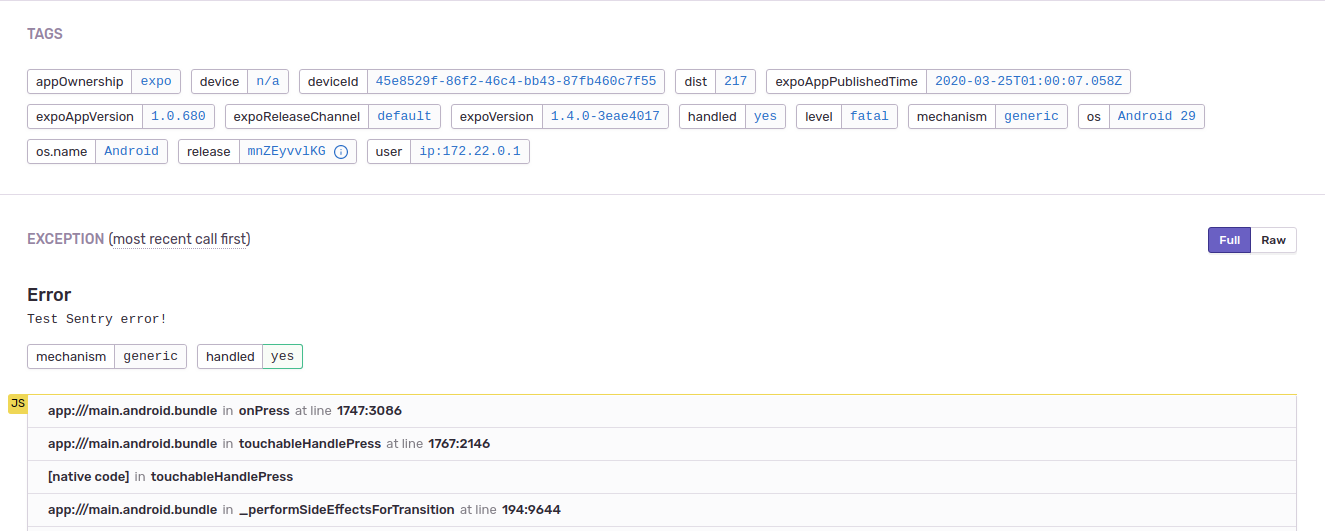
Even with recognized release and corrected RewriteFrame (app:///) my code is not linked to uploaded source.
But sentry docs has dist set.
:thinking: Interesting thing is in my code (Sentry.init) is dist set to release but as you can tell in screenshot is 217.
Platform:
- [ ] iOS
- [x] Android
SDK:
- [x]
@sentry/react-native - [ ]
react-native-sentry
SDK version: 1.3.3
react-native version: 0.59.8
Are you using Expo?
- [x] Yes
- [ ] No
Are you using sentry.io or on-premise?
- [ ] sentry.io (SaaS)
- [x] on-premise
Sourcemap upload command:
sentry-cli releases files $VERSION upload-sourcemaps . --ext bundle --ext map --rewrite
Configuration:
    Sentry.init({
        dsn: 'https://*****',
        dist: 'release',
        release: Constants.manifest.revisionId,
    });
 petrleocompel
on 25 Mar 2020
petrleocompel
on 25 Mar 2020
@petrleocompel Are you using the gradle plugin, or are you uploading source maps manually?
lobsterkatie
on 25 Mar 2020
@lobsterkatie
I'm using sentry-expo/upload-sourcemap so in core it's sentry-cli.
Also I pointed that in my comment Sourcemap upload command: (which is real command executed by that script) :blush:
petrleocompel
on 25 Mar 2020
Mystery kinda solved.
In my case i needed to add to upload sourcemap dist atritbute. And set it in aplication.
Sentry.setDist(dist).
I would love to know meaing of dist attr.
Could somebody explain or point me to docs about attr dist?
I did not set it because sentry-expo/upload-sourcemap does not sett it. :confused:
petrleocompel
on 26 Mar 2020
Related issues
 poocart
·
3Comments
poocart
·
3Comments
 sercanov
·
3Comments
sercanov
·
3Comments
 deathemperor
·
3Comments
deathemperor
·
3Comments
 kriptonhaz
·
3Comments
kriptonhaz
·
3Comments
 JonasBAJ
·
3Comments
JonasBAJ
·
3Comments
Most helpful comment
Mystery kinda solved.
In my case i needed to add to upload sourcemap
distatritbute. And set it in aplication.Sentry.setDist(dist).I would love to know meaing of
distattr.Could somebody explain or point me to docs about attr
dist?I did not set it because
sentry-expo/upload-sourcemapdoes not sett it. :confused: